Button Reference
The physical controls on the RS50 / G PRO wheel and hub, and the joystick button index each one reports. Buttons use sequential indices matching Windows DirectInput, so bindings stay consistent across platforms.
This is the reference for binding controls in a game. The wire-level bitmask (which report bit encodes which button) is in the Protocol Specification.
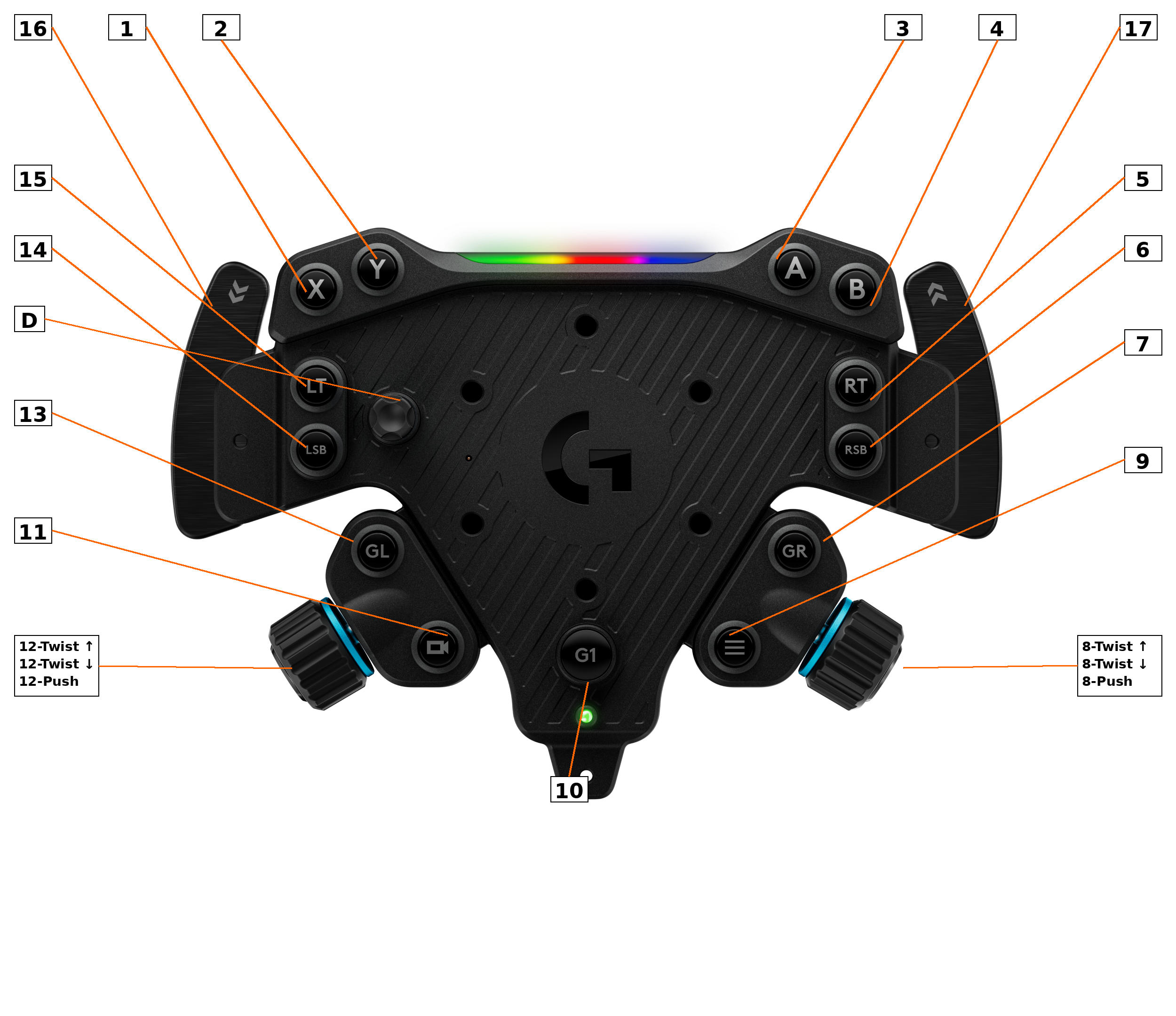
The Index column is the joystick button number games show when binding (sequential, matching Windows DirectInput). The Diagram # column is the numbered callout box in the layout image above; the two numbering systems are unrelated, so a button's index and its diagram number usually differ.
| Index | Button | Diagram # |
|---|---|---|
| 0 | A | 3 |
| 1 | X | 1 |
| 2 | B | 4 |
| 3 | Y | 2 |
| 4 | Right Paddle / Gear Right | 17 |
| 5 | Left Paddle / Gear Left | 16 |
| 6 | RT (Right Trigger) | 5 |
| 7 | LT (Left Trigger) | 15 |
| 8 | Camera / View | 11 |
| 9 | Menu | 9 |
| 10 | RSB (Right Stick) | 6 |
| 11 | LSB (Left Stick) | 14 |
| 21 | Right Encoder CW | 8 |
| 22 | Right Encoder CCW | 8 |
| 23 | Right Encoder Push | 8 |
| 24 | Left Encoder CW | 12 |
| 25 | Left Encoder CCW | 12 |
| 26 | Left Encoder Push | 12 |
| 27 | G1 (Logitech logo) | 10 |
| 28 | GL | 13 |
| 29 | GR | 7 |
Notes:
- GL and GR are their own buttons, not aliases of the shifter paddles (hardware-verified by guided capture).
- The D-pad reports as a hat switch (
ABS_HAT0X/ABS_HAT0Y), not as four buttons; diagram callout "D". - Indices 12 to 20 are gaps in the HID descriptor (unused).
The accessory rides the wheel's existing report, so its inputs reach games with no extra setup. By its mode switch:
| Mode | Action | evdev |
|---|---|---|
| Sequential shifter | shift up | BTN_TOP2 |
| Sequential shifter | shift down | BTN_PINKIE |
| Digital handbrake | pull past point |
BTN_THUMB2 (face button) |
| Analog handbrake | pull |
ABS_Z axis |
The analog handbrake can be shaped with a response curve; see Configuring the Wheel.
The Info / Testing page in logi-dd / logi-dd-gui highlights each button while held and names the last one pressed, which makes verifying a binding (or a suspect button) quick; see Configuring the Wheel.