The missing open-source CLI for Bear notes. Read, search, export, and manage your notes from the terminal.



- ✨ Agent-ready - bundled Claude skill and MCP server (
bearcli mcp install) - Search & browse - fuzzy or exact, filters for tags, dates, and status
- Write - create, append, tag, archive, straight from the terminal
- Terminal UI - a full Bear client in your shell
- Export & git mirror - self-contained markdown folders, never-stuck
--push - Secret protection - offline credential scanning and redaction
- Scriptable - JSON/TSV output everywhere; Python API via
bearkit
brew install michel-tricot/tap/bearcli # or: uv tool install bearcli, pipx install bearcliOr from a clone: uv sync, then uv run bearcli --help.
bearcli doctor checks the whole setup: which binary your PATH picks up,
Bear app presence, database access, and MCP client wiring — with a fix
suggested for anything it flags.
The bearcli command can conflict with Bear's official CLI if both are
installed — which -a bearcli shows which one your shell picks. To make
this CLI take precedence, put its install directory first in your PATH:
# in your ~/.zshrc or ~/.bashrc
export PATH="$(brew --prefix)/bin:$PATH"   # brew install
export PATH="$HOME/.local/bin:$PATH"       # uv tool or pipx install
MCP configs are immune to the conflict: bearcli mcp install writes the
absolute path of the very binary it is run from. If bearcli itself
reaches the wrong tool, call ours by its full path once:
"$(brew --prefix)/bin/bearcli" mcp install # or: ~/.local/bin/bearclibearcli list # 20 most recently modified notes
bearcli search "quarterly report" # search titles, tags, and content
bearcli get <note-id> # print a note's markdown
bearcli create "Idea" --tag inbox # create a note
bearcli export ~/bear-backup # export everything as markdown folders
bearcli ui # full Bear client in the terminalCommands are grouped under note and tag.
The most common commands are also top-level aliases:
bearcli list        # alias for `note list`
bearcli search      # alias for `note search`
bearcli get         # alias for `note get`
bearcli open        # alias for `note open`
bearcli create # alias for `note create`bearcli note list # 20 most recently modified
bearcli note list --limit 5 --tag work # filters: tag (incl. nested), dates...
bearcli note list --modified-after 2026-07-01
bearcli note list --only pinned # or: encrypted, trashed, archived
bearcli note list --all --trashed --archived
bearcli note list --ids # only identifiers, one per line
bearcli note get C44D09DC # a unique id prefix (4+ chars) works everywhere
bearcli note get C44D09DC-... --meta # with YAML-style frontmatter
bearcli note get C44D09DC-... -r # rewrite attachment refs to absolute paths
bearcli note get C44D09DC-... --redact-secrets # secrets replaced by placeholders
bearcli note open C44D09DC-... # open in the Bear appbearcli note search "invoice" --tag work -n 5 # case-insensitive substring
bearcli note search "quarterly planing" --fuzzy # typo-tolerant, ranked by scoreWrites go through the Bear app and are verified before the command reports success.
bearcli note create "Meeting notes" --text "agenda..." --tag work
echo "follow-up item" | bearcli note append C44D09DC-...
bearcli note rename C44D09DC-... "New title"
bearcli note get C44D09DC-... | sed 's/foo/bar/' | bearcli note replace C44D09DC-...
bearcli note attach C44D09DC-... screenshot.png   # ≤500 KB
bearcli note archive C44D09DC-...
bearcli note trash C44D09DC-...bearcli tag list # all tags with note counts
bearcli note tag C44D09DC-... "work/ideas" # add a tag to a note
bearcli note untag C44D09DC-... "work/ideas" # remove a tag from a note
bearcli tag rename old-name new-name # across all notes
bearcli tag delete old-name # across all notes (asks first)Every note becomes a directory: <slug>/README.md plus attachments. A
generated index makes the export browsable on GitHub.
Notes are scanned for secrets before anything is written. Findings block
the export. Use --redact-secrets to export with [redacted: <rule>]
placeholders or --allow-secrets to export as-is. Notes in Bear are never
modified.
⚠️ Warning: detection is best-effort. A secret that reads like ordinary text will not be caught. Better: keep secrets in a password manager or in Bear's encrypted notes.
bearcli export ~/bear-backup
bearcli export ~/bear-backup --sync          # only rewrite notes that changed
bearcli export ~/bear-backup --redact-secrets  # secrets become [redacted: <rule>]

# Mirror to a private git repo (clone it first). Bear is the source of truth:
# manual edits stay in history but HEAD always matches Bear. Never gets stuck.
git clone git@github.com:you/bear-notes.git ~/bear-notes
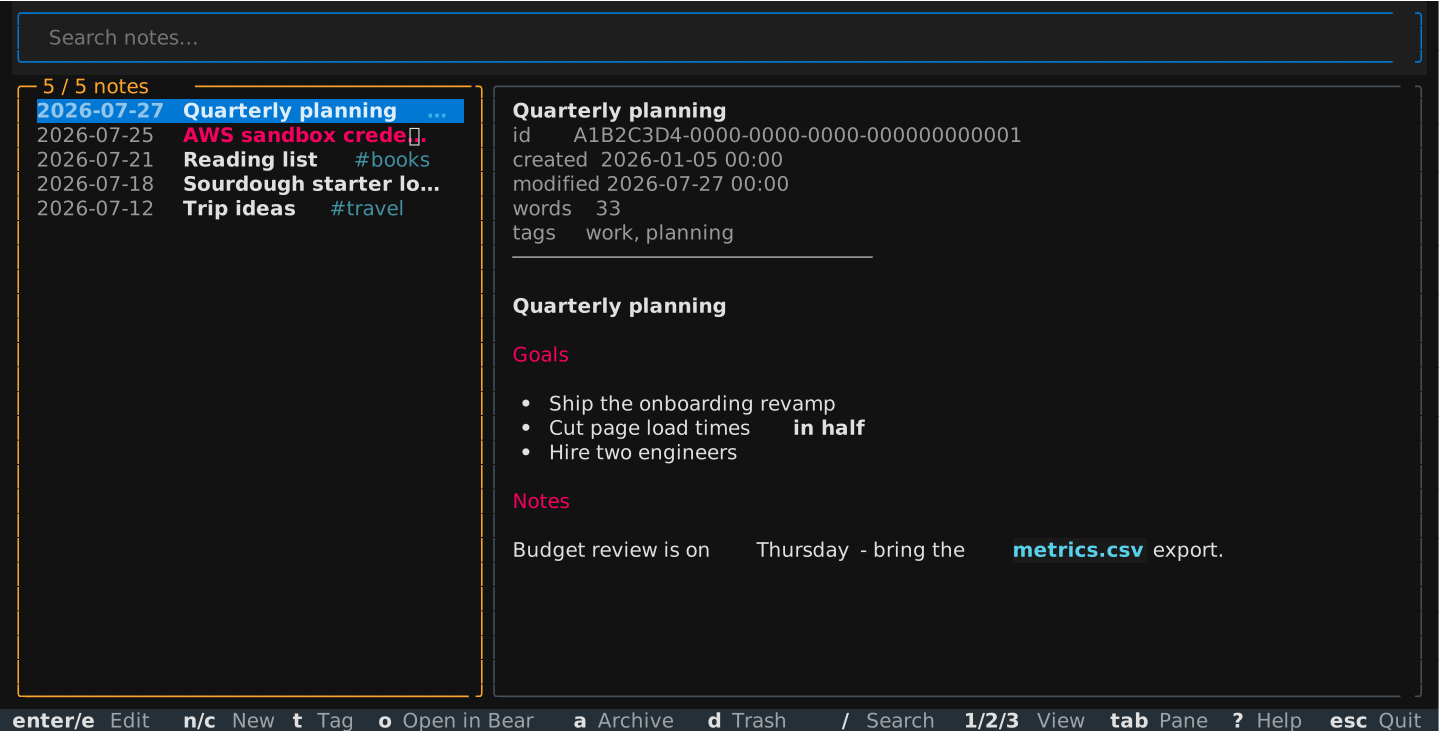
bearcli export ~/bear-notes --sync --pushbearcli ui is a full Bear client in the terminal. Press ? for the key map.
Every listing takes --format / -f: table (default), json, or
tab-separated text built for pipes.
bearcli list -f json | jq -r '.[].title'
bearcli list -f text | cut -f1               # text is: id, modified, tags, status, title
bearcli stats -f json                        # library totals: counts, words, top tags
Dates are ISO (2026-07-01 or 2026-07-01T14:30). Override the database
path with --db or BEAR_DB_PATH. Encrypted notes are listed but
unreadable. bearcli --version prints the version.
An Agent Skill for Claude Code and other agents ships inside the package (source):
bearcli skills install               # into ~/.claude/skills/
bearcli skills install --dir .claude/skills   # into a project
bearcli skills list                  # bundled skills
bearcli skills show bear-notes       # print the skill
Reinstall after upgrading so agents always match the installed CLI.
bearcli mcp run serves your notes to AI apps over MCP (stdio): list,
read, search, create, edit, tag, archive, open in Bear. Note content is
secret-redacted by default.
bearcli mcp install configures your client:
bearcli mcp install                  # choose from a list
bearcli mcp install claude-desktop   # or: claude-code, cursor, vscode,
                                     #     windsurf, gemini-cli, zed, codex
JSON configs are updated in place with a .bak. Other clients get exact
instructions. Restart the client afterwards.
The engine ships separately on PyPI as bearkit: reading, search, writes,
and secret detection. No CLI or TUI dependencies.
from bearkit import Bear, BearWriteError

with Bear() as bear:
    for note in bear.list_notes(tag="work", limit=10):
        print(note.title, note.tags)

    try:
        bear.add_tag(bear.get_note("C44D09DC"), "from-python")
    except BearWriteError:
        print("Bear did not apply the change")
Full reference: docs/BEARKIT.md. The package ships typed
(py.typed).
uv sync
uv run ruff format src/ && uv run ruff check src/
uv run ty check src/
uv run python scripts/check_docs.py          # docs must cover every command
Design notes and internals: docs/IMPLEMENTATION.md. Contributor/agent guidelines: AGENTS.md.
MIT · not affiliated with Shiny Frog