When using the manual camera setting feature (by pressing M): there is a strange bug occurring that affects the subwindow layout in the HUD. As soon as M is pressed to enter this mode, the SubWindow0 container is flipped and pushed to the left. This happens even if that container is moved anywhere within the HUD. Doesn't affect any of the other containers/images. (Picture below: top is any of the other modes, bottom is manual camera mode). The layout corrects itself only when this mode is exited.
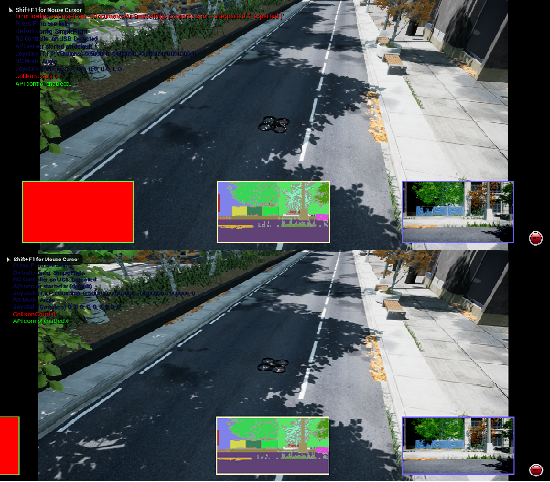
This seems to be a side effect when the code executes the enableBindings() function within ManualPoseController.cpp. If I, say, comment out all those lines in the function, this bug disappears, and manual camera control still works fine.

When using the manual camera setting feature (by pressing M): there is a strange bug occurring that affects the subwindow layout in the HUD. As soon as M is pressed to enter this mode, the SubWindow0 container is flipped and pushed to the left. This happens even if that container is moved anywhere within the HUD. Doesn't affect any of the other containers/images. (Picture below: top is any of the other modes, bottom is manual camera mode). The layout corrects itself only when this mode is exited.
This seems to be a side effect when the code executes the
enableBindings()function within ManualPoseController.cpp. If I, say, comment out all those lines in the function, this bug disappears, and manual camera control still works fine.