Associations
Here is an example of a one-to-many association relationship.
    R1
    has service features define by, 1 Bank
    defines service features of, M Shaft
    Shaft.Bank -> Bank.Name
--
It might be helpful to see this in diagram form:
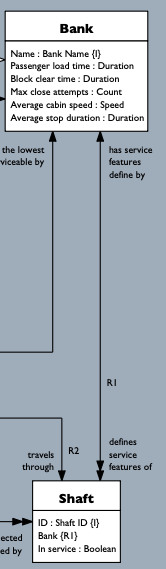
After the R1 rname we have two lines that each define a phrase and multiplicity on one direction of the
association. This is followed by one line for each attribute reference, which turns out to be just one in
this case. Here's the grammar:
// Binary association
binary_rel = t_side p_side assoc_class? ref1 ref2? // Both sides
t_side = rel_side
p_side = rel_side
rel_side = INDENT phrase "," SP mult SP+ icaps_name EOL*  // One side of a binary association
assoc_class = INDENT ('1' / 'M') SP+ icaps_name EOL*   // Association class
ref1 = binref
ref2 = binref
...
phrase = lword (delim lword)*  // Relationship phrase
lword = r'[a-z][a-z]*' // Lower case only word (used in relationship phrase)
The two sides of the association are represented by the t_side and p_side tokens, both of which have the same
structure. This is a verb phrase (any sequence of lower case words), followed by a comma and a single space.
After that, on the same line, you have the multiplicity. Here's the grammar for that:
mult = r'[1M]c?' // Binary relationship multiplicity, Shlaer-Mellor notation
That's either a 1 or M cardinality followed by a c if it is conditional (zero permitted).
So a UML 0..1 would be 1c (one conditional), and * would be Mc.
The multiplicity is followed by a single space and then you have the icaps_name of the target class.
The final line in the R1 example defines each referential attribute, one in this case, that formalizes the
association. This is a binref token with the following grammar:
binref = INDENT source_attrs SP '->' (WRAP / SP) target_attrs reflex? EOL* // Single class to single class ref
reflex = '.' phrase
//binref = INDENT source_attrs SP '->' (WRAP / SP) target_attrs (',' SP itag)? EOL* // Single class to single class ref
source_attrs = single_class_attrs // So parse visitor can define distinct source target dict keys
target_attrs = single_class_attrs
single_class_attrs = class_name attr_set // A subset of attrs from a single class
attr_set = '.' ('(' attr_name (',' SP attr_name)+ ')' / attr_name)  // The subset attr names or name
Wow, that seems like a lot of grammar for this simple line:
Shaft.Bank -> Bank.Name
That's because the R1 association is a simple case. Let's break it down before moving on to a more involved
example.
The text on the left side of the -> keyword is the referring attribute set which happens in our case to just
be a single attribute: Shaft.Bank. The same is true of the referenced attribute on the right side.
So the line is simply saying that the Shaft.Bank attribute references the value of the Bank.Name attribute.
In other words, any value of Shaft.Bank must match a value of Bank.Name.
It is not obvious from the diagram alone that the Shaft.Bank {R1} attribute references the
Bank.Name {I} attribute. An experienced modeler will expect a reference along the indicated relationship to land
on the identifier. In practice, there's rarely any confusion. But our text in the xcm file removes any potential doubt.
It reinforces the point that a diagram is simply a view of an underlying model.
Here is an association formalization (binref) that references a multi-attribute identifier.
    R43
    is location of, 1c Cabin
    is at, 1 Shaft Level
    Cabin.(Shaft, Current floor) -> Shaft Level.(Shaft, Floor)
--
Here the identifier of Shaft Level consists of two attributes. The formalization therefore requires two attributes on each side to guarantee that a single instance of Shaft Level is referenced.
And here is a generated diagram excerpt:
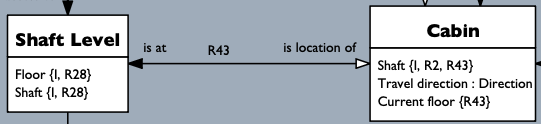
Here you need both a Shaft and Floor to uniquely identify a Shaft Level. So the Cabin's Shaft and Current floor attributes reference the Shaft Level's Shaft and Floor attributes. The modeler must ensure that the corresponding types match, but that detail is not checked by the class model parser.
Consequently, the ordering of attribute names in each pair of parentheses must match. If it doesn't, the downstream population module will have a word with you when it tries to load your model.
An associative reference adds a third association class to house a reference to the class on each side of the binary association. Here's an example:
    R53
    is current destination of, 1c Cabin
    is going to, 1c Accessible Shaft Level
    1 Transfer
    Transfer.Shaft -> Cabin.Shaft
    Transfer.(Shaft, Destination floor) -> Accessible Shaft Level.(Shaft, Floor)
--
Notice the line 1 Transfer. This indicates that the association is formalized by the Transfer association
class which houses the referring attributes. This is represented by the assoc_class term in our grammar.
The 1 indicates that each pairing of a Cabin and Accessible Shaft Level results in a single instance of Transfer.
This multiplicity is mirrored in the diagram below by the single arrowhead pointing into R53.
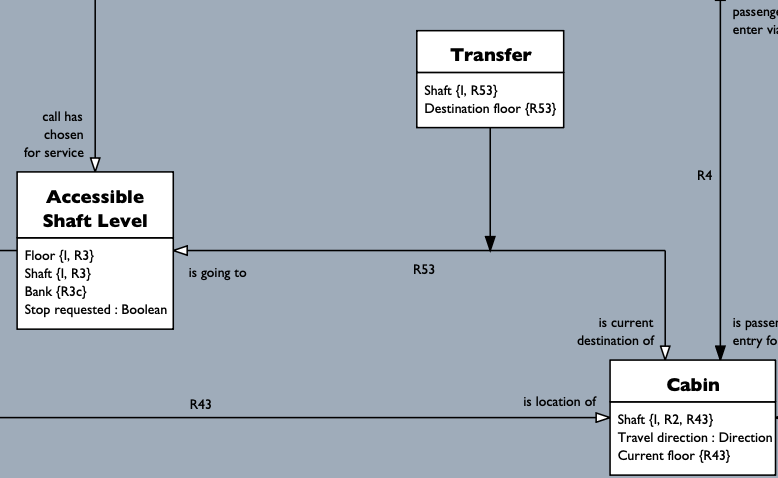
Whenever we have an association class, we'll need two separate references, one to each side of the association. Here, the Transfer association class refers to the Cabin identifier in the first reference and then to the Accessible Shaft Level identifier, which happens to have two attributes, in the second reference.
The binary in binary association means that the association has two sides, but not necessarily two classes. If both sides of the association land on the same class, you have a reflexive association. If this association is NOT formalized with an association class, you need to add a small element to the relationship specification to resolve the referencing and referenced side. Since there is only one class referring to itself, we can specify the verb phrase on the referenced (target) side of the association.
Take a look at the reflex grammar term inside the binref term in our grammar excerpt up above.
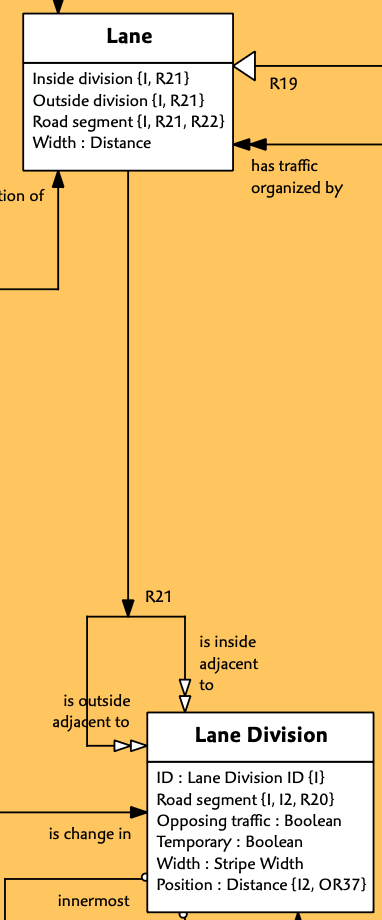
Unfortunately, I don't have an example in the elevator model, but here's one from my road model defining adjacent driving lanes for autonomous driving.
    R21
    is outside adjacent to, Mc Lane Division
    is inside adjacent to, Mc Lane Division
    1 Lane
    Lane.(Inside division, Road Segment) -> Lane Division.(Inside division, Road Segment).is inside adjacent to
    Lane.(Outside division, Road Segment) -> Lane Division.(Outside division, Road Segment).is outside adjacent to
--
The terms 'outside' and 'inside' are used in place of 'left' and 'right' so that the same model works in countries where people drive on either side of the road, e.g. USA, Europe vs. UK, Australia, Japan, with 'inside' meaning toward the median or opposing traffic.
Note the reflex term on the far right of each formalization line. That rightmost reflex term establishes
which side of the association is traversed to locate the target identifier. Intuitively, you can work it out
by just matching up the phrase and target attribute names. That's fine for the diagram, but not the model itself.
We don't do this with a non-reflexive association since the association side is determined just by looking at the target class.
By the way, here's the diagram: