Before submitting a bug report
Step to reproduce
- Install the 8.1.0 version of Multi-Account Containers
- Open the Multi-Account Containers pop-up and notice there is no Facebook container in the list of available containers
- Install Facebook Container (https://addons.mozilla.org/en-US/firefox/addon/facebook-container/)
- Open the Multi-Account Containers pop-up and notice there is a Facebook container entry in the list of available containers
- Remove Facebook Container
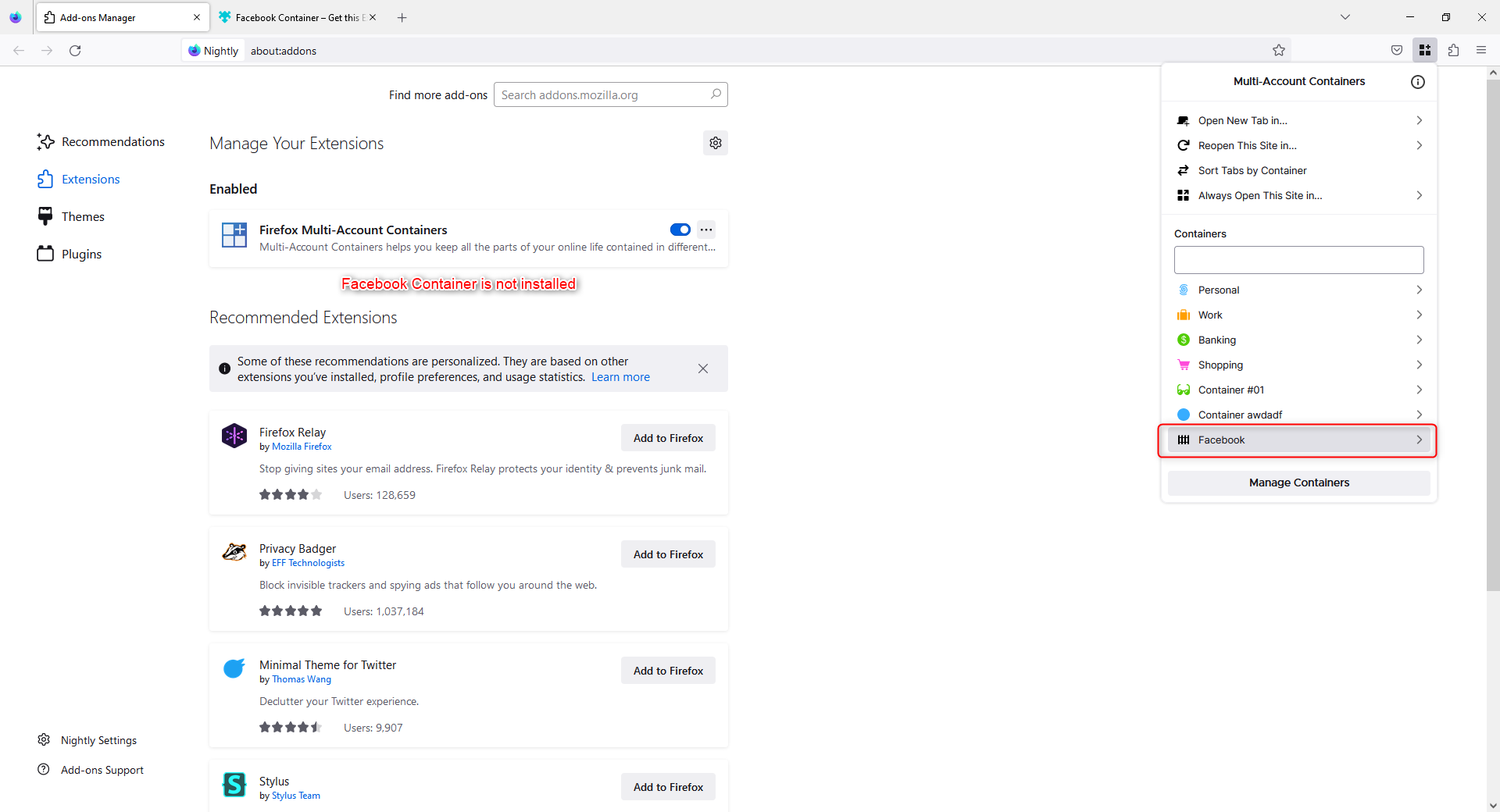
- Open the Multi-Account Containers pop-up and notice there still is a Facebook container entry in the list of available containers which still retains functionality in the sense that tabs can be opened in said container
Actual behavior
Once Facebook Container is removed, the corresponding container is still available in Multi-Account Containers.
Expected behavior
Once Facebook Container is removed, the corresponding container should also be removed from Multi-Account Containers.
Additional informations
Provide a copy of Troubleshooting Information page (optional)
No response
Before submitting a bug report
Step to reproduce
Actual behavior
Once Facebook Container is removed, the corresponding container is still available in Multi-Account Containers.
Expected behavior
Once Facebook Container is removed, the corresponding container should also be removed from Multi-Account Containers.
Additional informations
Provide a copy of Troubleshooting Information page (optional)
No response