Repository navigation
Installation
Three pieces: a sync server, the parent console served next to it, and the TimeLimit app on the child's device. Order: server → console (create the family and the child) → child device.
You need a TimeLimit sync server. Two options:
Upstream cloud api.timelimit.io
|
Your own server | |
|---|---|---|
| Cost | 14-day trial, then a premium subscription for extra time, «allow for» and temporary lock | a VPS, a domain with TLS, SMTP for login codes, your time |
| Web console | not possible: the console must be served from the same origin as the server (see below) | yes |
| Sign-up | open | set ALWAYS_PRO=yes; restrict or close sign-up (DISABLE_SIGNUP=yes) once your family exists |
In practice the console needs your own server. Server requirements:
- timelimit-server behind a reverse proxy that passes websockets (otherwise devices silently stop syncing);
- SMTP (
MAIL_TRANSPORT) — login codes are sent by mail; - the server must allow
sign-in-into-familyfor your family.
Patched server branch. The website filter (UPDATE_USER_URL_FILTER, server apiLevel 10) and
Google sign-in (POST /auth/sign-in-by-google, needs GOOGLE_CLIENT_ID) are changes on a
parent-console branch of timelimit-server that is not published yet. Everything else works with
the upstream server; the «Сайты» screen then says the server is too old and the CLI refuses
filter set. The changes are additive: old Android clients keep working.
Requirements: Node.js 22.18+.
git clone https://github.com/mpashka/timelimit-parent && cd timelimit-parent
npm install
npm test               # hermetic, no network
npm run build          # dist/ (CLI) and dist/web/ (web console)
Serve dist/web/ from the same origin as the sync server — the server sends CORS headers only
for /admin. Use a path like /console/, not /parent/ (that is a server API path). Asset paths are
relative. Example for nginx:
location /console/ { alias /srv/timelimit-parent/dist/web/; }Do not cache index.html and config.json for long. GOOGLE_CLIENT_ID=... npm run build adds the
«Войти через Google» button (needs a Google OAuth client and the patched server).
Try it without a server: npm run web:mock serves the console on
http://127.0.0.1:5180/console/ with a fake API (code new — a mail without a family, 000 — wrong
code). All screenshots in this wiki come from the mock with fake data.
 |
1. Open the console, enter the parent mail, «Прислать код» (send code). 2. Enter the three words from the mail, «Открыть веб-админку» (open the console). |
 |
3. No family on this mail yet → your name and the parent password, «Создать семью». The password is hashed in the browser; it only unlocks parent mode on the child's device and is not needed for the console. |
 |
4. «Кого ограничиваем?» (who is restricted): child name, «Добавить ребёнка». Categories «Разрешено» (allowed) and «Игры» (games) are created. |
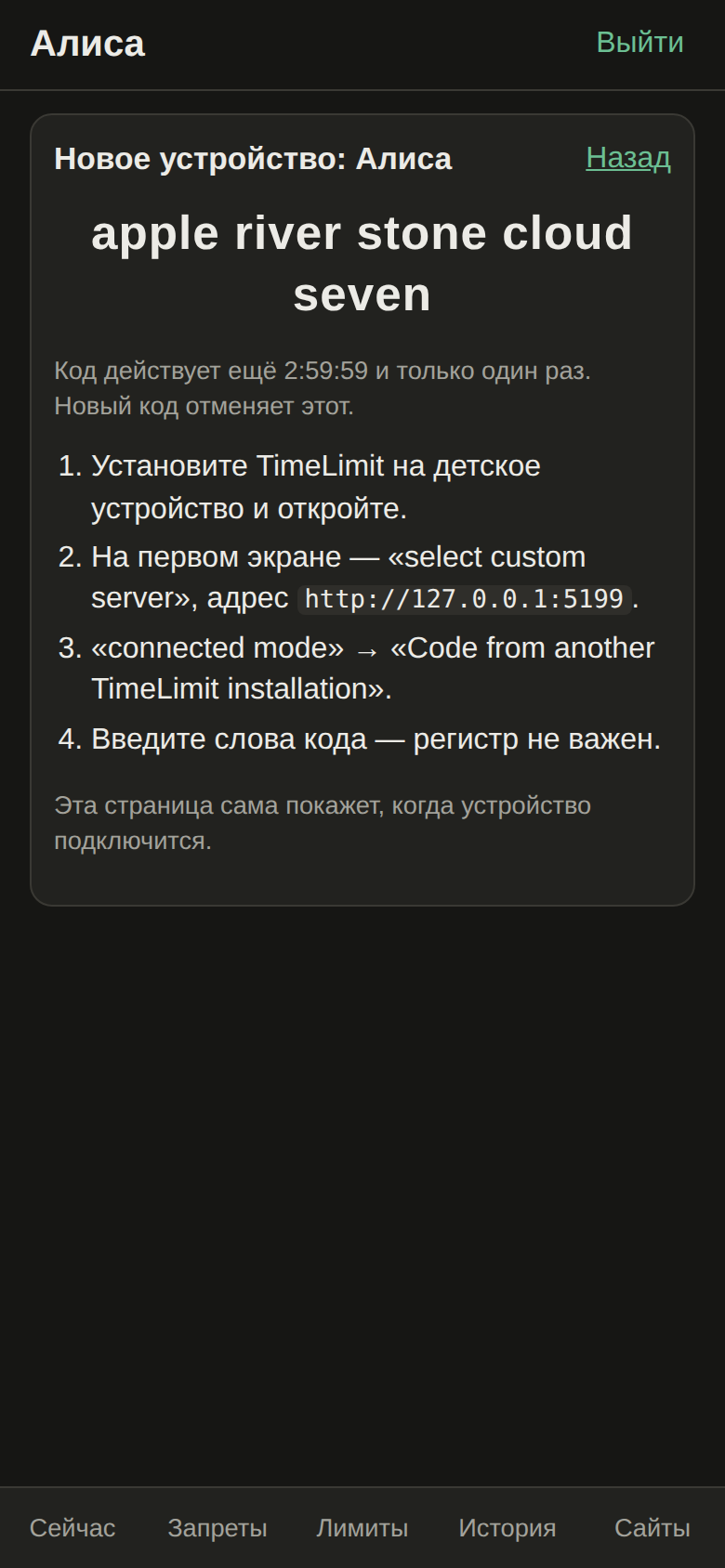 |
5. «Подключить устройство» (connect device) shows a five-word code, valid 3 hours and once. The page notices by itself when the device joins. |
If the mail already has a family, the console just signs in as another parent device.
- Install TimeLimit on the child's device and open it.
- On the very first screen tap «select custom server» and enter your server address — the server can not be changed later without reinstalling.
- Choose «connected mode» → «Code from another TimeLimit installation», enter the five words.
- On the device choose the child as its user, grant the permissions (usage access, device admin, accessibility, notifications).
Put launcher, phone and settings into «Разрешено» before assigning the child: apps without a category are blocked.
For the website filter the child device additionally needs:
- a non-store build of TimeLimit (the Play Store build hides device-owner features behind
BuildConfig.storeCompilant) — and for the filter itself the patched Android build from theparent-consolebranch (not published yet); - the device owner role, granted over ADB on a device without accounts:
adb shell dpm set-device-owner \
io.timelimit.android.aosp.direct/io.timelimit.android.integration.platform.android.AdminReceiverНужны свой сервер синхронизации (облако апстрима не подходит: веб-админка отдаётся с того же адреса,
что и сервер), собранная веб-админка под /console/ и TimeLimit на детском устройстве. Фильтр
сайтов и вход через Google требуют доработанного сервера (ветка parent-console, пока не опубликована), фильтр ещё
и нашей сборки Android и роли device owner. Порядок: почта → код из письма → имя и пароль родителя →
имя ребёнка → код из пяти слов → на детском устройстве «select custom server», «connected mode», код.
Всего у родителя ≈ 16 шагов.