Repository navigation
Settings Reference
Türkçe: Settings-Reference-TR
Every option in the Settings dialog, in the sections the dialog uses. Labels below are the English interface strings.
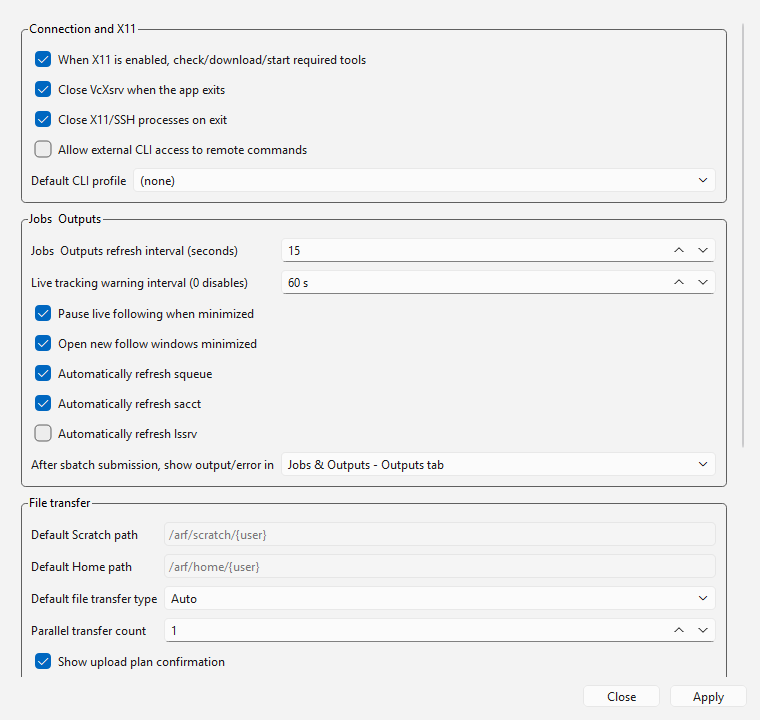
The Settings dialog: Connection and X11, Jobs & Outputs, and File transfer.
| Setting | What it does |
|---|---|
| When X11 is enabled, check/download/start required tools | On Connect, plink.exe and VcXsrv are checked. If missing, they are downloaded with your consent and started. |
| Close VcXsrv when the app exits | If VcXsrv was started by the application, it is closed by PID on exit. |
| Close X11/SSH processes on exit | Terminates the plink/ssh processes the application started. |
X11 itself is enabled per connection — Enable X11 forwarding (for GUI apps) on the connection form. See X11 Forwarding.
| Setting | What it does |
|---|---|
| Jobs & Outputs refresh interval (seconds) | How often the jobs and outputs views refresh. |
| Live tracking warning interval (0 disables) | How often live tracking warns; 0 turns the warning off. |
| Pause live following when minimized | Stops live output following while the window is minimized. |
| Open new follow windows minimized | New follow windows start minimized. |
| Automatically refresh squeue | Refreshes the queue view on the interval. |
| Automatically refresh sacct | Refreshes the accounting view on the interval. |
| Automatically refresh lssrv | Refreshes the resource view on the interval. |
| After sbatch submission, show output/error in | Where output is followed after a successful submission. |
The submission-follow choice has five values:
| Value | Behavior |
|---|---|
| Do not open a follower | Register and refresh the job, leave the current view unchanged |
| Jobs & Outputs — Outputs tab | Continue in the existing Output 1 and Output 2 panels |
| New follow tab | One new lower tab following output and error together |
| One combined follow window | One independent window with output and error together |
| Separate output and error windows | Two independent windows |
See Job Outputs.
| Setting | What it does |
|---|---|
| Default file transfer type | Binary, ASCII, or automatic. |
| Default Home path | The remote home path the file manager opens at. |
| Default Scratch path | The remote scratch path shortcut. |
| Parallel transfer count | How many parallel uploads and downloads use isolated channels. Other file operations stay sequential. |
| Use remote directory listing cache | Keeps visited remote folders in memory; create, delete, and refresh update the affected entry. |
| Clear remote directory cache | Drops the cache immediately. |
| Show upload plan confirmation | Shows what will be uploaded before the transfer starts. |
| Verify transfers with SHA-256 after completion | Compares source and destination checksums before marking a transfer successful. |
| Remote test size | The temporary file size used by the speed test. |
| Run remote transfer speed test | Uploads and downloads a temporary file on the remote backend, verifies it, then removes it, and reports upload and download rates. |
| Reset to defaults | Restores the file-transfer defaults. |
See File Transfers.
| Setting | What it does |
|---|---|
| Allow external CLI access to remote commands | Off by default. When on, any local process running this application's command-line interface can reach remote commands — files, jobs, edit, shell, diagnostics — using saved profiles, with no GUI session. |
| Default CLI profile | The profile used when a command-line invocation omits --profile. Can be left unset. |
Enable external access deliberately, and only on machines where you trust the local processes. See Security Model and CLI Guide.
Choose which local program opens a given file type when you open a remote file from the file manager. Each association can be changed or cleared; unset associations show as none selected.
The interface language — Turkish or English — is selected in the application
and persists to ~/.truba_slurm_gui/language.json. See
Interface Language and i18n.