Repository navigation
Releases: mstan/StarFoxSNESRecomp
Release list
v0.3.1 - Windows launch fix (0xc000007b)

Windows packaging fix. If v0.3.0 failed to launch, this release is the fix.
The problem
Launching StarFoxSNESRecomp.exe from the v0.3.0 Windows zip could fail
immediately with either:
0xc000007b— "The application was unable to start correctly"0xc0000135— the DLL could not be found
The zip was missing libiconv-2.dll, a dependency of the SDL3.dll it
shipped. If your PC had no copy of that DLL, you got 0xc0000135. If your PATH
happened to carry a 32-bit copy (32-bit Git for Windows, GTK, PHP and GIMP
all ship one), Windows loaded it, the 32/64-bit mismatch aborted the process
before the game started, and you got 0xc000007b naming the exe rather than the
DLL — which is why the message was so unhelpful.
Nothing was wrong with your system, your ROM, or your drivers. The package was
simply incomplete.
The fix
make_release.ps1 used to copy a hand-written list of runtime DLLs into the zip.
That list was correct when it was written and quietly went stale when the build
picked up a newer SDL3 that needed one more library.
Packaging no longer works from a list. It now walks the executable's actual
dependency graph, ships everything it finds that Windows does not provide, and
then re-checks the finished package: every dependency must resolve inside the
zip, and every binary must be 64-bit. Anything missing or wrong-architecture
fails the release instead of shipping. This release was verified by launching it
with PATH stripped to C:\Windows\system32;C:\Windows.
As a side effect the zip is smaller: this build links the MinGW runtime
statically, so the three MinGW DLLs the old list copied in unconditionally were
never needed and are no longer shipped.
What has not changed
The game itself is identical to v0.3.0 — same engine revision, same generated
code, same features. Only the contents of the zip changed. Save files,
config.ini, keybinds and menu settings all carry over.
Linux users: the AppImage bundles its own SDL3 and was never affected. The
v0.3.0 AppImage
remains current.
Install
Download the zip, extract the whole folder, run StarFoxSNESRecomp.exe. Supply
your own legally-obtained Star Fox ROM when prompted. The ROM is never
redistributed.
Star Fox v0.3.0 — Save states and rewind
Save states and rewind are now available through the shared snesrecomp menus.
- F7: open the 12-slot save-state browser, with thumbnails.
- F8: open the rewind filmstrip. Select an earlier snapshot to resume there, or cancel to keep playing.
- Rebind or clear both shortcuts in recomp-ui's Settings > Controls > Hotkeys, using the same defaults as PSXRecomp.
- On a controller, use Select+R for Save States and Select+L for Rewind.
- Legacy direct-load shortcuts for slots 7 and 8 move to F11/F12; Shift+F7/F8 still save those slots.
Snapshots now restore the CPU, title scheduler and Super FX execution state. Older Star Fox save states are incomplete and cannot be loaded by this version; create fresh saves. Loading also refreshes presentation history and audio buffering.
The build uses the current shared framework helpers and dependency pins. Star Fox remains single-player, with no netplay menu. Enhanced widescreen and the optional Star Fox 64 Arwing remain available in Mods.
Download the Windows x64 ZIP or Linux x86_64 AppImage. Extract the entire Windows ZIP; on Linux, make the AppImage executable. Select your own supported Star Fox ROM in recomp-ui. Packages include no ROMs or extracted Arwing assets. Checksums are in SHA256SUMS.txt.
Validation: the owner confirmed save states and rewind interactively. Automated Windows/SDL3 and Linux/SDL2 checks cover deterministic replay, fresh-process save loading, menu input isolation, and recomp-ui binding persistence. Both packaged builds pass a fresh boot check; the AppImage also passes portable-settings tests.
This remains a development preview. The native renderer is adapted from kandowontu's Star Fox Enhanced, with thanks to its author and the snesrecomp/recomp-ui contributors.
Star Fox v0.2.0 — Enhanced renderer + Star Fox 64 Arwing
Two major presentation features arrive in 0.2.0: the new Enhanced widescreen renderer and the Star Fox 64 Arwing mod.
New: Enhanced widescreen renderer
- A native renderer expands the game world for 16:10, 16:9, 21:9 and 32:9 displays.
- Menus and briefing screens keep their original proportions; scene transitions and fades now preserve the original presentation.
- Restored ground dots provide depth cues across the wider view.
- Improved high-FPS presentation pacing and normal builds without heavy developer tracing address the stalls seen during testing.
New: Star Fox 64 Arwing
- The SF64 ship replaces the player model in gameplay and the controls preview, sized to the original SNES ship's wingspan with fully expanded wings.
- Includes wing damage, engine glow, roll shield, SF64 player laser visuals and ship sound effects.
- Works with Authentic 4:3 and Enhanced widescreen. Supersampling and SF64 audio have separate settings.
- Requires your own Star Fox 64 (USA) Rev A / v1.1 ROM. Assets are extracted and cached locally on first use.
Both features are off by default. Enable Enhanced Widescreen in the launcher and Star Fox 64 Arwing on its Mods page. Presentation changes do not change guest gameplay or write guest WRAM; the Arwing's original ship is hidden with a guarded ROM patch that is removed when the feature is disabled.
Downloads and setup
- Windows x64: extract the entire ZIP to a fresh folder and launch
StarFoxSNESRecomp.exe. Keep its DLLs andassetsfolder beside it. - Linux x86_64: make the AppImage executable and launch it. Configuration and locally extracted assets live beside the AppImage.
- Select your own supported Star Fox SNES ROM in recomp-ui. For Arwing64, also select the supported SF64 ROM on the Mods page.
- No ROMs, extracted models, textures, or sound clips are included. Screenshots and setup documentation are included in the packages.
Screenshots
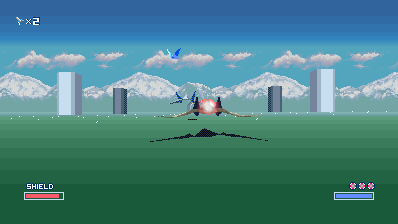
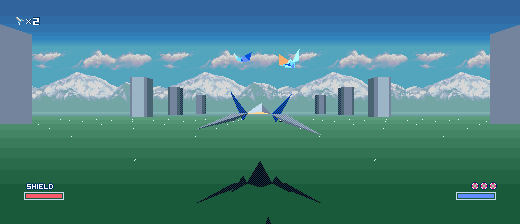
Arwing64 gallery and setup · Widescreen details
Scope and credits
Release checks: all 15 Arwing tests passed. Both packaged builds completed the Corneria script through frame 7351 with fresh SF64 model/audio extraction. Four 21:9 gameplay captures matched pixel for pixel between Windows and Linux. The Windows launcher and Linux portable-state layout were also checked. Uploaded package checksums are listed in SHA256SUMS.txt.
This remains a development preview. Corneria and the documented scripted routes have been checked; full-game coverage and exact save-state CPU/scheduler fidelity remain open audit items. Object draw distance is unchanged.
The native renderer is adapted from kandowontu's Star Fox Enhanced. Arwing extraction follows sonicdcer/sf64 (CC0), with Torch (MIT) used as a development reference. Thanks to those projects and the shared snesrecomp and recomp-ui contributors.
Star Fox v0.0.3 - audio crackle fixed
Audio: family-wide crackle fixed
The shared engine retired a hardcoded 534 output samples per audio callback
regardless of how many the host actually asked for, so consumption tracked the
callback rate and ignored the callback size. Any host not asking for exactly
534 drove the DSP output ring permanently out of balance.
Measured on the Super Mario Kart port before the fix: 17.8 k samples/s consumed
against 32.04 k/s produced, the ring pinned at its cap, and 43% of every audio
sample generated was discarded - 384,032 of them carrying audible music - in
64,935 separate drop runs. Tempo survived because the drops landed as thousands
of very short runs per second, which is why this was heard as static rather than
as obviously wrong pitch.
The consumer now retires exactly as many samples as it emits frames, converts
the SPC's native 32040 Hz onto the device rate with continuous-phase
interpolation, and steers ring occupancy with a +/-0.5% servo (about 8 cents,
well below audibility) so the guest and the audio device can no longer drift
apart. Starvation fades over 64 frames instead of cutting to silence.
After the fix, same measurement: 0 samples dropped, 0 audible drops, 0 drop
runs, occupancy stable, consumed/produced 0.999, no steady-state underruns.
Engine: snesrecomp 1c271f9 + ad7860b. Launcher: recomp-ui 58e9d72.
Also fixed here
This title opened the audio device at 32000 Hz while the SPC produces 32040 Hz.
That 40 samples/s surplus filled the output ring after about 178 seconds, so the
crackle appeared a few minutes into play and then never left. It now opens at the
true native rate.
v0.0.2 — fullscreen setting
What's new
- Fullscreen setting restored in the launcher — Settings → Display → Fullscreen now cycles Off / Borderless / Exclusive (was lost in the RmlUi→ImGui launcher migration). Persists in config.ini, applies at boot.
- Engine updated to latest main.
Notes
- Windows zip only; unzip and run the exe. Settings are stored in config.ini next to the exe.
v0.0.1 — first public preview + widescreen
First public development preview of StarFoxSNESRecomp.
Highlights
- LLE-authoritative Super FX/GSU execution and SNES timing.
- Basic attract sequence, menu, route-selection, training, and gameplay support.
- Configurable expanded viewport with a tested 16:9 preset; authentic 4:3 remains available with
Widescreen = Off. - Star Fox-themed RmlUi launcher with the North American SNES cover, ROM verification, graphics/audio settings, controller setup, and optional direct boot.
- Automatic keyboard/controller configuration and the existing runtime diagnostics.
Install
- Download
StarFoxSNESRecomp-windows-0.0.1.zip. - Extract it into a fresh folder.
- Run
StarFoxSNESRecomp.exe. - Select your legally obtained, unheadered Star Fox (USA), version 1.2 ROM.
Required ROM SHA-256:
82E39DFBB3E4FE5C28044E80878392070C618B298DD5A267E5EA53C8F72CC548
Release zip SHA-256:
4D91C8291D6435A9F31E3740FA7DA26DBF54FFDCCD36D07A23451A5AAF2D0B36
Preview status
This is an early public preview, not a production-ready claim. Longer play sessions, additional routes, save-state behavior, and non-Windows builds still need broader coverage. Please file reproducible visual, audio, timing, or stability defects in GitHub Issues.