Repository navigation
Troubleshooting
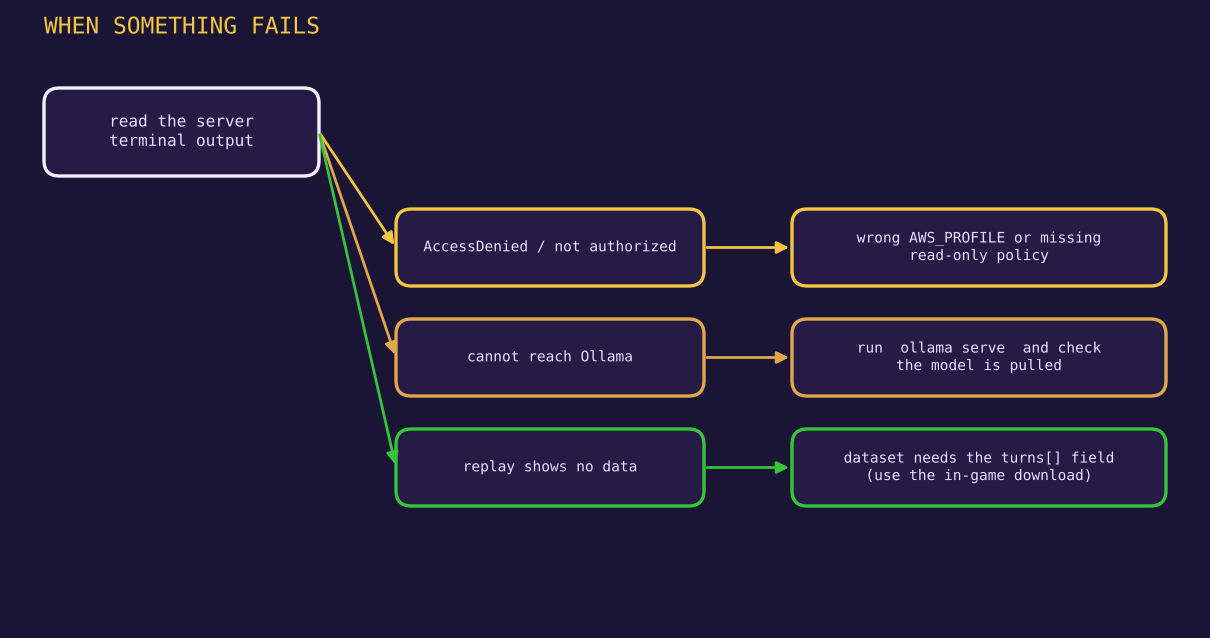
Always start by reading the terminal where python -m arena.server is running. The server prints the cause of most failures.
| Symptom | Likely cause | Fix |
|---|---|---|
AccessDeniedException on a quota, price or describe call |
The active AWS identity lacks a read action | Attach the policy in Getting-Started or switch profile |
cannot reach Ollama at http://localhost:11434/api/chat |
Ollama is not running | Run ollama serve (or start the app) |
| Model list is empty or shows the config defaults | Ollama is up but has no models, or /api/tags failed |
ollama pull <name>, then reload |
no plan; call /plan first |
The server restarted after the page loaded | Return to the menu and begin again |
| Replay shows "No dataset to replay." | No results/dataset.json locally |
Copy a dataset there, or run a live tournament first |
Static site says dataset is not JSON (got HTML 404?)
|
Wrong path to data/dataset.json
|
Check docs/data/dataset.json is committed |
| Port 8080 already in use | Another process | Stop it, or change the port in arena/server.py
|
| The first duel is slow | Ollama is loading the model into memory | Wait. Later duels are faster |
| A reply times out | The model is slow on your hardware, 120 s limit | Use a smaller model or raise timeout in bench/models.py
|
| A cave is scored as a hold (or the reverse) | A reply format the parser does not handle | See "Scoring surprises" below |
The classic case: the shell has an identity that is not the one you intended.
aws sts get-caller-identity        # who am I?
export AWS_PROFILE=your-profile    # Git Bash, macOS, Linux
PowerShell:
$env:AWS_PROFILE = "your-profile"An AccessDeniedException names the denied action in its message. Add exactly that action to the policy. The five actions the benchmark uses are in Getting-Started.
Other AWS surprises:
- The Pricing API is served from
us-east-1. The code pins that region for Pricing and Service Quotas. -
servicequotas:GetServiceQuotareturns the applied value for your account. A new account can differ from the documented default, which is the point of the project. - A fact built on a filter (such as pricing) can return an empty list if the filter does not match. Print the response and adjust the filter.
ollama list                 # what is installed
ollama run gemma2 "hi"      # does it answer at all
curl localhost:11434/api/tags
If you run Ollama on another machine, set OLLAMA_URL before starting the server, for example OLLAMA_URL=http://192.168.1.20:11434/api/chat.
Open the Logs modal, or read the text of the offending turn in the dataset, and check:
- Does the reply end with
ANSWER: <number>? If not, the parser fell back to the last number in the text. - Does the number contain a thousands separator? Older versions of the parser read
100,000as100. Updatebench/debate.pyto the fixed version in Methodology. - Did the model write a sentence such as
ANSWER: Not fixed at 100,000? The fixed parser returns no number for it and the duel counts as held.
To list every suspicious final answer in a dataset, use the audit snippet in Dataset-Format.
- Activate the virtual environment from Git Bash with
source .venv/Scripts/activate. - In PowerShell use
.venv\Scripts\Activate.ps1. -
exportis a Bash command. PowerShell uses$env:NAME = "value".
- Hard-refresh (Ctrl+Shift+R) after changing JavaScript or CSS.
- If the page shows stale behaviour after a server restart, reload and start from the menu.
- Stored history lives in
localStorageforlocalhost:8080. Clear it in the browser's site settings if you want a clean start.
Open an issue at https://github.com/mursalfk/gaslight-bench/issues with the terminal output, your OS, python --version and ollama --version.