

The project was made using python 3.12, to run it you can do:
python3 DuckDecoder.py <display | decode> /path/to/inject.bin
Run it without arguments to display the help menu. The program currently has two modes, to explain them better lets say I encode this payload:
 DELAY 500
 STRING Hello!!
 BACKSPACE
 ENTER
 STRING This is a test!!
The display mode is intended to show you what would the code look like once it was typed by the duck, deleting when backspace and not showing delays. Runing DuckDecoder.py display /path/to/inject.bin will output this:
 Hello!
 This is a test!!
The decode mode is intended to output the text in Duck-ready format for revision or reuse in other scripts. Runing DuckDecoder.py decode /path/to/inject.bin will output this:
 DELAY 500

 STRING Hello!!
 BACKSPACE
 ENTER
 STRING This is a test!!
The program finds the position of the duck hex code and translates it by finding its mirror position in another list with the letters. To submint a keyboard mapping, make two lists pressing the keys in this order:
![keyboard_mapping] (https://raw.githubusercontent.com/JPaulMora/Duck-Decoder/master/mapping.png) { width: 400px; }
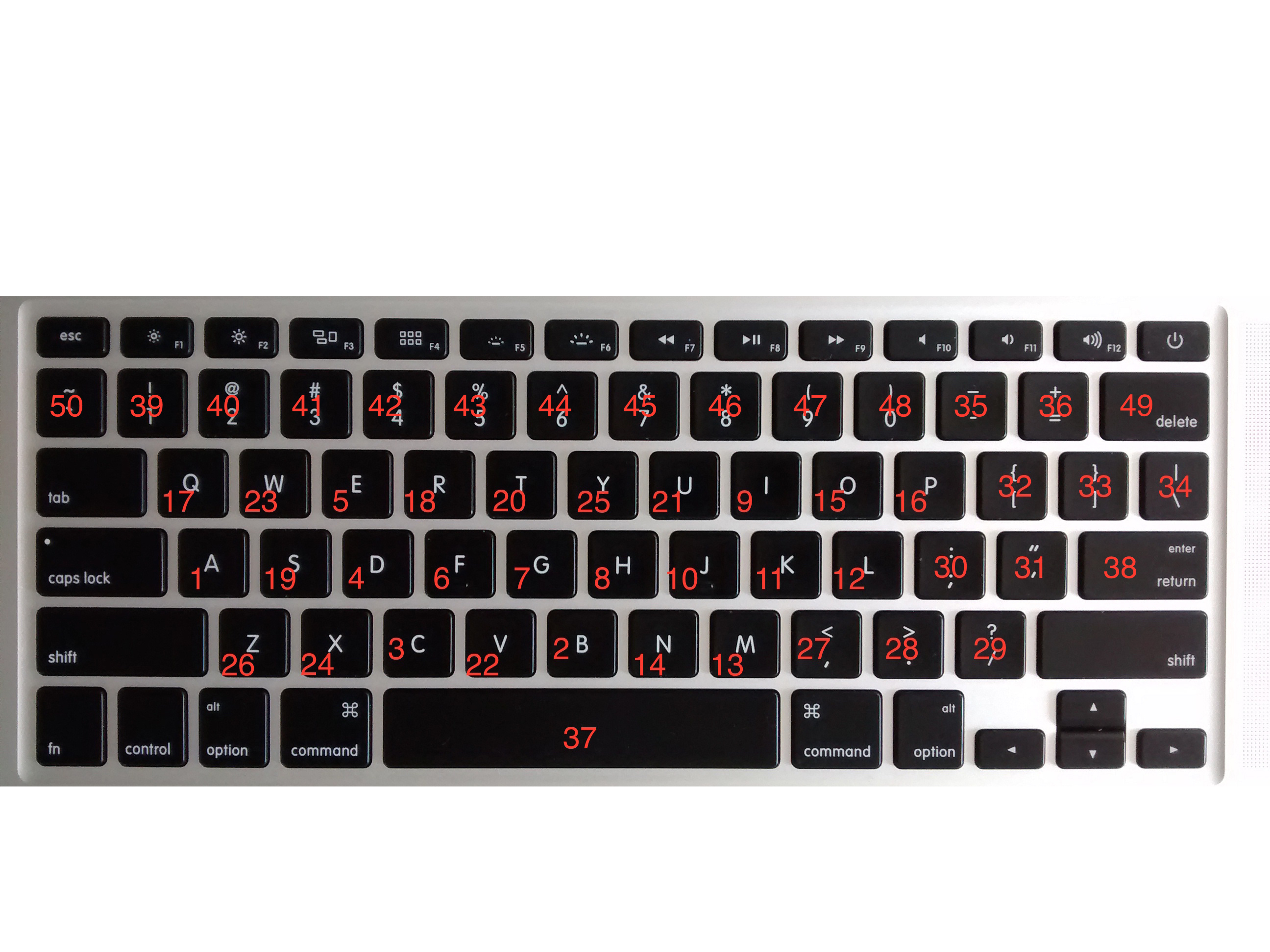
The lists should look like this, one for shift and one for plain characters:
 Letters = ["a","b","c","d","e","f","g","h","i","j","k","l","m","n","o","p","q","r","s","t","u","v","w","x","y","z"etc..]
 CapLetters = ["A","B","C","D","E","F","G","H","I","J","K","L","M","N","O","P","Q","R","S","T","U","V","W","X","Y","Z"etc..]