Repository navigation
Releases: mwgo/SimpleWhisper
Release list
SimpleWhisper 0.6.0

What's new
Parakeet Ultra
- New on-device speech model: Parakeet Ultra, a post-trained Parakeet v3 from FluidAudio. Same speed and 25 European languages, more robust on noisy audio. Pick it in Settings › General › Speech model; it downloads (~0.6 GB) on first use.
- FluidAudio updated to 0.17.5.
Better vocabulary boosting (Parakeet)
- Voice macro and spoken punctuation words are no longer boosted acoustically, so ordinary words stop turning into “przecinek” and similar.
- Stricter matching: common words are no longer replaced by vocabulary terms that only look similar.
- Replacements keep punctuation and neighbouring words, use the spelling from your vocabulary, and skip words that are already a vocabulary term.
Installation
- Unzip and move
SimpleWhisper.appto/Applications. With automatic updates on, 0.5.0 installs this version by itself. - The app is ad-hoc signed (not notarized). Clear the quarantine flag before the first launch:
xattr -dr com.apple.quarantine /Applications/SimpleWhisper.app - Grant Microphone, Accessibility and Input Monitoring when asked.
SHA-256: 2e2d75a8412ab51dd0ea7629b0039462814a52749c014e13550f63456287aadf
SimpleWhisper 0.5.0
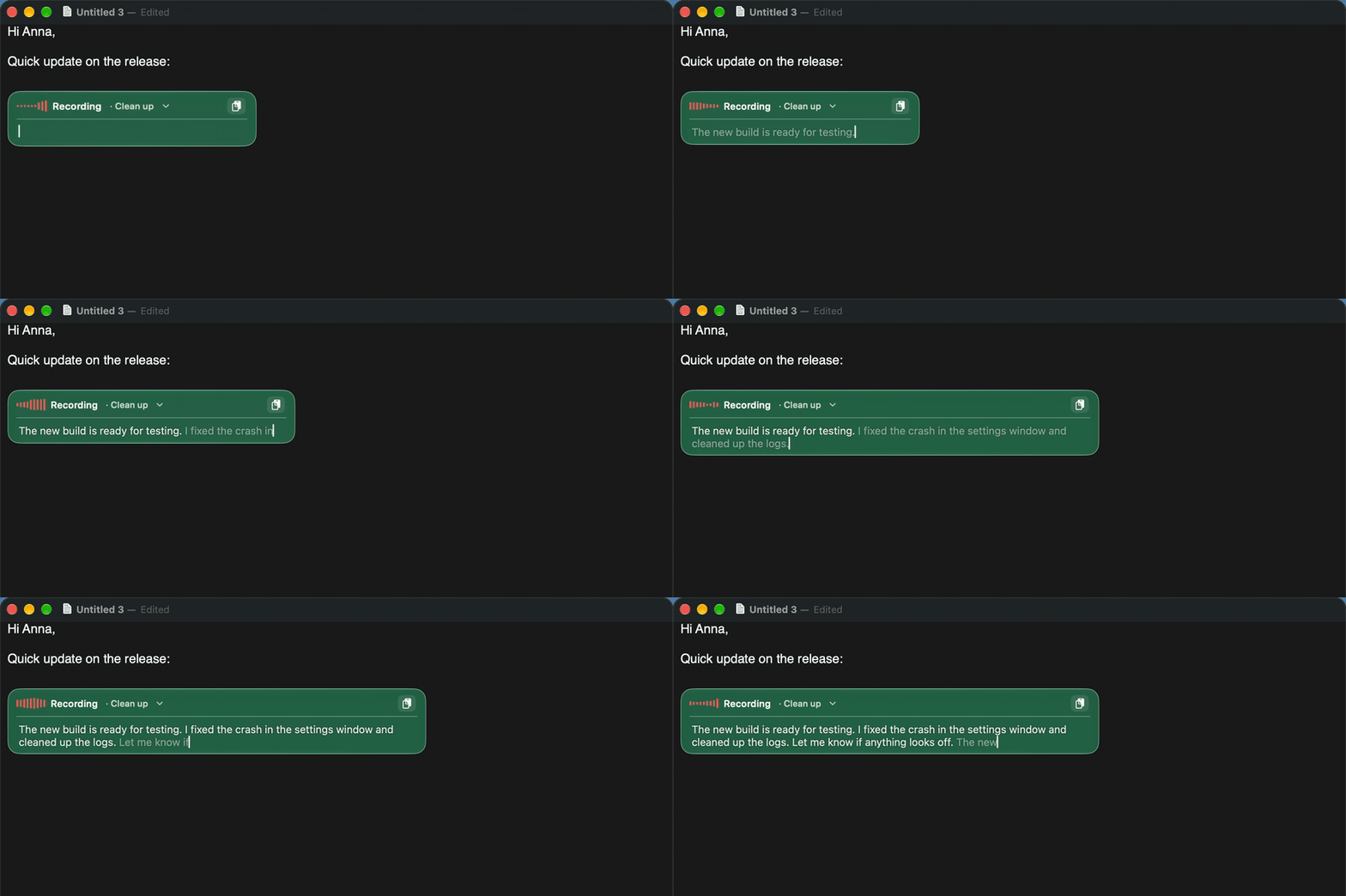
What's new
Live typing
- An editor opens in the HUD and fills with text as you speak: greyed while provisional, confirmed at each pause.
- Click anywhere to keep dictating there, select text to replace it, or edit with the keyboard; the editor grows with the text.
- Clipboard button, prompt picker always visible, Control + letter switches prompt (Control + space: plain text).
- Stop dictation to run the prompt and insert the result into the original app; Esc discards it.
Better transcripts
- Filter silence and hallucinations (on by default): Silero VAD cuts out non-speech before transcription, and phrases models invent on silence (“Thank you.”, “Dziękuję.”, “Napisy stworzone przez społeczność Amara.org”) are removed.
- Whisper retries a result that comes back empty or cut short.
- New optional Gemini API cloud engine.
HUD
- Liquid Glass background tinted with the theme colour (can be turned off).
- Nowhere to paste? The text stays in the HUD card with Copy and Close instead of a separate window.
Automatic updates
- Optional daily check for new GitHub releases, verified in-place install and restart (Settings › General › Updates), plus Check for Updates… in the menu bar. This is the first version with the updater, so the next release can install itself.
Other
- Menu bar trimmed: language and spoken punctuation switches live in Settings only; the default language set is English.
- New product-style README with screenshots and animations.
Installation
- Unzip and move
SimpleWhisper.appto/Applications. - The app is ad-hoc signed (not notarized). Clear the quarantine flag before the first launch:
xattr -dr com.apple.quarantine /Applications/SimpleWhisper.app - Grant Microphone, Accessibility and Input Monitoring when asked.
SHA-256: d98b887c7fa5000b10a33f80126a9305074def4403f2cb7074894034557abeea
SimpleWhisper 0.4.0
What's new
Fixes
- Long dictations are no longer truncated. The vocabulary prompt is only passed to Whisper for recordings that fit one 30 s window, a suspiciously short result triggers a retry without it, and the engine remembers when a model cannot cope with the prompt (Large v3 / Turbo).
- More apps detected as editable: Microsoft Teams and other Electron apps (accessibility tree switched on via
AXManualAccessibility), Microsoft Word (focus on a container around the document), JetBrains Rider tool windows (focused element without a role), VS Code Markdown editor and othercontenteditableweb editors. - fn combined with other modifiers (ctrl+fn, ⌥+fn…) no longer starts dictation.
- No speech / too short recordings fold the HUD away quietly with the cancel sound instead of showing an error.
HUD & result window
- Translucent HUD (85 % opacity); no more dark rim during animations.
- Copy in the result window closes it after copying.
Diagnostics
- The last recording is saved as
last-recording.wavin~/Library/Application Support/SimpleWhisper/so a bad transcription can be replayed with--transcribe. --ax-probe [--deep]prints the focused accessibility element and the paste decision.
Installation
- Unzip and move
SimpleWhisper.appto/Applications. - The app is ad-hoc signed (not notarized). Clear the quarantine flag before the first launch:
xattr -dr com.apple.quarantine /Applications/SimpleWhisper.app - Grant Microphone, Accessibility and Input Monitoring when asked.
SHA-256: 2ec2be548cfcfa916e1032b660ef6c6fd0838b33b93726e87a268be76dc55caa
SimpleWhisper 0.3.0
What's new in 0.3.0
AI providers
- More providers, selectable per prompt and for command mode: Claude Code CLI, OpenAI Codex CLI, Gemini CLI, Agy CLI, a custom shell command, Claude API, OpenAI API, Google Gemini API (keys stored in the Keychain), Apple Intelligence.
- Settings › AI is split into Prompts and Command mode & assistant, each with its own provider and only that provider's settings. Web access (WebFetch/WebSearch) is available for Claude Code in command mode; prompts always run without tools.
claude -pruns with no tools by default (faster, cannot read local files).
Command mode & assistant
- With text selected, ▶ or Control applies the dictated instruction to the selection. With nothing selected the dictation is a question to the assistant and the answer opens as a rendered Markdown document.
- Selection detection fixed for Electron editors (VS Code).
Hotkeys
- Dictation key selectable: 🌐 fn, left/right Command, left/right Option.
- Optional double-press mode (two quick presses = start, press-release-hold = push-to-talk, single press does nothing).
- Any other key within a second of fn cancels the recording silently, so fn+F12 and similar shortcuts keep working.
- Prompt shortcuts: press a prompt's letter while recording to use it, Space for plain text.
HUD & feedback
- Rotating rainbow border while transcribing / processing, left-to-right unfold on appear and a mirrored fold-away on hide (reversed on cancel), animated resizing.
- Short, soft sounds on start / stop / cancel (toggle in settings).
- Result window renders Markdown via swift-markdown (tables, GFM), remembers its frame.
Fixes
- Recordings longer than 30 s are transcribed completely (Whisper timestamps kept).
- Readable key legend in Settings › General › Hotkey.
Installation
Download SimpleWhisper-0.3.0.zip, unzip, move to /Applications. The app is ad-hoc signed (not notarized): on first launch use right-click › Open, or run
xattr -dr com.apple.quarantine /Applications/SimpleWhisper.appRequirements and permissions: see the README.
SHA-256 SimpleWhisper-0.3.0.zip: 4df3ceffe50584f04cae6c826b97d698967058b99f3cf865c2331031080c7be8
SimpleWhisper 0.2.0
What's new in 0.2.0
- Result window when nothing can be pasted. If no text field is focused when you start dictating (Finder, a web page without an input, the desktop…), the result opens in a window instead of being pasted. Text that looks like Markdown is rendered (headings, lists, code blocks, quotes, links) with a Rendered / Source switch for editing; plain text is editable right away. Nothing is copied automatically; use Copy. The window remembers its size and position.
- Markdown from the AI. When the result will be shown in that window, prompts and commands ask the AI for Markdown output (Settings › AI › Result window, on by default).
- HUD colour themes. Nine capsule colours (fresh green, mint, sky blue, indigo, violet, coral, amber, graphite, snow white) with matching text and level-bar colours, Settings › General › HUD.
- HUD animation-only mode keeps the prompt name visible.
Installation
Download SimpleWhisper-0.2.0.zip, unzip, move to /Applications. The app is ad-hoc signed (not notarized): on first launch use right-click › Open, or run
xattr -dr com.apple.quarantine /Applications/SimpleWhisper.appRequirements and permissions: see the 0.1.0 release notes and the README.
SHA-256 SimpleWhisper-0.2.0.zip: 11f82ddd994596285613fdb837dbf93cb4e36605a425d5fe7623dcce2067d98d
SimpleWhisper 0.1.0
First public release of SimpleWhisper, a free, local dictation tool for macOS 26 (Apple Silicon).
Highlights
- Menu bar app, no Dock icon. Press Globe/fn (short press = toggle, hold = push-to-talk), speak, and the text lands in the active editor. Esc cancels.
- Speech models, all on-device: Whisper Large v3 Turbo / Large v3 / Small (WhisperKit), NVIDIA Parakeet v3 (FluidAudio), Apple Speech. Models download on first use.
- Languages: auto-detect among a configurable set (default Polish + English, mixed sentences are fine), a fixed language, or any language.
- HUD next to the text caret (or top/bottom of the screen, or hidden) with recording level, transcribing and processing animations; click it to pick a prompt.
- Spoken punctuation (PL/EN): "przecinek", "kropka", "nowy akapit", "comma", "period", "new paragraph"…, merged with the punctuation the model already produced.
- Voice macros: "schowek"/"clipboard" inserts the clipboard, "nowa linia"/"new line", custom text macros.
- Custom vocabulary with aliases for words the models get wrong.
- AI prompts (Clean up, Formal email, Bullet points, Translate…) via
claude -p(or Apple Intelligence for English). - Command mode: select text, say what to do with it ("convert to markdown"), press ▶ in the HUD or Control; the result replaces the selection (or the text you just dictated).
- History window (opt-in) with the last 10 dictations/commands: click to copy, ▶ to paste.
- Launch at login, CLI test mode (
SimpleWhisper --transcribe file.aiff).
Requirements
- macOS 26, Apple Silicon.
- Permissions: Microphone, Accessibility, Input Monitoring (the app asks on first launch).
- System Settings › Keyboard › "Press 🌐 key to" → Do Nothing.
- For AI prompts/commands: Claude Code CLI installed and logged in (
claude).
Installation
- Download
SimpleWhisper-0.1.0.zip, unzip, moveSimpleWhisper.appto/Applications. - The app is ad-hoc signed, not notarized. On first launch macOS will refuse to open it; either right-click › Open, or run:
xattr -dr com.apple.quarantine /Applications/SimpleWhisper.app
- Grant the permissions when asked, then press fn and start dictating.
Or build from source: Scripts/make-app.sh (Xcode 26 / Swift 6.2).
SHA-256 SimpleWhisper-0.1.0.zip: 613fed900c0274ae499ac7623759f45dbb8341b5a034c9bd3528d98262a59e96