
Your Notion workspace, in your vault, in plain Markdown.
Pull pages and databases into Obsidian as clean Markdown. Free, open source, up to 100 pages.



Website / Docs / Report a bug / Request a feature
Not a Notion product. N2O Sync Lite is an independent Obsidian plugin. It is not made by, endorsed by, or affiliated with Notion Labs or Obsidian. It uses Notion's public API with a token you provide.
It only reads from Notion. Lite never writes to your Notion workspace, so there is nothing it can break over there. The only thing it changes is your vault.
You have years of work in Notion. Meeting notes, project databases, research, half-finished writing, the wiki nobody else maintains.
It lives on somebody else's server, in somebody else's format. Notion's own
Markdown export is a manual .zip you have to request, where every filename has
a 32-character UUID stapled to the end, internal links point at files that no
longer exist, and databases arrive as loose CSV. There is no incremental option
and no way to schedule it. Do it twice and you get two unrelated folders.
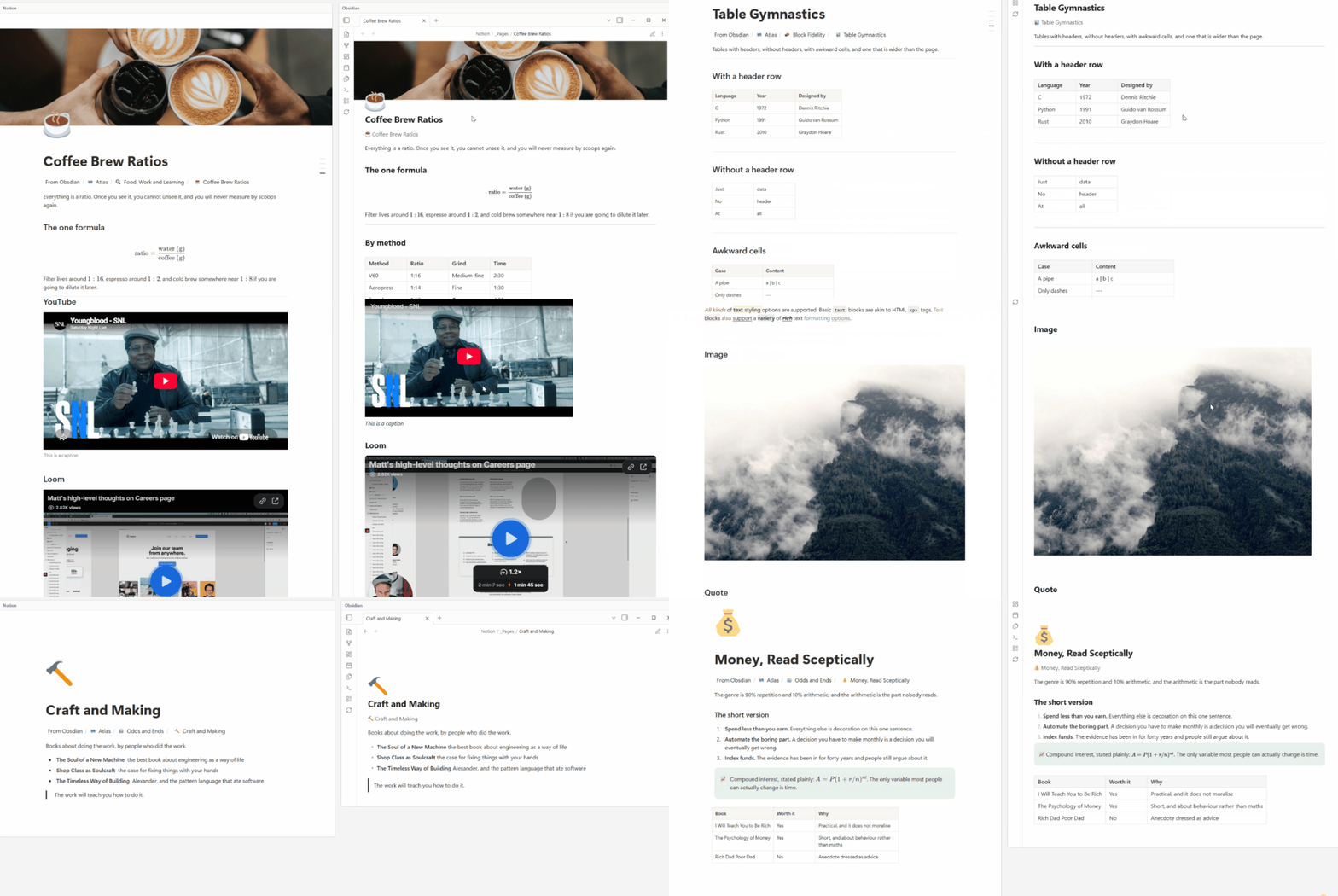
N2O Sync Lite pulls the same content into your Obsidian vault as clean Markdown, with working links, properties as frontmatter, and images on disk. Run it again next week and it updates what changed instead of dumping a second copy.
- A readable copy of your Notion, on your own disk. Plain
.mdfiles with normal names. Openable in any editor, on any machine, in ten years. - Formatting that survives. Callouts, toggles, columns, code blocks, maths, tables, synced blocks and nested lists all come across as the equivalent Obsidian construct, not as flattened text.
- Databases as folders. Each row becomes a note, each property becomes frontmatter you can query.
- Relations become wikilinks. Your Notion relation graph turns into a real Obsidian backlink graph, which is something Notion itself cannot show you.
- Media downloaded locally. Images, PDFs, video, audio and file attachments
land in
_files/next to the note, because Notion's own file URLs expire after about an hour. - Safe to re-run. A sync never writes over a note you edited. If a page
changed in Notion and in Obsidian, your file is left exactly as it is and
Notion's version is saved next to it as
<name>.conflict.md. - Up to 100 pages, and no nagging. Lite is free and stays free. It syncs up to 100 notes per vault. Every synced note counts, including the rows of a database. Whether you need an account depends on how you connect: pasting an integration token needs none, while "Connect with Notion" signs you in and registers a free account. Both are described under Connecting.
| A backup you can actually read | Notion goes down, the bill goes up, or your account gets locked. Your notes are already on your disk, in Markdown, readable in any text editor. |
| Offline access | Obsidian works on a plane. Notion effectively does not. |
| Instant local search | Full-text and regex search over your whole workspace with no server round trip. |
| A graph of your Notion | Relations become wikilinks, so you get backlinks and a local graph view over content Notion can only render as a table. |
| Queries Notion cannot express | Dataview and Bases can query across databases, folders and tags at once. Notion needs an explicit relation for anything cross-database. |
| Run AI over your own notes | Copilot, Smart Connections and every RAG tool want plain Markdown on disk. Now your Notion is exactly that, locally, without paying for Notion AI. |
| Publish properly | Quartz, Obsidian Publish, Astro and Hugo all read Markdown. Notion's publish gives you one ugly URL and no control. |
| Version control your workspace | Put the vault in git and you get per-commit diffs of your Notion, plus blame and restore to any point. |
| An exit ramp | If you ever want to leave Notion, your knowledge is already in an open format. You are not starting the migration from zero. |
Text and formatting. Paragraphs, headings H1 to H4, quotes, dividers. Bold, italic, strikethrough, inline code, underline and links.
Notion's text and background colours are not rendered in Lite. Notes come across as plain Markdown and take your Obsidian theme's styling. Colour, page covers and page icons are part of the paid edition's visual fidelity.
Lists. Bulleted with nesting, numbered, and to-dos with their checked state.
Callouts and toggles. Notion callouts become Obsidian callouts, with the icon mapped to the matching callout type. Toggles become collapsible callouts. Toggle headings keep their heading level.
Media. Images, video, audio, PDFs and file attachments, downloaded into
_files/. Bookmarks and embeds keep their URL.
Covers and icons, as data. A page's cover image is downloaded and its path
written to frontmatter as n2o_cover; the page icon lands in icon. Lite does not
draw either one, so if you want them shown at the top of a note, point a plugin like
Pretty Properties or Banners at those two fields. Nothing is lost, it is just yours
to render however you prefer.
Code and maths. Fenced code blocks with the language tag preserved, inline
$math$ and block $$math$$.
Layout and structure. Tables, multi-column layouts, synced blocks (references become Obsidian transclusions), child pages as wikilinks, and page mentions as wikilinks.
Database properties. All 23 Notion property types map to YAML frontmatter:
title, text, number, select, multi-select, status, date, date range, checkbox,
URL, email, phone, people, files, relation, formula, rollup, created and last
edited time, created and last edited by, and unique ID. A property named "Tags"
maps to Obsidian's native tags: key, so synced pages show up in tag search
straight away.
Full mapping table, block by block: n2osync.com/docs/reference/supported-blocks
| Notion Markdown export | N2O Sync Lite | |
|---|---|---|
| How you run it | Request it, wait for an email, download a .zip |
One command in Obsidian |
| Filenames | Page Title abc123def456...789.md |
Page Title.md |
| Internal links | Point at exported filenames, frequently broken | Working [[wikilinks]] |
| Databases | Loose CSV next to the pages | A folder of notes with typed frontmatter |
| Properties | In the CSV, not on the page | YAML frontmatter, queryable |
| Images | In the zip, paths often mangled | Downloaded into _files/, links correct |
| Running it again | A second unrelated folder | Updates what changed |
| Your local edits | Overwritten or duplicated | Never written over |
| Scheduling | Not possible | Re-run whenever you want |
From the Obsidian community store
- Open Settings > Community plugins > Browse
- Search for N2O Sync Lite
- Install, then Enable
Manually
- Download
main.js,manifest.jsonandstyles.cssfrom the latest release - Put them in
<your-vault>/.obsidian/plugins/notion-pull-lite/ - Restart Obsidian and enable N2O Sync Lite in Community plugins
Two routes. Both end in the same place, so pick whichever you prefer.
Sign in (easiest). Settings > N2O Sync Lite > Connection > Connect with Notion. Sign in, pick the pages you want to share, done. This creates a free account on the N2O licence server, which holds your email and workspace name and nothing else. If you would rather not, use the token route below.
Paste a token (no account needed). Nothing leaves your machine except Notion traffic. Create an internal integration at notion.so/my-integrations, share the pages you want with it from Notion's page menu under Connections, then paste the token into the same Connection tab.
- Open the N2O panel from the ribbon or the command palette
- Choose what to sync: everything, or pick specific pages and databases
- Run N2O: Pull from Notion
Start with one database or one page tree rather than the whole workspace. It makes the first run fast and it makes it obvious what N2O is doing to your vault.
Re-running is safe. If you edited a note in Obsidian and the page also changed in
Notion, N2O does not try to combine them and does not overwrite you. Your file
stays as it is and Notion's version is written beside it as <name>.conflict.md,
so you can compare the two and keep what you want.
Up front, so none of it surprises you later:
- One direction only. Notion to Obsidian. Your Obsidian edits stay in Obsidian and are never written back to Notion.
- On demand only. You press Sync. There is no background or automatic sync.
- No live database views. Databases arrive as folders of notes with frontmatter, not as Obsidian Bases views.
- No merging and no conflict review UI. When both sides change, Lite hands you both versions as two files and stops there. It will not combine them for you, and there is no screen for picking a side line by line.
- Desktop only. Same as the paid edition.
N2O Sync is the paid edition. It adds the things above: your Obsidian edits flow back to Notion, sync runs on its own in the background, Notion databases become live Obsidian Bases views, and changes made on both sides are merged for you with a conflict review screen, plus template support.
| Lite | N2O Sync | |
|---|---|---|
| Pull from Notion | Yes | Yes |
| Blocks and properties | Yes | Yes |
| Notion colours, covers and page icons | No | Yes |
| Media download | Yes | Yes |
| Automatic merge when both sides change | No | Yes |
| Page limit | 100 notes per vault, database rows included | None on a paid plan; the 14-day trial caps at 300 pages |
| Push back to Notion | No | Yes |
| Automatic background sync | No | Yes |
| Live Bases database views | No | Yes |
| Conflict review screen | No | Yes |
| Templates | No | Yes |
| Price | Free | 14-day trial, then $8/month or $249 once |
Lite is complete on its own. The paid edition is described in two places you can ignore: a section in the settings tab listing what it adds, and a note written into your sync folder on the first sync, which you can delete and which never comes back. Nothing pops up, nothing interrupts a sync, and nothing is disabled to make a point.
N2O Sync Lite talks to three hosts at most, and usually only one:
api.notion.comfor all sync traffic. Media files download from the URLs the Notion API returns, which are Notion-hosted (typically AWS S3).n2o-lic.vercel.apponly for the "Connect with Notion" sign-in handshake, and only if you use it. That server is never used for sync, so your Notion content never passes through it. If you opt in to the newsletter during sign-in (off by default), the opt-in is the only thing sent; leaving it unticked sends nothing.api.github.comonly when you click Install in the upgrade panel, to fetch the paid edition's release fromgithub.com/n2osync/n2o. Never during sync, and never on its own.
If you connect with a pasted integration token and do not install the paid edition,
the plugin talks to api.notion.com alone.
There is no client-side telemetry, no analytics and no update pings. Your token
is stored in the vault's plugin settings and is only ever sent to
api.notion.com.
Full policy: n2osync.com/docs/legal/privacy
This repository holds the complete source the released plugin is built from. You can check that yourself, and CI keeps it true:
The build is deterministic. A clean checkout produces a byte-identical
main.js. You can rebuild the release and diff it against the one you installed:
git clone https://github.com/n2osync/n2o-lite.git
cd n2o-lite
npm ci
npm run build
sha256sum main.js
# compare against the main.js in your vault's .obsidian/plugins/notion-pull-lite/
Network purity is enforced. scripts/check-network.mjs runs on every
release and fails the build if any endpoint other than the two named above
appears in src/ or in the built main.js. If a future version started phoning
somewhere new, the release would not ship.
Will this overwrite notes I have edited in Obsidian?
No. A sync never writes over a note you have edited. If the page also changed in
Notion, your file is left untouched and Notion's version is written beside it as
<name>.conflict.md, so you have both and you decide.
The one exception is the command that says so on the tin: "Overwrite from Notion" replaces your local version deliberately, and asks you to confirm first.
Does it sync my whole workspace, or can I choose?
You choose. In the settings you can sync everything, or pick specific pages and databases, with optional toggles for sub-pages and inline databases. You can also paste Notion page URLs or IDs directly.
How big a workspace can it handle?
Lite syncs up to 100 notes per vault. Every synced note counts, including the rows of a database, because a row is a page in Notion and becomes a note in your vault just like any other. Notes you have already synced keep syncing even if you are above the limit, and a run that hits it says so: "100 of 340 pages synced, 240 skipped". The other constraint is Notion's API rate limit of 3 requests per second; N2O stays at 2.5 to be safe. A few thousand pages will take several minutes on the first run. After that, syncs are incremental and only refetch pages Notion says have changed.
Why do images sometimes fail to download?
Notion serves uploaded files from S3 with signed URLs that expire after about an hour. N2O downloads them immediately during sync. If one fails, the next sync retries with a fresh URL.
What are the `` comments in my notes?
Invisible HTML comments on a few block types (toggles, callouts, coloured blocks, synced blocks) that store the Notion metadata needed to keep formatting stable across syncs. They are invisible in reading view and visible in source mode.
Can I use Lite and the paid edition in the same vault?
No. Lite refuses to sync in a vault that already has the paid edition, so the two never fight over the same files.
Is there a mobile version?
Not yet. Both editions are desktop only.
- Docs and guides: n2osync.com/docs
- Bugs and feature requests: GitHub issues
When reporting a bug, it helps a lot if you include your Obsidian version, the N2O version, what you were doing, and anything the developer console shows (Ctrl+Shift+I on Windows and Linux, Cmd+Option+I on macOS).
I read everything that comes in. This is a one-person project, so response times vary, but nothing gets ignored.
MIT. See LICENSE.