Releases: nikotaronosuke/tiny-code-pet
Releases · nikotaronosuke/tiny-code-pet
Release list
Tiny Code Pet v1.0.1

Maintenance release. Same features as v1.0.0, rebuilt from the current master with the public name applied consistently throughout the UI, docs and packaging.
Changes since v1.0.0
- Public product name is now Tiny Code Pet everywhere the user sees it: window title, tray tooltip, tray menu and the idle label.
- Repository moved to
nikotaronosuke/tiny-code-pet; clone, badge and release links updated. - Preview images regenerated from the shipping renderer so they show the current name.
- Documentation fixes: the always-on-top note no longer blames a specific OS action, the Codex subagent note describes cancelling the completion candidate instead of the retired activity indicator, and current-spec wording uses "quiet window" rather than "grace".
- Issue template no longer offers blank issues, matching its stated policy.
No behaviour changes: completion (root Stop + 20s quiet), whole-request progress, multi-session handling, tray semantics and the TOPMOST recovery are identical to v1.0.0.
Install
- Download
Tiny-Code-Pet-v1.0.1-windows.zipbelow and extract it. - Register the hooks you want:
pwsh -File install-hook.ps1         # Claude Code
pwsh -File install-codex-hook.ps1   # Codex (try -DryRun first)
.\bin\ClaudePet.exe                 # start the pet
Notes
- The
ClaudePet.exe/ClaudePetNotify.exe/CodexPetNotify.exefilenames are kept for compatibility with existing hook configurations. - The binaries are unsigned, so Windows SmartScreen may warn on first run. Build from source with
build.ps1if you would rather not accept that. - Windows only. Requires the .NET Framework 4.8 runtime that ships with Windows 10/11.
Tiny Code Pet v1.0.0
A tiny native Windows desktop pet that shows what Claude Code and Codex are doing — from the corner of your screen, without getting in the way.
Highlights
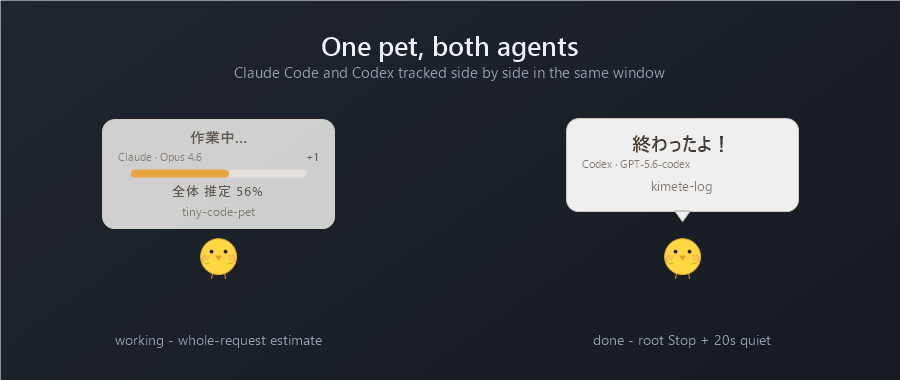
- Claude Code + Codex — one pet tracks both. Use either alone or both at once; sessions and turns stay isolated per provider.
- Whole-request progress — the percentage estimates how far the whole request has come, taken from the structured plan/todo list, not from whatever single task is running. No percentage is shown for a one-step plan.
- Completion = root Stop + 20s quiet — the pet says
終わったよ!only after a root Stop with no follow-up work for 20 seconds. The task tracker is never used as proof of completion, so a stale or missing todo list cannot produce a false "done". - Multi-session — several sessions are tracked at once; active work always outranks a finished notification, and a completion is dropped rather than queued if other work is still running.
- Provider / model /
+N— the pet shows who is working (Claude · Opus 4.6,Codex · GPT-5.6-codex) and how many other sessions are active. - Tray controls — a 🐥 icon in the notification area: show, hide, bring to front, exit. Hiding is visual only — tracking continues, and the completion sound is muted while hidden.
- Event-driven TOPMOST recovery — the window was observed losing its always-on-top position with no way back; it now re-asserts it when the display changes or on demand, without stealing focus.
- Native Win32, lightweight — C# + P/Invoke only. No Electron, WebView, Node, local server or database. Idle CPU is essentially 0 and it blocks in
GetMessage. - Privacy — prompts, responses, task text and source code are never read. Only hook status metadata (event name, session/turn id, project directory name, model id, status counts) is used.
Install
- Download
Tiny-Code-Pet-v1.0.0-windows.zipbelow and extract it. - Register the hooks you want:
pwsh -File install-hook.ps1         # Claude Code
pwsh -File install-codex-hook.ps1   # Codex (try -DryRun first)
.\bin\ClaudePet.exe                 # start the pet
Both install scripts append only and back up your settings first.
Notes
- The public product name is Tiny Code Pet. The
ClaudePet.exe/ClaudePetNotify.exe/CodexPetNotify.exefilenames are kept for compatibility with existing hook configurations. - The binaries are unsigned, so Windows SmartScreen may warn on first run. Build from source with
build.ps1if you would rather not accept that. - Windows only. Requires the .NET Framework 4.8 runtime that ships with Windows 10/11.
See the README for the full design and behaviour reference.