Tiny Code Pet v1.0.0

·
20 commits
to f8ba0ab37947b7c60ae510da82c613fd9bf1d7f8
since this release
A tiny native Windows desktop pet that shows what Claude Code and Codex are doing — from the corner of your screen, without getting in the way.
Highlights
- Claude Code + Codex — one pet tracks both. Use either alone or both at once; sessions and turns stay isolated per provider.
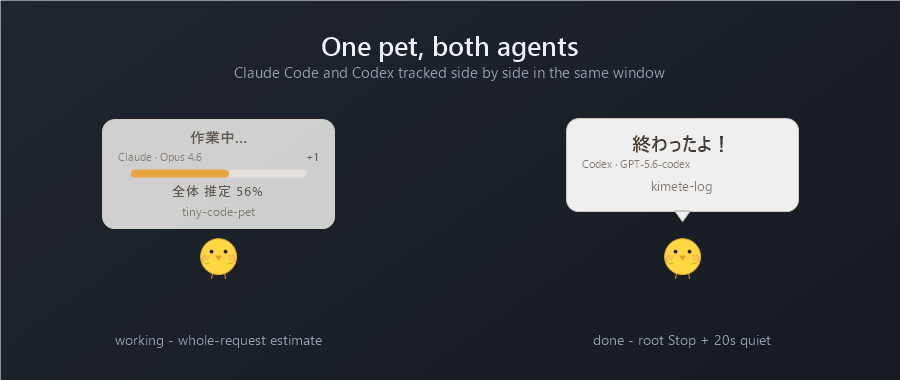
- Whole-request progress — the percentage estimates how far the whole request has come, taken from the structured plan/todo list, not from whatever single task is running. No percentage is shown for a one-step plan.
- Completion = root Stop + 20s quiet — the pet says
終わったよ!only after a root Stop with no follow-up work for 20 seconds. The task tracker is never used as proof of completion, so a stale or missing todo list cannot produce a false "done". - Multi-session — several sessions are tracked at once; active work always outranks a finished notification, and a completion is dropped rather than queued if other work is still running.
- Provider / model /
+N— the pet shows who is working (Claude · Opus 4.6,Codex · GPT-5.6-codex) and how many other sessions are active. - Tray controls — a 🐥 icon in the notification area: show, hide, bring to front, exit. Hiding is visual only — tracking continues, and the completion sound is muted while hidden.
- Event-driven TOPMOST recovery — the window was observed losing its always-on-top position with no way back; it now re-asserts it when the display changes or on demand, without stealing focus.
- Native Win32, lightweight — C# + P/Invoke only. No Electron, WebView, Node, local server or database. Idle CPU is essentially 0 and it blocks in
GetMessage. - Privacy — prompts, responses, task text and source code are never read. Only hook status metadata (event name, session/turn id, project directory name, model id, status counts) is used.
Install
- Download
Tiny-Code-Pet-v1.0.0-windows.zipbelow and extract it. - Register the hooks you want:
pwsh -File install-hook.ps1         # Claude Code
pwsh -File install-codex-hook.ps1   # Codex (try -DryRun first)
.\bin\ClaudePet.exe                 # start the pet
Both install scripts append only and back up your settings first.
Notes
- The public product name is Tiny Code Pet. The
ClaudePet.exe/ClaudePetNotify.exe/CodexPetNotify.exefilenames are kept for compatibility with existing hook configurations. - The binaries are unsigned, so Windows SmartScreen may warn on first run. Build from source with
build.ps1if you would rather not accept that. - Windows only. Requires the .NET Framework 4.8 runtime that ships with Windows 10/11.
See the README for the full design and behaviour reference.