Repository navigation
Releases: nomunomu0504/sub-screen-player
Release list
v0.2.0

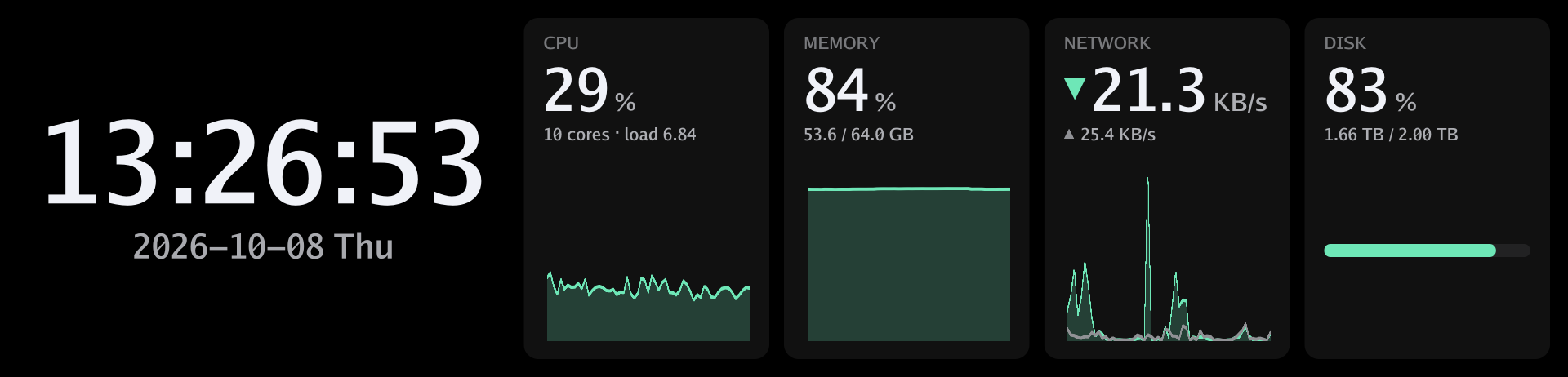
Adds a dashboard that shows the time next to CPU, memory, network and disk use, and lets the clock show Japanese and other non-Latin text.
(日本語は下にあります)
Highlights
- System dashboard:
ssp dashboardshows the time next to panels for CPU, memory, network and disk use. CPU, memory and network come with a graph of the last minute. The network panel shows the download speed with the upload speed below it, and the disk panel the space used on the system disk.--widgets clock,cpu,networkpicks and orders the panels (1 to 6 ofclock,cpu,memory,network,disk).[startup] show = "dashboard"shows it whenever a display connects;[dashboard]keeps the panels and colors (color,accent,background).POST /api/v1/displays/{id}/dashboardswitches to it from your own programs.
- Japanese (and other) text: characters the built-in font lacks are drawn with a font installed on the system: Hiragino on macOS, Yu Gothic or Meiryo on Windows, Noto Sans CJK and similar on Linux.
- Weekday names:
[clock] weekdays(alsossp clock --weekdaysandweekdaysin the API) takes seven names from Sunday that%aand%Aprint instead of the English ones, e.g. fordate_format = "%Y年%m月%d日(%a)".
For developers
cargo run -p ssp-server --example render -- dashboard out.pngdraws a built-in screen into a PNG without a display (clockordashboard;--configand--seconds).
Notes
- On Linux, install a CJK font (e.g. the
fonts-noto-cjkpackage) if Japanese does not show. - Tested with the D92 on macOS (Apple Silicon). The x86_64 builds of Linux and Windows have still not been tried with a display. Reports with the output of
ssp selftestare welcome.
Install or update
curl -fsSL https://subscreen.dev/install.sh | sh   # macOS, Linux
irm https://subscreen.dev/install.ps1 | iex       # Windows (PowerShell)
Running the installer again updates ssp; then restart the daemon (see Autostart: ssp service install again on macOS, systemctl --user restart sub-screen-player on Linux). The archives are also attached below (checksums in SHA256SUMS.txt).
Full changelog: v0.1.1...v0.2.0
日本語
時刻と一緒に CPU・メモリ・ネットワーク・ディスクの使用状況を表示するダッシュボードを追加し、時計で日本語などの文字を表示できるようにしました。
主な変更
- システムダッシュボード:
ssp dashboardで、時刻と、CPU・メモリ・ネットワーク・ディスクのパネルを並べて表示します。CPU・メモリ・ネットワークには直近1分のグラフが付きます。ネットワークのパネルはダウンロードの速度と、その下にアップロードの速度を、ディスクのパネルはシステムのディスクの使用量を表示します。--widgets clock,cpu,networkで、表示するパネルと順番を選べます(clock・cpu・memory・network・diskから1〜6個)。[startup] show = "dashboard"で、ディスプレイの接続時に表示します。[dashboard]でパネルと色(color・accent・background)を保存できます。- 自作のプログラムからは
POST /api/v1/displays/{id}/dashboardで切り替えられます。
- 日本語などの文字: 内蔵フォントにない文字を、OS に入っているフォント(macOS はヒラギノ、Windows は游ゴシックやメイリオ、Linux は Noto Sans CJK など)で描くようになりました。
- 曜日の名前:
[clock] weekdays(ssp clock --weekdays、API のweekdaysでも可)に日曜日から順に7つの名前を書くと、%aと%Aがその名前になります。例えばdate_format = "%Y年%m月%d日(%a)"と組み合わせて使います。
開発者向け
cargo run -p ssp-server --example render -- dashboard out.pngで、ディスプレイなしで組み込み画面を PNG に書き出せます(clockかdashboard。--configと--secondsも使えます)。
補足
- Linux で日本語が表示されない場合は、CJK のフォント(
fonts-noto-cjkパッケージなど)を入れてください。 - D92 を使い、macOS(Apple Silicon)で確認しました。x86_64 版の Linux と Windows は、まだ実機で試していません。
ssp selftestの出力を添えた報告を歓迎します。
インストール・更新
curl -fsSL https://subscreen.dev/install.sh | sh   # macOS・Linux
irm https://subscreen.dev/install.ps1 | iex       # Windows(PowerShell)
インストーラーをもう一度実行すると ssp が更新されます。そのあとデーモンを再起動してください(自動起動を参照。macOS はもう一度 ssp service install、Linux は systemctl --user restart sub-screen-player)。下のアセットからアーカイブをダウンロードすることもできます(チェックサムは SHA256SUMS.txt)。
変更の一覧: v0.1.1...v0.2.0
v0.1.1
Adds ssp selftest for checking displays, driver selection with --driver, a website with one-line installers, and a fix that shows the firmware version on Windows.
(日本語は下にあります)
Highlights
ssp selftestchecks every connected display directly, without the daemon: open (and firmware version), commands, still image, streaming (fps), keep-alive and power. It prints PASS / WARN / FAIL per check (or JSON with--json) and exits with 1 on failure. With several displays it opens them all first and tests one at a time. While the daemon is running, it skips the displays the daemon's drivers use.- Choose drivers with
--driver <id>onssp serve,ssp devicesandssp selftest, or with the new[drivers] enable / disableconfig section. A daemon limited to some drivers leaves other displays alone, e.g. one whose driver you are developing. - Experimental drivers: a driver can mark itself as experimental (
Driver::experimental()); it is only used when named, so it never takes over a display on its own. - Website and one-line installers: subscreen.dev has downloads and the documentation in English and Japanese. The installers download the latest release, check its SHA-256 checksum and install
ssp:curl -fsSL https://subscreen.dev/install.sh | sh # macOS, Linux irm https://subscreen.dev/install.ps1 | iex # Windows (PowerShell)
GET /api/v1/healthnow lists the drivers the daemon uses.
Fixes
- Windows: the D92's firmware version (and with it the "upHere" model name) is now shown. hidapi's native Windows backend cannot read input reports, so Windows now builds the C hidapi library, as macOS already did.
- A command that failed because the display was gone could be answered before the presenter was marked stopped, so
is_running()briefly returned true.
Tested platforms
ssp selftest passes with the D92 on macOS 27 (Apple Silicon), and on Ubuntu 24.04 and Windows 11 (both ARM64, in VMware Fusion VMs with the display passed through). The x86_64 builds of Linux and Windows have not been tried with a display yet. Reports with the output of ssp selftest are welcome.
Install
curl -fsSL https://subscreen.dev/install.sh | sh   # macOS, Linux
irm https://subscreen.dev/install.ps1 | iex # Windows (PowerShell)Or download the archive for your platform from the assets below (checksums are in SHA256SUMS.txt). See the download page for details.
Full changelog: v0.1.0...v0.1.1
日本語
ディスプレイを検査する ssp selftest、--driver によるドライバの指定、1行インストールのできる Web サイトを追加し、Windows でファームウェアのバージョンが表示されない問題を直しました。
主な変更
ssp selftest: デーモンを使わずに、接続中のディスプレイを直接検査します。接続(とファームウェアのバージョン)、コマンド、静止画、連続送信(fps)、キープアライブ、電源を順に試し、項目ごとに PASS / WARN / FAIL を表示します(--jsonで JSON)。失敗があると終了コード 1 で終わります。複数台あるときは全台を先に開いてから1台ずつ検査し、デーモンが動いている場合は、デーモンが使うドライバのディスプレイを飛ばします。--driver <id>でドライバを指定:ssp serve・ssp devices・ssp selftestで使えます。設定ファイルの[drivers] enable / disableでも指定できます。デーモンを一部のドライバだけで動かせば、ほかのディスプレイ(開発中のドライバのものなど)には触れません。- 試験中のドライバ: ドライバは自分を試験中(
Driver::experimental())として印を付けられます。名前を指定したときだけ使われるので、勝手にディスプレイを取ることはありません。 - Web サイトと1行インストール: subscreen.dev で、ダウンロードとドキュメント(英語・日本語)を公開しました。インストーラーは最新のリリースをダウンロードし、SHA-256 チェックサムを確認してから
sspを置きます。curl -fsSL https://subscreen.dev/install.sh | sh # macOS・Linux irm https://subscreen.dev/install.ps1 | iex # Windows(PowerShell)
GET /api/v1/healthが、デーモンの使っているドライバの一覧を返すようになりました。
修正
- Windows: D92 のファームウェアのバージョン(と「upHere」の機種名)が表示されるようになりました。hidapi の Windows ネイティブ実装は input レポートを読めないため、macOS と同じく C 版の hidapi ライブラリをビルドするようにしました。
- ディスプレイが外れて失敗したコマンドの応答が、Presenter の停止より先に返ることがあり、直後の
is_running()が一瞬 true を返していました。
確認済みの環境
D92 を使い、macOS 27(Apple Silicon)と、Ubuntu 24.04・Windows 11(どちらも ARM64、VMware Fusion の VM にディスプレイを渡して実行)で ssp selftest が通ることを確認しました。x86_64 版の Linux と Windows は、まだ実機で試していません。ssp selftest の出力を添えた報告を歓迎します。
インストール
curl -fsSL https://subscreen.dev/install.sh | sh   # macOS・Linux
irm https://subscreen.dev/install.ps1 | iex # Windows(PowerShell)下のアセットから使っている環境のアーカイブをダウンロードすることもできます(チェックサムは SHA256SUMS.txt)。詳しくはダウンロードページを参照してください。
変更の一覧: v0.1.0...v0.1.1
v0.1.0

The first release of sub-screen-player: a daemon and CLI (ssp) that drive small USB sub-displays from macOS, Linux and Windows.
(日本語は下にあります)
Highlights
- Live frames at up to 60 fps. Encoding and sending run on separate threads, and only the newest frame is sent when frames arrive faster than the display can take them.
- Built-in clock with configurable formats and colors, shown by default when a display connects.
- Images (PNG, JPEG, GIF, WebP) fitted with
contain,coverorstretch; optionally stored on the device so they survive power loss (ssp show --persist). - HTTP + WebSocket API so any program can draw on the screen.
- Hotplug: a replugged display carries on with what it was showing.
- Autostart at login:
ssp service install(launchd, systemd user unit, WindowsRunkey). - Secure by default: localhost only, requests from web pages are refused, and a token is required to listen on the network.
Supported displays
| Display | Panel | USB id | Status |
|---|---|---|---|
| upHere D92 / MiraBox D92 (9.2") | 1920x462 | 2100:0006 |
Tested on macOS (Apple Silicon): ~58–60 fps streaming, stored images, brightness, power |
Install
Download the archive for your platform from the assets below, extract it and put ssp (ssp.exe on Windows) on your PATH.
| Platform | Archive |
|---|---|
| macOS (Apple Silicon and Intel) | ssp-v0.1.0-universal-apple-darwin.tar.gz |
| Linux x86_64 / arm64 (static, any distribution) | ssp-v0.1.0-x86_64-unknown-linux-musl.tar.gz / ssp-v0.1.0-aarch64-unknown-linux-musl.tar.gz |
| Windows x64 / ARM64 | ssp-v0.1.0-x86_64-pc-windows-msvc.zip / ssp-v0.1.0-aarch64-pc-windows-msvc.zip |
Checksums are in SHA256SUMS.txt. The binaries are not code-signed: on macOS run xattr -d com.apple.quarantine ssp if it is blocked; on Windows choose "More info" → "Run anyway" if SmartScreen warns. On Linux, install the included udev rule (see the README).
Or build from source with mise:
git clone https://github.com/nomunomu0504/sub-screen-player.git
cd sub-screen-player
git checkout v0.1.0
mise install && mise run build   # target/release/ssp
Then run ssp serve and see the command line guide.
Known limitations
- Linux and Windows were checked with a display after this release, on ARM64 (Ubuntu 24.04 and Windows 11) with the code on
main; see the tested platforms. The x86_64 builds have not been tried with a display yet. Reports are welcome. - On Windows the D92's firmware version is not shown (hidapi's native backend cannot read input reports). Fixed on
mainin 5319924; will be in the next release. - The built-in clock font has Latin characters only.
- The HTTP endpoints do not send CORS headers; browsers can use the WebSocket stream.
Documentation
README · CLI guide · API · Architecture · Adding a device
日本語
sub-screen-player の最初のリリースです。USB 接続の小型サブディスプレイを macOS・Linux・Windows から操作するデーモンと CLI(ssp)です。
主な機能
- 最大 60fps のライブ表示: エンコードと送信を別スレッドで並行して行い、ディスプレイが受け取れる速さを超えてフレームが届いた場合は最新のものだけを送ります。
- 時計を内蔵: 書式と色を設定でき、ディスプレイの接続時に既定で表示します。
- 画像表示(PNG・JPEG・GIF・WebP):
contain/cover/stretchでパネルに合わせます。電源を切っても残るようにデバイスへ保存することもできます(ssp show --persist)。 - HTTP + WebSocket API: どんなプログラムからでも描画できます。
- 抜き差しに追従: 挿し直すと、それまでの表示内容を再開します。
- ログイン時の自動起動:
ssp service install(launchd / systemd ユーザーユニット / Windows のRunキー) - 安全な初期設定: localhost のみで待ち受け、Web ページからのリクエストを拒否し、ネットワークに公開するときはトークンが必須です。
対応ディスプレイ
| ディスプレイ | パネル | USB ID | 状況 |
|---|---|---|---|
| upHere D92 / MiraBox D92 (9.2 インチ) | 1920x462 | 2100:0006 |
macOS(Apple Silicon)で確認済み: 約 58〜60fps の配信、保存画像、明るさ、電源 |
インストール
下のアセットから使っている環境のアーカイブをダウンロードして展開し、ssp(Windows では ssp.exe)を PATH の通った場所に置いてください。
| 環境 | アーカイブ |
|---|---|
| macOS(Apple Silicon・Intel 共通) | ssp-v0.1.0-universal-apple-darwin.tar.gz |
| Linux x86_64 / arm64(静的リンク。ディストリビューションを問いません) | ssp-v0.1.0-x86_64-unknown-linux-musl.tar.gz / ssp-v0.1.0-aarch64-unknown-linux-musl.tar.gz |
| Windows x64 / ARM64 | ssp-v0.1.0-x86_64-pc-windows-msvc.zip / ssp-v0.1.0-aarch64-pc-windows-msvc.zip |
チェックサムは SHA256SUMS.txt にあります。バイナリはコード署名をしていないため、macOS で実行を拒否されたら xattr -d com.apple.quarantine ssp を、Windows で SmartScreen の警告が出たら「詳細情報」→「実行」を選んでください。Linux では同梱の udev ルールを入れてください(README を参照)。
ソースからビルドする場合は mise を使います。
git clone https://github.com/nomunomu0504/sub-screen-player.git
cd sub-screen-player
git checkout v0.1.0
mise install && mise run build   # target/release/ssp
その後 ssp serve を実行し、コマンドラインガイドを参照してください。
既知の制限
- Linux と Windows は、このリリースの後に
mainのコードで、ARM64 版(Ubuntu 24.04、Windows 11)の実機確認が取れました(確認済みの環境)。x86_64 版はまだ実機で試していません。報告を歓迎します。 - Windows では D92 のファームウェアのバージョンを表示できません(hidapi の Windows ネイティブ実装が input レポートを読めないため)。
mainの 5319924 で修正済みで、次のリリースに含まれます。 - 時計の内蔵フォントは欧文の文字のみです。
- HTTP のエンドポイントは CORS ヘッダーを返しません。ブラウザからは WebSocket ストリームを使えます。
ドキュメント
README · コマンドラインガイド · API · アーキテクチャ · 機種の追加方法