Repository navigation
Self Bot Guard
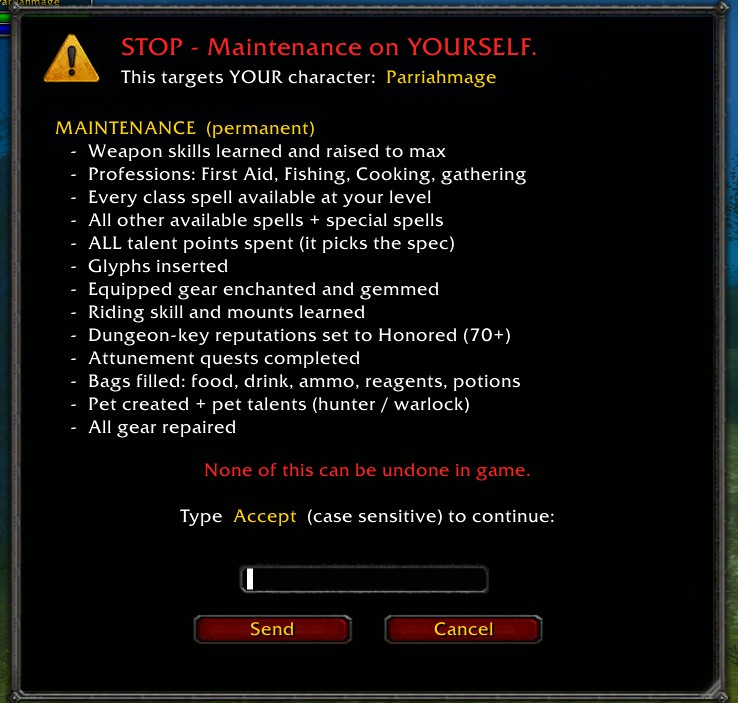
maintenance is not a repair button. On whatever character receives it, it permanently:
- learns weapon skills and sets them to max (Swords, Daggers, Maces, Staves, … for the class)
- learns professions and secondary skills (First Aid, Fishing, Cooking, gathering/crafting)
- learns every class spell available at that level, plus all other available and special spells
- spends ALL talent points (it picks the spec)
- inserts glyphs, enchants and gems the equipped gear (level-gated)
- learns riding and mounts, sets dungeon-key reputations to Honored (70+), completes attunement quests
- fills the bags (food, drink, ammo, reagents, consumables, potions, keyring), creates/trains a pet, repairs everything
Source: MaintenanceAction::Execute in mod-playerbots src/Ai/Base/Actions/TrainerAction.cpp — verified line by line on commit b6696bd.
With self-bot on (.playerbots bot self), the character that receives it is you. That happened, unwarned, to a character that mattered. Hence 1.2.0.
autogear equips generated gear up to the server's quality cap where the new item scores at least 1.2× the worn one; replaced items go to the bags. autogear reset and bis destroy every equipped item first — MiniGM refuses to send either, from anywhere.
| Maintenance | Autogear |
|---|---|
 |
 |
- MiniGM watches the server's own system lines —
Enable player botAI/Disable player botAI— so it always knows whether self-bot is on for your character. The flag survives/reload(/mgm selfbotshows it,/mgm selfbot offclears a stale one). - While self-bot is on, Maint and Gear stop and open the confirm window instead of sending.
- The window lists every change the command will make, one item per line. It is opaque, movable, scalable by its bottom-right grip, and works by click or Enter.
- Nothing is sent until you type
Accept(case sensitive) and press Enter or click Send. A wrong word keeps the window open with a red error inside it. Esc or Cancel sends nothing.
Solo, each button offers its own command on your character behind that same window. After Accept, MiniGM:
- turns self-bot on (only if it was off);
- verifies the server actually enabled it — if refused, nothing else is sent;
- whispers you the one command;
- waits for the bot AI's own answer ("I'm maintaining" / "I'm auto gearing (…)"), up to 30 s;
- turns self-bot back off (only if MiniGM turned it on).
In a group, /mgm maintme and /mgm gearme do the same. The group Maint and Gear buttons keep talking to your bots as always.