Repository navigation
Releases: onelegdave/omadroid
Release list
OmaDroid v0.3.7

OmaDroid v0.3.7 fixes the ADB destination-restriction bypass reported by @HANCORE-linux.
- Disable ADB mDNS and require the running daemon to explicitly report it disabled before Pair/Connect. An enabled or unverifiable daemon is refused with manual recovery guidance.
- Preserve validated Avahi discovery, private-address restrictions, and stdin-only pairing codes. OmaDroid never restarts an existing ADB daemon automatically.
Validation: 111 Python tests, QML lint, and plugin validation pass. Focused offline regressions cover destination substitution and daemon state; fresh phone pairing/mirroring works. No live substitution experiment was performed.
Exact commit: 5c6366bd1bfd390da81ff6e0344f28bf05ad5faf. Marketplace review: #10485; publication here is not marketplace approval.
Download the source archive and verify its accompanying SHA-256 checksum. See README for installation and existing-daemon recovery.
Contributors

Assets 4
OmaDroid v0.3.6
OmaDroid v0.3.6 improves desktop dependency recovery:
- Check that ADB can start before marking desktop setup ready. Shared-library failures recommend the distribution's supported full system update; failed startup skips device enumeration and discovery.
- When the verified installation launcher is unavailable, disable installation actions and show selectable manual commands for each missing dependency group. Direct backend requests return the same guidance instead of a raw launcher error.
- Preserve executable verification, launcher symlink rejection, fixed package groups, and existing permissions. Installed tools remain usable.
Thanks to @HermeticOrmus for the ADB readiness fix in PR #1. Original commit authorship is preserved; README and changelog credit the contribution.
Validation: all 102 Python tests, QML lint, and Omarchy plugin validation pass. Runtime fallback checks and dark/light captures use an isolated Quickshell instance with synthetic status. No new physical-phone pairing or OmarchyMac launcher compatibility is claimed. Issue #2 remains open for the launcher investigation.
Download the source archive and verify its accompanying SHA-256 checksum. From the extracted release, run /usr/bin/python3 -E -s install.py, then separately omarchy restart shell. Existing settings and saved phone connections are preserved.
Marketplace update review is submitted for this exact release commit in request #10485. Publication here does not constitute marketplace approval.
OmaDroid v0.3.5
OmaDroid v0.3.5 adds maintainer links, credits, and optional support in Help > About.
- Links to OneLegDave's website, GitHub profile, project source, and X profile.
- Optional Buy Me a Coffee support opens in the external browser only when clicked. No features require payment.
- Clear maintainer and Codex AI-assistance credits, with project and upstream acknowledgments.
- Matching README links and support information. Backend behavior and saved settings are unchanged.
Update with:
omarchy plugin update onelegdave.omadroidThe shell should reload the plugin after updating. If it does not, run omarchy restart shell. No new dependencies are required by this release.
Marketplace promotion is a separate exact-commit review. A prior listing approval does not automatically approve this update.
OmaDroid 0.3.4 — VPN pairing guidance and ADB startup
Android can display a Tailscale/VPN address in Wireless debugging, which OmaDroid does not accept. This release explains how to pair using the Wi-Fi address and reconnect after enabling the VPN again.
- Added Tailscale/VPN guidance to the pairing page, Help, README, and shared-range address errors.
- Clarified that nearby phone information comes from live network discovery and that each computer needs its own authorization.
- Clarified how Connect resumes a deliberate Disconnect without new pairing; connection failures now include recovery steps for network changes.
- Fixed local ADB daemon startup on a fresh desktop, removing the need for a manual start command or separate startup service.
The phone endpoint allowlist is unchanged. This release does not add remote mirroring over Tailscale, change VPN settings, or pair unknown phones automatically.
Validation: all 93 Python tests pass, including a real isolated ADB startup test, plus QML lint and Omarchy manifest validation. Installed on two Omarchy desktops; verified cold startup on the newly configured desktop and inspected the pairing page in dark and light themes. Broader handset/VPN compatibility remains subject to physical testing.
Update an existing git-managed installation with omarchy plugin update onelegdave.omadroid --yes, then omarchy restart shell. For a local installation, extract the attached archive, run /usr/bin/python3 -E -s install.py from its directory, then omarchy restart shell. The installer preserves settings and saved phone authorization. Verify the archive with sha256sum -c omadroid-v0.3.4.sha256.
Created and maintained by OneLegDave. Commit: 704e8305964e9b6a390c4cd7d20fe10ac71db9ae.
OmaDroid v0.3.3
OmaDroid now uses onelegdave.omadroid as its plugin ID and shell command target.
omarchy-shell onelegdave.omadroid open
omarchy-shell onelegdave.omadroid setup
omarchy-shell onelegdave.omadroid help
omarchy-shell onelegdave.omadroid settings
omarchy-shell onelegdave.omadroid status
omarchy plugin disable onelegdave.omadroid
For an existing installation through v0.3.2, extract the attached archive, run /usr/bin/python3 -E -s install.py from its folder, then run omarchy restart shell. The installer preserves bar position, options, and disabled preferences; it backs up and disables the old copy. Saved phones and pairing stay available. If both IDs are configured, it refuses to guess which settings to keep.
For a fresh install:
omarchy plugin add https://github.com/onelegdave/omadroid --enableThe Omarchy command obtains current upstream HEAD. The attached archive and checksum identify this numbered release; verify with sha256sum -c omadroid-v0.3.3.sha256.
Validation: all 89 Python tests, QML lint, and Omarchy plugin validation pass. The new commands were exercised on the live desktop, with bar position/options and saved phone state preserved. The existing verified marketplace preview is unchanged.
Created and maintained by OneLegDave. Commit: 8f64d6ce09b768e3cc640c6b054c9e6dd9279b23.
OmaDroid v0.3.2
OmaDroid brings your Android phone to Omarchy, with a real scrcpy mirror and mouse/keyboard control over USB or paired Wi-Fi.
First public release, created and maintained by OneLegDave.
- Guided desktop setup, phone preparation, pairing, and connection instructions.
- Explicit buttons to install desktop dependencies; optional KDE Connect battery status and Ring.
- Theme-aware interface, one card per identified phone, and clear Stop / Disconnect / Wake controls.
- Keep the phone awake during mirroring and choose quality, audio, and physical screen behavior.
- No telemetry or background website requests. See SECURITY.md for network behavior and audit limits.
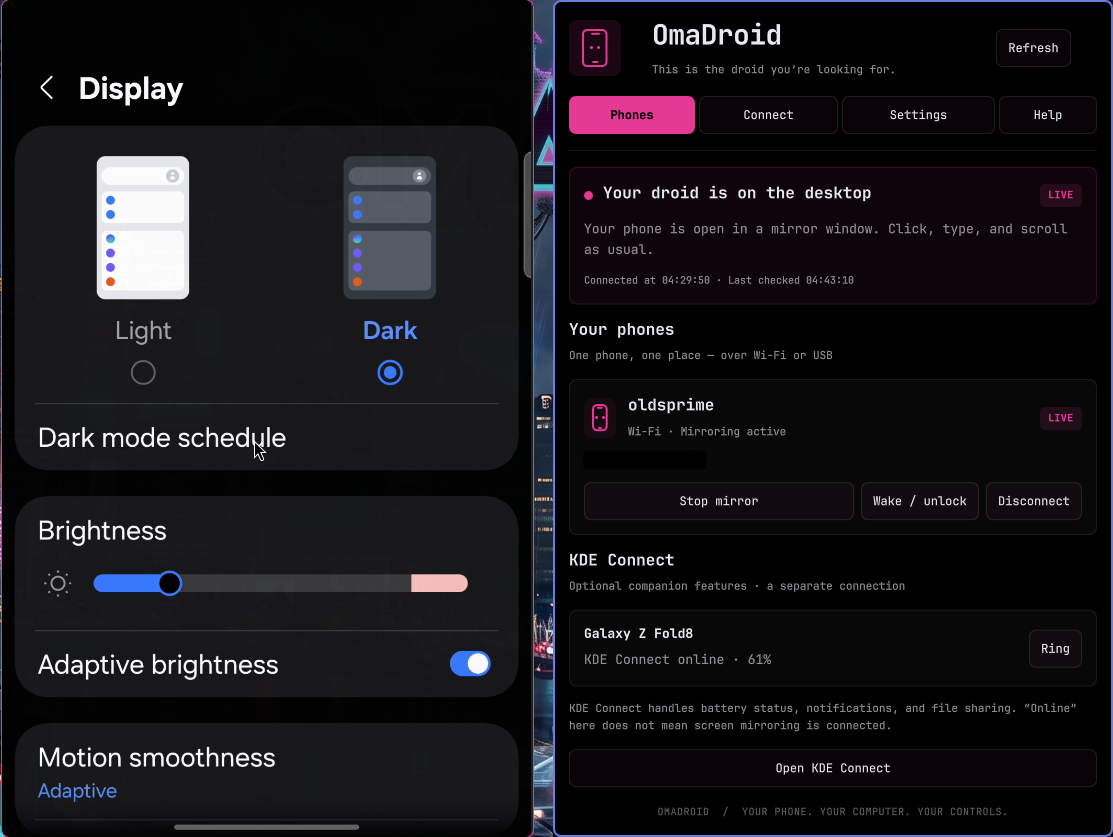
Install
omarchy plugin add https://github.com/onelegdave/omadroid --enableThat command obtains current upstream HEAD. For this exact release, download the attached archive and checksum, verify with sha256sum -c omadroid-v0.3.2.sha256, extract it, and run /usr/bin/python3 -E -s install.py from the extracted folder, followed by omarchy restart shell.
Open the phone icon and follow Connect. Android debugging authorization is required; KDE Connect alone cannot provide mirroring. See the README for dependencies, setup, and removal.
Validation
85 Python tests passed during release preparation. Final QML lint, Omarchy plugin validation, and network-policy tests passed. The real mirror and screenshots were visually checked; the phone address is redacted in the preview. Device testing is currently limited to the development Samsung foldable; protected screens and vendor restrictions still apply.
Version: 0.3.2. Commit: b3a1881709d056a842fdc432f0f7cbaab2e50a44. Internal plugin ID: onelegdave.phone-mirror (preserved for existing settings).