Home
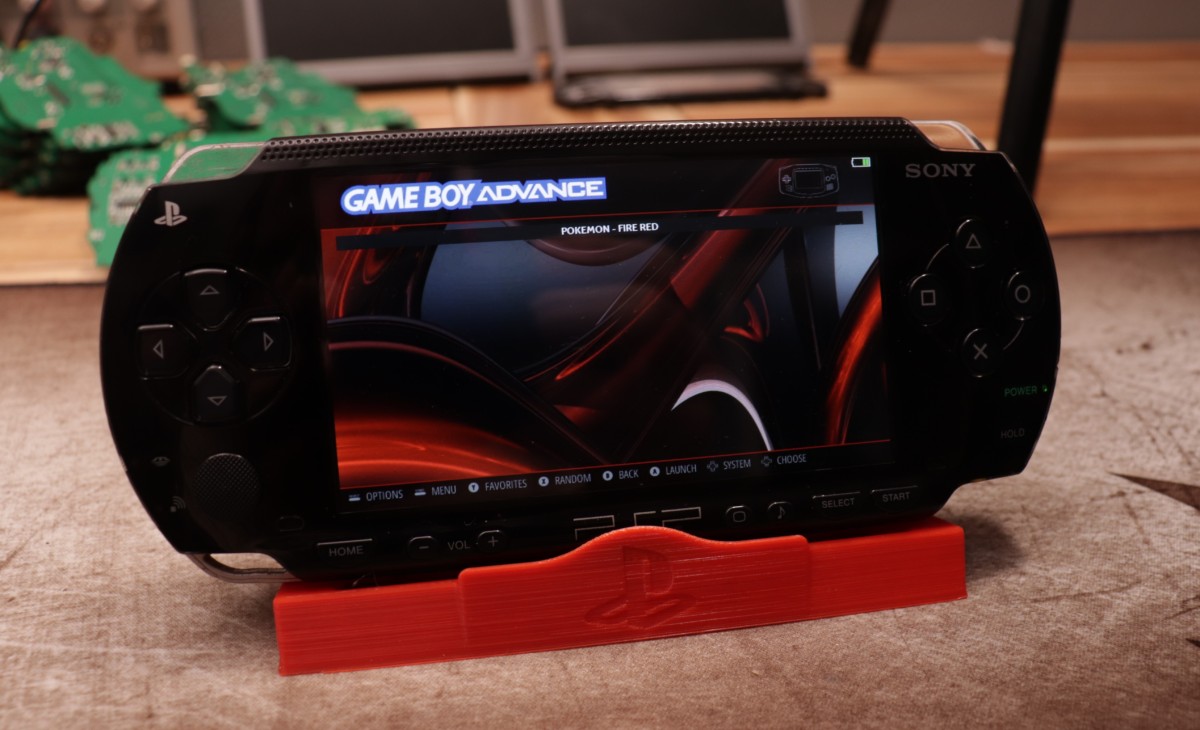
Welcome to the PSPi 6 GitHub repository! This project is a combination of hardware and software development aiming to retrofit a PSP with almost every type of Raspberry Pi.
Get up and running using the PSPi 6 Getting Started page.
The board fits into only the original PSP 1000 model.
The board is electrically compatible with all 40-pin Raspberry Pi boards, but only the Raspberry Pi Zero, Zero 2W, and CM4 fit into the PSP shell with no case modification.
The Compute Module 4 only works when using the CM4 Carrier.
Works with many operating systems, including RetroPie, Lakka, Ubuntu, Raspberry Pi OS, Batocera, and Kali.
- LCD Compatibility: This is designed for a high resolution 800x480 LCD, but works with many 40-pin LCDs.
-
Color Depth: Supports 21-bit and 24-bit DPI for different Raspberry Pi models.
- 21-bit DPI 777 when using 40-pin Raspberry Pi boards.
- 24-bit DPI 888 when using the Raspberry Pi CM4.
- Brightness Control: 8 levels of adjustment available via display button.
-
On Screen Display: Gives feedback when some conditions change.
- Brightness: Provides real-time feedback when adjusting brightness levels.
- Battery Status and Charge Levels: Displays real-time battery status and charge levels.
- Volume and Mute Controls: Immediate feedback displayed when adjusting volume or muting audio.
- WiFi Status: Displays information regarding WiFi connection.
- Power On/Off: Graceful startup and shutdown with a momentary push switch. More details in the Input section.
-
Charging and Battery Management: Efficient charging with real-time battery status.
- Supports 3.7v batteries with a JST PH 2.0mm connector.
- Charge using the miniUSB or barrel jack (at up to 1.35 amps).
- The board works when no battery is installed, using only external power.
- Efficient charging using a switching regulator with minimal heat generation.
- Auto shutdown when the battery is depleted.
- Auto forced power-off when the battery voltage drops below 3.08v.
- Power Supply and USB: Supports external USB power input and provides output power to external USB devices. The miniUSB port does not provides power to external devices unless the PSPi is powered on, with one exception. If the barrel jack is plugged in, the power from the barrel jack will pass through directly to the miniUSB port. This is useful when a USB device needs extra power.
- Audio Quality: PWM audio signal processed through a low-noise buffer and filters for enhanced quality.
- Headphone Integration: Automatic speaker muting upon headphone connection.
- Volume and Mute Controls: Adjustable via buttons, with immediate feedback displayed on the OSD.
-
Switches and Buttons: Various controls for power modes, display brightness, and volume.
-
Power Switch: Has multiple functions.
- Power On: Sliding upward momentarily powers the PSPi on.
- Power Off: When on, another momentary press will shut the OS down and power the PSPi off.
- Forced Power Off: Holding it upward for 3-5 seconds will force the PSPi to power off.
- Sleep: Placing it into the Hold position will activate a locked sleep mode, disabling audio, input, and the LCD. More details below.
-
Left Switch: Used to cycle between high power and power efficiency modes (programmable).
- Power Save Mode: Engaged by putting the left switch in the down position. More details in the Efficiency section.
-
Display Button:
- Pressing the Display button will cycle the backlight through 8 brightness levels.
- Holding the Display button for 2 seconds will set the current brightness level as the default brightness at bootup.
-
Mute Button:
- A press will mute the speakers and headphones, and disable the audio electronics
- Another press will re-enable and unmute the audio
-
Volume Buttons:
- Press or hold Vol - or + to adjust the volume.
-
Power Switch: Has multiple functions.
-
LED Indicators: Indicate SD/eMMC activity, WiFi status, and power status.
- SD and eMMC activity indicator is above the left switch.
- WiFi connection status indicator is below the left switch (programmable).
- Power status is indicated by the right LED. Normal status is a green LED, which turns orange for charging or low battery.
- RTC (Real-Time Clock): Maintains time and date when powered off.
- Microcontroller: Atmega8a manages essential functions to reduce Raspberry Pi load.
-
Solder Pads: Additional inputs for expanded functionality.
- Additional Inputs: The board includes pads for 2 additional analog axes (a single joystick) and two additional buttons.
- I2C: The board includes pads for SDA and SCL, enabling the use of additional I2C devices.
- Touch: Includes the connections necessary to use a touch panel. More details will come at a later time if I can get this working.
-
Power Save Mode: Reduces power consumption and indicates status via the battery outline color.
- The left switch puts the Raspberry Pi into a lower power mode using the governor.
- This will also disable WiFi, depending on whether it's configured to do that.
- Power save mode is disabled when the PSPi is plugged in and charging.
-
Sleep Mode: Reduces power consumption while in "standby". The Raspberry Pi doesn't have a sleep mode, but this is the next best thing.
- The ATmega microcontroller will turn off the screen and cut power to the audio circuits, giving a reduction in power consumption.
- The controls are locked to prevent any accidental inputs during sleep.
- The Raspberry Pi detects that the device is entering sleep mode, pauses the drivers, and switches the CPU governor to powersave mode. If RetroArch is running, it will also be paused to save resources.
- This will also disable WiFi, if it's configured to do that.
- Mute: Reduces power usage by disabling audio circuits.
- Component Selection: The design is optimized for minimal power consumption, using as many of the Raspberry Pi's integrated features as possible.
- Code Efficiency: All functionalities are programmed in C for optimal performance.
Solve issues with the Troubleshooting guide.
To get started with PSPi 6, you'll need various items categorized into Genuine PSP 1000 Series Parts, PSPi 6 Components, and Optional Parts. For a detailed list, refer to the Getting Started page.
- Code for Raspberry Pi: Essential code for integrating the Raspberry Pi and Atmega.
- Firmware for Atmega: Firmware for the Atmega8a microcontroller within the PSPi.
- PCB and Schematics: Design files and schematics, also available on EasyEDA.
You can order the boards directly from the manufacturer; however, the project is ongoing and subject to changes. Boards will also be available on my website upon completion.
PSPi 6 is actively in development. The core features are functional, and I'm working on adding some additional ones.
This project is a one-man-show, but any help or input is welcome and appreciated. Whether you are a designer, coder, tester, or just someone with ideas to share, your contributions are highly valued. You can also contribute by spreading the word and sharing the project with others, or by supporting monetarily.
- Discord: Join for the latest discussions and updates.
- YouTube: Subscribe for video updates and demonstrations.
- Feel free to reach out if you have any thoughts, suggestions, or ideas.
The hardware of PSPi 6 is open-sourced under Creative Commons (CC BY-SA). You are allowed to share and adapt the material for any purpose, as long as you adhere to the CC BY-SA requirements.