    ____  __  _____    _   ____________  __  ___
   / __ \/ / / /   |  / | / /_  __/ __ \/  |/  /
  / /_/ / /_/ / /| | /  |/ / / / / / / / /|_/ /
 / ____/ __  / ___ |/ /|  / / / / /_/ / /  / /
/_/   /_/ /_/_/  |_/_/ |_/ /_/  \____/_/  /_/

   _____ ___________   _____    __
  / ___//  _/ ____/ | / /   |  / /
  \__ \ / // / __/  |/ / /| | / /
 ___/ // // /_/ / /|  / ___ |/ /___
/____/___/\____/_/ |_/_/  |_/_____/

         >> OPEN-SOURCE OSINT INTELLIGENCE FRAMEWORK <<
                 "See everything. Leave no trace."








phantomsignal scan <target> now renders module-specific intelligence panels instead of a raw table — DNS records, subdomains, SPF/DMARC/DNSSEC status, an aligned port table with version/banner/risk, tech stack with security header grade A–F, exposed API resources, GeoIP/ASN intel, and a red anomaly callout. All panel right-borders are pinned to terminal width.
The port scanner now chains nmap (-sV --version-intensity 7 -O --osscan-guess) for full service-version detection and OS fingerprinting, with a transparent pure-Python async TCP fallback when nmap is absent or running without raw-socket privileges (macOS / Windows). The scan engine used and OS guess are shown inline in the port panel footer.
COMMON_PORTS expanded from 56 → 99 ports covering low privileged services and high-numbered application ports — WinRM (5985/5986), Webmin (10000), InfluxDB (8086), Radmin (4899), and more. DANGEROUS_PORTS extended accordingly.
The scan results page now renders each result type as structured output — port cards, DNS record tables, SPF/DMARC status, security header grade, TLS issuer/expiry, API endpoint status codes, IP geolocation with TOR/VPN flags — matching the CLI display. Quick Probe now runs all 5 default modules (dns_recon, port_scan, tech_detect, api_hunt, intel).
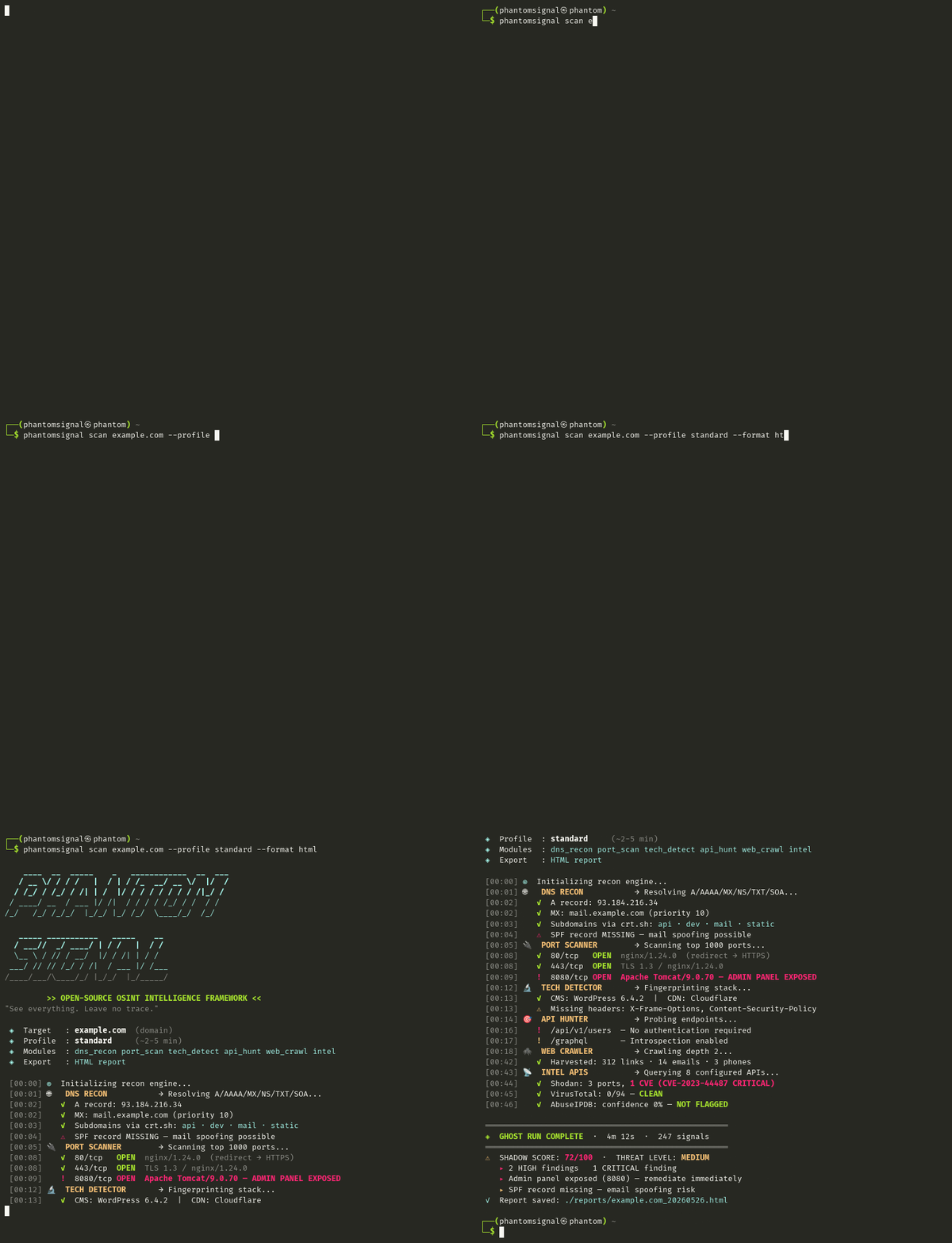
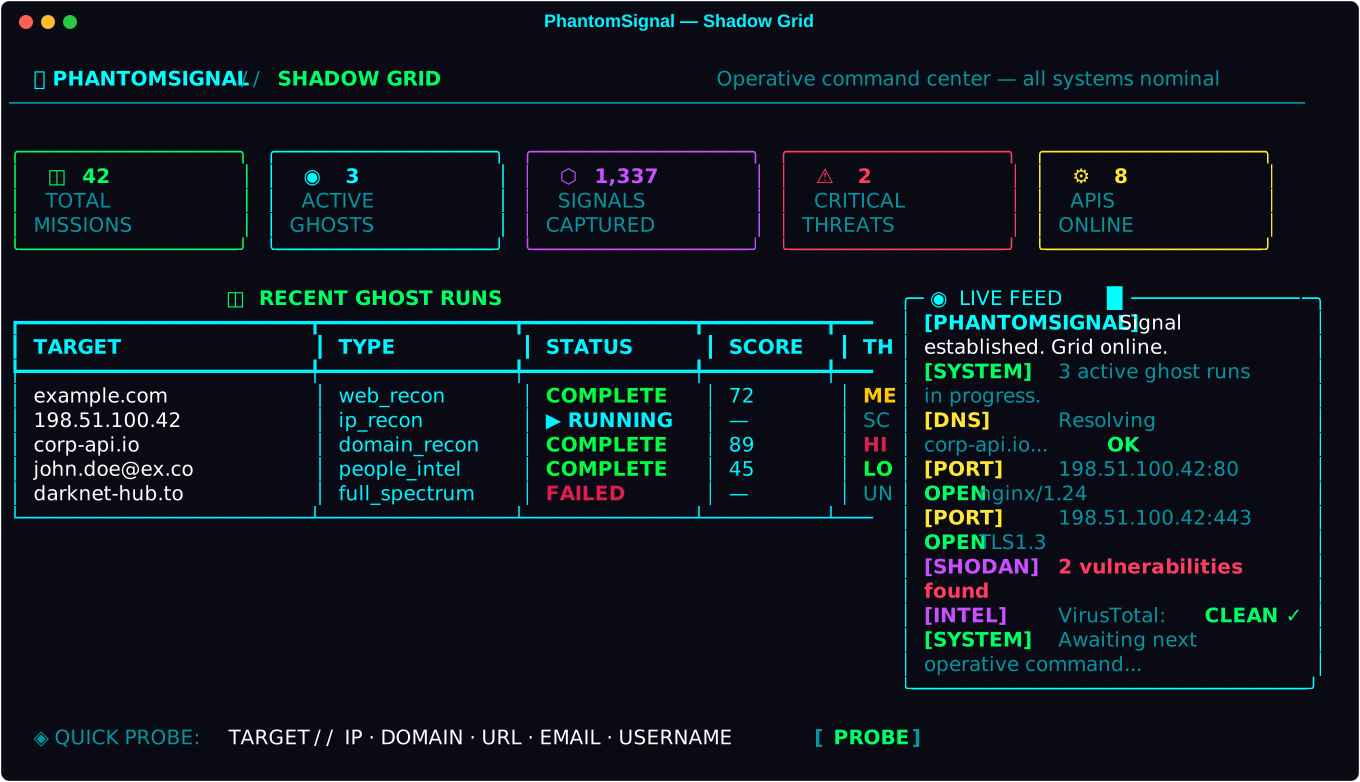
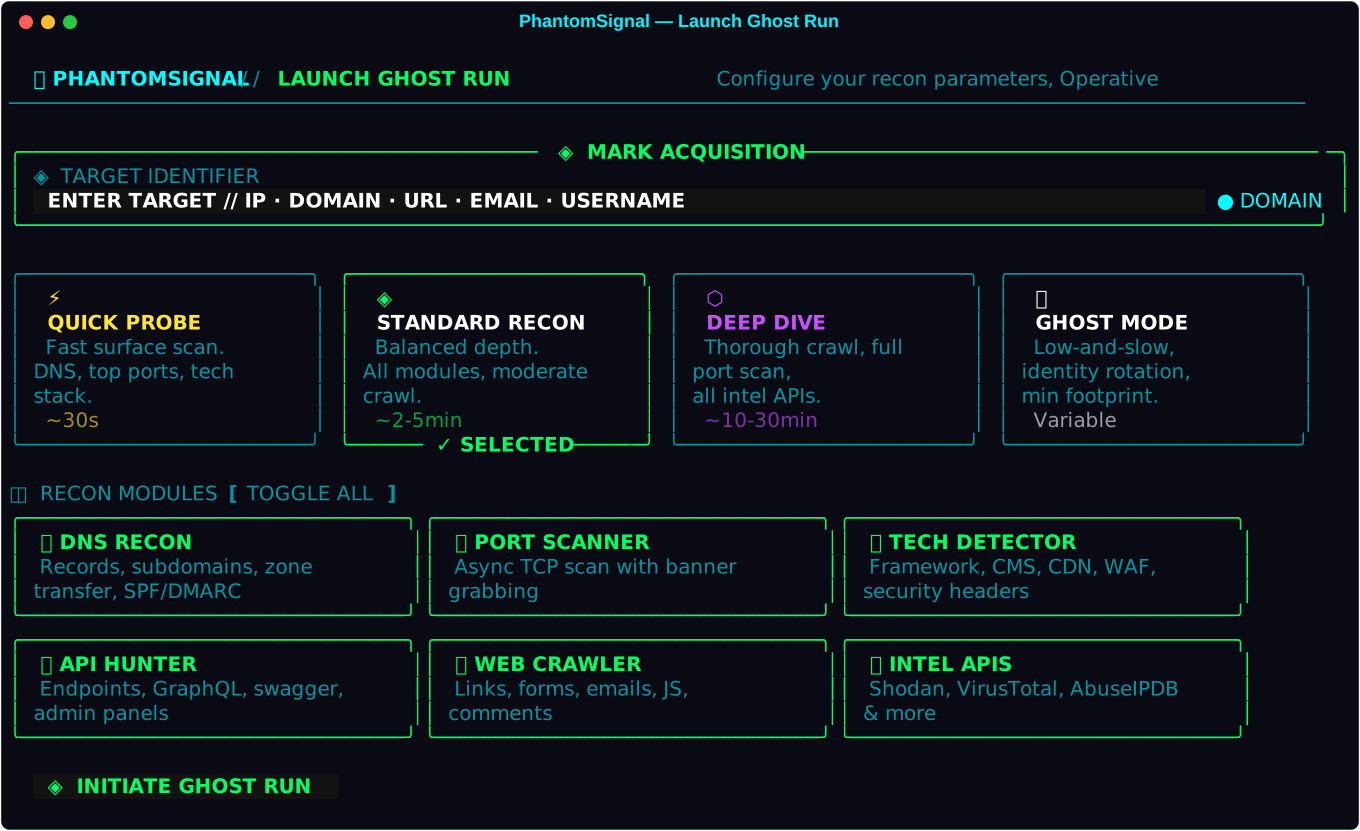
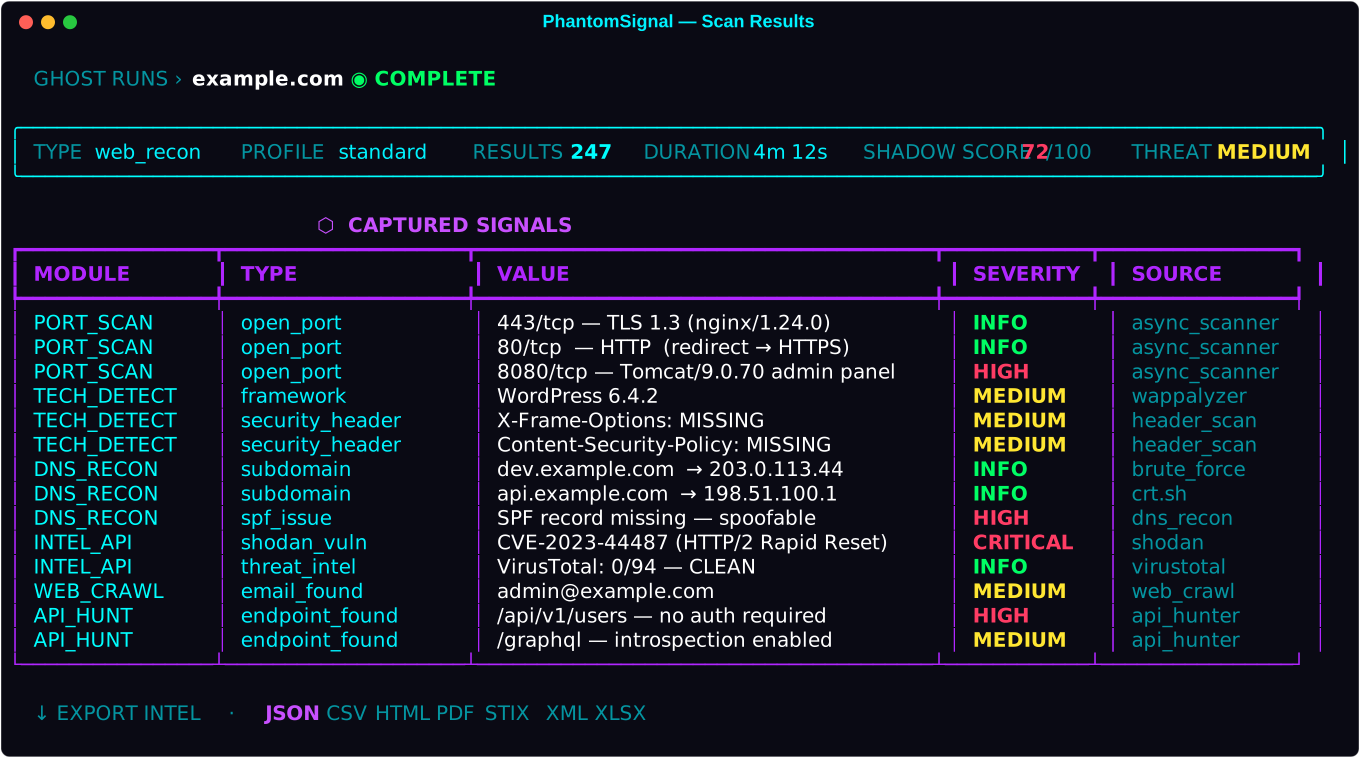
PhantomSignal ships with two built-in UI themes, selectable via the ☀/🌙 toggle in the top navigation bar. Your preference is saved automatically and persists across sessions.
| Theme | Description |
|---|---|
| Dark (default) | Cyberpunk aesthetic — deep charcoal background, neon green/cyan/purple accents, matrix rain canvas, glowing owl logo |
| Light | "Phantom Dawn" — soft blue-grey background, muted accent palette, clean black ASCII logo, matrix rain disabled |
Asciinema recording: Watch the full interactive demo on asciinema.org, or play it locally:
pip install asciinema
asciinema play https://raw.githubusercontent.com/getphantomsignal/phantomsignal/main/docs/assets/demo.cast

PhantomSignal is a community-powered, open-source OSINT intelligence framework built for security researchers, penetration testers, investigators, and enthusiasts. It combines web scraping, network reconnaissance, people intelligence aggregation, and threat analysis into a single cohesive platform.
LEGAL DISCLAIMER: PhantomSignal is for authorized security research, OSINT investigations, and educational purposes only. Only scan targets you have explicit permission to test. You are solely responsible for compliance with all applicable laws. The developers assume NO liability for misuse.
- Scrapy-powered deep web crawler with JavaScript rendering support
- Technology detection — fingerprints 50+ technologies (CMS, frameworks, CDNs, WAFs)
- API endpoint hunter — discovers REST APIs, GraphQL, Swagger docs, admin panels,
.envleaks - Security header analysis with graded posture scoring
- Email, phone, link, and comment harvesting
- nmap-powered port scanner — full service-version detection and OS fingerprinting via nmap (
-sV -O); pure-Python async TCP fallback when nmap unavailable — no config required - Expanded port coverage — 99 common ports by default, 1,000+ port profile, or full 65,535; covers WinRM, Webmin, InfluxDB, Docker API, Kubernetes, and more
- DNS recon — A/AAAA/MX/NS/TXT/SOA/CAA, zone transfer attempts, subdomain brute-force
- Certificate transparency via crt.sh — uncover subdomains via SSL history
- SPF/DMARC analysis — identify email spoofing vulnerabilities
- Reverse DNS and co-hosted domain discovery
| Category | APIs |
|---|---|
| Network Scanning | Shodan, Censys, ZoomEye, BinaryEdge |
| Threat Intelligence | VirusTotal, AbuseIPDB, GreyNoise, AlienVault OTX |
| Hunter.io, HaveIBeenPwned, HaveIBeenPwned | |
| Domain/Web | SecurityTrails, URLScan.io, WhoisXML, Local WHOIS |
| Geolocation | IPInfo.io |
| People Search | Pipl, FullContact, WhitePages, Spokeo, Clearbit |
| Social | GitHub, Twitter/X |
| Custom | Bring your own API via plugin architecture |
LexisNexis-style identity aggregation from public records:
- Cross-correlates data from multiple people-search APIs
- Discovers emails, phones, addresses, relatives, employers
- Breach data correlation via HIBP and other sources
- Social media profile linking
- Shadow Score — digital exposure quantification (0-100)
- Social graph building and timeline reconstruction
| Format | Description |
|---|---|
| JSON | Raw machine-readable data |
| CSV | Spreadsheet-compatible |
| HTML | Self-contained cyberpunk-styled report |
| Professional dossier via ReportLab | |
| XML | Structured data |
| XLSX | Excel workbook |
| STIX 2.1 | Threat intelligence sharing format |
| Markdown | Human-readable report |
All formats support ZIP compression and AES-256-GCM encryption.
- Low-and-slow scanning profiles to minimize detection
- Identity rotation via user-agent spoofing
- Tor proxy integration (Docker compose profile:
ghost) - Configurable request jitter and delays
- Real-time live feed — WebSocket-powered terminal during scans
- Shadow Score — composite risk/exposure scoring
- Scheduled Phantoms — recurring automated ghost runs
- API health monitor — dashboard showing configured APIs and rate limits
- Light/Dark theme — toggle between cyberpunk Dark mode and "Phantom Dawn" Light mode via the ☀/🌙 button; preference persisted in localStorage
- Full REST API — integrate PhantomSignal into your own toolchain
- CLI interface —
phantomsignal scan,phantomsignal profile,phantomsignal export - Docker — single-command deployment
git clone https://github.com/getphantomsignal/phantomsignal
cd phantomsignal
docker-compose up -d
# Open http://localhost:5000# Python 3.10+ required
git clone https://github.com/getphantomsignal/phantomsignal
cd phantomsignal
pip install -e .
phantomsignal init
phantomsignal web --open-browser# Quick probe
phantomsignal scan example.com --profile quick
# Full spectrum with export
phantomsignal scan 192.168.1.1 --type ip_recon --format html --output ./reports
# People intelligence
phantomsignal profile --email target@company.com --first-name John --last-name Doeexport SHODAN_API_KEY="your-shodan-key"
export VIRUSTOTAL_API_KEY="your-vt-key"
export HUNTER_API_KEY="your-hunter-key"
export HIBP_API_KEY="your-hibp-key"
export GREYNOISE_API_KEY="your-greynoise-key"
export IPINFO_TOKEN="your-ipinfo-token"
export ABUSEIPDB_API_KEY="your-abuseipdb-key"
export ALIENVAULT_API_KEY="your-otx-key"
export GITHUB_TOKEN="your-github-token"
export SECURITYTRAILS_API_KEY="your-st-key"
# See config/phantomsignal.yaml for full listCopy config/phantomsignal.yaml to ~/.phantomsignal/config.yaml and customize.
PhantomSignal uses a plugin architecture. Adding a new intelligence source takes ~20 lines:
# phantomsignal/intel/apis/my_api.py
from phantomsignal.intel.apis.base import BaseIntelAPI, register_api, APICategory, APITier

@register_api
class MyAPI(BaseIntelAPI):
    NAME = "myapi"
    DESCRIPTION = "My custom intelligence source"
    REQUIRES_KEY = True
    TIER = APITier.FREE_LIMITED
    CATEGORIES = [APICategory.NETWORK]
    BASE_URL = "https://api.myservice.com/v1"
    SIGN_UP_URL = "https://myservice.com/signup"

    async def search(self, query: str, **kwargs):
        data = await self._get(
            f"{self.BASE_URL}/search",
            params={"q": query, "key": self._api_key}
        )
        return [self._wrap_result("my_result", data)]
Then import it in phantomsignal/intel/orchestrator.py and it auto-registers.
phantomsignal/
├── core/               — Engine, config, database, models
├── scrapers/           — Scrapy crawler, tech detector, port scanner, API hunter, DNS recon
├── intel/
│   ├── apis/           — 30+ API integrations (plugin architecture)
│   └── people/         — People intelligence aggregation
├── exporters/          — JSON/CSV/PDF/HTML/XML/XLSX/STIX + crypto wrapper
└── web/
    ├── routes/         — Flask blueprints (dashboard, scans, intel, settings, export, REST API)
    ├── templates/      — Cyberpunk Jinja2 templates
    └── static/         — CSS (cyberpunk), JS (matrix, terminal, app)
# Create a scan
curl -X POST http://localhost:5000/api/v1/scans \
  -H "Content-Type: application/json" \
  -d '{"target": "example.com", "scan_type": "web_recon"}'

# Get results
curl http://localhost:5000/api/v1/scans/{scan_id}

# List all APIs
curl http://localhost:5000/api/v1/apis

# Health check
curl http://localhost:5000/api/v1/healthPhantomSignal thrives on community contributions. Ways to help:
- Add API integrations — Follow the plugin pattern above
- Improve detection signatures — Expand
tech_detector.py - Bug reports — GitHub Issues
- Documentation — Improve the wiki
- Translations — Internationalize the UI
See CONTRIBUTING.md for guidelines. Please also review our Code of Conduct and Security Policy.
- Usage Guide — full walkthroughs, usage scenarios, CLI reference, and per-platform troubleshooting (Linux / macOS / Windows / Docker)
PhantomSignal is free, open-source, and built on personal time. If it's useful to you, consider sponsoring to help cover infrastructure costs, domain renewals, trademark filing, and ongoing development.
→ Sponsor PhantomSignal on GitHub
| Tier | $/mo | What it covers |
|---|---|---|
| Ghost Operative | $5 | Domain renewals & infrastructure |
| Shadow Agent | $15 | API integrations & dependency updates |
| Signal Sponsor | $50 | Trademark filing, new modules — listed in README |
| Grid Patron | $200 | Development sprints, roadmap input — prominent listing |
Signal Sponsors ($50+) and Grid Patrons ($200+) are listed below.
PhantomSignal is a dual-use tool. Operators are responsible for:
- Obtaining explicit authorization before scanning any system
- Complying with applicable laws (CFAA, GDPR, CCPA, ECPA, local laws)
- Respecting privacy and data protection regulations
- Not using this tool for harassment, stalking, or unauthorized surveillance
The developers provide this software as-is with no warranty. Misuse is your responsibility.














| Document | Description |
|---|---|
| Code of Conduct | Community standards and expectations |
| Contributing Guidelines | How to contribute to PhantomSignal |
| Security Policy | Reporting vulnerabilities responsibly |
| License | MIT License terms |
MIT License — see LICENSE
Built with questionable amounts of caffeine. "See everything. Leave no trace." Some ghosts leave no trace. This one left commits. — Claude