Repository navigation
Installation
EasyPDM for FreeCAD comes from its own repository through FreeCAD's Addon Manager.
Edit → Preferences → Addon Manager, under Custom repositories:
- click + to add a row,
- paste
https://github.com/pawelcel/EasyPDM-FreeCADas the repository URL andmainas the branch, - OK.

Tools → Addon Manager, find EasyPDM, Install, then restart FreeCAD. Updates arrive the same way: the Addon Manager offers them when the repository has a newer version. After an update, restart FreeCAD — until then the previous version keeps running.
Without the Addon Manager: unpack the zip from the
latest release into the Mod folder of
FreeCAD's user data — for FreeCAD 1.1 %APPDATA%\FreeCAD\v1-1\Mod on Windows,
~/.local/share/FreeCAD/v1-1/Mod on Linux, ~/Library/Application Support/FreeCAD/v1-1/Mod on
macOS — and restart FreeCAD.
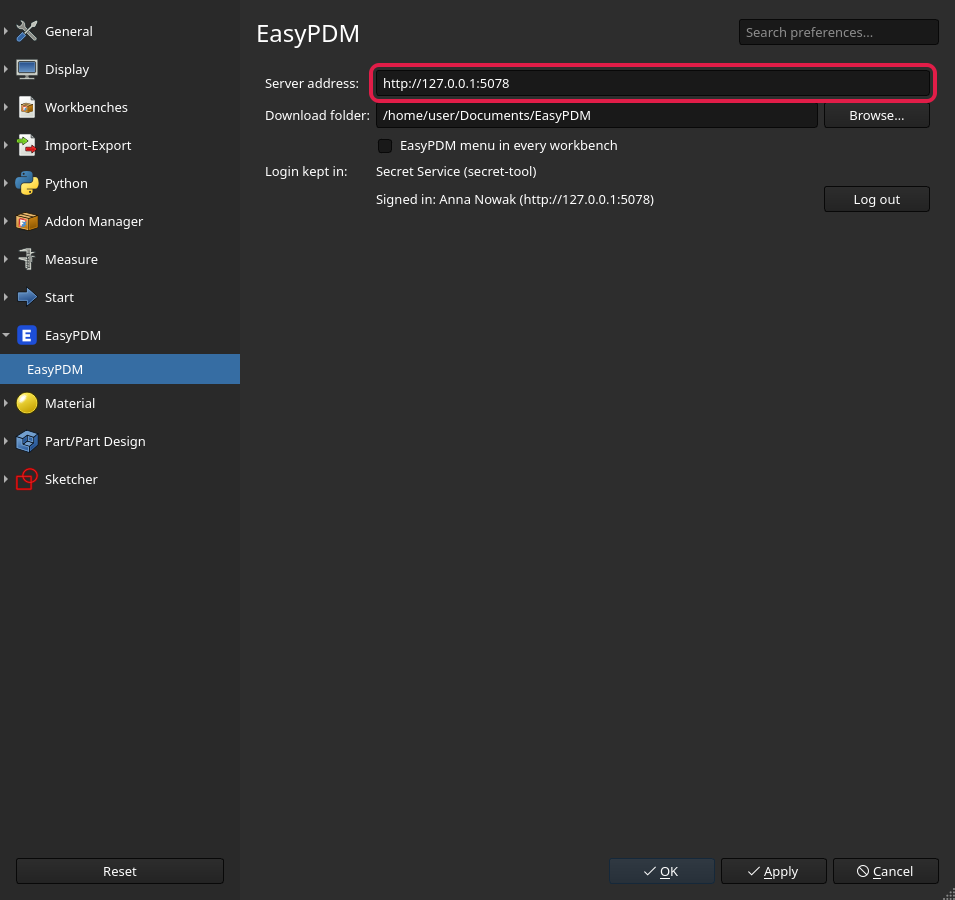
Pick EasyPDM in the workbench list. Then Edit → Preferences → EasyPDM:
-
Server address — your EasyPDM server, e.g.
http://192.168.1.10:5000. - Download folder — where downloads go and where uploaded documents are saved under their EasyPDM name. Leave it empty and FreeCAD asks once, the first time it needs it.
- EasyPDM menu in every workbench — the EasyPDM menu also in Part Design, Assembly and the rest, not only in the EasyPDM workbench. Off by default.
-
Login kept in — where your login is stored (Windows: the user's protected storage;
macOS: the keychain; Linux: KWallet / GNOME Keyring through
secret-tool), and Log out.
Next: Signing in.