Repository navigation
Signing in
EasyPDM → Log in… (or the last toolbar button). FreeCAD never sees your password: you approve the sign-in in the browser where you are already logged in to EasyPDM.
-
Check the server address and click Log in in the browser.
-
FreeCAD shows a code and EasyPDM opens in your browser:

-
Check that the browser shows the same code and click Allow:
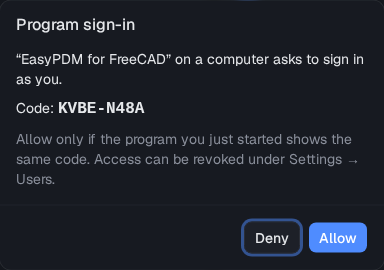
FreeCAD then stays signed in, also after a restart, until you log out. The login is a token of its own, listed under Settings → Users in EasyPDM, where it can be revoked; it is kept in your system's secret storage, not in FreeCAD's settings file.
The same button then reads Log out. The top line of the EasyPDM menu shows who is signed in, and to which server.
Log in with password… is there for servers older than EasyPDM 0.9, which cannot approve a sign-in in the browser.
If you run Upload or Download while signed out, or after your login was revoked, they start this sign-in first.