Repository navigation
Upload and Download
EasyPDM → Upload (first toolbar button, or the Upload button in the document panel) sends the active document to EasyPDM:
- FreeCAD saves the document (a new one asks where first).
- It checks that the document and its components are not older than their files in EasyPDM — see below.
- A document that is not an EasyPDM item yet opens a form in your browser: a new item, or attach to an existing one. An item it already belongs to is uploaded straight away, as its next version (a released item asks whether to start a new revision).
- The document is saved under its EasyPDM name in your download folder and uploaded, with a preview and, when chosen, a STEP and a drawing's PDF; mass and material go into the item; the EasyPDM drawing sheet is filled in.
For an assembly, new components are created the same way first, one browser form after another, and the assembly's BOM is set from its links. The progress shows in the EasyPDM tab in the browser.
If the document or one of its components is older than its file in EasyPDM — someone uploaded a newer one while you worked — Upload sends nothing and says which:
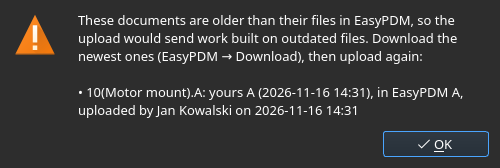
Download the newest files (below), check your assembly with them, then upload again. This keeps an assembly built on outdated parts out of EasyPDM, and keeps your upload from overwriting someone else's newer file. The document panel shows the same before you even try.
EasyPDM → Download (second toolbar button): EasyPDM opens in the browser, you pick the part or assembly there, and FreeCAD downloads its current revision — for an assembly with all its components — into your download folder and opens it. A file already there at the same revision is not downloaded again; when the folder holds an older revision of an item, it asks before downloading the newer one. A summary at the end says what was downloaded and what was skipped.
The EasyPDM A3, A2 and A1 sheets come with the add-on: freecad/EasyPDM/templates/ in its
folder inside FreeCAD's Mod folder (also
in the repository).
Start a drawing with TechDraw → Insert page using template and one of them; Upload fills its
title block in, and Refresh drawing sheet does it without uploading. A document with an
ordinary TechDraw page is offered the EasyPDM sheet on upload. What the title block shows, and
the SolidWorks sheets: Drawing sheets
on the EasyPDM wiki.