hands on3
In R matrices are two-dimensional collections of elements all of which have the same mode or type. This is different than a data frame in which the columns of the frame can hold elements of different type (but all of the same length), or from a list which can hold objects of arbitrary type and length. Matrices are more efficient for carrying out most numerical operations, so if you’re working with a very large data set that is amenable to representation by a matrix you should consider using this data structure.
There are a number of different ways to create matrices in R. For
creating small matrices at the command line you can use the matrix()
function.
> X <- matrix(1:5)
> X
      [,1]
 [1,]    1
 [2,]    2
 [3,]    3
 [4,]    4
 [5,]    5
> X <- matrix(1:12, nrow=4)
> X
     [,1] [,2] [,3]
[1,]    1    5    9
[2,]    2    6   10
[3,]    3    7   11
[4,]    4    8   12
> dim(X) # give the shape of the matrix
[1] 4 3
matrix() takes a data vector as input and the shape of the matrix to
be created is specified by using the nrow and ncol arguments (if the
number of elements in the input data vector is less than nrow (\times)
ncols the elements will be ’recycled’ as discussed in previous
lectures). Without any shape arguments the matrix() function will
create a column vector as shown above. By default the matrix()
function fills in the matrix in a column-wise fashion. To fill in the
matrix in a row-wise fashion use the argument byrow=T.
If you have a pre-existing data set in a list or data frame you can use
the as.matrix() function to convert it to a matrix.
> turtles <- read.table('turtles.txt', header=T)
> tmtx <- as.matrix(turtles)
> tmtx   # note how the elements were all converted to character
   sex length width height
1  "f" " 98"  " 81" "38"
2  "f" "103"  " 84" "38"
3  "f" "103"  " 86" "42"
4  "f" "105"  " 86" "40"
 ... output truncated ...
> tsub <- subset(turtles, select=-sex)
> tmtx <- as.matrix(tsub)
> tmtx    # this is probably more along the lines of what you want
   length width height
1      98    81     38
2     103    84     38
3     103    86     42
4     105    86     40
 ... output truncated ...
You can use the various indexing operations to get particular rows, columns, or elements. Here are some examples:
> X
     [,1] [,2] [,3]
[1,]    1    5    9
[2,]    2    6   10
[3,]    3    7   11
[4,]    4    8   12
> X[1,] # get the first row
[1] 1 5 9
> X[,1] # get the first column
[1] 1 2 3 4
> X[1:2,] # get the first two rows
     [,1] [,2] [,3]
[1,]    1    5    9
[2,]    2    6   10
> X[,2:3] # get the second and third columns
     [,1] [,2]
[1,]    5    9
[2,]    6   10
[3,]    7   11
[4,]    8   12
> Y <- matrix(1:12, byrow=T, nrow=4)
> Y
     [,1] [,2] [,3]
[1,]    1    2    3
[2,]    4    5    6
[3,]    7    8    9
[4,]   10   11   12
> Y[4] # see explanation below
[1] 10
> Y[5]
[1] 2
> dim(Y) <- c(2,6)
> Y
     [,1] [,2] [,3] [,4] [,5] [,6]
[1,]    1    7    2    8    3    9
[2,]    4   10    5   11    6   12
> Y[5]
[1] 2
The example above where we create a matrix Y is meant to show that
matrices are stored internally in a column wise fashion (think of the
columns stacked one atop the other), regardless of whether we use the
byrow=T argument. Therefore using single indices returns the elements
with respect to this arrangement. Note also the use of assignment
operator in conjuction with the dim() function to reshape the matrix.
Despite the reshaping, the internal representation in memory hasn’t
changed so Y[5] still gives the same element.
You can use the diag() function to get the diagonal of a matrix or to
create a diagonal matrix as show below:
> Z <- matrix(rnorm(16), ncol=4)
> Z
           [,1]       [,2]         [,3]        [,4]
[1,] -1.7666373  2.1353032 -0.903786375 -0.70527447
[2,] -0.9129580  1.1873620  0.002903752  0.51174408
[3,] -1.5694273 -0.5670293 -0.883259848  0.05694691
[4,]  0.9903785 -1.6138958  0.408543336  2.39152400
> diag(Z)
[1] -1.7666373  1.1873620 -0.8832598  2.3915240
> diag(5) # create the 5 x 5 identity matrix
     [,1] [,2] [,3] [,4] [,5]
[1,]    1    0    0    0    0
[2,]    0    1    0    0    0
[3,]    0    0    1    0    0
[4,]    0    0    0    1    0
[5,]    0    0    0    0    1
> s <- sqrt(10:13)
> diag(s)
         [,1]     [,2]     [,3]     [,4]
[1,] 3.162278 0.000000 0.000000 0.000000
[2,] 0.000000 3.316625 0.000000 0.000000
[3,] 0.000000 0.000000 3.464102 0.000000
[4,] 0.000000 0.000000 0.000000 3.605551
The standard mathematical operations of addition and subtraction and
scalar multiplication work element-wise for matrices in the same way as
they did for vectors. Matrix multiplication uses the operator %*%
which you saw last week for the dot product. To get the tranpose of a
matrix use the function t(). The solve() function can be used to get
the inverse of a matrix (assuming it’s non-singular) or to solve a set
of linear equations.
> A <- matrix(1:12, nrow=4)
> B <- matrix(rnorm(12), nrow=4)
> A
     [,1] [,2] [,3]
[1,]    1    5    9
[2,]    2    6   10
[3,]    3    7   11
[4,]    4    8   12
> B
           [,1]        [,2]        [,3]
[1,] -2.9143953  0.38204730 -1.33207235
[2,]  0.1778266 -0.44563686  0.76143612
[3,]  1.7226235  0.03320553 -0.06652767
[4,]  0.5291281 -0.13145408  0.14108766
> A + B
          [,1]     [,2]      [,3]
[1,] -1.914395 5.382047  7.667928
[2,]  2.177827 5.554363 10.761436
[3,]  4.722623 7.033206 10.933472
[4,]  4.529128 7.868546 12.141088
> A - B
         [,1]     [,2]      [,3]
[1,] 3.914395 4.617953 10.332072
[2,] 1.822173 6.445637  9.238564
[3,] 1.277377 6.966794 11.066528
[4,] 3.470872 8.131454 11.858912
> 5 * A
     [,1] [,2] [,3]
[1,]    5   25   45
[2,]   10   30   50
[3,]   15   35   55
[4,]   20   40   60
> A %*% B
Error in A %*% B : non-conformable arguments
> A %*% t(B)
          [,1]     [,2]     [,3]     [,4]
[1,] -12.99281 4.802567 1.289902 1.141647
[2,] -16.85723 5.296193 2.979203 1.680408
[3,] -20.72165 5.789819 4.668505 2.219170
[4,] -24.58607 6.283445 6.357806 2.757932
> C <- matrix(1:16, nrow=4)
> solve(C)
Error in solve.default(C) : Lapack routine dgesv: system is exactly singular
> C <- matrix(rnorm(16), nrow=4)
> C
           [,1]       [,2]       [,3]       [,4]
[1,] -1.6920758 -0.8104245  0.9940420  0.3592050
[2,]  1.5949448 -0.9508142 -0.1960434 -0.5678855
[3,] -1.2443831  0.6400100  0.2645679 -0.8733987
[4,]  0.2129116  0.6719323  0.7494698 -0.3856085
> Cinv <- solve(C)
> C %*% Cinv
             [,1]          [,2]          [,3]          [,4]
[1,] 1.000000e+00 -2.360850e-17  6.193505e-17  4.189425e-18
[2,] 2.710844e-17  1.000000e+00  3.577867e-18 -7.264493e-17
[3,] 4.944640e-17  7.643625e-17  1.000000e+00  5.134714e-17
[4,] 1.978161e-17 -1.187201e-17 -4.022390e-17  1.000000e+00
> all.equal(C %*% Cinv, diag(4)) # test approximately equality
[1] TRUE
We expect that (CC^{-1}) should return the above should return the (4 \times 4) identity matrix. As shown above this is true up to the approximate floating point precision of the machine you’re operating on.
Matrices in Python are created are created using the Numeric.array()
function. In Python you need to be a little more aware of the type of
the arrays that you create. If the argument you pass to the array()
function is composed only of integers than Numeric will assume you want
an integer matrix which has consequences in terms of operations like
those illustrated below. To make sure you’re matrix has floating type
values you can use the argument typecode=Numeric.Float.
>>> import numpy as np # I'm 'aliasing' the name so I can type 'np' instead of 'numpy'
>>> array = np.array # setup another alias
>>> X = array(range(1,13))
>>> X
array([ 1,  2,  3,  4,  5,  6,  7,  8,  9, 10, 11, 12])
>>> X.shape = (4,3) # rows, columns
>>> X
array([[ 1,  2,  3],
       [ 4,  5,  6],
       [ 7,  8,  9],
       [10, 11, 12]])
>>> 1/X # probably not what you expected
array([[1, 0, 0],
       [0, 0, 0],
       [0, 0, 0],
       [0, 0, 0]])
>>> X = array(range(1,13), dtype=np.float)
>>> X.shape = 4,3
>>> X
array([[  1.,   2.,   3.],
       [  4.,   5.,   6.],
       [  7.,   8.,   9.],
       [ 10.,  11.,  12.]])
>>> 1/X # that's more like it
array([[ 1.        ,  0.5       ,  0.33333333],
       [ 0.25      ,  0.2       ,  0.16666667],
       [ 0.14285714,  0.125     ,  0.11111111],
       [ 0.1       ,  0.09090909,  0.08333333]])
>>> X
array([[  1.,   2.,   3.],
       [  4.,   5.,   6.],
       [  7.,   8.,   9.],
       [ 10.,  11.,  12.]])
>>> X + X
array([[  2.,   4.,   6.],
       [  8.,  10.,  12.],
       [ 14.,  16.,  18.],
       [ 20.,  22.,  24.]])
>>> X - X
array([[ 0.,  0.,  0.],
       [ 0.,  0.,  0.],
       [ 0.,  0.,  0.],
       [ 0.,  0.,  0.]])
>>> np.dot(X,np.transpose(X)) # dot fxn in numpy gives matrix multiplication for arrays
array([[  14.,   32.,   50.,   68.],
       [  32.,   77.,  122.,  167.],
       [  50.,  122.,  194.,  266.],
       [  68.,  167.,  266.,  365.]])
>>> np.identity(4)
array([[1, 0, 0, 0],
       [0, 1, 0, 0],
       [0, 0, 1, 0],
       [0, 0, 0, 1]])
>>> np.sqrt(X)
array([[ 1.        ,  1.41421356,  1.73205081],
       [ 2.        ,  2.23606798,  2.44948974],
       [ 2.64575131,  2.82842712,  3.        ],
       [ 3.16227766,  3.31662479,  3.46410162]])
>>> np.cos(X)
array([[ 0.54030231, -0.41614684, -0.9899925 ],
       [-0.65364362,  0.28366219,  0.96017029],
       [ 0.75390225, -0.14550003, -0.91113026],
       [-0.83907153,  0.0044257 ,  0.84385396]])
The code above also demonstrated the Numpy functions dot(),
transpose() and identity(). Note too that Numpy has a variety of
functions such as sqrt() and cos() that work on an element-wise
basis.
Indexing of arrays in Numpy is demonstrated below. You’ll see that Python arrays support ‘slicing’ operations. For more on slicing and other array basics see the Numpy documentation at http://docs.scipy.org/doc/.
>>> X
array([[  1.,   2.,   3.],
       [  4.,   5.,   6.],
       [  7.,   8.,   9.],
       [ 10.,  11.,  12.]])
>>> X[0,0] # get the 0th row, 0th column (remember that Python sequences are zero-indexed!)
1.0
>>> X[3,0] # get the fourth row, 1st column
10.0
>>> X[:2,:2]  # an example of slicing, get the first two columns and rows (i.e. indices 0 and 1)
array([[ 1.,  2.],
       [ 4.,  5.]])
>>> X[1:,:2] # get everything after the 0th row and  the first two columns
array([[  4.,   5.],
       [  7.,   8.],
       [ 10.,  11.]])
To calculate matrix inverses in Python you need to import the
numpy.linalg package.
>>> import numpy.linalg as la
>>> import numpy.random as ra  # for matrices with elements from random distributions
>>> C = ra.normal(loc=0,scale=1,size=(4,4)) # do help(ra.normal) for explanation of argumnets
>>> C
array([[ 0.79525679,  1.11730719, -2.19257712, -0.06289276],
       [ 0.7087366 ,  0.70574975, -1.51599336, -0.90360945],
       [-0.33845153, -0.20109722, -0.75245988, -0.56027025],
       [-0.51692665,  0.59972543,  1.55562234,  1.88639367]])
>>> Cinv = la.inv(C)
>>> print np.array2string(np.dot(C,Cinv),precision=2, suppress_small=True)
[[ 1. -0.  0.  0.]
 [-0.  1.  0.  0.]
 [ 0.  0.  1.  0.]
 [-0. -0. -0.  1.]]
>>>The data set yeast-subnetwork-raw.txt can be found on the class
website. This data set consists of gene expression measurements for 15
genes from 173 two-color microarray experiments (see Gasch et al. 2000,
Mol Biol Cell 11(12):4241-57). The genes included in this example are
members of a gene regulatory network that determines how yeast cells
respond to nitrogen starvation. The values in the data set are
expression ratios (treatment:control) that have been transformed by
applying the (\log_2) function (so that a ratio of 1:1 has the value 0,
a ratio of 2:1 has the value 1, and a ratio of 1:2 has the value 0.5).
Assignment 1: The raw data file
yeast-subnetwork-raw.txthas the genes (variables) arranged by rows and the observations (experiments) in columns. There are also missing values. Using R, show how to read in the data set and then create a matrix where the genes are in columns and the observations in rows. Then replace any missing values (NA) in each column with the variable (gene) means (there are better ways to impute missing values but this will do for now). Extra credit: see if you can encapsulate these steps in a function.
Functions that might come in handy for the assignment above
include: read.delim(), t(), subset(), as.matrix(),
is.na(), and replace(). Note that t() applies to data frames as well as matrices.Also take note of the na.rm argument of mean().
You might consider creating a function that handles the missing value
replacement and using it in conjunction with the apply() function.
colnames() and rownames() allow you to assign/extract column and row
names for a matrix. Use the write.table() function to save your
results (I recommend you use "\t" (i.e. tab) as the sep argument).
Assume you have a data set represented as a (n \times p) matrix (X) with observations in rows and variables in columns. Below I give formulae for calculating some descriptive statistics as matrix functions.
To calculate a row vector of means, (\mathbf{m}): [ \mathbf{m} = \frac{1}{n} \mathbf{1}^T X ] where (\mathbf{1}) is a (n \times 1) vector of ones.
A (n \times p) matrix (M) where each column is filled with the mean value for that column is: [ M = \mathbf{1}\mathbf{m} ]
To re-express each value as the deviation from the variable means (i.e. each columns is a mean centered vector) we calculate a deviation matrix: [ D = X - M ]
The (p \times p) covariance matrix is given by: [ S = \frac{1}{n-1} D^T D ]
The correlation matrix, (R), can be calculated from the covariance matrix by: [ R = V S V ]
where (V) is a (p \times p) diagonal matrix where (V_{ii} = 1/\sqrt{S_{ii}}).
If the covariance matrix, (S) is invertible, than inverse of the covariance matrix, (S^{-1}), is called the ‘concentration matrix’ or ‘precision matrix’. We can relate the concentration matrix to partial correlations as follow. Let [ P = S^{-1} ]
Then: [\mathsf{cor}(x_i,x_j|X\backslash{x_i,x_j}) = -\frac{p_{ij}}{\sqrt{p_{ii} p_{jj}}} ]
where (X \backslash {x_i,x_j}) indicates all variables other than (x_j) and (x_i). You can read this as ‘the correlation between x and y conditional on all other variables.’
Assignment 2: Create an R library that includes functions that use matrix operations to calculate each of the descriptive statistics discussed above (except the concentration matrix / partial correlations). Calculate these statistics for the
yeast-subnetworkdata set and check the results of your functions against the built-in R functions.
Plotting and visualizing multivariate data sets can be challenge and a
variety of representations are possible. We cover some of the basic ones
here. Get the file yeast-subset-clean.txt from the class website (or
use the cleaned up data set you created in the assignment above).
A scatter plot shows the relationship between two variables by plotting the observations in the variable space. A scatter of points that falls approximately along a line indicate that the variables of interested are linearly correlated, while a circular scatter indicates a lack of correlation. Other shapes in the scatter can be indicative of non-linear relationships. Scatter plots can also be useful for highlighting outliers.
A scatter plot matrix is a simply a set of scatter plots, arranged like
a matrix, showing the bivariate relationships for every pair of
variables. The size of this plot is (p^2) where (p) is the number of
variables so you should only use it for relatively small subsets of
variables (maybe up to 7 or 8 variables at a time). The R function
pairs() will create a scatter plot matrix.
> yeast.clean <- read.delim("yeast-subnetwork-clean.txt")
> names(yeast.clean)
 [1] "FLO8" "RAS2" "TEC1" "PHD1" "ACE2" "SWI5" "SOK2" "RME1" "IME1" "GPA2" "MEP2" "IME2" "CLN2"
[14] "ASH1" "MUC1"
> pairs(yeast.clean[1:4]) # create a scatter plot matrix of the first 4 variables
A three-dimensional scatter plot can come in handy. The R library
lattice has a function called cloud() that allows you to make such
plots. There is also a package available on CRAN called scatterplot3d
with similar functionality. I will demonstrate in class how to install
packages.
> library(lattice)
> cloud(ACE2 ~ ASH1 * RAS2, data=yeast.clean)
> cloud(ACE2 ~ ASH1 * RAS2, data=yeast.clean, screen=list(x=-90, y=70)) # same plot from different angle
> attach(yeast.clean) # so we can access the variables directly
> library(scatterplot3d) # assumes package is properly installed
> scatterplot3d(ASH1, RAS2, ACE2)
> scatterplot3d(ASH1, RAS2, ACE2, angle=-30)
See the help file for cloud() and panel.cloud() for information on
setting parameters.
A colored grid (or ‘heatmap’) is another way of representing 3D data. It
most often is used to represent a variable of interest as a function of
two parameters. Grid plots are created using the image() function in
R.
> x <- seq(0, 2*pi, pi/20)
> y <- seq(0, 2*pi, pi/20)
> coolfxn <- function(x,y){
+    cos(x) * cos(y)}
> z <- outer(x,y,coolfxn) # the outer product of two matrices or vectors, see docs
> dim(z)
[1] 41 41
> image(x,y,z)
The x and y arguments to image() are vectors, the z argument is
a matrix (in this case created using the outer product operator in
conjunction with our function of interest).
Python doesn’t have any ‘native’ data plotting tools but there are a variety of packages that provide tools for visualizing data. The package we’re going to use is called ‘Matplotlib’. Matplotlib is one of the many packages that is distributed with the Enthought Python distribution. If you want to explore the full power of Matplotlib check out the example gallery and the documentation at http://matplotlib.sourceforge.net/.
If you invoked the Ipython shell using the pylab option than most of the basic matplotlib functions are already available to you. If not, import them as so:
>>> from pylab import *
>>> import numpy as np # go ahead and import numpy as well
First let’s load the yeast data set:
>>> data = np.loadtxt('yeast-subnetwork-clean.txt',skiprows=1,usecols=range(1,16))
>>> data.shape   # check the dimensions of the resulting matrix
(173, 15)
The skiprows argument tells the function how many rows in the data
file you want to skip. In this case we skipped only the first row which
gives the variable names. The usecols arguments specificies which
columns from the data file to use. Here we skipped the first (zeroth)
column which had the names of the conditions. The usecols loadtxt
works when there is no missing data. Use numpy.genfromtxt instead when
there are missing values. For a full tutorial on how to use the
numpy.genfromtxt function see
http://docs.scipy.org/doc/numpy/user/basics.io.genfromtxt.html.
Matplotlib has a histogram drawing function. Here’s how to use it:
>>> hist? # in Ipython calls the help function
>>> h = hist(data[:,0]) # plot a histogram of the first variable (column) in our data set
>>> clf() # clear the plot window, don't need this if you closed the plot window
>>> h = hist(data[:,0], bins=20) # plot histogram w/20 bins
>>> h = hist(data[:,:2])  # histograms of the first two variables
There’s no built in density plot function, but we can create a function
that will do the necessary calculations for us to create our own density
plot. This uses a kernel density estimator function in the scipy library
(included with EPD). Put the following code in a file called
myplots.py somewhere on your PYTHONPATH:
# myplots.py

import numpy as np
from scipy import stats

def density_trace(x):
    kde = stats.gaussian_kde(x)
    xmin,xmax = min(x), max(x)
    xspan = xmax - xmin
    xpts = np.arange(xmin, xmax, xspan/1000.)
    ypts = kde.evaluate(xpts) # evalude the estimate at the xpts
    return xpts,ypts
You can then use the density_trace function as follows:
>>> import myplots
>>> h = hist(data[:,0], normed=True) # use normed=True so histogram
                           # is normalized to form a prob. density
>>> x,y = myplots.density_trace(data[:,0])
>>> plot(x,y, 'red')
Box-and-whisker plots are straightforward in Matplotlib:
>>> b = boxplot(data[:,0])
>>> clf()
>>> b = boxplot(data[:,:5]) # boxplots of first 5 variables
The boxplot function has quite a few facilities for customizing your
boxplots. For example, here’s how we can create a notched box-plot using
1000 bootstrap replicates (we’ll discuss the bootstrap in more detail in
a later lecture) to calculate confidence intervals for the median.
>>> boxplot(data[:,0], notch=1, bootstrap=True)
See the Matplotib docs for more info.
Scatter plots are also easy to create:
>>> s = scatter(data[:,0], data[:,1])
Recent version of Matplotlib include facilities for creating 3D plots. Here’s an example of a 3D scatter plot:
>>> from mpl_toolkits.mplot3d import Axes3D
>>> fig = figure()
>>> ax = fig.add_subplot(111, projection = '3d')
>>> ax.scatter(data[:,0],data[:,1],data[:,2])
<mpl_toolkits.mplot3d.art3d.Patch3DCollection object at 0x1a0bbd70>
>>> ax.set_xlabel('Gene 1')
<matplotlib.text.Text object at 0x1a0ae7d0>
>>> ax.set_ylabel('Gene 2')
<matplotlib.text.Text object at 0x1a0bb2b0>
>>> ax.set_zlabel('Gene 3')
<matplotlib.text.Text object at 0x1a0bbcd0>
>>> show()
Retyping all those commands is tedious and error prone so let’s turn it
into a function. Add the following code to myplots.py:
from matplotlib import pyplot
from mpl_toolkits.mplot3d import Axes3D

def scatter3d(x,y,z, labels=None):
    fig = pyplot.figure()
    ax = fig.add_subplot(111, projection='3d')
    ax.scatter(x,y,z)

    if labels is not None:
        try:
            ax.set_xlabel(labels[0])
            ax.set_ylabel(labels[1])
            ax.set_zlabel(labels[2])
        except IndexError:
            print "You specificied less than 3 labels."
    return fig
Now reload myplots and call the scatter3d function as so:
>>> reload(myplots)
>>> myplots.scatter3d(data[:,0], data[:,1], data[:,2])
>>> myplots.scatter3d(data[:,0], data[:,1], data[:,2], lab)
>>> myplots.scatter3d(data[:,0], data[:,1], data[:,2],labels=('X','Y','Z'))
There are a number of toolkits available for Matplotlib that extend the functionality of the package. The mplot3d is one of those toolkits which has now been incorporated into the standard distribution. Basemap is another toolkit that provides the ability to plot 2D data on maps. The Basemap toolkit supports a variety of mapping projections and coordinate transformations and has the ability to plot things likes water bodies and political boundaries.
The EPD edition of Python includes Basemap but in the interest of space they have removed the high resolution maps that the normal Basemap distribution includes. In order to use those maps you can download a basemap binary (for Windows) or the source code (on OS X) from the here.
On Windows just run the executable installer (make sure you get the version that is appropriate to your EPD distribution; either 32-bit or 64-bit).
On OS X, once you have downloaded the source tarball (basemap-1.0.1.tar.gz), open up a bash shell, navigate to the directory where you saved the tarball, and type:
tar xvzf basemap-1.0.1.tar.gz
This will decompress and unarchive the source code into a directory called basemap-1.0.1. Navigate to the directory where the mapping data is stored:
cd basemap-1.0.1/lib/mpl_toolkits/basemap/data
And then copy all the .dat files to your Python installation:
cp *.dat /Library/Frameworks/Python.framework/Versions/Current/lib/python2.7/site-packages/mpl_toolkits/basemap/data
In our first basemap example we show how to plot the US lower 48 and we
add a red dot to represent the city of Durham, NC. Save this code as
mapex.py and run it from the command line (python mapex.py).
# Derived from: Tosi, Sandro. Plotting Geographical Data using Basemap
# url: http://www.packtpub.com/article/plotting-geographical-data-using-basemap

import numpy as np
from matplotlib import pyplot
from mpl_toolkits.basemap import Basemap

# Lambert Conformal map of USA lower 48 states
m = Basemap(llcrnrlon=-119, llcrnrlat=22, urcrnrlon=-64,
  urcrnrlat=49, projection='lcc', lat_1=33, lat_2=45,
  lon_0=-95, resolution='l', area_thresh=10000)

# draw the coastlines of continental area
m.drawcoastlines()
# draw country boundaries
m.drawcountries(linewidth=2)
# draw states boundaries (America only)
m.drawstates()

# fill the background (the oceans)
m.drawmapboundary(fill_color='aqua')
# fill the continental area and lakes
m.fillcontinents(color='coral',lake_color='aqua')

# draw pt. indicating durham/raleigh area
# Durham, latitude:  35deg 52min N, longitude:78deg 47min W
dlat, dlong = 35.86, -78.78 # west is minus

# this maps latitude and longitude to map coordinates
mcoordx, mcoordy = m(dlong,dlat)
pyplot.plot(mcoordx,mcoordy, 'ro') # draw red dot
pyplot.text(mcoordx+36000, mcoordy-18000, 'Durham')

# finally show the file
pyplot.show()
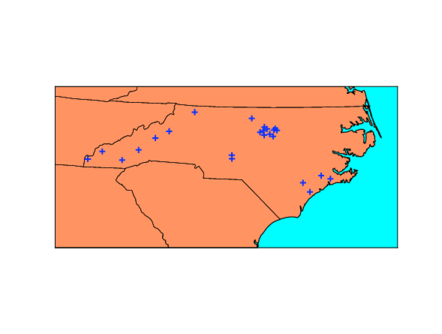
In our second example let’s assume you’ve been studying the
population genetics of the beautiful and rare North Carolina Blue
Snouter (mammals of the order Rhinogradentia; see Stümpke 1967. The
snouters: form and life of the Rhinogrades). You’ve been sampling
snouter populations from across NC and you want to make a figure for a
paper showing all your sampling locations. Download the file
nc-sites.txt from the course wiki, and place it in the same directory
as the following module (mapex2.py).
# mapex2.py

import numpy as np
from matplotlib import pyplot
from mpl_toolkits.basemap import Basemap

m = Basemap(llcrnrlon=-85, llcrnrlat=33, urcrnrlon=-75,
  urcrnrlat=37, projection='lcc', lat_0=35.774, lon_0=-78.634,
  resolution='l', area_thresh=10000)

m.drawcoastlines()
m.drawcountries(linewidth=2)
m.drawstates()
m.drawmapboundary(fill_color='aqua')
m.fillcontinents(color='coral',lake_color='aqua')

sites = np.loadtxt('nc-sites.txt')

for row in sites:
    lat, lon = row[0], row[1]
    x,y = m(lon, lat) # note how longitude (x-direction) comes first
    # use blue +'s to plot sites
    pyplot.plot(x,y, 'b+', markersize=8,markeredgewidth=2)

pyplot.show()
The mapex2.py code will produce a figure like the one below.