hands on5
The eigen() function computes the eigenvalues and eigenvectors of a
square matrix.
> A <- matrix(c(2,1,2,3),nrow=2)
> A
     [,1] [,2]
[1,]    2    2
[2,]    1    3
> eigen.A <- eigen(A)
> eigen.A
$values
[1] 4 1
$vectors
           [,1]       [,2]
[1,] -0.7071068 -0.8944272
[2,] -0.7071068  0.4472136
> V <- eigen.A$vectors
> D <- diag(eigen.A$values)
> Vinv <- solve(V)
> V %*% D %*% Vinv  # reconstruct our original matrix (see lecture slides)
     [,1] [,2]
[1,]    2    2
[2,]    1    3
> Vinv %*% A %*% V
             [,1] [,2]
[1,] 4.000000e+00    0
[2,] 2.220446e-16    1
> all.equal(Vinv %*% A %*% V, D) # test 'near equality'
[1] TRUE
> V[,1] %*% V[,2] # note that the eigenvectors are NOT orthogonal. Why?
          [,1]
[1,] 0.3162278
> B <- matrix(c(2,2,2,3),nrow=2) # define another tranformation
> B
     [,1] [,2]
[1,]    2    2
[2,]    2    3
> eigen.B$values
[1] 4.5615528 0.4384472
> eigen.B$vectors
          [,1]       [,2]
[1,] 0.6154122 -0.7882054
[2,] 0.7882054  0.6154122
> Vb <- eigen.B$vectors
> Vb[,1] %*% Vb[,2] # these eigenvectors ARE orthogonal.
     [,1]
[1,]    0
As we discussed in lecture, the eigenvectors of a square matrix, (\mathbf{A}), point in the directions that are unchanged by the transformation specified by (\mathbf{A}). The following relationships relate (\mathbf{A}) to it's eigenvectors and eigenvalues:
[\mathbf{V}^{-1}\mathbf{A}\mathbf{V} = \mathbf{D} ]
[\mathbf{A} = \mathbf{V}\mathbf{D}\mathbf{V}^{-1}]
Since (A) and (B) represent 2D transformations we can visualize the effect of these transformations using points in the plane. We’ll show how they distort a set of points that make up a square.
# define the corners of a square
> pts <- matrix(c(1,1, 1,-1, -1,-1, -1,1),4,2,byrow=T)
> pts
     [,1] [,2]
[1,]    1    1
[2,]    1   -1
[3,]   -1   -1
[4,]   -1    1
> plot(pts,xlim=c(-6,6),ylim=c(-6,6),asp=1) # plot the corners
> polygon(pts) # draw edges of square
> transA <- A %*% t(pts)
> transA
     [,1] [,2] [,3] [,4]
[1,]    4    0   -4    0
[2,]    4   -2   -4    2
> newA <- t(transA)
> newA
     [,1] [,2]
[1,]    4    4
[2,]    0   -2
[3,]   -4   -4
[4,]    0    2
> points(newA, col='red') # plot the A transformation
> polygon(newA, lty='dashed', border='red')
> newB <- t(B %*% t(pts)) # do the same for the B transformation
> polygon(newB, lty='dashed', border='blue')
> points(newB, col='blue')
> legend("topleft", c("transformation A","transformation B"),
lty=c("dashed","dashed"),col=c("red","blue"))
The code given above will produce the plot show in the figure below.
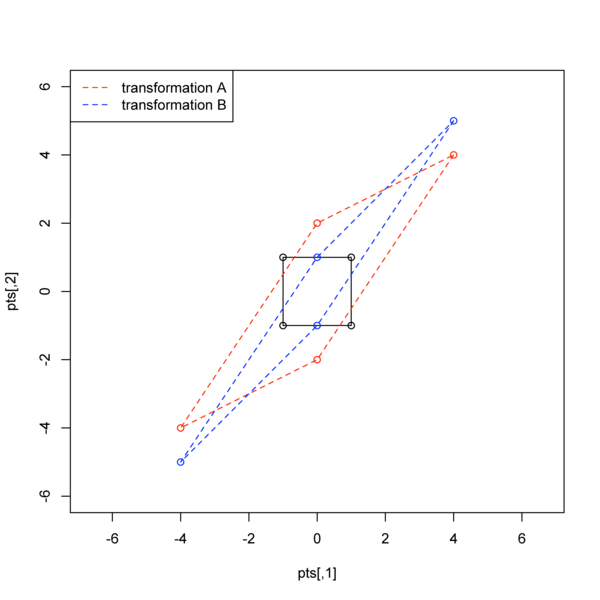
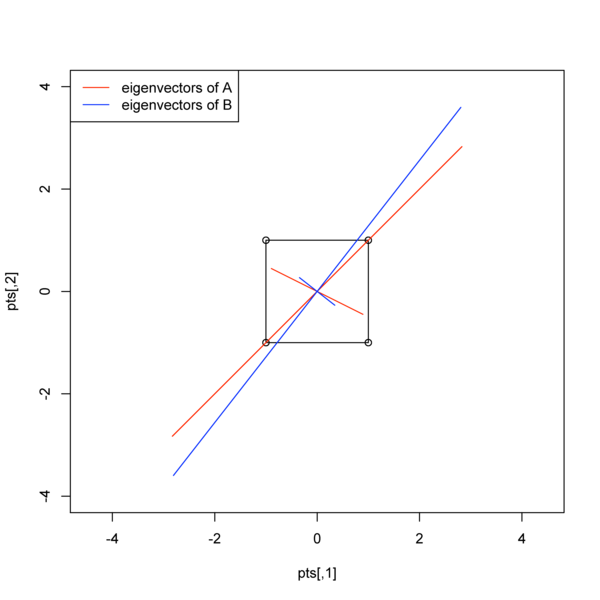
Extra Credit: write R code to reconstruct the plot shown in the figure below which illustrates the geometry of the eigenvectors for matrices A and B. Note that the lengths of the eigenvector depictions are scaled to be proportional to their eigenvalues.
The eigenanalysis functions in Python are found in the linalg module
in the Numpy package. These functions are specified by linalg.eig()
(which returns both eigenvalues and eigenvectors) and linalg.eigvals()
(which only returns the eigenvalues).
>>> import numpy as np, numpy.linalg as la
>>> A = np.array([ [2,2],[1,3] ],np.float)
>>> A
array([[ 2.,  2.],
       [ 1.,  3.]])
>>> evals, evecs = la.eig(A)
>>> evals
array([ 1.,  4.])
>>> evecs
array([[-0.89442719, -0.70710678],
       [ 0.4472136 , -0.70710678]])
Note that (somewhat inconveniently) the eig() function does not
necessarily return the eigenvalues and eigenvectors in sorted fashion.
The Numpy documentation states that the normalized eigenvector
corresponding to the eigenvalue w[i] is the column v[:,i]. Also note
that both the R eigen() function and the Numpy eig() function return
normalized eigenvectors (i.e. each eigenvector has length 1).
We can get sort the eigenvectors by their eigenvalues as so:
>>> colorder = list(np.argsort(evals)) # get back argsort as a list
>>> colorder
[0, 1]
>>> colorder.reverse() # need to reverse the column order because want from large to small
>>> colorder
[1, 0]
>>> srtevals = np.take(evals, colorder) #see the Numpy docs on take()
>>> srtevals
array([ 4.,  1.])
>>> srtevecs = np.take(evecs, colorder,axis=1) # sort columns
>>> srtevecs
array([[-0.70710678, -0.89442719],
       [-0.70710678,  0.4472136 ]])
>>> V = srtevecs
>>> Vinv = la.inv(srtevecs)
>>> D = np.diag(srtevals)
>>> np.dot(V, np.dot(D, Vinv))
array([[ 2.,  2.],
       [ 1.,  3.]])
>>> Arecon = np.dot(V, np.dot(D, Vinv))
>>> Arecon == A
array([[ True,  True],
       [ True, False]], dtype=bool)
>>> np.allclose(Arecon, A)  # like R's all.equal()
True
See the Numpy docs for more information on the argsort() (Numpy:
Sorting and
searching),
take() ((Numpy: Indexing
Routines),
and allclose() (Numpy: Logic
functions).
Assignment 1: Write a Python function that takes as input a square matrix, and returns a vector of sorted eigenvalues (sorted from largest to smallest) and the corresponding matrix of eigenvectors sorted according to their corresponding eigenvalues.
There are two functions in R for carrying out PCA - princomp() and
prcomp(). The princomp() function uses the eigen() function to
carry out the analysis on the covariance matrix or correlation matrix,
while prcomp() carries out an equivalent analysis, starting from a
data matrix, using a technique called singular value decomposition
(SVD). The SVD routine has greater numerical accuracy so it should
generally be preferred but we’ll delay it’s use until next week when we
introduce the mathematics behind SVD. The princomp() function is also
useful when you don’t have access to the original data, but you do have
a covariance or correlation matrix (a frequent situation when
re-analyzing data from the literature). By default the princomp()
function carries out PCA on the covariance matrix of the data. If you
wish to carry out PCA using the correlation matrix specify the argument
cor=T.
To demonstrate PCA we’ll use Anderson’s Iris data set.
> names(iris)
[1] "Sepal.Length" "Sepal.Width"  "Petal.Length" "Petal.Width"  "Species"
> iris
    Sepal.Length Sepal.Width Petal.Length Petal.Width    Species
1            5.1         3.5          1.4         0.2     setosa
2            4.9         3.0          1.4         0.2     setosa
3            4.7         3.2          1.3         0.2     setosa
.. output truncated ..
> summary(iris) # notice that  Petal.Width is
        # about an order of magnitude smaller than the other variables.
        # We should therefore consider doing the PCA on the correlation
        # matrix rather than the cov matrix. We'll try both
> setosa <- subset(iris, Species=='setosa', select=-Species)
> pca.setosa <- princomp(setosa)
> summary(pca.setosa)
Importance of components:
                          Comp.1    Comp.2    Comp.3     Comp.4
Standard deviation     0.4813799 0.1902114 0.1620508 0.09408823
Proportion of Variance 0.7647237 0.1193992 0.0866625 0.02921456
Cumulative Proportion  0.7647237 0.8841229 0.9707854 1.00000000
> plot(pca.setosa) # plots histogram plot of eigenvalues
> plot(pca.setosa$scores)  # in space of PC1 and PC2
> plot(pca.setosa$scores, asp=1)  # compare to the previous plot
> plot(pca.setosa$scores[,1],pca.setosa$scores[,3], asp=1) # PC1 and PC3
> pca.setosa$loadings

Loadings:
             Comp.1 Comp.2 Comp.3 Comp.4
Sepal.Length -0.669 -0.598  0.440
Sepal.Width  -0.734  0.621 -0.275
Petal.Length        -0.490 -0.832 -0.240
Petal.Width         -0.131 -0.195  0.970

               Comp.1 Comp.2 Comp.3 Comp.4
SS loadings      1.00   1.00   1.00   1.00
Proportion Var   0.25   0.25   0.25   0.25
Cumulative Var   0.25   0.50   0.75   1.00

# now do the PCA based on the correlation matrix
> pca.setosa.cor <- princomp(setosa,cor=T)
> summary(pca.setosa.cor)
Importance of components:
                          Comp.1    Comp.2    Comp.3     Comp.4
Standard deviation     1.4347614 1.0110283 0.8172027 0.50145917
Proportion of Variance 0.5146351 0.2555446 0.1669551 0.06286532
Cumulative Proportion  0.5146351 0.7701796 0.9371347 1.00000000
> pca.setosa.cor$loadings

Loadings:
             Comp.1 Comp.2 Comp.3 Comp.4
Sepal.Length  0.604  0.335         0.720
Sepal.Width   0.576  0.441        -0.689
Petal.Length  0.375 -0.627 -0.677
Petal.Width   0.403 -0.548  0.733

               Comp.1 Comp.2 Comp.3 Comp.4
SS loadings      1.00   1.00   1.00   1.00
Proportion Var   0.25   0.25   0.25   0.25
Cumulative Var   0.25   0.50   0.75   1.00
> plot(pca.setosa.cor)
> plot(pca.setosa.cor$scores,asp=1)
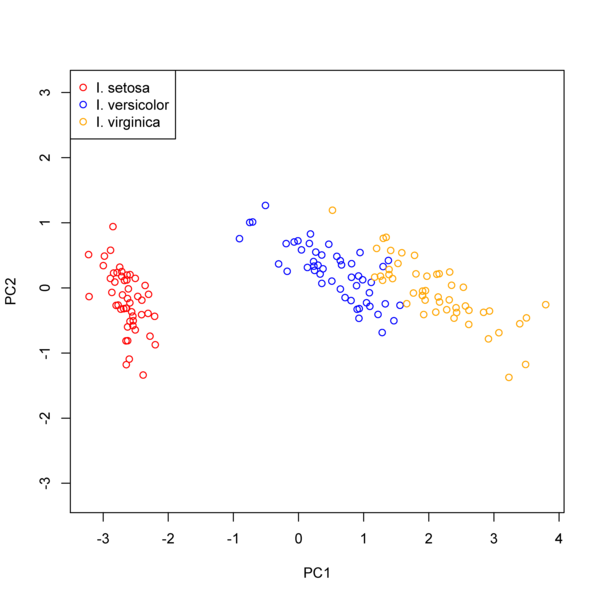
Assignment 2: Do a PCA analysis on the iris data set with all three species pooled together. Generate a plot showing the projection of the specimens on the first two PC axes as shown in the figure below. Represent the specimens from a given species with different colors. Make sure you include a legend for your plot.
Apply PCA (on the covariances) to the
yeast-subnetworkdata set from week three. Now do the same analysis based on PCA of the correlation matrix. How does your interpretation of the data change?
There are no built-in functions for carrying out PCA in Python. Luckily you have all the tools you need at your disposal to write your own PCA module.
Note that when performing PCA on a correlation matrix, to get the proper PC scores you need to use mean centered and standardized variates.
Here’s an example:
>>> import numpy as np, numpy.linalg as la
>>> turt = np.loadtxt('turtles.txt',skiprows=1,usecols=(1,2,3)) # see the Numpy docs
>>> turt.shape
(48, 3)
>>> import pylab # convenient interface to Matplotlib
>>> pylab.scatter(turt[:,0], turt[:,1])
<matplotlib.collections.CircleCollection object at 0x2502630>
>>> pylab.show()
>>> pylab.scatter(turt[:,0], turt[:,2])
<matplotlib.collections.CircleCollection object at 0x66d4a30>
>>> pylab.scatter(turt[:,1], turt[:,2])
<matplotlib.collections.CircleCollection object at 0x63296b0>
>>> tmean = np.mean(turt,axis=0) # get the column means
>>> tmean
array([ 124.6875    ,   95.4375    ,   46.33333333])
>>> deviates = turt - tmean # this mean centers each observation
>>> stdized = deviates/np.std(deviates,axis=0) # standardize variates
>>> pylab.scatter(stdized[:,0],stdized[:,1],color='red') # plot the standardized observations
>>> tcor = np.corrcoef(turt,rowvar=False)
>>> tcor
array([[ 1.        ,  0.97831162,  0.96469455],
       [ 0.97831162,  1.        ,  0.96057053],
       [ 0.96469455,  0.96057053,  1.        ]])
>>> u,v = la.eig(tcor)
>>> u # the eigenvalues
array([ 2.93573765,  0.02141848,  0.04284387])
>>> v
array([[-0.57879812, -0.74789704, -0.32502731],
       [-0.57798399,  0.65741263, -0.48346989],
       [-0.57526276,  0.09197088,  0.81278171]])
>>> colsort = np.argsort(u)[::-1] # fancy way  to do the
                  # argsort and reversing to sort index in one call
>>> colsort
array([0, 2, 1])
>>> usort = np.take(u,colsort)
>>> vsort = np.take(v,colsort,axis=1)
>>> usort
array([ 2.93573765,  0.04284387,  0.02141848])
>>> vsort # the PC coefficents are the normalized eigenvectors
array([[-0.57879812, -0.32502731, -0.74789704],
       [-0.57798399, -0.48346989,  0.65741263],
       [-0.57526276,  0.81278171,  0.09197088]])
>>> L = np.diag(usort**0.5) # mtx with sqrt of eigenvalues on diagonal
>>> L
array([[ 1.71339944,  0.        ,  0.        ],
       [ 0.        ,  0.2069876 ,  0.        ],
       [ 0.        ,  0.        ,  0.14635054]])
>>> f=np.dot(vsort,L) # "factor loadings" -- gives corr. btw original vars and PC axes
>>> f
array([[-0.99171237, -0.06727662, -0.10945514],
       [-0.99031745, -0.10007227,  0.09621269],
       [-0.98565489,  0.16823574,  0.01345999]])
>>> scores = np.dot(stdized,vsort)
>>> scores[:5]  # compare to the values you got in R
array([[ 2.00466025,  0.16892135,  0.13583391],
       [ 1.72362844, -0.02689852,  0.10856089],
       [ 1.35439901,  0.2874806 ,  0.25768234],
       [ 1.43581697,  0.05967203,  0.16172995],
       [ 0.95235368,  0.30990249,  0.16324351]])
>>> pylab.scatter(scores[:,0],scores[:,1]) # don't close the plot
                                        # or else the next line won't work
<matplotlib.collections.CircleCollection object at 0x66d5f50>
>>> pylab.axes().set_aspect(1) # equivalent of the asp=1 argument in R
>>> pylab.xlim(-5,3)  # to make the plot limits more like those we saw in R
(-5, 3)
>>> pylab.ylim(-3,3)
(-3, 3)
Assignment 3: Write a Python function that takes as it’s input an (n \times p) data matrix and returns the following four objects (in this order):
A vector of the eigenvalues of the correlation matrix sorted from largest to smallest
A corresponding matrix of eigenvectors of the correlation matrix sorted relative to their eigenvalues
The principal component scores for the dataset
An array giving the percentage of variation explained by each principal component.
Apply this to the
yeast-subnetworkdata set and check your answers against the R implementation.