
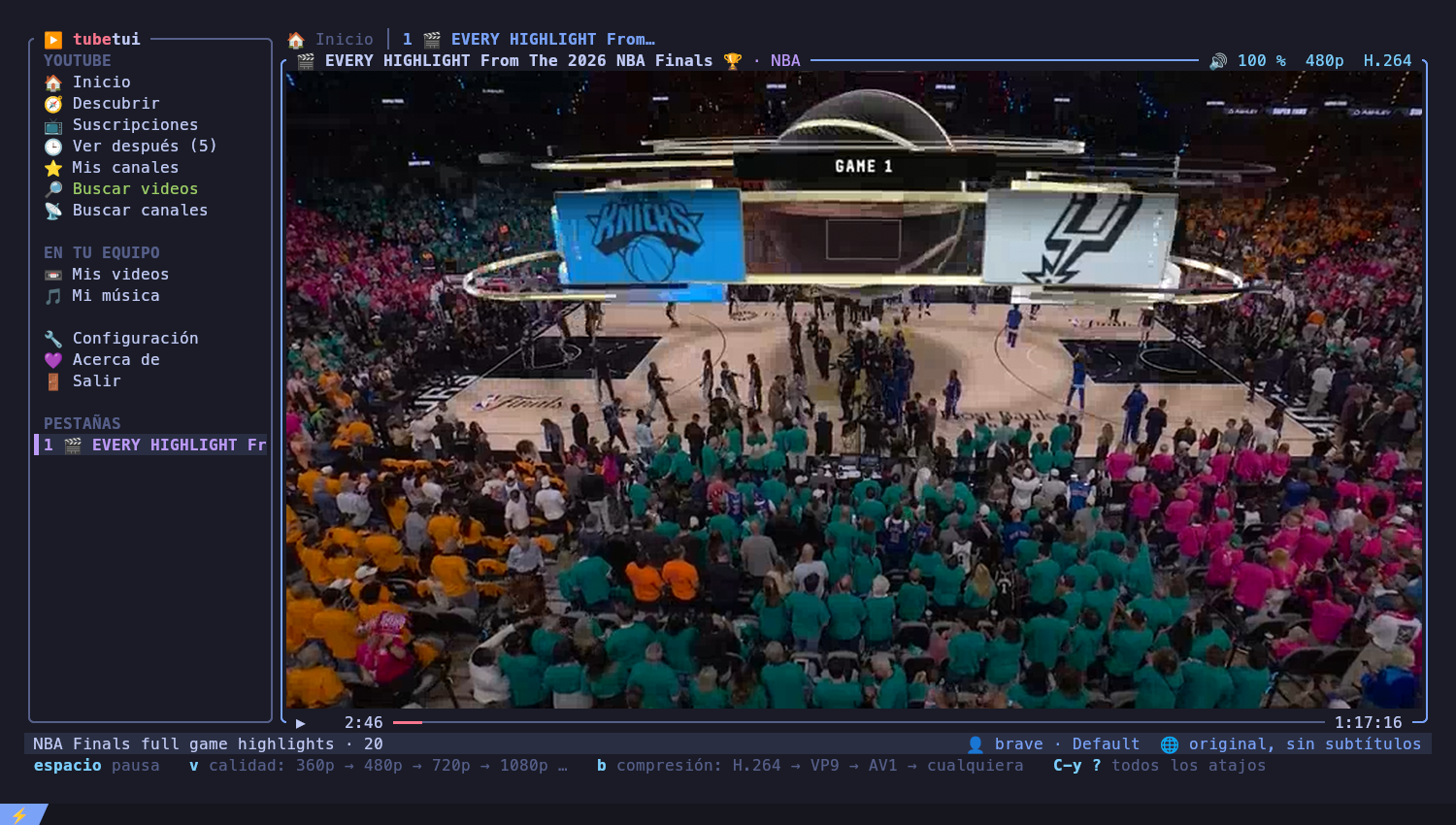
YouTube — and your own videos and music — in the terminal, written in Rust with ratatui. Videos play through mpv: in their own window by default (its tab shows the video's details and what to watch next), or drawn inside the app in kitty. Every video opens in its own tab.
Interface in English and Spanish (
Ctrl+y lswitches). Early but usable: feedback welcome.Website and downloads: https://polblancoo.github.io/tubetui/
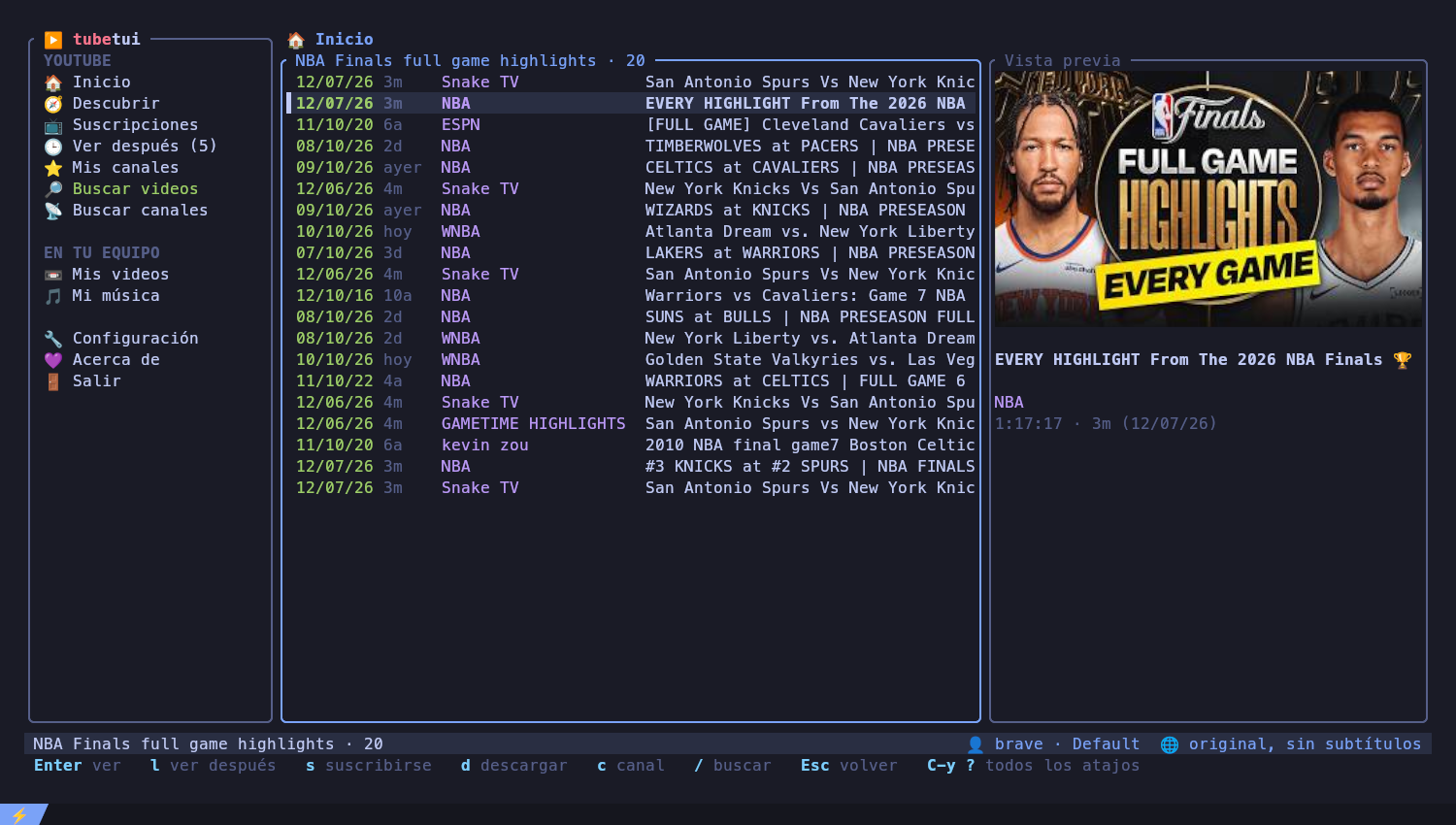
YouTube
- Mis recomendados (your home feed, in YouTube's own order, only your
channels;
tswitches to everything YouTube recommends, as in the browser), Descubrir (this week's most watched videos on your topics, e.g.rust, nba, jazz, outside your channels and your history), Suscripciones (newest from your channels, live and upcoming first), Mis canales, Descubrir canales (YouTube's picks from channels you don't follow yet) - Según lo que vi: what YouTube puts Up next to the last 10 videos you watched, all together and taking turns, without the ones you already saw
- Mis listas: your YouTube playlists, plus Liked videos and Watch
later;
Enteropens one,xdeletes it from YouTube (after asking) - Historial: everything you watched, newest first, with the day you
watched it: in tubetui and, logged in, on YouTube too (the browser, the
phone), more pages coming as you scroll down (
xremoves one from the list) - Resume where you left off: closing a video remembers the second; opening it again starts there, and lists show how far you got. Finished videos (or ones you barely started) start from the beginning
- New videos notice: every 15 minutes your subscriptions are checked;
new videos are announced in the status bar, counted in the menu
(Suscripciones (3 nuevos)), marked NUEVO in the list and, with
notify-send, as a desktop notification - Shorts hidden from every list (a setting turns them back on)
- Your favorite channels first: the channels you watch most (3 videos or more in the last 30 days, up to 10) are marked ⭐. Their videos from the last week go first in Suscripciones (after live ones), they top Mis canales with how many of their videos you watched, and new video notices name them first
- Search videos in all of YouTube (about a second, more results load as
you scroll), only in your channels, or inside a channel (
Tabswitches the scope); search channels (with their description, whole in the side panel) - A preview of the selected video with its thumbnail (in kitty), its length and what it weighs to download at your quality (💾 Download ≈ 84 MB (1080p)), asked to yt-dlp once the selection rests on it
- With the video in its own window, its tab shows the video's details
(thumbnail, subscribers, views, likes, date) and Up next:
Tabmoves into it,Enteropens one in a new tab. Closing the video keeps the tab with its details and Up next;Enterplays it again where you left it - A progress bar under the video (played, downloaded, rest) and its volume, resolution and codec on top
- Mouse: click to select, double click to open, wheel to scroll (on the video: volume), click the video to pause, the progress bar to jump. Right click opens a menu with what can be done there: play, sound only, watch later, download, like, channel, subscribe, close the tab, delete…
- Subscribe / unsubscribe (
s, unsubscribing asks first), like / dislike (g/G, again takes it back), watch later (l), download with subtitles (d), open the channel (c) - Comments: next to Up next when the video plays in its own window or
as audio only (in terminals 100 columns wide or more);
PgUp/PgDnscroll them
Playback
- Embedded video in kitty, an mpv window, or an overlay (X11): an mpv window without borders laid exactly over the app, so it looks embedded but plays with the GPU; one tab per video, background audio when you go back to browsing
- Volume, mute, seek, subtitles on/off, switch original / subtitles / auto-dubbed audio and the language while watching (the video reloads at the same second)
- Fullscreen (
f): the video fills the terminal, and on X11 the terminal window goes fullscreen too - Audio only (
a): play a video as sound only, like music; inside its tabaswitches between audio and video at the same second - Chapters:
[/]jump to the previous / next one; they are marked┃on the progress bar and the current one shows on top - SponsorBlock: sponsors, self promotion and "subscribe!" reminders are skipped by themselves (they show green on the progress bar). Intros and outros are left alone
On your computer
- Mis videos and Mi música list the files in the folders you choose (several per kind); music plays from the chosen song to the end of the list
- Descargas: what you download with
d, with live progress, speed and time left, and its size.xcancels one (its half-downloaded pieces are deleted) or removes a finished one from the list (the file stays),Enterplays the file. Quitting with downloads running asks first
Account and settings
- Log in with any installed browser (Brave, Chrome, Chromium, Vivaldi, Edge,
Opera, Firefox — profiles are detected), or import a
cookies.txton machines without a browser (servers, SSH) - A settings screen for everything; changes go to
config.toml, keeping your comments.$EDITORcan open the file from the app - The bottom bar always shows the keys that work right now;
Ctrl+y ?lists them all - English or Spanish, following the system language until you pick one
- Short animations when pages and dialogs open, each one can be turned off
- An About page with links and how to support the project
mpvandyt-dlpinPATH(on Windows they are also found where winget, scoop or the mpv installer leave them)- For embedded video: the kitty terminal
- Optional:
wmctrl(X11) for window fullscreen
tubetui checks this itself: when something needed is missing (or yt-dlp is too old for YouTube) it opens a system check that lists what is there, what is not and the command that installs it with your package manager (apt, pacman, dnf, zypper, Homebrew or winget). It is also in Settings → Check the system.
Ready-made packages for every release are on the website and in GitHub Releases:
- Windows:
tubetui-x86_64-windows-setup.exe(installs for your user, adds tubetui to the PATH and the Start menu, and can install mpv (the official build,mpv-player.mpv-CI.MSVC) and yt-dlp with winget), or the portable.zip - Debian / Ubuntu / Mint:
sudo apt install ./tubetui_amd64.deb - Other Linux:
tubetui-x86_64-linux.tar.gz - macOS (Apple Silicon):
tubetui-aarch64-macos.tar.gz
Or from source on Linux / macOS with the installer, which checks the C compiler, Rust (1.88 or newer), mpv and yt-dlp first and prints the commands for whatever is missing:
curl -sSf https://raw.githubusercontent.com/polblancoo/tubetui/main/install.sh | shor by hand, anywhere Rust 1.88+ runs:
cargo install tubetui
feature edition2024 is requiredmeans your Rust is too old — distro packages often are (Ubuntu 22.04 ships 1.75). Install a current one with rustup:curl --proto '=https' --tlsv1.2 -sSf https://sh.rustup.rs | sh -s -- -y . "$HOME/.cargo/env"
Global commands use a Ctrl+y prefix (tmux style): press Ctrl+y, then:
| Key | Action |
|---|---|
b |
show / hide the menu |
m |
go to the menu |
f |
fullscreen |
n p 0-9 |
next / previous / numbered tab (0 = Inicio) |
x |
close the tab |
/ |
search videos |
l |
English / español |
? |
every shortcut, explained |
q |
quit |
With the mouse: click selects (menu sections and tabs open), double click plays / opens, the wheel scrolls lists and sets the volume over the video, a click on the video pauses (double click: fullscreen), a click on the progress bar jumps there. A right click opens the options of what is under it (each with its key). Hold Shift to select text.
In lists: ↑↓ / jk, Enter, Esc to go back, Tab menu ↔ list,
l watch later, s subscribe, g / G like / dislike, d download, c channel, a play as
audio only. In History x removes the video; in Downloads it cancels
the download (or forgets a finished one). In My videos
and My music: space marks files, x / Del moves the marked ones (or
the selected one) to the system trash, after asking.
While watching: space pause, ←→ seek, ↑↓ volume, m mute, j
subtitles, i original / subtitles / dubbed, o language, v quality
(360p–1440p), b codec (H.264 / VP9 / AV1 / any), f fullscreen, . ,
next / previous song, [ ] previous / next chapter, a audio only ⇄ video,
PgUp PgDn scroll the comments. Quality, codec and language reload the video at the
same second and are remembered. If embedded video looks behind the sound,
the CPU is dropping frames: v down to 480p, or try the overlay.
Embedded video goes through the CPU: every frame is decoded, scaled and sent
to kitty as an image (on a 2012 laptop: 134 % CPU, a third of the frames
dropped). mode = "overlay" (Settings → Video) instead opens a borderless
mpv window over the video pane: hardware decoding, every frame, about 10 %
CPU, and it still looks part of the app. It follows the terminal window when
it moves, hides when you switch tabs, open the help or focus another
program, and lets clicks and keys through to the app. It needs X11 and
xdotool, xwininfo and xprop (wmctrl keeps it off the taskbar);
without them, or on Wayland, it falls back to a separate window.
Inside a multiplexer, keys and images travel through it, which adds lag and
can break embedded video. When tubetui detects one (TMUX, ZELLIJ,
HERDR_ENV), automatic mode opens videos in an mpv window and fullscreen
does not resize the outer terminal window. You can still force embedded video
(mode = "embedded"), but for the smoothest experience run tubetui directly in
kitty.
~/.config/tubetui/config.toml (or the platform equivalent). Every key is
optional; everything can also be changed from the app (⚙ Configuración).
[session]
browser = "brave+GNOMEKEYRING:Default"  # yt-dlp --cookies-from-browser syntax
cookies_file = ""                       # imported cookies.txt, wins over browser

[player]
mode = "window"          # window (default) | auto | embedded | overlay
max_height = 720
prefer_codec = "avc1"    # H.264 decodes in hardware almost everywhere
language = "subtitles"   # subtitles | original | dubbed
sub_lang = "es"          # subtitles and dubbing language
background_audio = true  # keep listening while browsing
sponsorblock = true      # skip sponsors, self promotion and "subscribe!" reminders

[media]
video_dirs = ["~/Videos"]
music_dirs = ["~/Música", "/mnt/discos"]

[ui]
icons = "emoji"          # emoji | nerd | unicode
lang = "en"              # en | es (unset: the system language)
thumbnails = true        # thumbnail in the preview panel (kitty)
mouse = true             # clicks and wheel; hold Shift to select text
splash = true            # the tubetui logo for a moment when it opens (any key skips it)
check_updates = true     # once a day, tell me about new versions and how to install them here
hide_shorts = true       # leave Shorts out of every list
notify_new = true        # check my subscriptions every 15 minutes and tell me about new videos
favorites_first = true   # my most watched channels first in Suscripciones and Mis canales
home_all = false         # Mis recomendados: only my channels, or all YouTube recommends (t switches)

[effects]                # animations
startup = true
pages = true
dialogs = trueIdle it uses about 25 MB and no CPU. Videos in their own window play with hardware decoding (8 % CPU on a 2012 laptop); embedded video is scaled on the CPU, so 480p is the sweet spot there. See the benchmark against ytfzf and youtube-tui.
If the app closes unexpectedly (for example when launched from a window
manager shortcut, whose terminal closes with it), the error is kept in
~/.cache/tubetui/crash.log.
To diagnose lag, run with TUBETUI_DEBUG=/tmp/tubetui.log tubetui: every key,
redraw and action is logged with its timing.
If tubetui is useful to you, the About page (Acerca de) lists donation
addresses. They live in donate.toml.
tubetui talks to YouTube's unofficial internal API and uses your browser session. That may go against YouTube's Terms of Service; use it at your own risk. Cookies give access to your account: never share them.
Licensed under either of Apache License, Version 2.0 or MIT license, at your option.