Hardware Teleop and Recording
Runs on the robot PC (SpaceMouse/gamepad + the GUI are local; raw-HID + display need the local seat).
Arm over RTDE (robot/rtde_arm.py: servoL streaming with a workspace no-go clamp (TCP and
elbow/wrist links via FK), per-command max_step (translation) + max_rot_step (wrist orientation) clamps,
an optional table z-floor, and an IK-reachability guard so an over-reach holds instead of faulting the
controller). Hand over TCP (hand/amazing_hand_client.py → .117).
Safety note. These clamps are software guards in the servo command path only — not a substitute for UR safety planes (set those in PolyScope for a safety-rated, controller-enforced limit). In particular they are bypassed in freedrive (teach mode is UR-controlled), and the elbow/wrist-link check is a crude nominal-FK approximation. Keep the e-stop in hand.
Three USB cameras, addressed by stable device path in sensors/cameras.py:
-
scene (
0:7.3) and side (0:8.4) — two 3rd-person views for occlusion coverage. -
wrist (
0:5) — eye-in-hand.
They're the same wide-FOV model with no serial, so their by-id names collide — each is addressed
by USB-port by-path instead (stable per physical port; keep each camera in its port). Per-camera
rotation (SCENE_ROTATE=90, SIDE_ROTATE=270, WRIST_ROTATE=0) and gain (default 128, to
lift the dim MJPG exposure) are constants at the top of cameras.py, tunable live while mounting.
Capture is 1280×720 MJPG (720p keeps 3-camera capture real-time on the robot PC — 1080p is ~2× the
per-frame CPU) and downsampled to the 960×540 dataset size, aspect-preserved (letterboxed, never
squished) so the rotated fisheye views stay upright. --side-cam enables the second 3rd-person view.
- UR pendant → Remote Control; if powered off, power on + release brakes (dashboard) and clear the position-verify dialog.
- The hand is powered from the UR tool port — enable Tool Output Voltage on the pendant so the ESP32 (
.117) boots. - Launch and record (a fresh
--rootstarts a new dataset;--resumeappends into an existing one):~/VLA/run.sh -m ur5e_lerobot.teleop.manual_panel --engine hardware --side-cam \ --use-videos --root outputs/datasets/hd_bucket --task "pick up the bucket"
Single-column layout (stacked cameras → controls → bottom button bar), dark theme.
-
Input dropdown, live-switchable:
spacemouse·gamepad(Xbox, evdev) ·freedrive(hand-guide the arm; grasp via keys/SpaceMouse buttons) ·sliders. -
Calibrate once so axes match your viewpoint —
sm_calibrate/gp_calibrateterminal tools, or the in-GUI Calibrate GP button (writesoutputs/{sm,gp}_calib.json, auto-loaded). The gamepad won't drive the arm until calibrated. - ⟳ Reconnect UR — recover from a fault / stopped control script (clears a protective stop, reuploads the script) without restarting.
-
Grasp: SpaceMouse buttons or keyboard
c/o; gamepad bumpers LB/RB. - ● Start rec → demo → ■ Save ep. Closing the window finalizes cleanly (parquet footers). Records all three cameras + the 10-D action; vary the object/target position across episodes.
Home pose: freedrive to a comfortable start pose and click 🏠 Set Home — it captures the joint
config to outputs/home_pose.json (loaded on launch). The deck Reset key hold-returns to it (slow
joint-space servoJ, singularity-safe). Make this a safe transport pose (arm tucked, object clear).
When Set Home is captured, pressing Save first drives the arm back to that home joint config —
recorded, with the grasp held — then saves. Every episode ends at the same pose, so a split
place skill can start from the same spot, and the pick policy learns to retract to the transport pose
autonomously. Joint-space return avoids the Cartesian singularities that cause servoL to jerk.
--no-home-on-save disables it (saves immediately); it also falls back to an immediate save if no home
is set.
On Save, the dataset is rsync'd to the GPU in the background (--gpu-host, disable with
--no-gpu-sync) and the deck's bottom row lights up 1★–5★ to rate the just-saved episode. The
rating is written to meta/annotations.json (the same sidecar the Web Manager reads) and
re-synced, so it lands on the GPU automatically. The stars clear on a press or after 30 s.
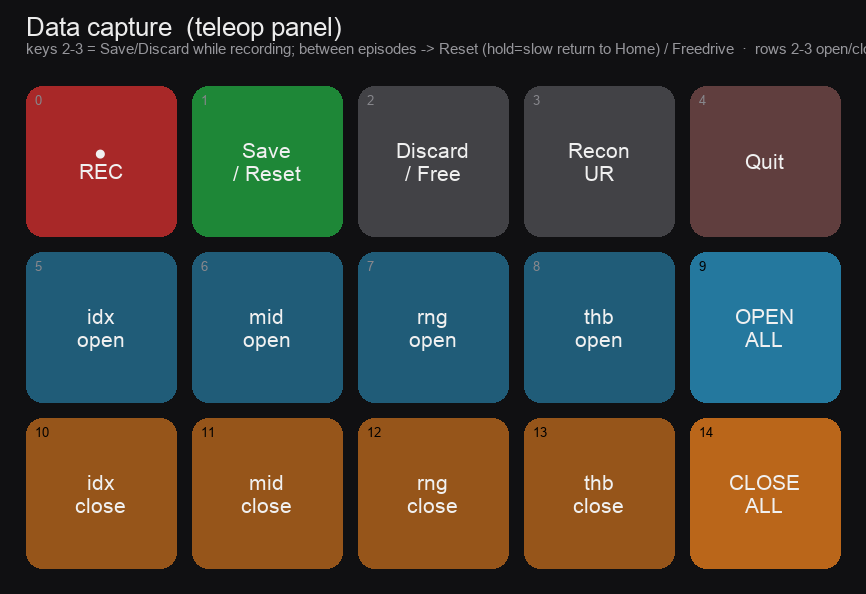
Optional (teleop/streamdeck.py, mounted upside down → labels auto-flip). Row 1 keys are
recording-state-dependent: while recording, keys 2–3 are ■ Save / Discard; between episodes they
flip to Reset (hold → slow return to Home) and Freedrive (toggle teach mode to reposition).
Rows 2–3 open/close a finger (idx/mid/rng/thb + Open-/Close-All), and the bottom row doubles as the
1★–5★ rating after Save. ● REC blinks red while recording; ■ Save flashes green on save.
Writes a montage (1 frame/episode) + a scene|wrist MP4. Headless (reads the recorded frames; no robot needed), so it runs over SSH:
~/VLA/run.sh -m ur5e_lerobot.sim.playback --root outputs/datasets/<dir> \
  --montage outputs/playback/<name>.png --video outputs/playback/<name>.mp4 --fps 12
--fps 12 plays hardware recordings at real time (raise to fast-forward); --step N subsamples;
--montage/--video are independent. Files land in outputs/playback/ — open on the robot PC's
desktop or copy off with scp.