Releases: ray77/MaClone
Release list
MaClone 1.3.0

Tells a recovered retry apart from a track the drive gave up on, and sums
the run up when it ends.
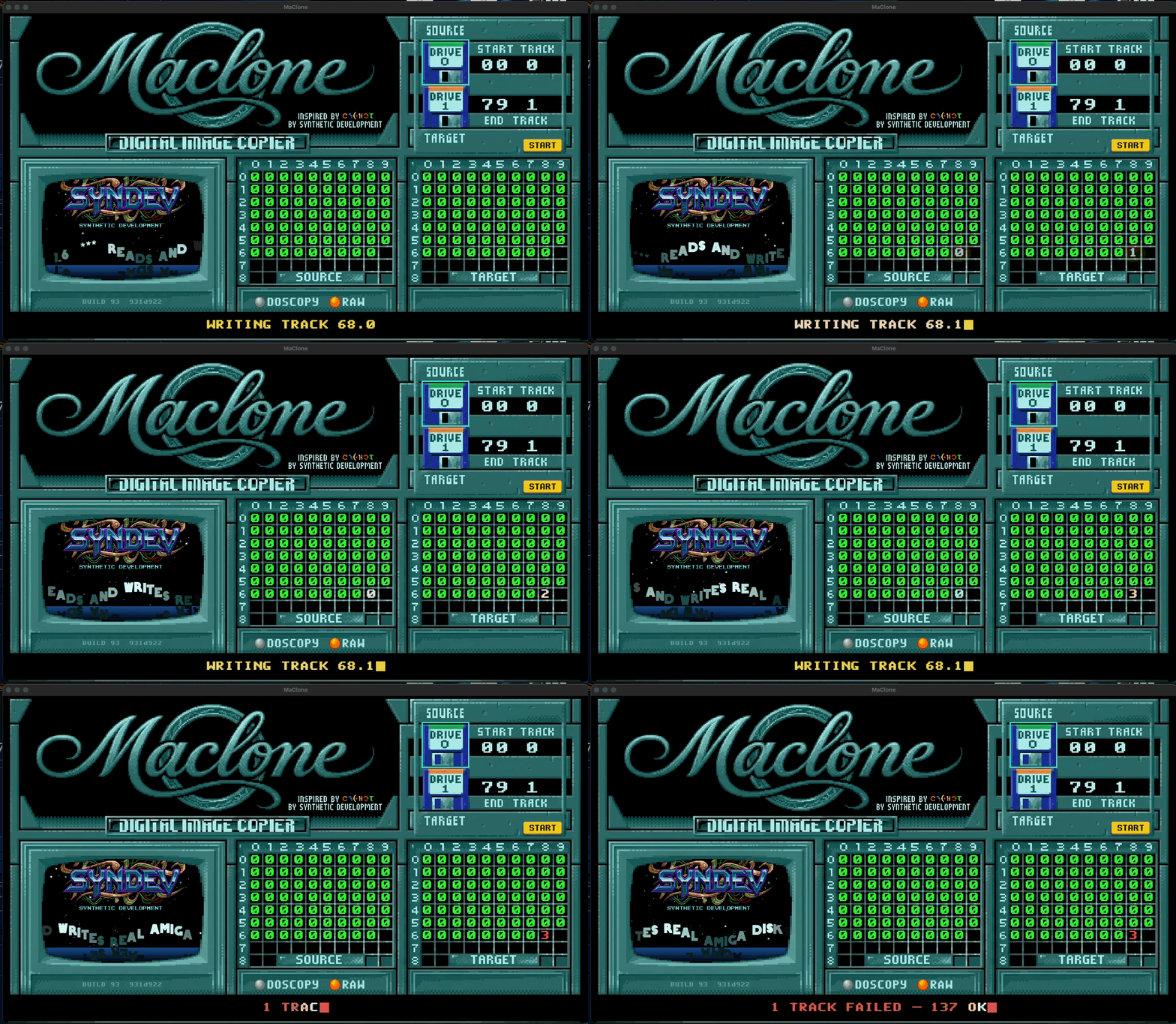
Why this release exists
A write that finished with All tracks verified but needed one retry on three
cylinders showed three red numbers and nothing to say they had been made good.
It looked like a failing disk. It wasn't.
gw distinguishes the two cases — Writing Track (Verify Failure: Retry #1)
followed by the next track means it recovered; Failed to verify Track 68.1
means it stopped trying. Now the display does too:
- green
0— clean - amber — retry needed, and it worked
- red — gw gave up, or sectors are missing for good
A verdict when the run ends
Instead of a bare DONE:
DONE — 160 TRACKS VERIFIED
DONE — 160 TRACKS, 3 REWRITTEN OK      ← green, the retries are accounted for
2 TRACKS FAILED — 158 OK               ← red
DONE — 160 TRACKS, 4 BAD SECTORS       ← reading
The numbers stay in the grid, so you still see where the disk was awkward.
The verdict says what it amounts to.
Everything else
Unchanged from 1.2.0 — ADF / ADZ / SCP / SCPZ / IPF / IPFZ, reading, writing,
verifying, IPF creation through the bundled disk-analyse, the app icon and
the styled disk image window.
Requirements
- A Greaseweazle (tested: V4.1, firmware 1.6)
- macOS 11 or newer
- A drive on the Greaseweazle's second port — it answers as unit 1 and
shows asDRIVE 0, matching the Amiga'sDF0: - IPF additionally needs the SPS/CAPS library in
~/Library/Frameworks/; it is
not bundled, and MaClone says so when it is missing
Unsigned build
Right-click MaClone.app → Open → Open on first launch.
Still unproven
Whether a written disk boots on a real Amiga. That test needs genuine DD media
and is outstanding.
Checksum
SHA-256 a810482905d9b79f89b005e2c6282b2ae496faacbcc82d2e5db308c69d41a86c
MaClone 1.2.0
Adds ADZ support, an application icon, a styled disk image window, and a
scroller face of its own.

ADZ — gzip'd ADF
The one packed name that exists independently of this project: emulators have
written and read gzip'd ADFs for years, while .scpz and .ipfz are this
project's own naming. It was not merely unlisted, it did not work — an .adz
was handed to gw unchanged, and gw has no ADZ reader.
.adz always packs as gzip, never xz, because the format is defined that
way and an xz payload under that name would be unreadable to every emulator.
It unpacks to .adf so gw recognises the format.
| Format | Extension |
|---|---|
| ADF AmigaDOS | .adf |
| ADF packed | .adz |
| SCP flux | .scp |
| SCP packed | .scpz |
| IPF image | .ipf |
| IPF packed | .ipfz |
An icon
A black floppy with a yellow MC label. macOS 26 forces every app icon into
its unified rounded shape, which clips any free-form silhouette — so a solid
field carries the shape and the floppy sits inside it intact. Built from the
source artwork during the build, in all ten sizes.
The disk image window
Opening the DMG no longer shows a bare file list: artwork behind, app and
Applications side by side. Sized so the whole design stays visible whether or
not the viewer has a path bar enabled.
Scroller
The sine scroller has its own face again — CC-Fat, which unlike its
predecessor may ship with the repository.
Save dialog
The two columns line up. Rows carried a fixed number of spaces and so came out
15 to 19 characters long; Tk centres each row on its own, which put the format
names on four different edges spanning 30 px.
Requirements
- A Greaseweazle (tested: V4.1, firmware 1.6)
- macOS 11 or newer
- A drive on the Greaseweazle's second port — it answers as unit 1 and
shows asDRIVE 0, matching the Amiga'sDF0: - IPF additionally needs the SPS/CAPS library in
~/Library/Frameworks/; it is
not bundled, and MaClone says so when it is missing
Unsigned build
Right-click MaClone.app → Open → Open on first launch. No security settings
need changing.
Still unproven
Whether a written disk boots on a real Amiga. That test needs genuine DD media
and is outstanding.
Checksum
SHA-256 58dc95c5fc8f4189c46a9f51b5e2c502cf476cd8e9821a60403f9fcace5a5ca2
MaClone 1.1.1
Packaging only — the app itself is unchanged from 1.1.0.
The DMG has its own window now
Opening the disk image no longer shows a bare file list. It opens at a fixed
512×512 window with the MaClone artwork behind it, the app on the left and the
Applications shortcut on the right — drag one onto the other and you are done.
The background is a HiDPI TIFF, so it stays sharp on Retina displays.
Under the hood
Getting there was not the usual route. On macOS 26 the Finder refuses this
specific property: background picture returns error -10000 — not only when
setting it, but on a plain read as well. TIFF and PNG, hidden and visible
folders, POSIX / alias / file notation all failed identically, while window
bounds, icon size and icon positions applied fine in the same script.
So the appearance is written straight into the .DS_Store instead, by
dmg_style.py. Its two dependencies are build-time only and are not shipped
inside the app — the "nothing is fetched at runtime" guarantee is untouched, and
the build still verifies it.
Icons are 96 px rather than the usual 128: measured against a screenshot of the
mounted window, 128 px cut into the MaClone lettering and crowded the floppy
graphic in the corner.
Everything else
Unchanged from 1.1.0 — ADF / ADZ / SCP / SCPZ / IPF / IPFZ, reading, writing,
verifying, IPF creation via the bundled disk-analyse. See the
1.1.0 notes.
Still unsigned: right-click MaClone.app → Open → Open on first launch.
Still unproven: whether a written disk boots on a real Amiga.
Checksum
SHA-256 4d580eb4a9e108681cb12bb75189a3b0bb667b9d2b4fdaed76e6b5c314988dd3
MaClone 1.1.0
Adds ADZ — gzip'd ADF, the packed format the Amiga world already uses.
New in 1.1.0
ADZ was missing while .scpz and .ipfz were supported, which had it
backwards: .adz is the one packed name that exists independently of this
project — emulators have written and read gzip'd ADFs for years — whereas
.scpz and .ipfz are this project's own naming.
It was not merely unlisted, it did not work. An .adz was handed to gw
unchanged, and gw has no ADZ reader at all. (A file named x.adf.gz already
worked, so only the name mapping was missing.)
.adz always packs as gzip, never xz — the format is defined as gzip'd
ADF, and an xz payload under that name would be unreadable to every emulator.
It unpacks to a .adf temporary file so gw recognises the format.
Both dialogs know it: ADF PACKED when saving, ADF Packed (*.adz) when
opening.
Formats
| Format | Extension |
|---|---|
| ADF AmigaDOS | .adf |
| ADF packed | .adz |
| SCP flux | .scp |
| SCP packed | .scpz |
| IPF image | .ipf |
| IPF packed | .ipfz |
The output format is chosen before the save dialog opens — a filter only
filters, it cannot decide what gets written. Compressed images are recognised
by magic bytes, not by extension, so a mislabelled file still opens.
Everything else from 1.0.0
Drive → file reads, file → drive writes and verifies; START again aborts.
SOURCE always shows reading, TARGET always shows writing, one error count per
cylinder — green 0 clean, red number for retries, blue X for raw flux
(gw cannot verify what it does not decode). IPF writing via gw, IPF creation
via the bundled disk-analyse. Write precompensation 40=125.
Requirements
- A Greaseweazle (tested: V4.1, firmware 1.6)
- macOS 11 or newer
- A drive on the Greaseweazle's second port — it answers as unit 1 and
shows asDRIVE 0, matching the Amiga'sDF0: - IPF additionally needs the SPS/CAPS library in
~/Library/Frameworks/; it is
not bundled (proprietary), and MaClone says so when it is missing
Unsigned build
Not code-signed, so Gatekeeper refuses it on first launch. Right-click
MaClone.app → Open → Open, which is macOS's own path for unsigned apps.
No security settings need changing.
Still unproven
Whether a written disk boots on a real Amiga. That test needs genuine DD media
and is outstanding. The ADF viewer behind OPENADF is not implemented, and
START/END TRACK are decoration.
Checksum
SHA-256 35b0f5a85fd396910110ada96fe2839c64c7095063e0b9d18aeda5aa6152170d
MaClone 1.0.0
Amiga floppy reading and writing with a Greaseweazle, in a window that shows
which track is running — the way it looked in 1992.
What is in this release
Reading and writing. Pick a source, the direction follows, press START.
Drive → file reads, file → drive writes and verifies. START a second time
aborts; an abort while writing reports ABORTED — TARGET INCOMPLETE, because
that is what the disk is.
Track grid. SOURCE always shows reading, TARGET always shows writing.
Each cell holds that cylinder's error count — green 0 for clean, a red
number for retries or failures. AmigaDOS covers cylinders 0–79, raw flux runs
to 81, and the grid has cells for both. Raw flux gets a blue X rather than a
green 0: gw does not decode raw flux, so it cannot verify it, and green
would claim a check that never happened.
Five output formats, chosen before the save dialog opens — a filter only
filters, it cannot decide what gets written:
| Format | Extension |
|---|---|
| ADF AmigaDOS | .adf |
| SCP flux | .scp |
| SCP packed | .scpz |
| IPF image | .ipf |
| IPF packed | .ipfz |
Compressed images are recognised by magic bytes, not by extension, so a
mislabelled file still opens. .gz and .xz work as well as .scpz/.ipfz.
IPF. Writing an IPF to disk goes through gw. Creating one goes through the
bundled disk-analyse, which knows 1810 formats but does not detect them —
you pick the title. IPF needs the SPS/CAPS library, which is not bundled
(proprietary, not ours to redistribute); install it into ~/Library/Frameworks/
and MaClone finds it. It says so when it is missing.
Write precompensation defaults to 40=125, which fixed a failing inner
track on real hardware.
Self-contained
Everything is inside the DMG. No Python, no venv, no Homebrew library, no
network access at runtime. The build verifies this and refuses to produce a
DMG if any bundled library points outside it.
Requirements
- A Greaseweazle (tested: V4.1, firmware 1.6)
- macOS 11 or newer
- A drive on the Greaseweazle's second port — it answers as unit 1 and
shows asDRIVE 0, matching the Amiga'sDF0:
Unsigned build
This DMG is not code-signed, so Gatekeeper will refuse it on first launch.
Right-click MaClone.app → Open → Open, which is macOS's own path for
running an unsigned app. No security settings need changing.
Verified in this build
Reading, writing and verifying work. A disk written from an IPF read back
clean: all 160 tracks, median 331,935 bits, 0.09 % spread, no weak tracks.
Not yet proven: whether a written disk boots on a real Amiga. That test
needs genuine DD media and is still outstanding. The ADF viewer behind OPENADF
is not implemented, and START/END TRACK are decoration.
Checksum
SHA-256 65fb9e283d3f2a1f2548e3d55e2f0df381f9141bec5f4061d63439f04c5b71ac