Issue description
After compiling an APK for Android using example source code (attached below), moving it to my smartphone, installing and launching, everything works properly until I press the "back" key on smartphone to exit application. It immediately gets stuck after pressing the button. Having no clues what's wrong with it, I decided to write this here, maybe someone else had this problem. I took a look at examples and games and I didn't notice any exclusive commands protecting from this issue. No clear informations about effective solution forced me to report this. Added the orange text to clearly show that moment when the app becomes "frozen".
Environment
Compilation for Android 10 (API level 29) on Windows 10 64-bit operating system using "raylib" 3.0 from the official installer in "Visual Studio Code" IDE. APK launched on Samsung Galaxy A40 smartphone.
Issue Screenshot
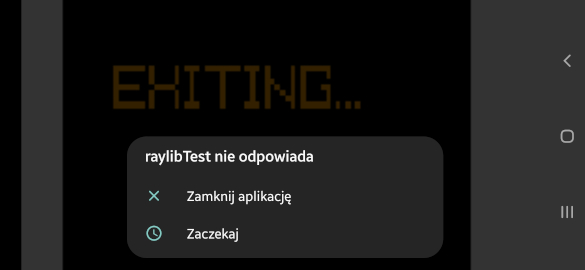
Snapshot from the smartphone showing popup displayed after a ~1 minute after pressing the "back" button. From Polish language: "raylibTest isn't responding". Options are "Close app" and "Wait".
Source code
#include <raylib.h>
#include <stdbool.h>

#define GAME_WIDTH 256
#define GAME_HEIGHT 144

int main(void)
{
	bool running = true;

	InitWindow(GAME_WIDTH, GAME_HEIGHT, "raylibTest");
	SetTargetFPS(60);

	while (!WindowShouldClose() && running)
	{
		BeginDrawing();
		ClearBackground(WHITE);
		DrawRectangle(0, 0, GAME_WIDTH, GAME_HEIGHT, BLACK);

		if(IsKeyDown(KEY_BACK))
		{
			DrawText("EXITING...", 32, 32, 32, ORANGE);

			running = false;
		}

		EndDrawing();
	}

	CloseWindow();

	return 0;
}
Issue description
After compiling an APK for Android using example source code (attached below), moving it to my smartphone, installing and launching, everything works properly until I press the "back" key on smartphone to exit application. It immediately gets stuck after pressing the button. Having no clues what's wrong with it, I decided to write this here, maybe someone else had this problem. I took a look at examples and games and I didn't notice any exclusive commands protecting from this issue. No clear informations about effective solution forced me to report this. Added the orange text to clearly show that moment when the app becomes "frozen".
Environment
Compilation for Android 10 (API level 29) on Windows 10 64-bit operating system using "raylib" 3.0 from the official installer in "Visual Studio Code" IDE. APK launched on Samsung Galaxy A40 smartphone.
Issue Screenshot
Snapshot from the smartphone showing popup displayed after a ~1 minute after pressing the "back" button. From Polish language: "raylibTest isn't responding". Options are "Close app" and "Wait".

Source code