Describe the bug
After updating to react-scripts v5.0.1 our builds starting failing as they were now including test files that relied on dev dependencies that had not been installed for the production build. I would not expect those test files to be included in the build.
The issue seems to be an incorrect glob pattern in the Webpack config for TypeScript files. There is already an open PR – #11875 – for this issue but it has been in review for a while and I could not find any related open issues so I'm opening one in the hope of getting the existing PR merged.
Did you try recovering your dependencies?
Yes, it did not fix the issue.
Which terms did you search for in User Guide?
"typescript", "typescript webpack", "devdependencies"
Environment
❯ npx create-react-app --info

Environment Info:

  current version of create-react-app: 5.0.1
  running from /Users/xxx/.npm/_npx/c67e74de0542c87c/node_modules/create-react-app

  System:
    OS: macOS 12.3.1
    CPU: (8) x64 Intel(R) Core(TM) i5-8257U CPU @ 1.40GHz
  Binaries:
    Node: 16.13.2 - ~/.nvm/versions/node/v16.13.2/bin/node
    Yarn: 1.22.17 - /usr/local/bin/yarn
    npm: 8.11.0 - ~/Projects/cra-bug-example/node_modules/.bin/npm
  Browsers:
    Chrome: 102.0.5005.61
    Edge: 102.0.1245.30
    Firefox: 93.0
    Safari: 15.4
  npmPackages:
    react: ^18.1.0 => 18.1.0
    react-dom: ^18.1.0 => 18.1.0
    react-scripts: 5.0.1 => 5.0.1
  npmGlobalPackages:
    create-react-app: Not Found
Steps to reproduce
I've included a link to a demo below which was created using these steps
- Create a new React app with TypeScript using
npx create-react-app my-app --template typescript
cd my-app- Add
msw as a dev dependency using npm install -D msw
- Add the following code to
src/App.test.tsx
import { setupWorker } from "msw";

const worker = setupWorker();
- Install only production dependencies using
npm install --omit=dev
- Run
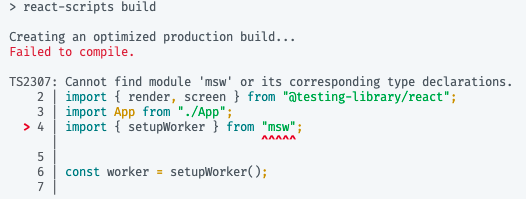
npm run build which should fail with TS2307: Cannot find module 'msw' or its corresponding type declarations.
You can test this was not an issue before v5 by downgrading to react-scripts v4.0.3 and running step 5 & 6 again. This time the build should succeed.
Expected behavior
The build would succeed as it would not include test files.
Actual behavior
Build failed because it could not find dependency imported in a test file.
Reproducible demo
This demo was created following the steps in the "Steps to reproduce" section.
https://github.com/heuperman/cra-bug-example
To reproduce the bug, take the following steps:
- Clone the repo
- Install only production dependencies using
npm install --omit=dev
- Run
npm run build which should fail with TS2307: Cannot find module 'msw' or its corresponding type declarations.
I hope this is enough information to review the issue. As I mentioned above there is already a PR with a fix here: #11875. Please let me know if I can provide anything else to help.

Describe the bug
After updating to
react-scriptsv5.0.1 our builds starting failing as they were now including test files that relied on dev dependencies that had not been installed for the production build. I would not expect those test files to be included in the build.The issue seems to be an incorrect glob pattern in the Webpack config for TypeScript files. There is already an open PR – #11875 – for this issue but it has been in review for a while and I could not find any related open issues so I'm opening one in the hope of getting the existing PR merged.
Did you try recovering your dependencies?
Yes, it did not fix the issue.
Which terms did you search for in User Guide?
"typescript", "typescript webpack", "devdependencies"
Environment
Steps to reproduce
I've included a link to a demo below which was created using these steps
npx create-react-app my-app --template typescriptcd my-appmswas a dev dependency usingnpm install -D mswsrc/App.test.tsxnpm install --omit=devnpm run buildwhich should fail withTS2307: Cannot find module 'msw' or its corresponding type declarations.You can test this was not an issue before v5 by downgrading to
react-scriptsv4.0.3 and running step 5 & 6 again. This time the build should succeed.Expected behavior
The build would succeed as it would not include test files.
Actual behavior
Build failed because it could not find dependency imported in a test file.

Reproducible demo
This demo was created following the steps in the "Steps to reproduce" section.
https://github.com/heuperman/cra-bug-example
To reproduce the bug, take the following steps:
npm install --omit=devnpm run buildwhich should fail withTS2307: Cannot find module 'msw' or its corresponding type declarations.I hope this is enough information to review the issue. As I mentioned above there is already a PR with a fix here: #11875. Please let me know if I can provide anything else to help.