
Run multiple Claude Code and Codex sessions in parallel — and see which one needs you.
A browser terminal for parallel AI coding agents: several Claude Code and Codex sessions side by side, each in its own cell, with the one that needs you marked in colour. Vibe coding with a single agent needs nothing but a shell — this is for when you run several and lose track of which is waiting. Sessions survive a reload (tmux), work isolates in git worktrees, and a phone push reaches you when a turn finishes.
Every cell is a real pty. htop, lazygit, a dev server and Claude Code are the same kind
of object here — which is why the one-session-per-worktree limit applies to agents only, and
a shell or a yarn dev launcher can sit in the same worktree an agent is working in.
📖 Documentation — receptron.github.io/mulmoterminal
- User guide: English — the grid view, everyday workflows, the full feature list, configuration, and mobile push notifications.
- ユーザーガイド: 日本語 — グリッドの使い方・日々のワークフロー・機能一覧・設定・スマホ通知の設定はこちら。
- Updates / アップデート情報: new releases and features are announced in Japanese on X — 新バージョンや新機能のお知らせは X の Singularity Society (@SingularitySoci) で。
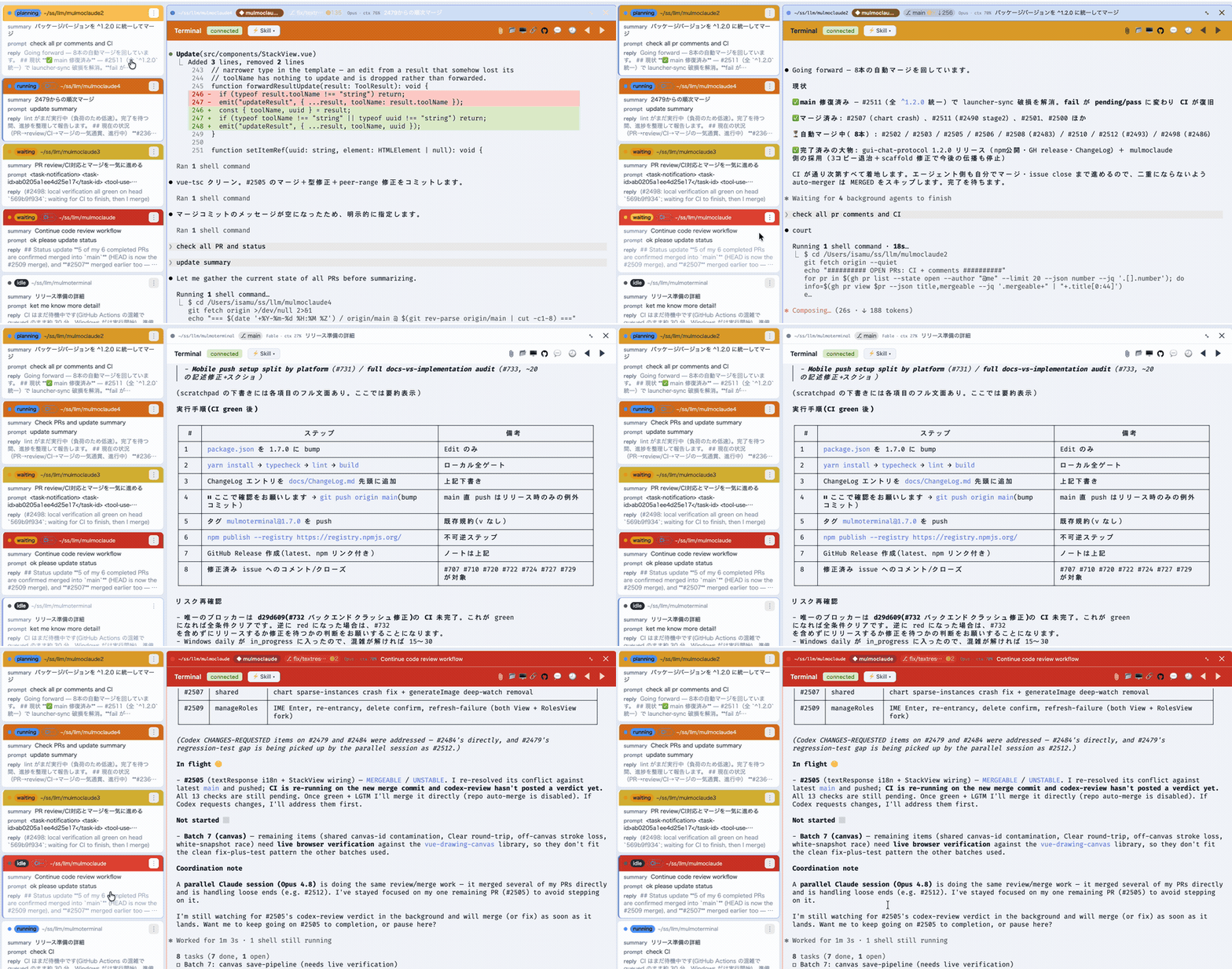
MulmoTerminal turns Claude Code (and OpenAI's Codex)
into a parallel, observable workspace: many agent sessions at once in a grid, each one
color-coded so you see at a glance which are working, which need you, and which are
done — plus rich GUI output, git worktrees with one-click PRs, cost readouts, and a
ping to your phone when a task finishes. One npx command, no Electron, no config.
npx mulmoterminal@latest # starts on http://localhost:34567 and opens your browserBuilt by receptron — Satoshi Nakajima, software architect for Windows 95 at Microsoft, and Isamu Arimoto; the same two behind GraphAI. More ↓
Something looks wrong? Type
/mulmoterminal-bug-reportin any MulmoTerminal session. The bundled skill hears the symptom out, checks your real config, schema and version to see whether the behaviour is configuration or by design, searches the existing issues — and only helps you file one if none of that explains it, with the environment collected and secrets masked. Getting you unstuck is the goal; an issue is what is left when the first three steps fail.
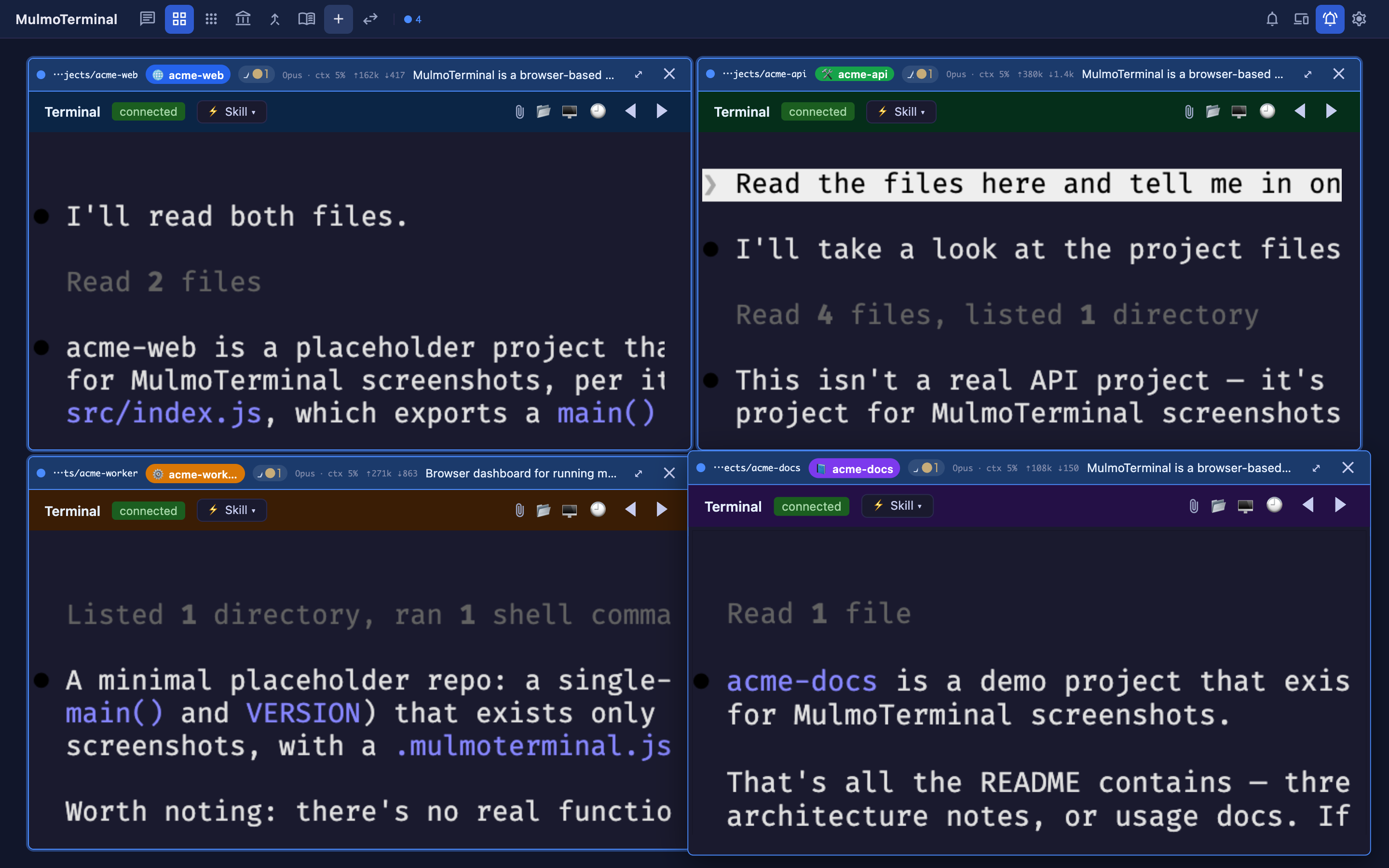
The grid is a cockpit for parallel agents — here, four live Claude sessions, each in its own color-coded project. Every cell's header carries what you need to triage at a glance: model · context %, token counts (⇡in ⇣out), the git branch / changes chip, and an AI summary of what the agent is doing. A cell's border color signals state — working (blue), done (green), needs-you (amber — e.g. waiting on a permission), idle — with an attention chime so a stuck cell off-screen still pulls you back. Supervise many; only step in where you're called.
- See every agent at once. A grid of live sessions, each cell color-coded by state — working (blue), blocked / needs a permission (amber), done, unreviewed (blue), idle — with an attention chime and a toolbar tally, so an off-screen agent that's stuck never slips past you. Stop babysitting one terminal; supervise ten. Zoom into one and the cockpit roster keeps everyone else in view — one text row per session with its AI summary, last prompt, latest reply, and the branch's PR phase (draft / CI fail / ready / merged).
- A GUI for your agents, not just a terminal. Beside the terminal, a Canvas panel renders what an agent produces over MCP — documents, forms, charts, generated images, HTML, collection cards — each drawn by its own plugin. The agent doesn't just print text; it hands you an interface.
- Get pulled back from anywhere. A finished — or input-waiting — task sends a Web Push to your phone, and the RemoteHost companion lets you watch sessions and answer with a tap (yes / no / continue) from the phone itself — walk away, get pinged, jump back in.
- Nothing is lost on a restart. With
tmux, every session survives a server crash, restart, ornode --watchreload — a mid-turn agent, a long build, a dev server all keep running and reattach when you come back. - Ship without leaving the grid. Each repo cell shows a git branch chip, isolates work in a one-click git worktree, opens a diff panel, and does commit / push / open PR — so several agents can work the same repo without colliding.
- Know what it's costing. Per-session context %, token, and estimated $ readouts, an activity timeline of tool calls, and AI-summarized cell titles and command-output explanations — so a wall of parallel agents stays legible.
- Make it yours. Per-directory themes, colors, and name badges (
prodin red,stagingin amber), a configurable header (buttons + info chips), custom attention sounds, and Run / Skill menus to launch a project's scripts and.claude/skillsright inside a cell.
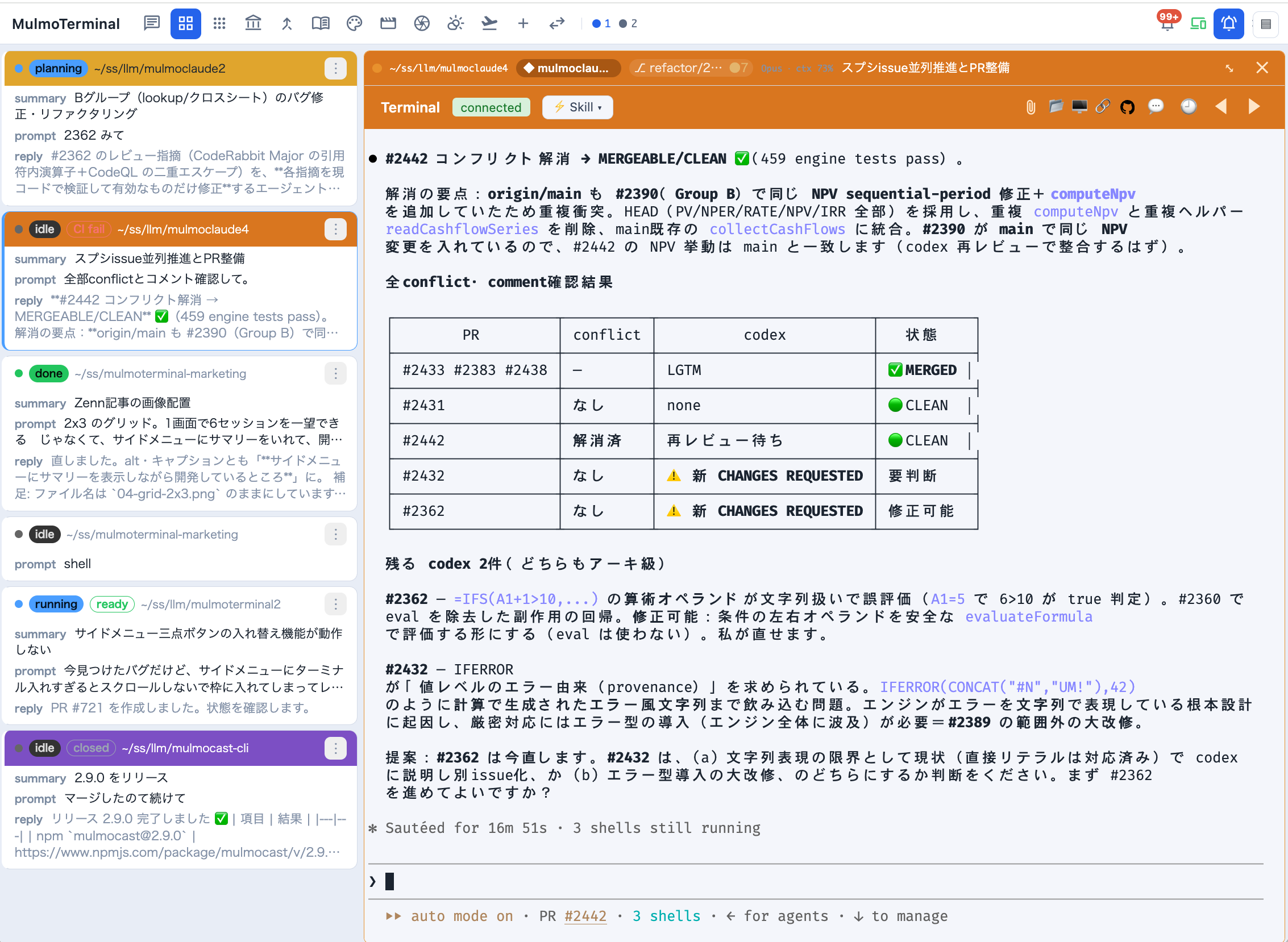
Zoomed in, the cockpit roster replaces thumbnails with information: every session as a text row — directory, AI summary, your last prompt, the agent's latest reply, a status word, and the branch's PR phase badge. A row whose agent is waiting on you rings amber and blinks; one that has merely finished rings green and stays still (Settings → Waiting rows turns the movement off). Click a row to swap the enlarged terminal.
Each session runs as a real PTY on the server (the agent CLI in a pseudo-terminal) and is streamed to an xterm.js terminal in the browser over a WebSocket. The cockpit roster lists every session and reflects, in real time, which are working (the agent is thinking, a spinner), which are waiting on you (a permission prompt or a question — an amber dot; nothing proceeds until you answer) and which are finished with output you haven't seen (a green dot) — driven by Claude/Codex activity hooks the server injects per spawn. The horizontal tab bar carries the same two dots.
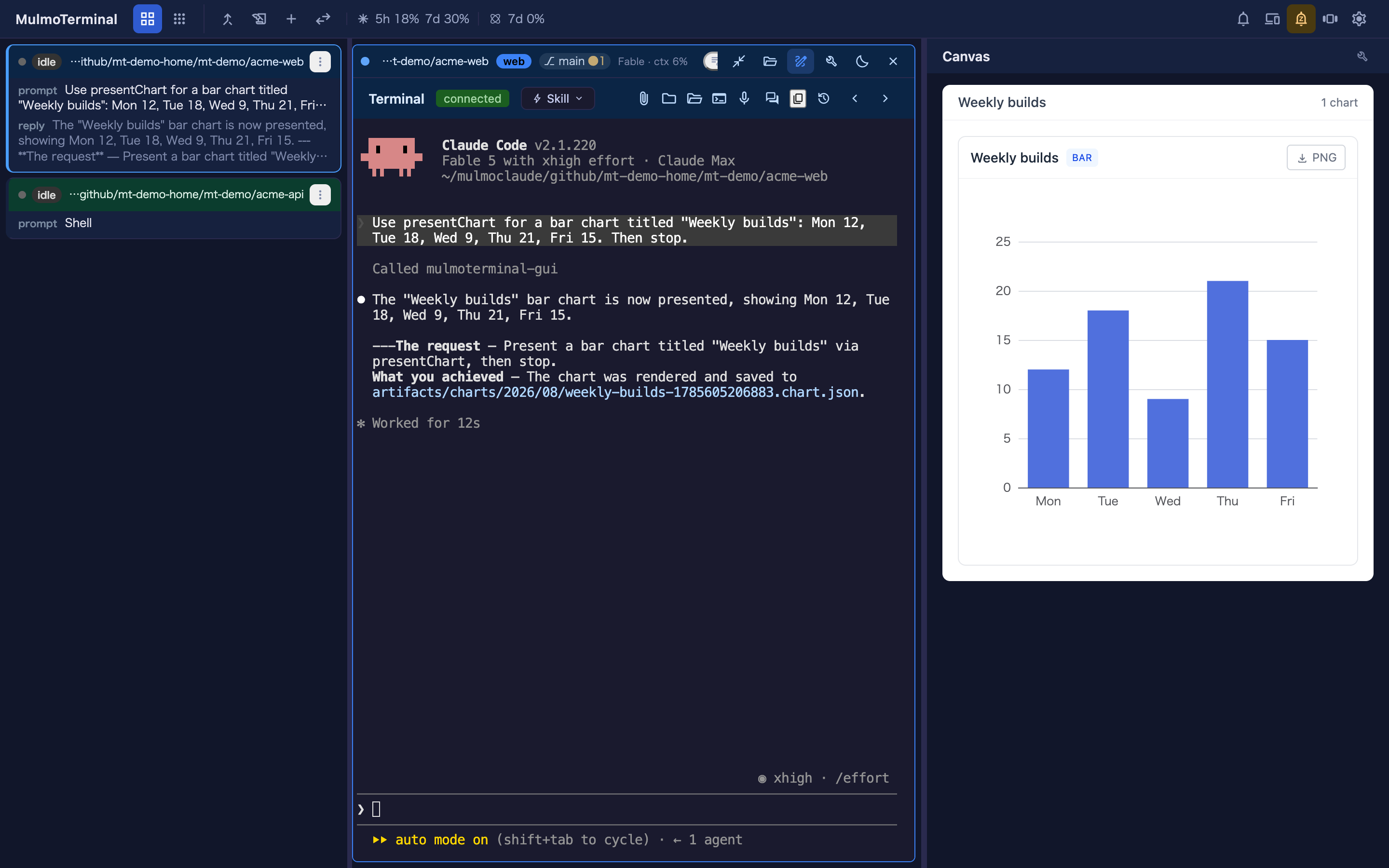
To focus on one agent, zoom its cell: it takes the window, and the GUI panel ("Canvas") opens beside it, where that agent's tool calls render as documents, forms, charts, images, and HTML rather than printed text. The app opens on the grid (/, settling on /terminals), which is the only view; 3.x had a separate single view at /chat and 4.0.0 removed it, so that URL now lands on the grid like any other.
Inserting a file path — like a native terminal, you can put a file's absolute path into the prompt: drag a file onto the terminal, or click the file button in the terminal header, which asks the local server to open the OS file dialog and inserts the chosen path. The path is inserted at the cursor — it is not submitted, so you can review it first.
A drag inserts the file's own path where the browser exposes one via file://
(Firefox/Safari), so editing it afterwards edits the file you dropped. Where the browser
withholds it — Chrome, and every browser when MulmoTerminal is open from another
machine, where a local path would name nothing on the host — the file's bytes are sent
instead, saved to a private per-session directory under the OS temp dir, and that path is
inserted. The session is granted that directory at launch (Claude Code's --add-dir), so the agent reads it without a permission prompt; the copies are removed
when the session ends, and any left by a crash are swept at the next start. Up to 110 MiB per
file — the same ceiling as a phone attachment. A session already running when you upgrade
was launched without that grant, so drops into it still prompt; new sessions don't.
Pasting a screenshot — take a screenshot and paste it straight into the terminal
(Cmd/Ctrl+V). The image is saved to the session's own drop directory — the same place a
dropped file goes, with the same grant, the same 110 MiB ceiling and the same cleanup when the
session ends — and its absolute path is inserted at the cursor, so the agent can read it.
Unlike a drop, this does not need the browser to expose a path — the bytes are on the
clipboard — so it also covers Chrome, where dropping a file cannot insert a path. It works
wherever the browser puts the image on the clipboard as image/png, image/jpeg,
image/gif, or image/webp. Anything else is left to the terminal's own paste handling,
exactly as before — including a paste that carries plain text next to the image, which
copying from a web page usually does, so that pasting text keeps working.
Clicking a file path — the other direction. A path an agent prints becomes a link, and what it opens is chosen by its extension, so each kind arrives as the thing it is rather than as bytes (files within the session's working directory only):
| A clicked … | opens as |
|---|---|
.md .markdown |
rendered markdown in a new tab — the same sandboxed …/md HTML the Files preview uses. It follows your system light/dark setting, since under the sandbox CSP it can't ask the app which theme is on |
.json |
indented in a new tab (Chrome and Safari otherwise show one long line) |
.csv .tsv |
a table in a new tab, with a sticky header that scrolls inside its own box |
source, config, logs, and .txt — 46 extensions |
the app's own Files view (/files?path=), where CodeMirror highlights it, the tree is right there, and it can be edited |
| everything else — images, PDF, SVG, HTML, video | raw bytes in a new tab, which the browser renders better than an editor would |
While a grid cell is enlarged, the Files pane takes the click first — every row above except the last one, since the pane is the same editor plus a Markdown preview. The file opens beside the terminal that printed it, and the pane opens itself if it was closed. It declines, leaving the routing above untouched, when nothing is enlarged, when the path is not under that cell's own directory (the pane cannot walk above its root), or for the raw-bytes row, where it would only show an empty editor.
Highlighting in the Files view covers the JS/TS family, JSON and Markdown (the modes
cmEditor.ts bundles); other languages open as plain text.
This set is deliberately asymmetric with the set the server serves as viewable text —
.md goes to the rendered viewer rather than the Files view, .txt does the opposite, and
dotfiles are server-only. The 45 extensions both sides agree on live in
common/sourceExtensions.ts, each side adds its own extras, and
test/common/sourceExtensions.spec.ts pins the asymmetry so it isn't "fixed" into symmetry.
Changing this? The routing table is
ROUTE_BY_EXTENSION/IN_APP_EXTENSIONSinsrc/composables/terminalFilePathLinkProvider.ts. Update this section, thedocs/guide/{en,ja}/features.mdrow, and the link table indocs/terminal-notes.mdtogether — all three went stale once already (#834).
These are experiences reported by users who moved over from an IDE or a split terminal — not benchmarks, and not claims we measured. Your setup may differ.
Keeping several agents apart by opening several IDE windows is expensive: each one brings its own editor, language server, extensions and file watchers. One user reported a 64 GB machine stuttering under that load, and running smoothly after moving over — here the agents are PTYs on a server and the UI is browser tabs.
Six panes of scrolling text look identical. Users have described typing a reply into another agent's terminal, and losing track of what they had asked in the first place. As one put it, the windows all look the same, so switching between them costs time just to work out what you are looking at.
The problem isn't attention — it's that N identical panes means holding N contexts in your head. Colour-coded state, a name badge and a per-directory colour move that onto the screen instead.
Splitting a terminal six ways leaves every pane too small to read a long answer without constant scrolling and resizing — one user described exactly that with a 4,000-character reply. So you quietly accept worse reading every time you add an agent.
Grid ↔ enlarge removes that. Watch all of them, then blow one up and read it properly — the cockpit roster keeps the rest in view as text while you do.
Sessions resume as-is — same claude --resume, same transcripts. Point it at a directory you
already work in and your history is there. Nothing to migrate, nothing to redo. One user said this
alone made the switch worth it, having previously lost context to killed sessions.
You don't need ten agents for this to pay off. Users have reported the switch being worth it at one to three parallel sessions. The wins above are about not losing track, not about running more.
Needs Node ≥ 22.9, plus these CLIs on your PATH:
Never installed any of this before? The guide walks it end to end, macOS and Windows, assuming no command-line experience: Getting started · はじめに — 起動するまで
| Tool | What it gives you | Install | |
|---|---|---|---|
| Required | claude |
every Claude session — this app is a cockpit for it | npm i -g @anthropic-ai/claude-code, then run claude once to log in |
| Required | git |
worktree isolation, each cell's branch / unsaved-dot / diff readout, the PR footer | brew install git · sudo apt install git · sudo dnf install git · Windows: git-scm.com |
| Required | gh |
the cross-repo PRs & Issues view and one-click PR creation — it uses your gh login, so no token is stored |
cli.github.com, then gh auth login |
| Optional | glab |
the same for GitLab projects (#981) — gitlab.com, and a self-hosted instance you declare in gitlabHosts (#1332). Same arrangement: the CLI holds the credentials, this app stores no token |
brew install glab, then glab auth login (self-hosted: glab auth login --hostname gitlab.example.com) |
| Recommended | tmux |
session persistence — terminals survive a server restart | brew install tmux · sudo apt install tmux · sudo dnf install tmux · no native Windows build (falls back to plain PTYs) |
| Optional | codex |
Codex sessions in a cell, alongside Claude | npm i -g @openai/codex |
| Optional | ffmpeg |
video rendering from the mulmo-script panel (its plugin ships enabled) | brew install ffmpeg · sudo apt install ffmpeg · sudo dnf install ffmpeg |
| Optional | ollama |
claude-ollama — Claude Code against a fully local model |
ollama.com/download |
| Linux only | a file dialog | the Choose a folder / Insert a file path buttons, which open an OS dialog on the machine the server runs on. macOS and Windows have one built in; WSL uses the Windows one over interop and needs nothing installed. A Linux desktop needs one of these — without any, the buttons say so and you type the path instead (#1447) | sudo apt install zenity · sudo dnf install zenity · kdialog, qarma and yad also work |
The server starts without any of the non-required rows; you just lose that row's feature,
and the header/panel for it says so. git and gh are marked required because losing them
costs whole views rather than one button. npx mulmoterminal@latest init (below) reports which of
these it can find.
npx mulmoterminal@latest           # start on http://localhost:34567 and open the browser
# or install globally:
npm install -g mulmoterminal
mulmoterminal
First-run setup (optional). npx mulmoterminal@latest init checks your environment (Node ≥ 22.9
and every CLI in the table above), seeds the launcher's directory
presets from the projects in your Claude Code history, and writes ~/.mulmoterminal/config.json.
It's idempotent — re-run it any time to refresh the presets; it overwrites the managed parts
and keeps your other settings. When claude is installed it can hand off to the
/mulmoterminal-config skill for interactive tweaks — it routes to the one that owns what you
want to change. Once the app is up you can also reach them from Settings: each section that a
skill can write ends in a button that starts that skill in a new session, which is how the settings
with no UI (a theme of your own, keymap) get written without hand-editing JSON.
Google account (optional). Link a Google account to enable the chat's google tool and the
phone's google.calendar.* commands: read/create events on any calendar (not just your primary),
list the calendars you've subscribed to, and read the colour palettes. Sign in from
Settings → Google account, or run npx mulmoterminal@latest google login — the CLI is the fallback
for when you're driving MulmoTerminal from another machine, since consent finishes on a loopback
listener and needs a browser on the host. Either way it needs a Desktop OAuth client JSON saved
as ~/.secrets/client_secret_*.json; the refresh token lands in ~/.config/mulmo/google-token.json
and is shared with MulmoClaude, so one link per machine covers both apps.
Local models (optional). The package also ships claude-ollama — a one-command launcher that
runs Claude Code fully locally against an Ollama model (no cloud, no API
key). It starts a large-context Ollama server and launches claude with a minimal system prompt so
small models aren't drowned:
ollama pull qwen3:4b
npx -p mulmoterminal claude-ollama qwen3:4b   # or, if installed globally: claude-ollama qwen3:4b
See Local models with claude-ollama for the details and model notes.
Already linked before the calendar-list / colour features? They need a read scope your existing link doesn't have, so
listCalendars(and, in practice,colors) fail with an insufficient-scope 403 until you re-authorize: Settings → Google account → Unlink, then sign in again (or re-rungoogle login). Reading/creating events on your primary calendar keeps working without re-linking.
A global install isn't auto-updated, so on startup MulmoTerminal checks npm and
prints a one-line notice when a newer version is available — and the web toolbar shows a
clickable update badge with the exact command for your install (npm i -g mulmoterminal,
or git pull for a clone). Disable with MULMOTERMINAL_NO_UPDATE_CHECK=1 (or NO_UPDATE_NOTIFIER=1).
Options: --cwd <dir> (working directory — relative paths allowed; defaults to the
directory you run the command from), --port <n> (default 34567), --no-open,
--version, --help.
npx mulmoterminal@latest --cwd ./my-project # work in a specific directoryThe published package ships the server (run via tsx) plus the pre-built web UI;
npx mulmoterminal@latest checks for the claude CLI, picks a free port, starts the
server, and opens the browser. For local development from a clone, see
Running.
Won't start with ERR_MODULE_NOT_FOUND? If a first npx run was interrupted, a half-unpacked ~/.npm/_npx/<hash> cache can remain and a later run fails at startup — a corrupted npx cache, not a bug in the published package.
The launcher detects it and prints the exact, OS-appropriate removal command; run that, then npx mulmoterminal@latest again.
- Architecture
- Why a PTY?
- Agents: Claude & Codex
- Session persistence (tmux)
- Tech stack
- Configuration
- Running
- Scripts (Run menu)
- Skills (Skill menu)
- Files view (browse & edit)
- Git worktrees & pull requests
- Cost & token usage
- Wiki, Collections & the GUI panel
- More features
- Server API specification
- Session model
- Session lifecycle
- Claude hook injection
- Closing summary
- Session discovery & titles
- Project structure
- Testing
- Contributing
┌──────────────────────────────────────┐         ┌─────────────────────────────────────────────┐
│ Browser (Vue 3 + xterm.js)            │         │ Server (Express + Node)                       │
│                                       │         │                                               │
│  App.vue ──────subscribe("sessions")──┼──SIO───►│  socket.io  /ws/pubsub   ── publish ──┐       │
│      ▲  refetch on any push (favicon) │         │                                       │       │
│      └──── GET /api/sessions ─────────┼──HTTP──►│  Express   /api/sessions              │       │
│                                       │         │            /api/hook  ◄──curl── hooks │       │
│  Terminal.vue ── ws JSON msgs ────────┼──WS────►│  ws        /ws  ──► node-pty ─► `claude`──hooks┘
│      (input / resize / output)        │         │                     (one PTY per session)     │
└──────────────────────────────────────┘         └─────────────────────────────────────────────┘
- Terminal I/O flows over a raw WebSocket (
/ws), one PTY per session. - Session list is fetched over HTTP (
/api/sessions) — byApp.vuefor the tab favicon, and by an empty cell's launch form (?cwd=) for its resume rows. - Live activity is pushed over a Socket.IO pub/sub channel (
/ws/pubsub); the server learns of activity from Claude hooks that POST to/api/hook. - Other terminals run on their own raw WebSockets: Codex sessions on
/ws/codex, persistent launch commands on/ws/launch, and one-off script commands (yarn dev, tests, …) on/ws/run. Only Claude/Codex are agent sessions with hooks; see Agents: Claude & Codex and Scripts (Run menu). - In dev (
yarn dev) the Vite dev server runs on its own port (CLIENT_PORT, default6856) and proxies/ws(a prefix covering/ws/codex,/ws/launch, and/ws/run),/ws/pubsub,/api, and/artifactsto the backend (PORT, default34567) — so you open the Vite port (e.g.http://localhost:6856). In production the backend serves the built client fromdist/onPORT, and you open that.
Claude Code's interactive mode renders its UI with Ink
(a React-based TUI framework), which requires a real TTY to be attached. A
plain child_process.spawn() provides no TTY, so interactive Claude won't start
(it stays silent). node-pty allocates a
real pseudo-terminal at the OS level, so from Claude's point of view it's
running in an ordinary terminal — full TUI rendering, cursor movement, colors,
and tool-approval prompts all work. We don't use -p/headless mode or the Agent
SDK; we drive the real interactive CLI and relay its TTY over the WebSocket.
macOS note: node-pty's bundled
spawn-helperbinary ships without the execute bit (mode 644), which causes aposix_spawnp failederror. Thepostinstallscript (server/fix-pty-perms.js) fixes it to 755 automatically.
MulmoTerminal drives interactive coding-agent CLIs, not just Claude. An
AgentAdapter seam abstracts the per-agent bits (which binary to spawn, how it resumes)
so the PTY, grid, persistence, and GUI-panel plumbing stay shared. Four adapters ship
today — Claude Code (the default), Codex, Antigravity (agy), and Grok.
-
Claude — spawned as
claude(override withCLAUDE_BIN). The server passes--session-id <uuid>, so it knows the live session's id even before its transcript file exists, and injects activity hooks per spawn (see Claude hook injection) plus the closing summary instruction. The whole GUI MCP (--mcp-config, on one all-tools URL) goes only to a session that is not a grid cell, or to a grid cell whose cwd IS the workspace —claimFullGuiMcpinserver/session/registry.ts, which is what gives a workspace cell the tools the single view had before 4.0.0 removed it. That equivalence is about what the session carries: a workspace cell is still a grid cell in every other respect. A cell in a project directory attaches none of ours, so its GUI tools come from whichever Canvas switches are registered for it. Either way, Claude Code loads your own MCP servers normally — the directory's local scope, any.mcp.jsonup the tree, your global ones and your claude.ai connectors. It did not always:--strict-mcp-configused to ride along with--mcp-config, which hid all of that from the very sessions meant to be the most capable (#1338, #1385). -
Codex — spawned as
codex(override withCODEX_BIN;CODEX_MODELsets--model). Codex runs on its own WebSocket (/ws/codex) and its sessions appear in the cockpit roster next to Claude's. Because Codex only mints its rollout id after the first turn, the server watches~/.codex/sessions/**/rollout-*.jsonl(home overridable viaCODEX_HOME) and maps the new rollout to the session — attributed only when it's unambiguous, never by "newest wins". That mapping is appended to~/.mulmoterminal/codex-rollouts.jsonl, so a conversation is still resumable after the server restarts — without it a session whose tmux is also gone came back as a fresh codex. Resume reattaches a live PTY, adopts a surviving tmux session, or cold-resumes the rollout id. -
Antigravity — spawned as
agy(override withANTIGRAVITY_BIN;ANTIGRAVITY_MODELsets--model). Antigravity runs on its own WebSocket (/ws/antigravity). Like Codex it mints its own conversation id, so the server watches~/.gemini/antigravity-cli/brain/(home overridable viaANTIGRAVITY_HOME) for the directory the new conversation creates — attributed only when unambiguous — and cold-resumes it with--conversation <id>. That mapping is appended to~/.mulmoterminal/antigravity-conversations.jsonl, so a conversation is still resumable after the server restarts — the same log Codex keeps, in the same format.Its GUI tools work differently — in the workspace too, because
agytakes no MCP flag: it reads its servers from.agents/mcp_config.jsonin the working directory. So it never gets the workspace's "every tool automatically"; register what it needs with the Canvas switches, wherever it runs (see MCP server ids). MulmoTerminal writes that file from the directory's Canvas switches — the same switches Claude's cells read — so one switch serves every agent, and rewrites it whenever a switch flips or an agy session starts. Servers in it that MulmoTerminal did not write are left alone, the file is removed once no group is on, and it is kept out of yourgit statusthrough.git/info/exclude— a local switch on a local machine, so it never reaches a diff or your team. The entry runsserver/mcp/bridge.mjs, a stdio-to-HTTP shim onto the same in-process GUI MCP server the other agents call. The session id is never written into that file — it is per directory and shared by every session running there — and reaches the bridge through the agy process's own environment instead. -
Grok — spawned as
grok(override withGROK_BIN;GROK_MODELsets--model), on its own WebSocket (/ws/grok). It resumes the way Claude does rather than the way Codex and Antigravity do:grok --session-id <uuid>starts a conversation under an id MulmoTerminal minted, so there is no watcher, no attribution guess, and no mapping log — the id the browser holds is grok's own. A reconnect passes--resume <id>instead, but only once a conversation by that name exists on disk: grok writes one under~/.grok/sessions/<url-encoded cwd>/<id>/(home overridable viaGROK_HOME) after the first turn, and re-using a--session-idthat already exists is a hard error, which is why the two flags are never sent together.Its GUI tools work like Antigravity's — in the workspace too and for the same reason:
groktakes no MCP flag, so it never gets the workspace's "every tool automatically" either, and MulmoTerminal registers the bridge in.grok/config.toml(grok's project-scope config) from the directory's Canvas switches, wherever it runs (see MCP server ids). That file is TOML and yours, so — unlike agy's JSON — MulmoTerminal never rewrites it directly: it drivesgrok mcp add -s project/grok mcp remove -s project, and only for the server ids it wrote itself. Nothing else in the file is touched, a directory already in the right state runs no command at all, and the file is added to.git/info/excludeonly when MulmoTerminal created it. As with agy, the session id is never written into that file — it reaches the bridge through the grok process's own environment.
Choosing an agent. Each grid cell's launch form carries the Agent Picker — a
Claude / Codex / Antigravity / Grok / Shell toggle — and the Collections browser a Claude /
Codex / Antigravity / Grok one (your choice is remembered).
Shell is not an agent: it runs your OS default shell ($SHELL, or /bin/sh) in the
chosen directory, with nothing to install and nothing to configure. It starts a launcher
cell, so it has no model, no MCP registration, and no worktree — those rows disappear
while it is picked.
Other models.
Claude Code can run against any Anthropic-compatible backend (OpenRouter, Moonshot, a
LiteLLM gateway). Backends are listed in ~/.mulmoterminal/config.json under providers,
and their keys are read from the server's environment — never from a file the app
serves. A directory sets its default in .mulmoterminal.json (provider / model), and
each grid cell's launch form has a MODEL select that overrides it for one session,
listing ~27 curated models with the measured pass rate of a real tool-using task beside
each. A provider whose token can't be resolved refuses to start rather than falling
back to Anthropic. Full walkthrough — setup, the measured model list, adding your own models, troubleshooting:
Using another model via OpenRouter.
Skills for Codex. Codex has no /<slug> slash commands, so on session setup
MulmoTerminal mirrors the workspace's .claude/skills into ~/.codex/skills (each
mirrored directory carries a .mt-mirror marker so a re-sync overwrites what MulmoTerminal
owns and never clobbers Codex's own skills), and rewrites a collection's /<slug> … seed
into a plain Use the "<slug>" skill. instruction. The same skills Claude uses then show
up for Codex, loaded by description.
If tmux is installed, MulmoTerminal runs each Claude session and launcher inside
a tmux session, so a server crash or restart doesn't kill your terminals — the
processes keep running and reattach when the server comes back (like screen/tmux).
A long build, a dev server, or a mid-turn Claude session all survive node --watch
reloads and crashes. It uses its own tmux server (-L mulmoterminal) and config, so
it never touches your personal tmux sessions or keybindings.
No tmux? No problem — terminals fall back to plain (non-persistent) PTYs, exactly as before. An explicit close (a cell's ✕) ends the tmux session; a machine reboot does not survive (tmux itself is gone). Command-cell scripts are ephemeral and not persisted.
Installing tmux (optional):
brew install tmux            # macOS (Homebrew)
sudo apt install tmux        # Debian / Ubuntu
sudo dnf install tmux        # Fedora
On Windows there's no native tmux, so sessions use the non-persistent fallback — run the
server under WSL if you want persistence. Nothing else is required: MulmoTerminal
detects tmux on PATH at startup and uses it automatically when present.
| Layer | Technology |
|---|---|
| Frontend | Vue 3 (<script setup> + TypeScript), Vue Router, Vite, xterm.js (@xterm/*), CodeMirror 6, socket.io-client |
| Backend | Node (ESM, TypeScript run via tsx), Express 5, ws (terminal WebSocket), node-pty, socket.io, @modelcontextprotocol/sdk (in-process GUI MCP) |
| Plugins | GUI-protocol Vue plugins (@mulmoclaude/*, @mulmochat-plugin/*): markdown, form, image, chart, HTML, collection, accounting, mulmoscript (MulmoCast video/slides), google |
| Tests | Vitest + @vue/test-utils + jsdom |
Requires Node ≥ 22.9 (uses node --env-file-if-exists) and the claude CLI on PATH.
The server is configured entirely through environment variables, optionally
loaded from a .env file. npx mulmoterminal@latest reads the .env in the
directory you run it from; the npm scripts read the one in the repo root. The
.env is optional — every variable below has a default, so the server runs
without one.
A variable already set in your shell wins over the same name in .env, so
adding a file never overrides what you exported. The server's environment is
inherited by every terminal it starts, so anything in .env is also visible to
the claude / codex sessions themselves.
| Variable | Default | Description |
|---|---|---|
PORT |
34567 |
Backend HTTP/WebSocket port (prod: the URL you open). |
CLIENT_PORT |
6856 |
Vite dev-server port (dev only: the URL you open with yarn dev). |
CLAUDE_BIN |
claude |
The Claude Code binary to spawn. On Windows a bare name is resolved on PATH before it reaches the PTY layer (which matches file names exactly): to the .exe when there is one, otherwise to the .cmd shim an npm-global install leaves, run through cmd.exe. |
CLAUDE_CWD |
current dir | Working directory each claude PTY runs in; determines which project's sessions are listed. Via npx mulmoterminal@latest it defaults to the directory you ran the command from (override with --cwd <dir>, relative allowed); when the server is run directly it falls back to ~/mulmoclaude. A value read from .env must be an absolute path (~ is not expanded). |
CLAUDE_PERMISSION_MODE |
auto |
Permission mode passed to each claude spawn. |
MT_TITLE_MODEL |
haiku |
Model used for the cell header's AI title (a cheap/fast model summarizing the recent turns). Accepts a --model alias or a full model id. |
CODEX_BIN |
codex |
The Codex CLI binary to spawn. |
CODEX_MODEL |
codex default | Model passed to Codex as --model (unset = Codex's own default). |
CODEX_HOME |
~/.codex |
Codex home — where its session rollouts and MulmoTerminal-mirrored skills live. |
ANTIGRAVITY_BIN |
agy |
The Antigravity CLI binary to spawn. |
ANTIGRAVITY_MODEL |
agy default | Model passed to Antigravity as --model (unset = agy's own default). |
ANTIGRAVITY_HOME |
~/.gemini/antigravity-cli |
Antigravity home directory containing session brain storage. |
GROK_BIN |
grok |
The Grok CLI binary to spawn. |
GROK_MODEL |
grok default | Model passed to Grok as --model (unset = grok's own default). |
GROK_HOME |
~/.grok |
Grok home directory containing its per-directory session store. |
MULMOTERMINAL_HOME |
~/.mulmoterminal |
Root for managed git worktrees. |
CLAUDE_CONFIG_DIR |
~ |
Claude Code's own config directory. .claude.json lives inside it, so relocating your Claude Code config moves that file too — MulmoTerminal reads it to tell whether the per-project GUI MCP server is registered (server/infra/gui-mcp-registration.ts). Leave it unset and ~/.claude.json is used. |
MULMOCLAUDE_WORKSPACE_PATH |
~/mulmoclaude |
Where the managed MulmoClaude workspace lives. MulmoTerminal seeds presets/helps only into this directory, so launching in an arbitrary project never writes them there (server/backends/workspaceSetup.ts). Set it to the same value MulmoClaude uses. |
MULMOTERMINAL_NO_SKILL_INSTALL |
unset | Set to any value to skip installing the bundled skills (mulmoterminal-config and the -dirs / -theme / -header / -keys / -model / -notify / -bug-report / -decisions family) into ~/.claude/skills/ and the Codex skills root on startup. |
GEMINI_IMAGE_MODEL |
gemini-3.1-flash-image-preview |
Model used for image generation (needs GEMINI_API_KEY). The default is a preview model Google schedules for retirement around mid-2026, so pin a stable one here (e.g. gemini-2.5-flash-image) rather than waiting for a code change. |
WAIT_REAP_GRACE_MS |
1800000 |
How long a waiting background session is kept before it's auto-reaped (0 or negative = never). |
The update-check opt-outs (MULMOTERMINAL_NO_UPDATE_CHECK, NO_UPDATE_NOTIFIER) are
covered in Install & run.
Example .env (gitignored):
CLAUDE_CWD=/Users/you/my-project
The Settings modal (the gear button) persists per-user UI choices to ~/.mulmoterminal/config.json
(read/written via GET/POST /api/config):
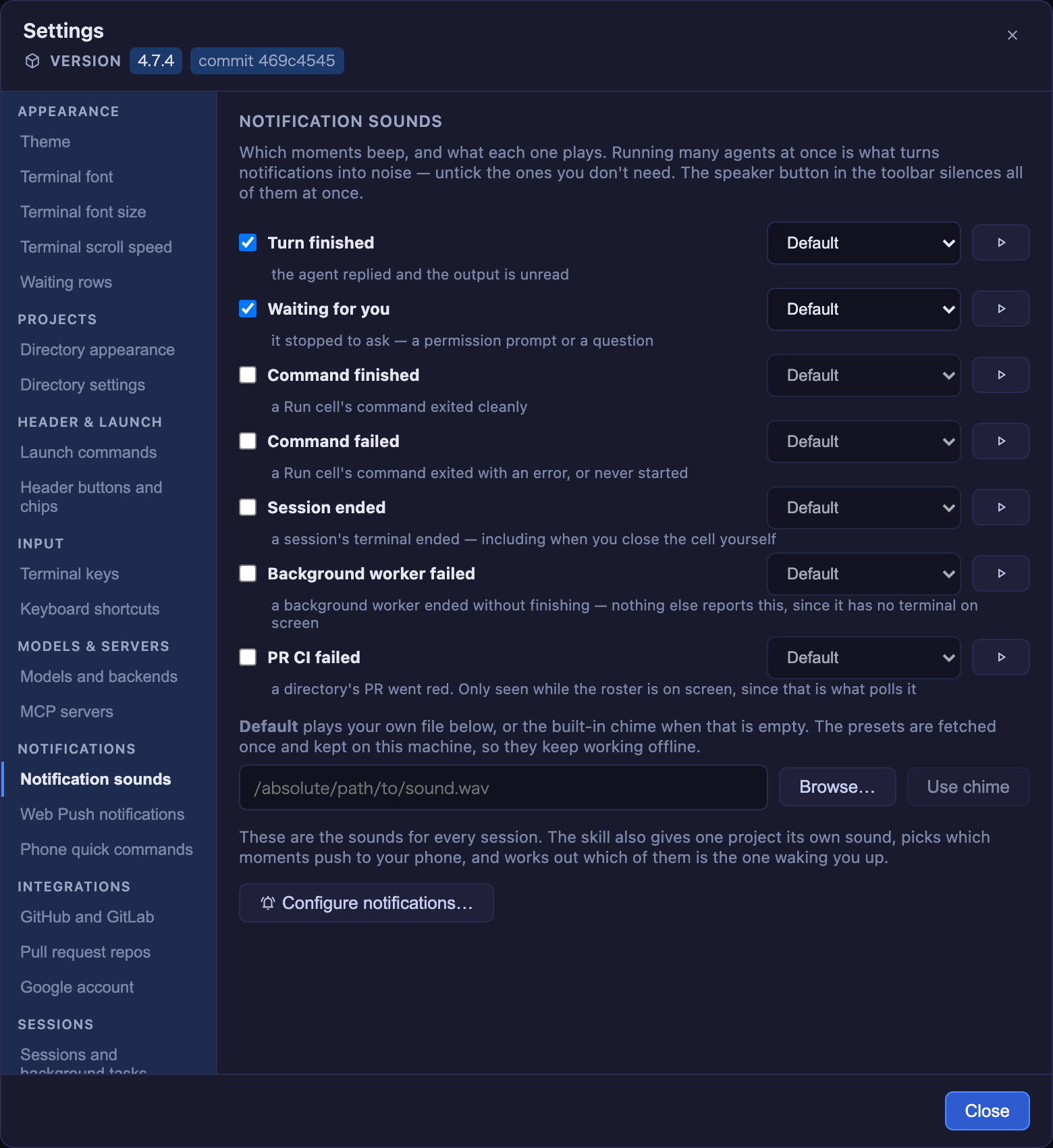
Open it from the gear button in the toolbar. The sidebar groups the sections — Appearance, Projects, Header & launch, Input, Models & servers, Notifications, Integrations, Sessions, Help — and one is on screen at a time; on a phone the sidebar becomes a picker above the section. Settings is available in English and Japanese: it follows your browser's language unless you pick one under Language (per browser, like the theme). Only this modal is translated so far. Under the title, a Version row shows what is running: the version from the shipped package.json, plus a commit <sha> chip on a git checkout — there the version is only whatever was last released, so the commit is what identifies the build. When something newer exists, the row is followed by the header badge's update notice, command included. Pick a theme, set the terminal font size, font and scroll speed (and whether sending returns to the latest output), set a custom attention sound, list the repos the cross-repo PRs & Issues view should aggregate, add launch commands for grid cells, register your own MCP servers, and turn on the switches for what this app writes on your behalf — issue work comments, the PR clone footer, the closing summary, the decision digest, the dev worklog — no need to hand-edit the config file. Four settings stay with their skill because a form would be the wrong tool for them (keymap, themes, providers, buttons/chips); Settings shows what each is doing now and launches that skill. Note that theme, font size, scroll speed and the return-to-latest switch are stored per browser (they're display preferences, so a phone and a desktop keep their own); the rest live in ~/.mulmoterminal/config.json and are shared by every client.
| Field | Meaning |
|---|---|
cwdPresets |
Quick-pick directories offered when launching a terminal. |
soundFile |
Absolute path to a custom attention sound, the fallback for every kind. Empty/unset uses the built-in synthesized chime. |
soundKinds |
Which moments beep — see Notification sounds. Defaults to ["finished","waiting"]; the other kinds are opt-in. |
sounds |
Per-kind sound: { "waiting": "preset:coin" }. A preset:<id> reference or an absolute path; a kind with no entry falls back to soundFile. |
prRepos |
owner/repo entries whose open PRs/issues the cross-repo PRs & Issues view aggregates, using whichever CLI the host needs — your own gh or glab login, so no token is stored here. An entry may name its host — gitlab.com/group/project is read with glab, and work can be started on it, commented on and turned into a merge request. A host that is neither shows a row saying so. |
gitlabHosts |
Hosts that run a self-hosted GitLab, e.g. ["gitlab.example.com"]. Nothing in a URL says which forge a host runs, so declaring it is what lets prRepos entries on that host be read with glab — everything gitlab.com can do, it can do. Needs glab auth login --hostname <host>. Editable in Settings → GitHub and GitLab; either way it takes effect on the next server start. |
repoDirs |
{ "owner/repo": "/abs/path" } — which local clone work on a repo starts in, when you keep several side by side. Only the choice is stored; which clones exist is re-derived from cwdPresets on every read, and an entry that no longer names a clone of that repo is ignored. |
launchers |
{ label, command } entries offered in a grid cell's launcher besides the agents — any interactive command. A plain shell needs no entry: the Agent Picker's Shell option opens $SHELL unconfigured. |
customAgents |
{ id, label, agent, command } entries offered in the Agent Picker — your own way of starting Claude Code (ollama launch claude --model … --, a wrapper script). Unlike a launcher, Claude Code's own argv is appended to command, so the cell is a real session: resume, cost, context, GUI tools. agent says which agent's arguments to append and is required ("claude" is the only value today); command must stop taking arguments where Claude Code's begin — hence the trailing -- above. Up to 8. |
quickCommands |
{ label, text, agents? } phrases the phone offers as chips on a session's terminal view. Tapping one puts text in the input box; it is not sent until you press send. agents ("claude" / "codex" / "shell") scopes a chip to session kinds — omit it to offer the chip everywhere. Empty by default. |
userMcpServers |
{ id, url } HTTP MCP servers merged into the --mcp-config of the Claude sessions that carry the full GUI MCP (codex is handed the GUI server alone, codexGuiMcpServers) — a cell whose working directory is the workspace, and a session the server starts itself (the phone, a scheduled task) unless it asks for a grid cell's shape, as an issue's seed session does (issueSpawnOptions). A cell in a project directory does not get this merge; the MCP config the user wrote is read either way. Takes effect on the next session. |
buttons |
Header action buttons — see Header buttons. Omit to keep the defaults; set to replace them. |
chips |
Header info chips (dir / git / work / diff / ctx / usage / status / tools / env, or custom text). env shows what this working tree was reserved by worktreeEnv (:3010, clickable) and draws nothing where none is declared. Omit to keep the default set; [] hides all built-ins. work shows which PR / issue the cell is on (#977 → #966) and clears itself when the PR merges — see the Configuration guide. |
pushEnabled |
true to send a Web Push to your registered devices. Off by default; only sends while the RemoteHost channel is connected (see below). The master switch — pushKinds picks which moments. |
pushKinds |
Which moments push: "finished" (a turn ended, ✅) and/or "waiting" (the agent stopped to ask — a permission prompt or a question, ❓, once per prompt). Omit to keep both; [] for none. A kind added in a later version stays off until you tick it. |
worklogEnabled |
true to run the built-in dev worklog batch (see below). Off by default (each run spawns an LLM session, so it costs tokens). Editable in Settings → Sessions and background tasks. |
worklogIntervalHours |
Worklog cadence in hours (default 6, clamped to 1–168). A stepper in the same Settings section covers the range. |
terminalSubmit |
Which bytes Claude reads as submit vs newline: "cr" (default — Enter submits, Shift+Enter makes a newline) or "esc-cr" (for a Claude Code rebound the other way). Applies to the keyboard and the phone remote-view submit, for Claude sessions only (shell/codex keep plain Enter). See the Configuration guide. Settings → Terminal keys offers both, worded as behaviour. |
copyOnSelect |
true puts a mouse selection on the clipboard the moment it settles, with no key pressed (the PuTTY / iTerm2 behaviour). Off by default — it changes the clipboard when you may only have meant to highlight something. There is a checkbox in Settings → Terminal keys, applied at once; a hand edit of the file needs a server restart, then a tab reload (the server reads this file once at startup, and the browser reads the value from it on load). Composes with the copy keymap action rather than replacing it. Over plain http:// the browser gives a page no clipboard access, so a fallback asks xterm to copy instead; see the Configuration guide. |
decisionDigest |
Keep a Markdown digest of the decisions this project's sessions asked for, refreshed at startup and every few hours, so an agent can read what has already been decided before asking something similar. Written to ~/.mulmoterminal/decisions/<project>.md (never into your repository) and served to agents by the bundled mulmoterminal-decisions skill. Off by default — it is a vision-stage idea, and it writes a file that would otherwise not exist. The digest holds dated facts, never inferred rules. Settings → Sessions and background tasks has the switch. |
issueWorkComments |
Let a cell comment on the issue it is working on: one comment, posted when the work starts and then edited as the PR opens and merges (closing the issue if the forge has not already), each milestone stamped in UTC. The comment names the working directory it happened in — the folder name only, never the path — so a reader can tell which clone, and two terminals do not start the same issue twice. It says it came from MulmoTerminal. CI is deliberately not reported: it is on the PR already, and it flaps. Off by default; it writes to the forge, often on somebody else's issue. Needs the matching CLI logged in — gh for GitHub, glab for gitlab.com and any host declared in gitlabHosts. See the Configuration guide. Editable in Settings → GitHub and GitLab. |
prWorkdirFooter |
Ends a PR body with work in <clone> — the directory name of the clone the work happened in, so a PR says which of several side-by-side checkouts produced it. Applies to both paths that open PRs here: ⧉ Open PR appends it to the PR it creates, and every Claude session is told to end the bodies it writes with the same line (the name is resolved by the server, so a session inside a managed worktree still names the main checkout). On by default; set false to opt out, from Settings → GitHub and GitLab or the file — read per PR and per session spawn, so no restart is needed, and a second MulmoTerminal beside this one sees the change too. Appending is idempotent: an existing PR never gets a second copy. |
appendSystemPrompt |
Whether a spawned Claude session is asked to end a reply with a closing summary — what was asked, what was achieved, what was not (see Closing summary). On by default; set false to opt out, and a directory's .mulmoterminal.json outranks this. Settings → Sessions and background tasks has the switch. Read per spawn, so no restart is needed, though a session already running keeps what it was launched with. true / false only. |
autoDirIcon |
Whether a project that sets no icon shows the favicon its repository already ships (public/favicon.svg, apple-touch-icon.png, a web manifest — first hit wins, ordered by how the image survives at 14px). On by default; Settings → Directory appearance has the switch. A single project opts out with "icon": false in its own .mulmoterminal.json, which this does not override. A key that was written and got it wrong shows nothing rather than falling back — a broken setting has to look broken. true / false only. |
cockpitLines |
{ summary, prompt, response } — how many lines each cockpit-roster row shows before it clamps (default 2 / 2 / 3, each clamped to 1–20). Raising them trades how many sessions fit on screen for reading a long one in place. Three steppers in Settings → Waiting rows. |
fontFamily |
The terminal font every session renders in — a CSS font-family stack, e.g. "'Cica', 'MS Gothic', monospace". Set it in Settings → Terminal font, applied at once; editing the file instead needs a restart (this config is read once at startup). Unset uses the built-in stack (JetBrains Mono / Fira Code / Menlo / Consolas, then CJK faces for Japanese, Korean and Chinese). Unlike the per-browser font size, this is one value for the whole host — it names fonts, and which fonts exist is a property of the machine. A directory can override it. See the Configuration guide. |
Every MulmoTerminal on the machine shares this one file, so an older build could save over a key a newer one wrote. It doesn't: a top-level key this version doesn't recognise is written back untouched, which is what makes running two versions side by side — or downgrading for a while — safe. A mistyped key survives on the same rule, which is deliberate: a line you can still see is easier to debug than one that silently vanished. See the Configuration guide.
Each terminal header shows configurable action buttons. Omitting buttons (globally or per-dir)
keeps the built-in starter set: a file-path picker (📎), an OS file-manager reveal (📂), an in-app
file explorer (📁), a new terminal here (🖥), this branch's PR (🔗, git repos, only when a PR exists),
and open-on-GitHub (🌐, git repos). Setting buttons (at either level) replaces the whole default
set with your list (it is not merged on top), so listing your own — even a shorter one — is how
you drop, reorder, or swap them.
A button has an id, label, and a run of "shell" (run a command), "input" (send text to the
agent), or "open". An open button targets one of url / reveal (OS file manager) / files
(in-app explorer) / view (a built-in overlay) / terminal (a dir → a new cell running $SHELL,
opened next to the current one) / pr: true (open the current branch's PR — the button is hidden when
there's no open PR) / pickFile: true (OS file dialog → insert the path).
${dir}, ${branch}, ${repo}, … substitute live context, and when (e.g. "isGitRepo") gates
visibility. The /mulmoterminal-header skill writes a valid config interactively; per-dir buttons
merge over the global ones by id, while chips replace the global list wholesale.
Six moments can beep, each with its own sound and its own on/off switch. Running many agents at once is what turns notifications into noise, so only the first two are on by default — the rest are opt-in from Settings.
| Kind | When | Default |
|---|---|---|
finished |
the turn ended and the output is unread | on |
waiting |
it stopped to ask — a permission prompt or a question | on |
command-done |
a Run cell's command exited 0 | off |
command-failed |
a Run cell's command exited non-zero, or never started | off |
session-exited |
a session's terminal ended — including when you close the cell yourself | off |
pr-ci-failed |
a directory's PR went red. Only seen while the roster is on screen, since that is what polls the phase | off |
A Run cell is the one-shot cell a script.json entry or a run:"shell" header button
opens — not a shell launcher cell. A launcher runs an interactive shell that stays alive, so
nothing marks where one command inside it ended; only the one-shot cell reports an exit code.
finished and waiting reach the phone too (pushKinds); the other four are seen only in
the browser — a Run PTY never enters the session registry, and a PR phase is something the
page polls — so Web Push cannot raise them.
What each one plays. The default chime is generated with the Web Audio API — no audio file is bundled, so the npm package stays light and has no media-licensing concerns. Beyond it there are two options:
- Presets — seven sounds hosted in the ownplate
repo (MIT), referenced as
preset:<id>:chimecoincheepdoorgongmagicmeow. The first play downloads one into~/.mulmoterminal/sounds/; every later play reads that file, so a preset keeps working offline. A failed download is not remembered as one — you get the chime that time and the next play retries. That holds on both sides: the server caches no failure, and it answers 503 (not 404) for a preset it could not fetch, because the browser remembers a 404 for the life of the page and only retries a 5xx. - Your own file — an absolute path, per kind in
soundsor as the all-kindsoundFile.
Resolution per kind, nearest first: the session directory's sounds[kind], its sound, your
sounds[kind], your soundFile, then the chime. The server streams whichever applies at
GET /api/sound?kind= / GET /api/dir-sound?cwd=&kind=, and the client falls back to the
chime if it's missing or not audio.
Web Push on task finish. Enable pushEnabled in Settings to have the server send a
push (title = the project dir, body = the last prompt) to your registered devices each
time a background task finishes — the same signal as the attention chime, but for the
panes you're not watching. Delivery is handled by the separate mulmoserver sendPush
Cloud Function; MulmoTerminal only makes the call, and only while the RemoteHost
channel is connected (its Google sign-in supplies the notification auth). With RemoteHost
disconnected, or with no device registered, the toggle is a no-op.
Dev worklog (cross-clone). Set worklogEnabled: true in
~/.mulmoterminal/config.json (and restart — the scheduler reads its tasks at boot)
to register a built-in scheduled task. Every worklogIntervalHours (default 6) it spawns
a Claude session that reviews the work you did across all your saved working dirs
(cwdPresets) since it last ran, and writes it up as a short manager-style report.
It runs as a background worker: behind the Background filter, never bold, and it takes
no grid cell, so an hourly task cannot fill the grid. Web Push still fires for it —
being quiet means out of the way, not unreachable, and it runs while you are away.
Multiple clones/worktrees of the same repo (e.g. myapp, myapp2) are merged into one
per-repository section, each covering what problem was addressed, what got solved, what's
still in progress, and — mined from the transcripts — decisions that were only discussed
and not built. The window is since the last run (tracked in
config/scheduler/worklog-state.json), not a fixed 6 h, so a missed/slept run doesn't drop
work. It reads and reconciles progress against vision.md / milestones.md (creating
empty ones if absent) so a long-running goal isn't forgotten.
A run due while the server was off is not lost: built-in scheduled tasks record their
runs in config/scheduler/state.json and catch up at startup, each by its own missed-run
policy. The worklog's is run-once — a single run covering everything since the last, so
several missed windows don't become several batches summarising the same period. Whether
they ran, and when they run next, is in GET /api/scheduler/tasks; the history is in
GET /api/scheduler/logs (?taskId=&since=&limit=, newest first) and on disk under
data/scheduler/logs/.
Output lands in the wiki: one weekly page per ISO week
(data/wiki/pages/dev-log-YYYY-www.md — filenames are lowercase, or the wiki can't open
them), each tagged worklog. To browse them, open the 作業ログ 一覧 hub page
(worklog), which links every week, or click the #worklog tag in the wiki index.
Off by default because each run costs tokens — watch the cost readout and tune the cadence.
Run it on a single "hub" instance; running it in several instances sharing one workspace
double-fires it. The batch treats everything it reads (transcripts, git, wiki) as untrusted
data and only writes the worklog / hub / vision / milestones pages.
Drop a .mulmoterminal.json in a project directory to give terminals opened in
that directory their own look and sound. It applies per terminal (per grid cell) —
the rest of the app keeps your chosen theme — and a directory's theme overrides your
manual theme pick for that terminal only. Every field is optional; a missing or
malformed file is ignored.
Already have a repo.json? MulmoTerminal reads it. It is an
open repository-metadata format — one
small file any tool can read — and a project that ships one gets a coloured, named, icon-bearing
cell without knowing this app exists:
{ "name": "diffusion-lab", "icon": "docs/logo.png", "color": "#7c3aed" }One colour becomes all seven: the header is it exactly, the badge/border/dot/button/body are
derived from its hue, and the header text is derived for contrast. Anything this app understands
but the open format doesn't goes under extensions.mulmoterminal.
The three files layer, general to specific — repo.json → .mulmoterminal.json →
.mulmoterminal.local.json — replacing whatever keys the one below it set.
Several clones of one repository? Drop a .mulmoterminal.local.json beside it. It is read
after .mulmoterminal.json and replaces whatever keys it names, so the shared file holds what
the project is — name, theme, a colour — and each checkout's local file holds only what makes it
recognisable:
// .mulmoterminal.json — the project. Complete on its own, so one clone needs nothing else.
{ "name": "acme-web", "theme": "nord", "badgeColor": "#1b3479", "headerColor": "#2d4ea9", "orderPriority": 30 }
// .mulmoterminal.local.json — this checkout only. Gitignore it.
{ "badgeColor": "#27b4a8", "headerColor": "#4ed0c5", "orderPriority": 65 }Whole keys, not a deep merge: a colors block in the local file replaces the shared one entirely.
Settings → Directory settings names both files and lists which keys the local one took over.
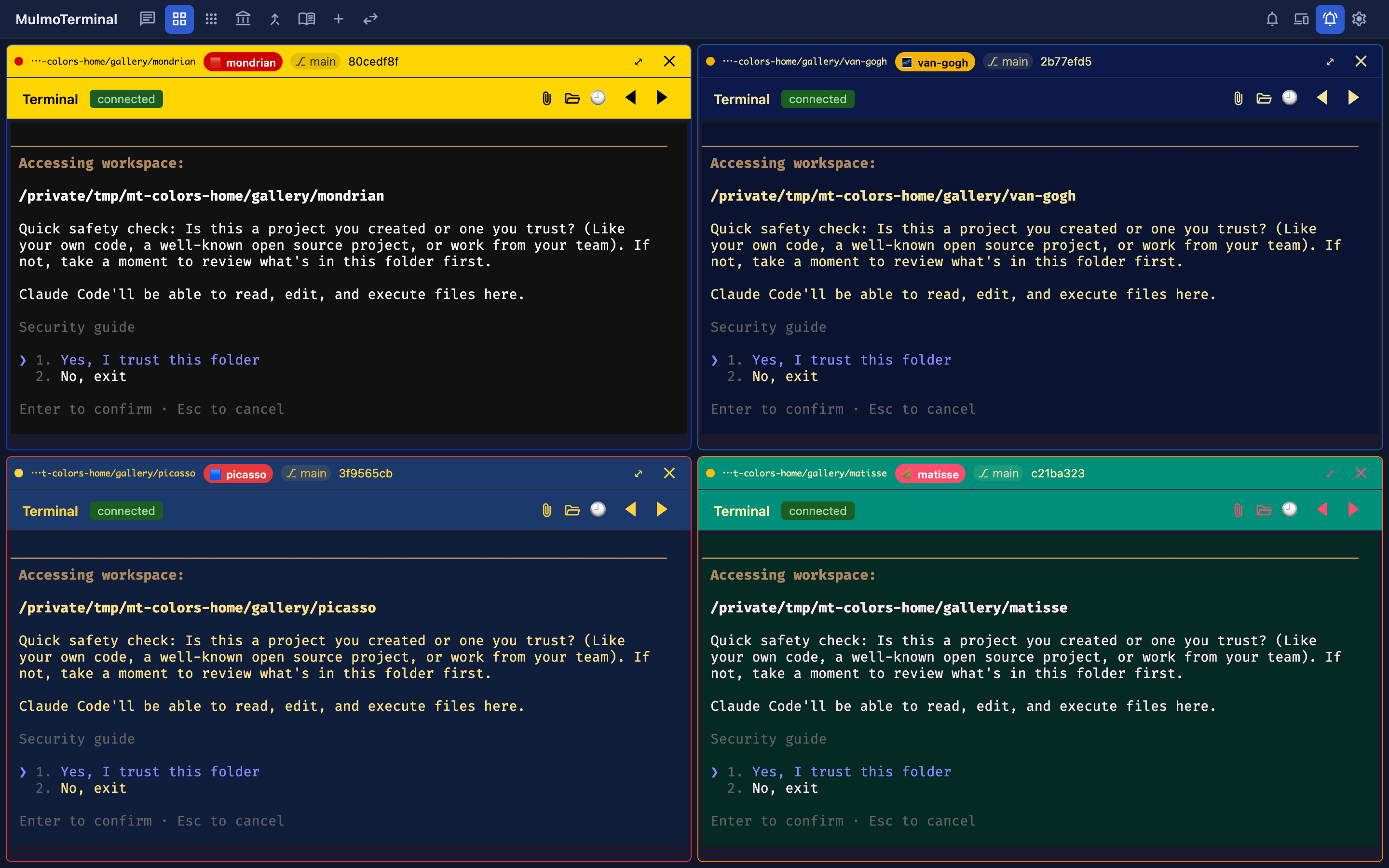
As cells pile up it gets hard to tell which project is which. Give each repo a name badge and its own colors in .mulmoterminal.json and they're unmistakable — headerColor/badgeColor tint the frame, while colors reaches all the way into the terminal's own background and text. (The example above dresses four repos in Mondrian / van Gogh / Picasso / Matisse palettes.)
| Field | Meaning |
|---|---|
name |
Label shown as a badge in the terminal/cell header. |
icon |
An image marking this directory — shown in the cell header, the cockpit roster, the filmstrip thumbnails, the launcher's directory chips, and the phone's terminal list and terminal screen. Either a path relative to this directory (an absolute path, or a ../ that escapes it, is rejected), an http(s):// URL, or a data:image/… URI. PNG / JPEG / GIF (animated plays) / WebP / AVIF / SVG / ICO / BMP. Not to be confused with a header button's icon, which is a Material Symbols name. Omit it and the repository's own favicon is used (public/favicon.svg, apple-touch-icon.png, a web manifest — see autoDirIcon); false means no icon here and stops that search. |
badgeColor |
Badge background color (#rrggbb); text auto-contrasts. |
headerColor |
Header background color (#rrggbb) — the grid cell's header row and the terminal's own header row (grid row 2). While a terminal is working/blocked the status tint still shows; the custom color applies when idle. |
headerTextColor |
Header text color (#rrggbb) — everything written on the header: the dir path, title and prompt, plus the model/context badge, the token counts and any custom chip. Omit it and a readable colour is derived from headerColor. It applies while that colour is what shows: a working/done/blocked cell paints the theme's own status tint, so its text returns to the theme's too — an ink chosen for your header colour is not readable on a tint the theme mixed. Recolour those states with headerStatusColors instead. |
headerStatusColors |
What the header shows once a status owns the background: an object keyed by working / done / blocked (there is no idle — headerColor is idle). Each value is a background #rrggbb, or { "background": …, "text": … }. Omit text and a readable one is derived from the background, so naming one colour can never come out unreadable. A status you don't name keeps the theme's tint. |
headerStatusTint |
"background" (default) lets a status replace the header background. "none" keeps headerColor while working and done — the status still reads from the cell border, the status dot and the pill. It deliberately does not reach blocked, the one state where nothing proceeds until you answer; give that state a colour of its own in headerStatusColors if you want one. |
cellColor |
Cell body background color (#rrggbb) — the frame around the terminal. |
cellBorderColor |
Cell border color (#rrggbb). The status frame (working/blocked) still overrides it while active. |
dotColor |
Idle status-dot color (#rrggbb). The working/waiting colors are unchanged so the activity signal stays intact. |
buttonColor |
Header icon button color (#rrggbb) — expand / close / attach / folder / etc., across both header rows. |
theme |
xterm palette for terminals in this directory (one of the built-in theme ids). |
colors |
Per-key xterm palette overrides applied on top of theme (or the app theme when theme is unset). Keys are xterm ITheme names (background, foreground, cursor, selectionBackground, the 16 ANSI colors, …); values are hex (#rgb / #rrggbb / #rrggbbaa). Unknown keys / bad values are dropped. |
fontSize |
Terminal font size in px for this directory (8–32), overriding the Settings value. A size outside the range is clamped; a non-number is ignored. Changing it re-fits the terminal, so the PTY learns the new width — unlike browser zoom, which leaves the two disagreeing. |
orderPriority |
This directory's rank in the grid's priority ordering — the third mode on the toolbar's ordering button, next to auto (attention-first) and manual (the move buttons). Any integer, lowest first; negatives are allowed. Directories that set nothing sort last, keeping their existing order, so adding the key to one project doesn't shuffle the rest. The grid reads it in priority mode only; the launcher's directory chips sort by it, so a project sits in the same place on both. The one exception is the workspace chip, which always leads the launcher's row regardless of any rank — it is not one of the directories being ranked against each other, and it is the one place a claude or codex session reaches every GUI tool without registering anything (agy and grok get what the directory registered wherever they run — see MCP server ids). |
fontFamily |
CSS font-family stack for this directory's terminals, overriding the global fontFamily. Use the names as your OS lists them ("'Cica', 'MS Gothic', monospace"). An unusable stack is ignored whole rather than half-applied; monospace is appended if you name no generic family. Prefer fonts whose fullwidth glyphs are exactly twice the Latin width, or box-drawing frames tear. |
sound |
Attention sound for this directory's sessions, a path relative to the directory (served at GET /api/dir-sound). The fallback for every kind. |
sounds |
Per-kind override of sound: { "command-failed": "preset:gong" }. Each value is a preset:<id> or a directory-relative path, under the same confinement. |
appendSystemPrompt |
Whether this directory's Claude sessions are asked to end a reply with a closing summary (see Closing summary). Omit to follow the global appendSystemPrompt, which is on; true / false here outranks it. Read per spawn, so a new session in this directory picks up an edit without a restart. |
worktreeEnv |
Values every working tree of this project needs its own of — the port its dev server binds, the database its migrations touch. A worktree isolates files, not ports: two trees running yarn dev both reach for 3000 and the second one dies. Each variable is { "kind": "port", "base": <1024–65215> } (a free port, base + a multiple of 10 — the checkout keeps base, its worktrees take the numbers above it) or { "kind": "slug", "prefix": "…" } (a [a-z0-9_] name from the tree's task name, ≤ 63 chars, for a database / schema / container). Up to 16, under whatever names the project reads (PORT, VITE_PORT, …). A value is reserved once and kept (~/.mulmoterminal/worktree-env.jsonl) for as long as its declaration is unchanged, so a running dev server's port never moves under it; editing base re-allocates, renaming or dropping a variable releases what it held, and removing the worktree releases all of them. Set on every terminal in the directory — agent cell, Shell, launcher, Run command — and shown on the header's env chip, where a port is a link to http://localhost:<port>. MulmoTerminal hands out the name; creating the database is the project's own job. |
addDirs |
Extra directories this project's Claude sessions may read and edit — the terminal-side equivalent of opening several folders in one VS Code workspace, via Claude Code's --add-dir. Relative entries resolve against this file's directory ("../shared-lib"), a path that doesn't exist is dropped, max 16. Claude only: codex has no equivalent flag and ignores the key. |
Security. sound and every sounds entry are directory-relative paths only — absolute
paths and any ../ that escapes the directory are rejected, and the path is never taken from the
HTTP request, so an opened project can't point the player at arbitrary files.
When changes take effect. A write made through Claude's tools — which includes the
mulmoterminal-dirs skill — applies live: the tool hook that reports the write doubles
as the reload signal, so colors, palette, font size and grid order update without reopening
anything. There is no filesystem watcher, so an edit made outside a session (your own
editor) is picked up when the terminal is next opened.
Checking what took effect. Settings → Directory settings lists your recent directories
and expands each one to the values in force, with a swatch per color and the path of the file
they came from. It also names the keys it dropped (a color that isn't #rrggbb, a size out
of range) and the keys it doesn't read at all (badgeColour, a global-only setting) — which is
what tells "I never set that" apart from "I set it and it didn't take".
yarn install # postinstall fixes node-pty prebuilt binary perms
yarn dev # backend (:34567) + Vite UI (:6856), concurrently — open http://localhost:6856
# or individually:
yarn dev:server # backend only (node --import tsx --env-file-if-exists=.env server/index.ts)
yarn dev:client # Vite dev server only
yarn typecheck # type-check everything (vue-tsc -b)
yarn build # type-check + vite build -> dist/
yarn server # run backend; serves dist/ + the APIs on :34567
yarn test # vitest runyarn typecheck covers the whole repo. The root tsconfig.json is a solution
file that references all five projects, so one vue-tsc -b builds them:
tsconfig.app.json (client), tsconfig.node.json (vite config),
tsconfig.server.json (backend, run directly via tsx with no build step),
plus tsconfig.test.json and tsconfig.test-server.json for the specs — which
need checking of their own because vitest strips types rather than checking
them. They exist as separate projects because each has its own compiler options
(the client ones DOM + .vue, the server ones node, the specs with
noUncheckedIndexedAccess off).
In dev, open the Vite URL; its proxy forwards /ws, /ws/pubsub, and /api to
:34567. In production, run yarn build then yarn server and open
http://localhost:34567.
An empty grid cell's launcher sets the Working directory by typing, by a preset
chip, or with the 📁 folder button (a native OS folder dialog). The preset chips are
the directories you have launched in — worktrees excluded, since one is a single task's
branch that is deleted with the task, not a place to launch in again; the
workspace leads them always, labelled
WORKSPACE and marked with an icon, whether or not you have ever launched there — it is
the one directory where a claude or codex session reaches every GUI tool (agy and grok get
what the directory registered, there as anywhere — see
MCP server ids), so it is never a click you can
lose. It has no remove button for the same reason. It is named for its role rather than its
folder, because the folder name (~/mulmoclaude by default, or wherever CLAUDE_CWD
points) says the least interesting true thing about it; the real path is on its hover.
The launcher is shorter in the workspace, because two of its choices do not apply there. The per-directory Canvas switches are replaced by a line saying every GUI tool is already available — a session there is handed the whole GUI MCP at spawn, so a switch would register a group URL that then has nothing left to serve. With Antigravity or Grok picked they stay, in the workspace as everywhere else: neither is handed anything at spawn and both read their servers from the directory's file, so the switches are their only route to a GUI tool and hiding them would leave the session with none (see MCP server ids). And the worktree section is hidden: a worktree isolates work on one codebase onto a branch, while the workspace is what a session works from (the shared wiki, collections and accounting live there), which is precisely what a detached branch would cut it off from. Both come back the moment you point the field at a project directory.
It also offers a
run a script row
that launches project scripts (a dev server, tests, a build, …) in that cell, in
the directory the cell is pointed at — so a whole workflow lives in one window
alongside the Claude sessions. Scripts are per-directory: the cell reads the
script.json of whatever directory you select, so different cells can offer
different projects' scripts.
The same launcher also has an or launch row for your configured launch commands
— any interactive command — set in Settings (the gear button) → Launch commands as
{ label, command } (e.g. htop → htop, Codex → codex). A plain shell needs no
entry here: the Agent Picker's Shell option already opens $SHELL. Unlike
a one-shot script, a launcher runs as a persistent terminal in the cell's directory:
it survives grid page switches and reconnects, and its dot shows running vs. exited (it
has no Claude hooks, so no blocked/done states).
Every running terminal's header also has a ▶ Run ▾ dropdown (next to the
connection status) — but only when the
open project has scripts (no script.json, no button). It lists the open
project's script.json — the directory that terminal runs in — and launches the
picked script in a spare grid cell (reusing an open launcher, else a new one), so
you can watch it. So you can start a
dev server or tests for the project you're working in without disturbing the
session that's running.
The list is populated from a script.json at the chosen directory's root. It's
optional; a directory without one simply shows no scripts.
// <dir>/script.json
{
"scripts": [
{ "label": "Dev server", "command": "yarn dev" },
{ "label": "Unit tests", "command": "yarn test" },
{ "label": "Build", "command": "yarn build" },
// optional per-script working dir (relative to this file, or absolute):
{ "label": "Sub server", "command": "yarn serve", "cwd": "packages/server" }
]
}| Field | Required | Meaning |
|---|---|---|
label |
yes | What the launcher shows. |
command |
yes | Shell command, run via the login shell ($SHELL -lc "<command>"). |
cwd |
no | Working dir, relative to script.json or absolute. Defaults to the cell's directory. |
A command terminal is not a Claude session: it has no session id, no hooks, no
transcript, and isn't persisted — it's ephemeral, so a page reload drops it and
closing the cell (or reloading) kills the process. When the command exits, the cell
offers a ↻ re-run. The browser only ever sends the script's index + its
directory; the server reads that directory's script.json and resolves the
command, so the file is the allowlist of what can run.
Each command cell also has a ✦ Summarize button: click it to send the cell's
captured output to claude -p (headless) and get a short Errors / Warnings /
likely cause / suggested fix note in a panel — handy when a build or install
buries the one failing line in thousands. It's manual (never auto-runs) and analyzes
the last 32 KB of output. See
POST /api/command/summarize.
Next to the ▶ Run ▾ dropdown, every running terminal's header has a ⚡ Skill ▾
dropdown — and only when the open
project has skills (nothing discovered, no button). It lists the
Claude skills discoverable for
that terminal's directory — both project scope (<dir>/.claude/skills) and user
scope (~/.claude/skills), the same skills Claude sees — and, on pick, runs the
skill in that session: it types the skill's invocation into the terminal and submits
it (for Claude, its /<slug> command; for Codex, which has no slash command, a plain
Use the "<slug>" skill. instruction). Unlike ▶ Run — which launches a
script.json shell command in a spare cell — a skill runs in the session you
picked it from, continuing that conversation.
Ordering: working-dir (project) skills come first, then user-scope ones, alphabetical within each group; a project skill of the same slug shadows the user one.
Filtering: add a skills array to the directory's
.mulmoterminal.json to narrow the menu —
an allowlist of slugs that also sets the order (only those show, in that order). Omit
it to show everything.
// <dir>/.mulmoterminal.json
{ "skills": ["review-diff", "commit-msg"] }Each menu item shows the skill's id, with its SKILL.md description as the hover
tooltip. A directory (or workspace) without any .claude/skills simply shows no
button. Skills are discovered read-only; the menu never creates or edits them.
A terminal header can carry a 📁 Files button — add it as a header button
("open": { "files": "${dir}" }) — that opens a full-screen file explorer
rooted at that terminal's project directory — so after Claude says "wrote foo.md"
you can jump straight there to read or edit it. The left pane is a lazy-loaded directory
tree; clicking a file opens it in a CodeMirror editor (Markdown / JS-TS / JSON
highlighting, everything else as plain text). Markdown files get a Preview toggle
that renders via the server's sandboxed …/md HTML. Save (or ⌘/Ctrl-S) writes back.
Beside an enlarged terminal, not only full-screen. Expand a grid cell (⤢) and its header gains a folder toggle that splits the enlarged area in two: terminal on the left, the same explorer + editor on the right, rooted at that cell's directory. Drag the divider (or focus it and use ←/→, Home, End) to resize — the terminal keeps a floor, so a squeeze shrinks the pane rather than reflowing xterm into garbage. It works in both zoomed layouts (cockpit roster and thumbnail filmstrip), the pane re-roots as you walk the zoom between terminals, and whether it's open plus how wide it is are remembered per browser.
The toggle is not the only way in: while a cell is enlarged, clicking a file path the agent printed opens it here too, rather than in a new tab or full-screen — see Clicking a file path.
All reads and writes go through GET/PUT /api/files/browse/*?cwd=&path=, and every
path is contained within the project root (server-side) — ../absolute escapes
are rejected for reads and writes alike, so editing can't reach outside the directory
the terminal is pointed at. A save sends the version the file had when it was opened, so
it is refused (409) rather than silently overwriting an agent that edited the same
file meanwhile; the editor then offers to reload or to overwrite deliberately.
You usually hear about it before that. An open file that changes on disk is picked up from Claude's own write hook (immediately) and from a 30-second version check (which catches Codex, git, builds and other editors too). A clean buffer just takes the new content — the pane reads as a live view — while a dirty one raises the same banner rather than choosing for you.
Leaving an open file saves it — switching files, moving the enlargement to another
terminal, closing the pane, navigating away. No dialog interrupts you mid-flow, because
opening a file, and replacing one, keep a copy under ~/.mulmoterminal/backups/ — three
generations per file, outside the project so they never reach git status or the agent's
view of its own repo. A parting save that loses the version race banks your version there
instead of overwriting the other writer. Re-opening unchanged content doesn't rotate one in, and a backup that
can't be written never blocks the read or the save it was taken for.
When a terminal's directory is a git repo, its header shows a branch chip
(⎇ <branch> with dirty / ahead / behind counts), fed by GET /api/git-status (polled
while the view is visible). A GitHub menu links straight to the repo, its issues, and
its pull requests.
Worktree isolation. A grid cell's launch form offers + New worktree: name a task
and the cell launches its agent inside a fresh
git worktree on a new agent/<slug> branch — a
separate working tree that shares the repo's .git, so several agents can work the same
repo without colliding. Worktrees live under ~/.mulmoterminal/worktrees/ (override with
MULMOTERMINAL_HOME), and existing ones are listed below the field.
A worktree inherits the project's settings. A fresh worktree used to have none — no colours,
no name, no model, no grid rank. It is now given its own copy derived from the project's, written
to .mulmoterminal.local.json so it layers over whatever the repository committed: name /
theme / colors / fontSize / fontFamily / provider / model / worktreeEnv as written
(the last is a declaration rather than a value — the worktree resolves its own values from it), the
seven chrome colours rotated 12 degrees further around the hue wheel per worktree (so a
project's trees read as a gradient; a grey like #ffffff has no hue to move and stays put), and
orderPriority at the project's rank + 1, so the worktree sorts directly after it. sound /
sounds / addDirs are not carried — they name paths inside the project directory. Written only
where git would ignore what it writes: an untracked file in a worktree's git status would
make it count as dirty, and a dirty worktree is one MulmoTerminal refuses to remove. The local
override is preferred; a repo that ignores .mulmoterminal.json instead (the setup this feature
shipped with) still gets its colours there. A committed shared config is never written to. A local
file the worktree already has is never overwritten.
One worktree, one session. A worktree is tied to a branch, so it is never started
twice: a listed row resumes that worktree's session when it has one, and starts one
only when it has none. A row whose session is open in another terminal reads in use and
cannot be clicked — close it there first. The refusal follows the directory, not the row:
the same worktree reached by pasting its path into WORKING DIRECTORY, or by a recent-dir
chip, will not launch either — and the server refuses the spawn whichever client asks,
so a path spelled another way (a trailing slash, a symlink) does not slip past.
What the limit covers is an agent: Claude, Codex, Antigravity or Grok, including an OR
LAUNCH command that runs one of them. A Shell, and a launcher that runs anything else
(yarn dev, lazygit, htop), stays free — a worktree an agent is working in is exactly
where you want those. A project that declares worktreeEnv also gets its own value per
worktree for each variable it declares there — so two dev servers given a port of their own do
not both reach for 3000 (see
worktreeEnv).
The same holds for OR RESUME HERE: a session someone is holding is listed with ● open
and refused, where before it could be confirmed away — which detached whoever had it.
"Someone" means any terminal anywhere, including another browser tab and a second
mulmoterminal process on this machine: the server answers from its own PTY table plus
tmux, not from what one page can see.
Change the directory and those lists empty immediately, replaced by a single
Loading this directory's sessions, worktrees and scripts… row until the new ones arrive.
Everything the launch form offers below the field — OR RESUME HERE, the worktrees and
OR RUN A SCRIPT — belongs to the directory it was read for, and reading it costs a
debounce plus a round trip. Rows left standing through that wait would be the previous
directory's, listed under the new directory's name, and clicking one resumes exactly the
session it offers.
A worktree started from an issue gets an issue/<N>-<slug> branch instead. The number
in the name is what later tells the app which issue the work belongs to: the ⧉ Open PR
button puts Fixes #<N> in the PR body, and the branch chip, the issue work comment and
the merge-time auto-close all read the same number rather than guessing at it.
That path also fetches first and forks from origin/<base>, because several clones of
one repo often run side by side and only the one being worked in gets pulled — forking from
the local branch would start the work on however old that clone happens to be. A local base
that already contains the remote wins anyway (it is a superset, so nothing is lost), and
with no remote reachable the local branch is used and the worktree is still created.
Typing a task name yourself keeps the local base it has always used, with no fetch.
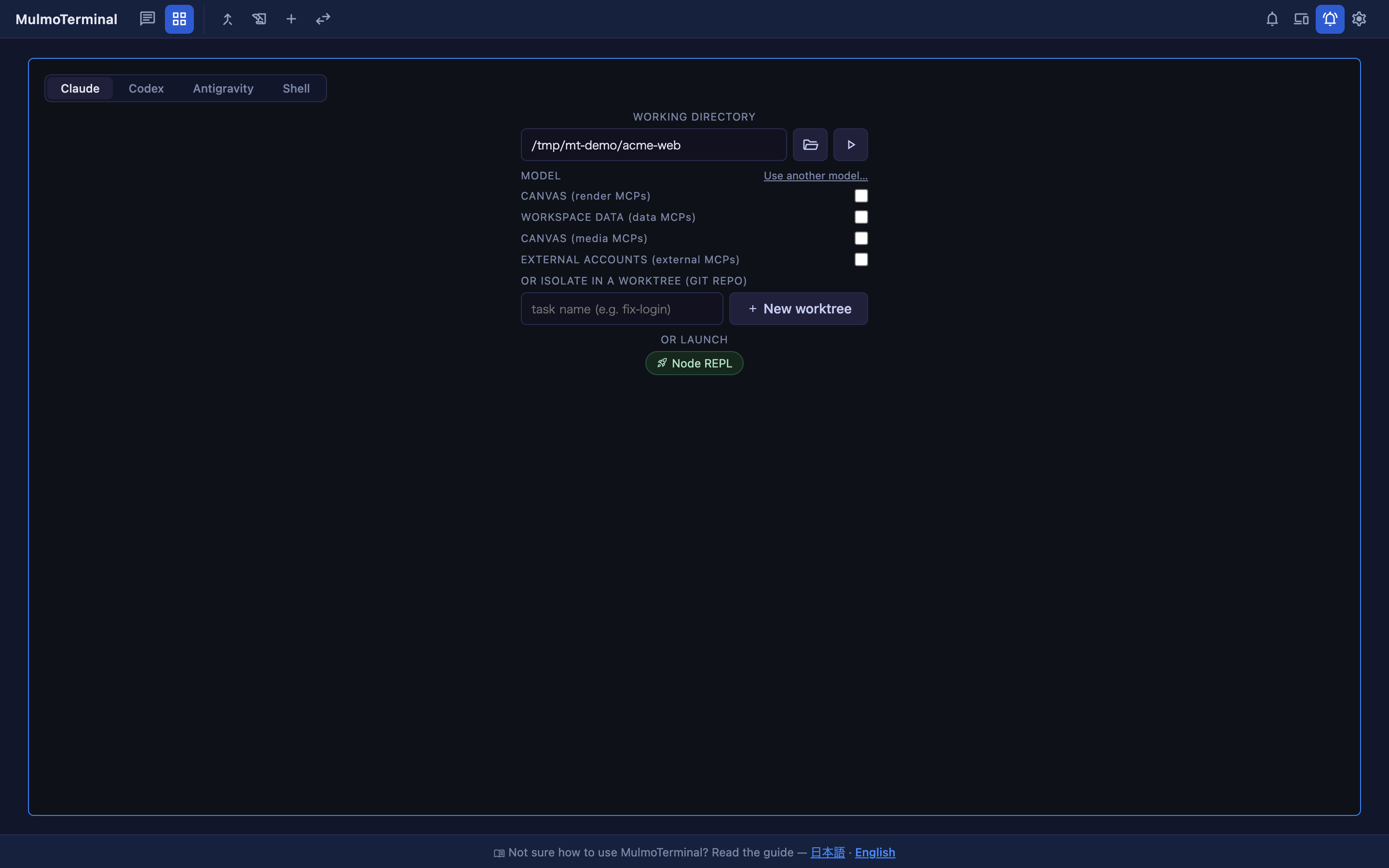
Every empty grid cell shows this launch form: pick an agent in the Agent Picker (Claude / Codex / Antigravity / Grok / Shell), type a working directory (frequent ones autocomplete from your presets), or — in a git repo — name a task under OR ISOLATE IN A WORKTREE and hit + New worktree to start the agent on its own isolated branch. Shell runs your OS default shell there instead of an agent; OR LAUNCH runs one of your configured launch commands.
A worktree cell's header carries a diff badge (+<commits> ●<dirty>); click it for a
Changes vs <base> panel (file list + patch) with actions:
- ✓ Commit — hands the cell's own session a canned commit prompt.
- ⬆ Push —
git push -u origin <branch>(POST /api/worktrees/push). - ⧉ Open PR — pushes, then
gh pr create … --fill; ifghis missing or unauthed it falls back to opening the GitHub compare URL (POST /api/worktrees/pr).
Closing a worktree cell asks whether to keep the worktree or discard & remove it (a dirty worktree is never removed unless you confirm).
PRs & Issues (cross-repo). The toolbar's Pull requests button opens a full-screen
view that aggregates open PRs and issues across the repos listed in Settings →
Pull request repos (prRepos, owner/repo entries, or gitlab.com/group/project — plus any host declared in gitlabHosts) via your server-side gh / glab login.
PRs show a CI-rollup / review-decision / draft badge; each repo lists its latest open
issues. Rows are real links, per-repo errors don't sink the view, and the two lists load
independently. Backed by GET /api/prs and GET /api/issues.
Starting work from an issue row. Each issue row carries a ▶ button that does the setup in
one click: read the issue, cut an issue/<number>-<slug> worktree in your clone of that repo, and
open Claude there as a grid cell with the issue typed into its input box but not sent. The
prompt is seeded server-side as a draft (server/session/draft-injection.ts), which waits for
claude's input box to be ready — text pushed in before that lands in the scrollback instead. A repo
with several clones asks which one the first time and remembers the answer; a repo with no clone
here disables the button and says why. Backed by POST /api/issues/start.
Which clone a repo's work happens in. GET /api/repo-dirs answers the reverse of the
GitHub link a cell already shows: given owner/repo, which of your saved directories are
clones of it. The candidates are derived from your directory presets by reading each one's
origin — there is no second list to keep in step — and are ordered by each directory's
orderPriority, then by path. Several clones of one repo commonly run side by side, so the
answer is a choice rather than a lookup; once you make it, repoDirs in the config records
owner/repo → the chosen path and it is used from then on. A recording is dropped if the
directory is no longer a saved clone of that repo, and a repo with no clone here is simply
absent from the answer — which is how a caller learns work cannot start on it.
Each grid cell's header shows two badges for its session, refreshed when a turn finishes
(from GET /api/session/:id):
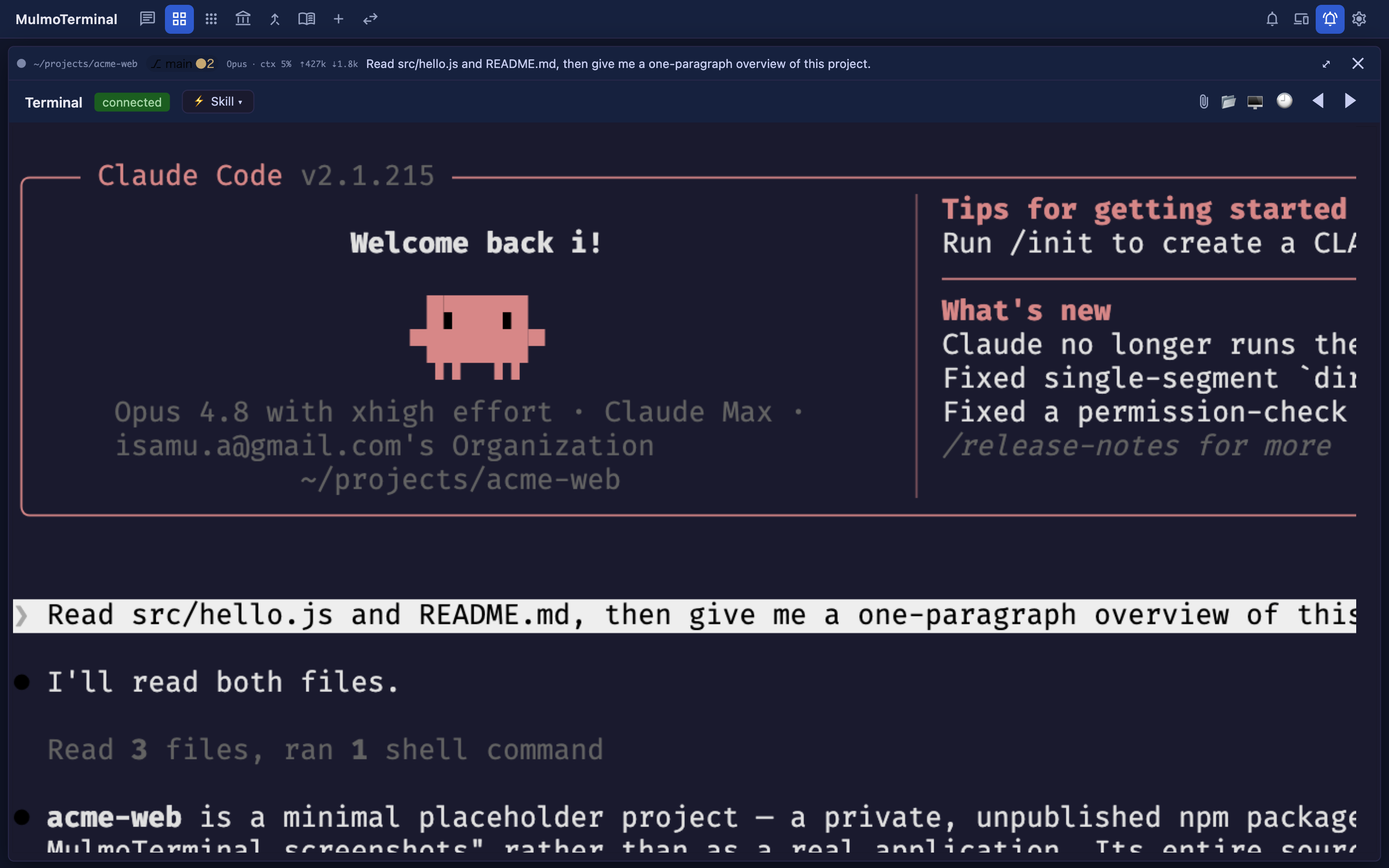
Both badges, live on a real Claude session: Sonnet · ctx 9% (model family + how full its context window is) and ⇡1.8M ⇣6.9k (cumulative input / output tokens for the session). They sit in the header's first row alongside the status dot and the git chip (⎇ main ●2), with what the agent is doing to the right; the working directory, the icon buttons and the timeline (🕘) of tool calls are on the second row.
- Context badge — e.g.
Opus · ctx 35%: the model family plus how full its context window is (the last turn's input + cache tokens ÷ the model's window — 1M for current-gen Opus / Sonnet / Fable / Mythos, 200k otherwise). A session running on a provider model shows that model's name and its published window (Kimi K2.7 Code · ctx 12%); a model in neither list keeps the label and hides the %, since the window is never guessed. A reading past 100% showsctx ?instead of the number: the window is a hard cap, so an impossible percentage means the built-in window table is out of date for that model rather than that the session is over-full. - Token badge —
⇡<in> ⇣<out>: cumulative input (fresh + cache-read + cache-creation) and output tokens for the session, k/M-formatted, with a full breakdown in the tooltip.
Both badges are read from the agent's own log, so what each agent can show differs by
what it writes down (?agent= on the route picks the reader):
| Agent | Context badge | Token badge |
|---|---|---|
| Claude | Opus · ctx 35% — window from the table above |
full |
| Codex | gpt-5.5 · ctx 21% — window from codex's own model_context_window, so no table to be out of date |
full |
| Grok | grok-4.5 · ctx 33% — window from grok's own contextWindowTokens, so no table either |
full |
| Antigravity | Gemini 3.6 Flash · ctx 78% — the model from the first step of the conversation's transcript, the reading from agy's own per-generation accounting (a real 256k window, not a table) |
full |
The token badge hides itself when nothing has been counted, and the context badge shows the model alone unless it has both a current-context token count from the agent and a context window — agent-reported (codex, Grok, Antigravity) or resolved from the built-in table above (Claude, provider models). Either one missing means a name and no percentage. The two badges are independent: an Antigravity session whose accounting cannot be read still shows its model, and one whose cumulative totals are zero still shows a percentage. The context badge is absent entirely until an agent has named a model: codex and Antigravity file their logs under an id the agent mints after the session starts, so a brand-new cell shows no model badge until it has been prompted once — a few seconds, not the rest of the session.
Antigravity's numbers are the one case read from a store with no published format: agy keeps
its per-generation accounting as protobuf in ~/.gemini/antigravity-cli/conversations/<id>.db,
with no schema on disk, so the fields are identified by measurement (see
server/agents/antigravity-usage.ts). Every layer of that reader is built to answer nothing
rather than a number it is unsure of, so if a future agy release moves those fields, an
Antigravity cell falls back to showing its model alone — it will not show a wrong percentage.
The Settings modal (the gear button) shows an estimated $ cost — Session / Today / Month — from
GET /api/cost, using a built-in public per-model price table (cache reads billed at
0.1×, cache writes at 1.25× input). It's an estimate: real billing differs, flat-plan
(Max) usage isn't reflected, and turns on unpriced models are flagged and excluded.
A separate, full double-entry accounting book (the account_balance toolbar button →
/accounting) is provided by the bundled @mulmoclaude/accounting-plugin and stores its
books under <workspace>/data/accounting. It's a bookkeeping app — unrelated to the LLM
cost estimate above — and is also exposed to Claude as the manageAccounting GUI tool.
MulmoTerminal is also a live view over the shared workspace (CLAUDE_CWD, default
~/mulmoclaude) that agents author into — never a snapshot, so it re-reads on entry.
GUI panel. Beside the terminal, a GUI panel ("Canvas") renders the rich results of
GUI-protocol tools the agent calls — documents (presentDocument), forms (presentForm),
generated images, charts, HTML, and collection cards. Each result is drawn by its plugin's
own Vue view inside a Shadow-DOM PluginFrame (so a plugin's bundled CSS can't leak),
mirrors the active session, and replays history on re-select. Plugins reach the agent over
an in-process MCP server served per session at POST /api/mcp/:sessionId. Which plugins
load is gated by plugins/plugins.json; the shipped set includes markdown, form, image
generation (needs GEMINI_API_KEY), chart, HTML, collection, and mulmoscript (MulmoCast
video/slides/PDF playback) views. You can also merge your own HTTP MCP servers into a
workspace session via Settings → userMcpServers.
A tool is never called by its own name. Every MCP client prefixes it with the id of the server
it came from — mcp__<id>__presentChart in Claude Code, mcp-<id>-presentChart in Codex (which
also rewrites - in the id to _). So the id you register under is repeated on every tool, in
every listing, for the life of the session.
MulmoTerminal delivers the GUI MCP by three different routes, and they do not share an id:
| Workspace cell / single view | Project-directory grid cell | |
|---|---|---|
| How it arrives | generated per spawn into --mcp-config (Claude) or -c mcp_servers.<id>.url= (Codex) |
the user's OWN per-folder config — .mcp.json, claude mcp add -s local |
| Server id | mt |
mulmoterminal-render, -data, -media, -external — one per tool group |
| Tools carried | all of them, on one URL | only the groups that directory registered |
| Tool name looks like | mcp__mt__presentChart |
mcp__mulmoterminal-render__presentChart |
The third is Muse, which reads neither a flag nor a file in the directory: its MCP servers are
declared by an installed plugin, and muse plugins install records one per MACHINE. So
MulmoTerminal registers a single mulmoterminal plugin holding all four group servers, and each
session is narrowed back to what its own directory switched on — the bridge asks the server which
session it belongs to (by its process tree) and is told which groups that session may reach. The
servers are named by group alone, because Muse composes the tool name out of both ids:
| Muse cell (anywhere) | |
|---|---|
| How it arrives | a mulmoterminal plugin installed for the machine, re-registered whenever the bridge path or port changes |
| Server id | render, data, media, external — inside the mulmoterminal plugin |
| Tools carried | only the groups that directory registered; the rest serve an empty toolset |
| Tool name looks like | mcp__plugin_mulmoterminal_render__presentChart |
Muse's plugin support is behind its own experimental flag (MUSE_EXPERIMENTAL_PLUGINS), which
MulmoTerminal sets on the sessions it starts. A Muse build without it simply has no GUI tools —
the registration fails with one warning and the session starts anyway.
A Muse session picks its plugins up when its own process starts, and MulmoTerminal's sessions
outlive the server. So a Muse cell that was already running when you switched a group on — or
when you first upgraded to a version that has this — keeps no tools until that CELL is started
again. Restarting the server is not enough: the session is still there in tmux and gets reattached,
exactly as it was. Close the cell and open a new one (or Stop it in Settings → Surviving sessions),
and it comes back with the tools its directory registered.
Which route a session takes is decided by carriesFullGuiMcp() in
server/session/mcp-config.ts — the single view, a cell-less chat, or anything whose cwd is
the workspace take the first; anything in a project directory takes the second.
The workspace is agent-agnostic for the agents that can RECEIVE a per-spawn config — claude and codex ask the same predicate, so two terminals in the workspace reach the same tools no matter which of the two started them. Antigravity, Grok and Muse cannot, and that is the exception you will meet first:
| Started as | In the workspace | In a project directory |
|---|---|---|
claude cell (including ?gui=0) |
mt, every tool |
the directory's registered groups |
| codex cell | mt, every tool |
the directory's registered groups |
| antigravity cell | the directory's registered groups — nothing registered means no GUI tools at all | the directory's registered groups |
| grok cell | the directory's registered groups — nothing registered means no GUI tools at all | the directory's registered groups |
| muse cell | the directory's registered groups — nothing registered means no GUI tools at all | the directory's registered groups |
| any launcher chip | untouched | untouched |
None of the three takes an MCP flag: agy reads .agents/mcp_config.json, grok reads
.grok/config.toml in the working directory, and muse reads a plugin installed for the whole
machine — and neither a file shared by every session in a directory nor a machine-wide plugin can be
handed to one session and not another — so there is nothing for "this cwd is the workspace" to change. The
membership is FULL_GUI_MCP_AGENTS in common/guiMcpAgents.ts, in common/ precisely so the
launcher form and the spawn cannot disagree about it
(#1423).
The consequence is easy to hit and hard to guess: presentDocument works in a project you once
flipped Canvas on for, and is missing in the workspace where everything else is automatic. Fix it
the same way anywhere — pick Antigravity or Grok, point WORKING DIRECTORY at that directory,
flip the Canvas switch (it stays visible for both), and start a new session; the switch
registers the directory, never a session already running. Full procedure:
Antigravity and Grok register everywhere
· 日本語.
A launcher chip is not an agent session — it is a command. Whatever the command line names,
it runs exactly as written: nothing is inserted, and no GUI MCP is attached. A chip running
claude therefore reads only its directory's own .mcp.json, and a chip running codex has no
Canvas. If you want a chip to reach the GUI tools, put the flags in the command yourself.
Earlier releases did rewrite a claude or codex chip to match the cell beside it. That was
removed: a chip that silently runs something other than what it says is indistinguishable from
the Agent Picker, which is the confusion the two controls exist on either side of. Use the Agent
Picker for an agent session — it is also the only one of the two that gives you a resumable
transcript, cost and context, and a "waiting for you" status.
The asymmetry is deliberate. mt is ours to name: nothing on disk holds it, it is
regenerated on every spawn, so it was shortened to stop paying 17 characters per tool name. The
group ids are the opposite — they are keys in config files users wrote, they are what the
launcher's per-group switch reads back, and they are documented in the setup guide. Renaming
them breaks working setups silently, and would need a migration that rewrites existing
per-folder configs. Both live in common/toolGroups.ts, where the
constants carry the same warning.
Wiki. The toolbar Wiki button opens a read-only browser over <workspace>/data/wiki/
— an index (tag-filterable page catalog), rendered pages with [[wiki links]] and
backlinks, a graph view (pages ranked by references), and a lint report (orphans /
broken links / tag drift) whose [[links]] are clickable too. Read-only endpoints:
GET /api/wiki, /api/wiki/graph, /api/wiki/lint.
Collections. The toolbar Collections button browses the workspace's collection
"cards" (@mulmoclaude/collection-plugin). Running a collection action fetches a seed
prompt and spawns a fresh agent session for it — the Launch with Claude / Codex toggle
decides which agent (and whether the seed auto-runs or drops in as an editable draft).
Favorited collections get their own toolbar buttons.
- Grid of parallel sessions — the + Terminal / grid view runs many sessions at once, auto-sizing by count across pages. Cell borders signal state at a glance — working (pulsing blue), blocked (amber — needs a permission / answer), done (blue — finished, output unreviewed), and idle — and the toolbar shows a tally across all pages so you notice an off-screen cell that needs you.
- Zoom & filmstrip — a cell's ⤢ enlarges one agent while the rest shrink to
thumbnails in a bottom filmstrip; click a thumbnail to switch, ⤡ to return to the
grid — so you can flip between "see everything" and "focus on one" in a click. While
zoomed, keys you bind walk the enlargement along the on-screen order without reaching for
the mouse — opt-in, nothing is bound by default, since any bound key is taken from the
terminal underneath. Add a
keymapto~/.mulmoterminal/config.json; see the guide for the syntax, the action list, and combinations a browser can never bind.
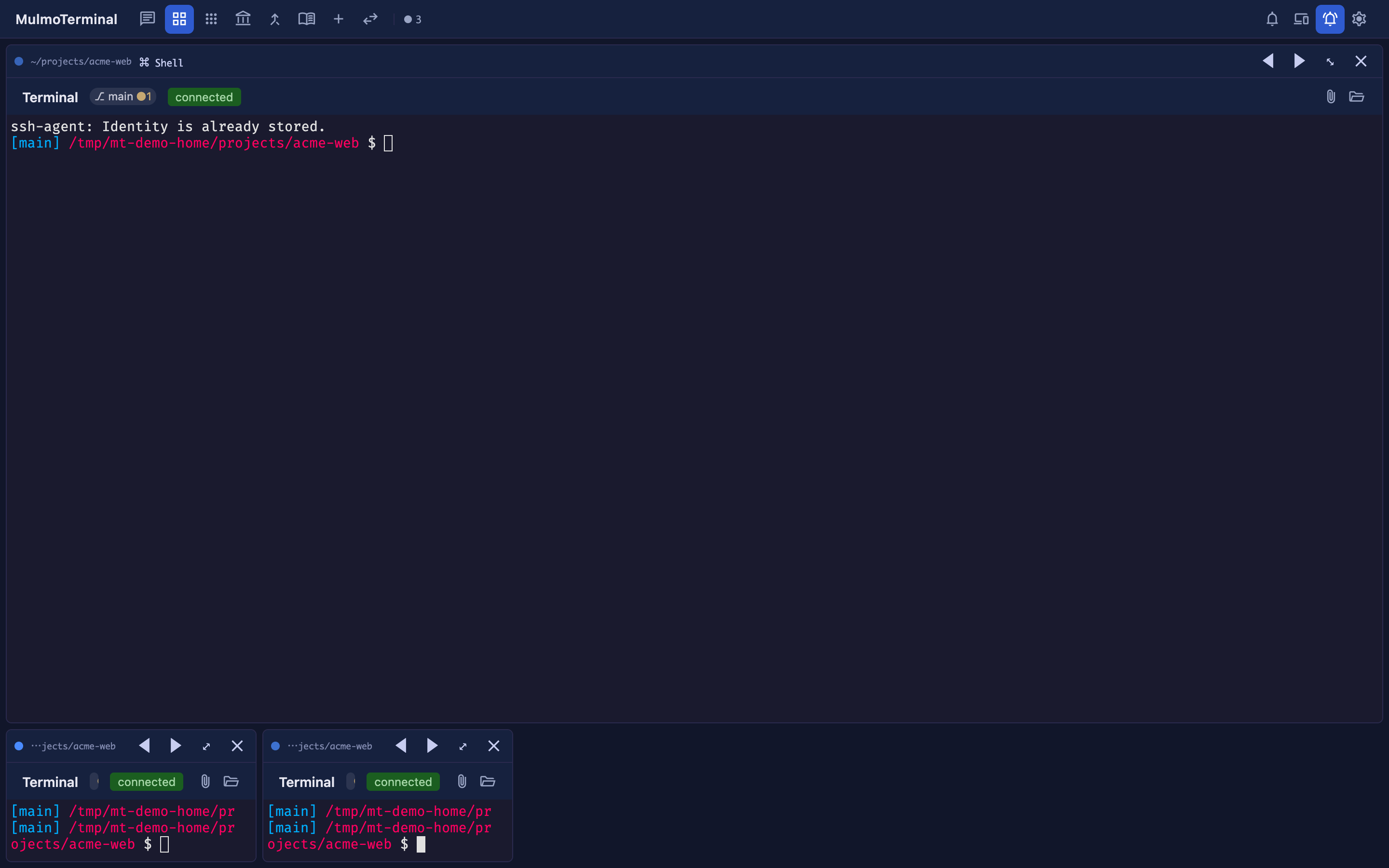
- Set a terminal aside — the moon button in a cell's header sinks it: the tile, its
filmstrip thumbnail and its cockpit-roster row all fade, and the working dot stops pulsing.
The session stays connected and keeps its whole history — this is what to reach for
instead of
/clear-ing a cell you are done with for now, which resets the conversation just to change how the cell looks. The setting survives a reload. Enlarging it keeps it faded — that is how you read a set-aside session without waking it, and its roster row keeps the blue "you are here" edge either way — while typing into it wakes it, so nothing has to be undone by hand. Clicking or scrolling to read it does not wake it, even though a mouse-tracking agent receives those as input. A cell that stops for a permission prompt comes back to full strength on its own, so setting one aside can never hide a session that is waiting on you; a merely finished turn does not, since that is the expected outcome of setting a running agent aside. - Timeline (🕘) — a read-only per-session activity timeline (tools run, newest first),
from
GET /api/transcript/timeline. - Bring another cell's turn here (💬) — pick another terminal in the grid and its last completed turn is pasted into this cell's input box, so you can have Claude and Codex look at each other's work (or pull in a session running in a different repo). The excerpt comes from the agent's own log, not the screen buffer, so it carries no ANSI debris and nothing lost to scrollback. It is pasted, never sent — you read what arrived and press Enter, in the cell you were already in. A turn still running isn't available yet (Codex writes its rollout only once the turn ends).
- Tools pane — the available GUI tools plus a live tool-call history for the active session.
- Notifications (🔔) — a toolbar bell with an unread badge and a dropdown of active notifications; click a row to jump to its session.
- Star MulmoTerminal — a star button in the grid toolbar that stars the project on GitHub
through your own
ghlogin, in one click. It is a one-time ask: once the repo is starred the button is gone for good and stops calling the server at all. It shows only whenghcan answer — with nogh, no login, or no network, one click couldn't star anything, so nothing is shown and nothing is recorded. Setghup later and the button appears by itself. - Voice input — dictate a prompt via on-device Whisper (
POST /api/transcribe, macOS only; the model downloads on first use). Settings picks the language you dictate in (per browser): your browser's, whisper's own per-clip detection, or a fixed one. Worth setting — speech in a language the mic is not expecting comes back translated into the one it is, so an English browser silently turned Japanese dictation into English. - Remote host — link MulmoTerminal to the companion phone client (Google sign-in) to watch and start sessions from your phone.
- Themes — four terminal palettes (midnight / nord / daylight / solarized), your pick
remembered; a project's
.mulmoterminal.jsoncan override per directory. - Editing niceties — Shift+Enter inserts a newline in the prompt, and on macOS
Option is treated as Meta so Claude's Alt-key bindings work. If your Claude Code is
rebound so Enter and Shift+Enter behave backwards, flip them with
terminalSubmit. - Scroll speed — one wheel notch or trackpad swipe moves the terminal the same distance whether you're reading a shell's scrollback or a full-screen app like Claude Code. If a two-finger scroll on a Mac trackpad flies past what you were reading, turn terminal scroll speed down in Settings (0.25×–3×, per browser — it's a property of the pointing device).
- No accidental page zoom —
Ctrl+wheel and a trackpad pinch would rescale the whole page and drag the layout and the terminal's fit along with it, so both are ignored. Keyboard zoom (Cmd/Ctrl+/-) still works when you mean it, and a phone's finger pinch is untouched. To make terminal text bigger for real, use the font size in Settings (or a directory'sfontSize) — that re-fits the PTY instead of leaving it disagreeing.
Base URL: http://localhost:$PORT (default http://localhost:34567).
Lists the most-recent chat sessions for the current project (CLAUDE_CWD),
newest first, including freshly-created sessions that aren't yet written to disk.
Response 200 application/json
{
"cwd": "/Users/you/my-project",
"sessions": [
{
"id": "d16f43f3-ef63-4a5e-b273-debaccb3522a", // session UUID (= .jsonl basename)
"title": "Review available skills list", // see "Session discovery & titles"
"mtime": 1781471064511.22, // last-modified, ms epoch (sort key)
"working": false, // Claude is mid-turn (blue dot)
"waiting": false // needs attention (bold)
}
// ...
]
}- Sessions are read from
~/.claude/projects/<encoded CLAUDE_CWD>/*.jsonland merged with in-memory sessions started this run but not yet persisted (those havetitle: "New session"andmtime= creation time). - Sorted by
mtimedescending and capped at the 50 most recent. Files are ranked by a cheapstat-only pass; only the top 50 are read and parsed for titles, so the endpoint stays cheap regardless of how many sessions exist. 500 { "error": string }on an unexpected filesystem error. A missing project directory is not an error — it yields an emptysessionsarray.
Every ?cwd= — on the terminal sockets and on the read routes alike — names the directory
the request is about. When one is named and cannot be used, the server says so instead of
quietly answering about the default workspace (#1151):
| Where | What happens |
|---|---|
/ws, /ws/codex, /ws/antigravity, /ws/grok, /ws/launch, /ws/run |
The socket is closed with { type: "error", message }, which the terminal shows as a red banner and does not retry. |
A session that is still running (?session= names a live PTY or a surviving tmux session) |
Attaches anyway, with a warning in the server log. Moving or renaming a directory must not shut you out of an agent that is still working in it — and the cwd reported back comes from the running PTY, not from the request. |
GET /api/scripts, /api/skills, /api/dir-config, /api/dir-sound, /api/git-status, /api/pr-phase, /api/header, /api/sessions, /api/codex/sessions, /api/antigravity/sessions, /api/grok/sessions, /api/session/:id, /api/transcript/*, /api/cost |
404 { error, cwd } — a directory that is not there. |
A ?cwd= that cannot name a directory at all (relative, or repeated as ?cwd=a&cwd=b) |
400 { error, cwd }. |
A request that names no directory is unaffected: CLAUDE_CWD is then the answer it
asked for. The wording of the refusal is the one a refused spawn already uses, so the same
condition reads the same whether it is caught here or by ptySpawn itself.
The runnable entries from <cwd>/script.json for a cell's chosen directory
(?cwd=<dir>, or CLAUDE_CWD when none is named); see
Scripts (Run menu). The resolved cwd is echoed back, and each
entry carries its index (the position the client sends back to /ws/run). A ?cwd=
that names a directory the server cannot enter is answered 404 { error, cwd } rather
than with the default workspace's scripts — see
Directories that cannot be used.
// GET /api/scripts?cwd=/Users/me/proj
{
"cwd": "/Users/me/proj",
"scripts": [
{ "index": 0, "label": "Dev server", "command": "yarn dev" },
{ "index": 1, "label": "Sub server", "command": "yarn serve", "cwd": "packages/server" }
]
}A missing or invalid script.json is not an error — it yields an empty
scripts array.
The Claude skills discoverable for a terminal's chosen directory (?cwd=<dir>, or
CLAUDE_CWD when none is named) — project scope (<cwd>/.claude/skills) plus user scope
(~/.claude/skills), deduped by slug (project shadows user), working-dir skills
first; see Skills (Skill menu). A skills allowlist in that
directory's .mulmoterminal.json narrows and reorders the result; absent → all. The
resolved cwd is echoed back. Each entry carries its slug (the skill invoked as
/<slug>) and the SKILL.md description (the menu tooltip).
// GET /api/skills?cwd=/Users/me/proj
{
"cwd": "/Users/me/proj",
"skills": [
{ "slug": "commit", "description": "Write a commit message" },
{ "slug": "review", "description": "Review the current diff" }
]
}A directory without any discoverable skills is not an error — it yields an empty
skills array.
Runs claude -p headless over a command cell's captured terminal output and
returns a short summary (Errors / Warnings / likely cause / suggested fix). Backs the
✦ Summarize button on a Run cell (see Scripts (Run menu)).
The browser sends the cell's xterm buffer as log; the server truncates it to the
last 32 KB (the tail, where errors + the exit line live), runs the CLI with the
log piped on stdin (argv — no shell), and returns its answer. Same-origin guarded.
Request application/json:
{ "log": "npm ERR! cannot find module 'foo'\n..." }Response 200 application/json:
{
"summary": "Errors: cannot find module 'foo'\nSuggested fix: run `yarn add foo`",
"truncated": false // true when the log exceeded 32 KB and only the tail was analyzed
}Empty output returns a { summary } note rather than calling the CLI. Errors:
400 (missing log), 403 (disallowed origin), 502 (the claude run failed).
Internal endpoint. Claude hooks (injected per session — see Claude hook injection) POST their event payload here. You normally don't call this yourself.
Request application/json — the Claude hook payload; only these fields are used:
{
"session_id": "d16f43f3-...", // the session the event is for
"hook_event_name": "UserPromptSubmit" // "UserPromptSubmit" | "Stop" | "Notification"
}Effect (see Session model):
hook_event_name |
Effect |
|---|---|
UserPromptSubmit |
working = true for the session. |
Stop |
working = false; if the session is backgrounded, also waiting = true. |
Notification |
If the session is backgrounded, waiting = true. |
Any resulting state change is published on the sessions pub/sub channel.
Response 200 application/json: { "ok": true } (always, even for unknown events).
The endpoints above are the core; the server exposes many more (all under
http://localhost:$PORT; query params shown where relevant). Mutating endpoints are
same-origin-guarded.
Sessions & agents
| Endpoint | Purpose |
|---|---|
GET /api/session/:id?cwd= |
One session's summary — cumulative usage and context (model + last-turn context tokens). Backs the cell token & ctx% badges. |
GET /api/codex/sessions?cwd= |
Codex sessions for the project (from ~/.codex rollouts), newest first. |
GET /api/antigravity/sessions?cwd= |
Antigravity conversations for the project, newest first. agy does record a workspace, but never as a complete conversation-to-workspace map (cache/last_conversations.json keeps one conversation per directory and is written at exit; history.jsonl carries no conversation id), so the project comes from MulmoTerminal's own ~/.mulmoterminal/antigravity-conversations.jsonl; agy's transcript supplies the title. |
GET /api/grok/sessions?cwd= |
Grok conversations for the project, newest first. ~/.grok/sessions is partitioned by working directory (percent-encoded), so this is a directory listing; each conversation's summary.json supplies the title and the last-active time, falling back to the directory's prompt_history.jsonl. |
GET /api/cost?cwd=&session= |
Estimated $ cost — session / today / month. |
GET /api/transcript/timeline?session=&cwd= |
Per-session activity timeline (tools run). |
GET /api/transcript/last-turn?session=&cwd=&agent= |
A session's last completed exchange (prompt, reply) plus the text to paste into another terminal. agent=codex reads the codex rollout instead of the Claude transcript. |
GET /api/decisions?cwd=&limit= |
The decisions a human was asked to make in this project, newest first — each question with the options it offered, their descriptions, and the answer. answerKind says whether the answer was one of the options, text the user wrote instead (the question was wrong), or never given. Read out of Claude's own transcripts; writes nothing. scanned reports how many transcripts were read (the scan is capped) and unreadable how many could not be, so a partial answer is visible rather than implied. A cwd that is not an existing directory answers an empty response rather than falling back to the default workspace. |
GET /api/decisions/digest?cwd= |
The same decisions as Markdown, for an agent to read ({ enabled, markdown }). enabled: false means the decisionDigest setting is off — a different answer from an empty digest, so a reader can tell "switched off" from "nothing decided here". |
Git & worktrees
| Endpoint | Purpose |
|---|---|
GET /api/git-status?cwd= |
{ repo, branch, detached, dirty, ahead, behind, upstream }. |
POST /api/git-remote |
The dir's GitHub repo URL (for the header GitHub menu). |
GET /api/worktrees?cwd= · GET /api/worktrees/diff?cwd= |
List managed worktrees / diff one vs its base. |
POST /api/worktrees/create · /remove · /push · /pr |
Create on agent/<slug> — or, with issue: <N>, on issue/<N>-<slug> forked from a freshly fetched origin/<base>; remove (managed root only), push, open a PR (gh, else compare URL). |
GET /api/prs · GET /api/issues |
Open PRs / issues across the configured prRepos — gh for github.com entries, glab for gitlab.com and any host declared in gitlabHosts. |
GET /api/repo-dirs |
Which saved directories clone which GitHub repo, ordered, with the recorded choice per repo. |
POST /api/issues/start |
Cut an issue's worktree in one of that repo's known clones and spawn a session there, seeded with the issue as a draft. |
GET /api/github/star · POST /api/github/star |
Whether you have starred MulmoTerminal, and star it (via gh). starred: null means gh could not answer, and hides the button. |
Workspace views
| Endpoint | Purpose |
|---|---|
GET /api/wiki (?slug=) · /api/wiki/graph · /api/wiki/lint |
Read-only wiki index / page / graph / lint. |
GET /api/collections/… · /api/feeds · GET|PUT /api/shortcuts |
Collections browser, feeds, favorites (see docs/collection-plugin-integration.md). |
GET /api/files/browse/{list,text,version,md} · PUT /api/files/browse/{write,backup} |
File tree / read / Markdown-render / write (contained within the project root). text answers { text, version }; write takes { text, baseVersion } (null = expecting to create it) and answers 409 with the version now on disk if the file changed since — so a save can't silently overwrite the agent that edits the same files. version answers that token alone, for the editor's periodic check. backup banks a buffer the editor is about to discard. |
GET /api/files/raw?path= |
Raw asset bytes (workspace-rooted). |
Conversation rooms
A room is one conversation, kept apart from the cells having it (~/.mulmoterminal/rooms/<id>.jsonl,
append-only). A round table writes every turn into one; the point of it being a file behind an API
is that the things which are not agents can join the same conversation — a person in the Rooms
view, a shell, a CI job posting a result. No agent calls any of this: the runner reads their turns
and writes for them, which is why the feature needs no MCP tool.
| Endpoint | Purpose |
|---|---|
GET /api/rooms |
The rooms that exist, newest activity first. |
GET /api/rooms/:room?since= |
What was said, oldest first. A room that does not exist is empty; a room that cannot be read answers 500, so a caller can tell "nobody has spoken" from "I could not find out" and decide for itself (the round-table runner carries on from the previous turn; the Rooms view says so). |
POST /api/rooms/:room |
{ from, text } — append. from is a display name, not an identity, and nothing authenticates it. Text over 4000 characters is clipped, since a room is read into an agent's context. |
DELETE /api/rooms/:room |
Forget a conversation. |
From a shell: mulmoterminal room read <room> · room post <room> <text…> [--from <name>] ·
room list. Everything after -- is message text, so a post can contain --force without losing it.
GUI panel / plugins / MCP
| Endpoint | Purpose |
|---|---|
POST /api/mcp/:sessionId |
Per-session GUI MCP server (Streamable HTTP; GET/DELETE → 405). |
POST /api/plugin/:toolName |
GUI-plugin dispatch (incl. spawnBackgroundChat, manageAccounting, presentHtml). |
GET /api/agent/toolResults/:id · POST /api/agent/toolResult |
GUI-panel result history / persist. |
GET /api/tools · GET /api/tool-calls/:id |
Available tools / tool-call history. |
POST /api/accounting |
Double-entry accounting (bundled plugin). |
Config, sound & misc
| Endpoint | Purpose |
|---|---|
GET|POST /api/config |
User UI config (cwdPresets, soundFile, soundKinds, sounds, prRepos, launchers, quickCommands, userMcpServers, providers). |
GET /api/sound?kind= · /api/dir-sound?cwd=&kind= · /api/sound-preset/:id · /api/dir-config?cwd= |
Custom / per-directory / preset attention sound + per-dir config. kind selects a config entry, never a path. |
GET /api/dir-config-detail?cwd= |
The same per-dir config, plus the settings a running terminal doesn't need (provider, model, skills, addDirs, header button/chip labels), plus which keys the file set and how each fared (applied / dropped in validation / not a setting at all). Read-only; backs the Settings modal's Directory settings preview. Unlike the other ?cwd= routes this one does not fall back to the default workspace — it reports on the directory it was asked about, so a path that no longer exists comes back as exists:false. Sound paths and button commands stay server-side. |
GET /api/launch-options |
The Anthropic-compatible backends this server can reach, each with its models and — when it can't — the reason. Reports the name of the env var a key is read from, never the key. |
GET /api/update-status |
What is running and whether anything newer exists: install (npm / git), version, commit (a checkout's short HEAD sha), latest (npm, only when newer) and the one-line notice. Backs the header's Update badge and the Settings version line. Computed once at startup and served from memory — ready is false until that check lands. |
GET /api/notifications(/history) · POST /api/notifications/:id/clear |
Notification feed. |
POST /api/transcribe(/model…) |
Voice-input transcription (Whisper, macOS). |
POST /api/translation |
Runtime UI-string translation. |
GET /api/remote-host/status · POST /api/remote-host/{connect,disconnect} |
Companion phone-client link. Each response carries the command channel's health (online / reconnecting / offline, plus the last listener error), so the toolbar shows a dropped channel instead of the last state it happened to fetch. |
POST /api/open-dir · POST /api/pick-file |
Reveal a dir in Finder/Explorer; OS file-picker → path ({ directory: true } opens the folder picker — used by the launcher's Working-directory 📁 button). Both run on the SERVER's machine, and both answer 500 with a reason when it has nothing to open a dialog with, rather than a silent nothing (#1447). The picker tries every dialog the host might have: macOS osascript, Windows PowerShell, WSL the Windows dialog over interop (powershell.exe + wslpath), Linux zenity → kdialog → qarma → yad. A user cancel is a 200 with paths: []. |
POST /api/session/:id/drop |
A dropped file whose path the browser withheld. Raw bytes, not JSON, under the file's own content type (base64 in JSON would cap real files near 18 MB, and a dropped .json would be parsed as a document); the original name rides percent-encoded in x-drop-filename and is used for its suffix only. Answers { path } — absolute, inside the private per-session directory the session was granted at launch. 110 MiB cap; 404 for a session this server isn't running. |
The phone itself uses none of these routes — it reaches the host over Firestore command
docs, not HTTP. Every command it can send, and the shapes it gets back, are in
docs/remote-host-protocol.md.
A raw WebSocket carrying the terminal stream for one session. One PTY per connection (or reattach to an existing background PTY).
Connect
ws://host/ws— start a new session (server generates a UUID and spawnsclaude --session-id <uuid> --settings <hooks>).ws://host/ws?session=<id>— resume/reattach a session. If a live background PTY exists for<id>, the socket reattaches to it (and its recent output buffer is replayed); otherwise the server spawnsclaude --resume <id> --settings <hooks>.&cols=<n>&rows=<n>— the terminal's geometry, on every endpoint that starts a PTY. The PTY is created at it instead of the 120x30 default, so nothing is ever drawn at a size the browser didn't ask for. Out-of-range values are ignored (same bounds as aresizeframe), and a connection that sends none keeps the default until its firstresize.
Server → client (JSON text frames):
| Message | Meaning |
|---|---|
{ "type": "session", "id": string } |
Sent immediately on connect — the session id this socket is bound to (lets the client learn a new session's generated id). |
{ "type": "output", "data": string } |
PTY output to write to the terminal. On reattach, the first output frame is the replayed tail buffer (≤ 64 KB). |
{ "type": "exit", "exitCode": number, "signal": number } |
The claude process exited; the socket then closes. |
Client → server (JSON text frames):
| Message | Meaning |
|---|---|
{ "type": "input", "data": string } |
Keystrokes / bytes to write to the PTY. |
{ "type": "resize", "cols": number, "rows": number } |
Resize the PTY. |
A non-JSON frame is written to the PTY verbatim (fallback).
Disconnect — when the socket closes, if Claude is still working the PTY is
kept alive in the background; otherwise it's killed. See
Session lifecycle.
Two more raw WebSockets share the /ws frame format (output / input / resize /
exit):
/ws/codex?session=<id>&cwd=<dir>&gui=<0|1>— a Codex agent PTY (see Agents: Claude & Codex). Like/wsit sends asessionframe with the id and reattaches to a live or tmux-backed session on resume.gui=0(grid cells) omits the GUI MCP and marks the session a grid terminal./ws/launch?session=<id>&cwd=<dir>&launcher=<index>— a launch command PTY (a plain shell,codex, or any command configured in Settings → Launch commands). Unlike a Run-menu script it's persistent and reattachable (survives page switches / reconnects), but it has no Claude hooks, so its dot only shows running vs. exited.
A raw WebSocket carrying a one-off Run-menu command (see
Scripts (Run menu)) — a plain shell PTY, not a Claude
session, so there's no session message, no hooks, and no reattach.
Connect
ws://host/ws/run?index=<n>&cwd=<dir>— run the script at position<n>in<dir>/script.json(cwd falls back toCLAUDE_CWD). The server reads that file and spawns$SHELL -lc "<command>"in the script'scwd. An out-of-range index (or a missing/invalidscript.json) yields{ "type": "error", "message": string }and the socket closes.
The output / input / resize / exit frames are identical to /ws. There is no
session frame.
Disconnect — the terminal is ephemeral: when the socket closes (cell closed, or page reloaded) the process is killed. There is no background survival and no resume.
A minimal Socket.IO pub/sub for live session-activity updates. Channel names are Socket.IO rooms.
- Path:
/ws/pubsub, transport:websocket. - Client → server events:
subscribewith a channel name (string) → join the room.unsubscribewith a channel name (string) → leave the room.
- Server → client event:
datawith{ channel: string, data: <payload> }.
Channel "sessions" — payloads describe a single session change:
// activity change (working/waiting flipped)
{ "id": "d16f43f3-...", "working": false, "waiting": true, "event": "Stop" }
// a brand-new session was created
{ "id": "…", "working": false, "event": "created" }
// a session's PTY was closed/reaped
{ "id": "…", "working": false, "event": "closed" }event is the originating hook (UserPromptSubmit | Stop | Notification) or
a lifecycle marker (created | closed | null). The client treats any
sessions message as a signal to refetch GET /api/sessions (the server is the
single source of truth for the list), so payload details are advisory.
Per-session state lives on the server (activity map) and is surfaced as two
booleans on every session record:
| Flag | Set when | Cleared when | UI |
|---|---|---|---|
working |
UserPromptSubmit hook fires (Claude started a turn) |
Stop hook fires (turn finished) |
Blue dot next to the title |
waiting |
A background session fires Notification (waiting for input — permission / question / idle) or Stop (finished, output unseen, ready for another message) |
The session is brought to the foreground (a WebSocket attaches to it) | Bold title |
"Foreground" = a session that currently has an attached terminal WebSocket (the
one you're viewing). waiting is only ever set for background sessions,
because a foreground session is already on screen.
new ws /ws ws /ws?session=<id>
│ │
▼ ▼
generate UUID, spawn live bg PTY? ──yes──► reattach + replay buffer
claude --session-id <uuid> │ no
register "New session", ▼
publish "created" spawn claude --resume <id>
│ │
└───────────────┬──────────────────────┘
▼
attached (foreground) ── setWaiting(false) ──► not bold
│
ws close (switch away / disconnect)
│
┌───────── working? ──────────┐
yes no
│ │
keep PTY alive (background) kill PTY (reap), publish "closed"
│
Stop hook in background:
waiting=true (bold), working=false, reap PTY
(flag persists via on-disk record → stays listed & bold until viewed)
Key rules:
- Switching away never interrupts Claude mid-turn — a
workingsession's PTY survives in the background. - A background session that goes idle (
Stop) is reaped (killed). If it finished with unseen output, itswaitingflag persists via the on-disk session record, so it stays listed and bold until you open it. - Reattach over respawn: selecting a session that still has a live background
PTY reattaches to it (replaying a ≤ 64 KB output tail) instead of spawning a
duplicate
claude. - One live viewer per session: a session is bound to a single socket. Opening
it in a second place (another tab, or another grid cell pointed at the same dir)
reattaches there and supersedes the first, which detaches. So a launcher's
resume list refuses a session that is open anywhere (
● open) rather than offering to take it over — and the server answers "anywhere" from its own PTY table plus tmux, so another browser tab and a secondmulmoterminalprocess count too. - Brand-new sessions are listed immediately (before their
.jsonlexists) via the in-memoryknownSessionsregistry + acreatedpush; an unused one disappears when its PTY is reaped. - Background workers get their own filter. A session nobody started by hand —
a collection's scheduled refresh, a user scheduled task (the dev worklog and
anything else the scheduler runs), or a plugin's
spawnBackgroundChathidden: true— is listed under the Background chip instead of among the chats, so a refresh schedule doesn't fill the history. It stays openable (a MulmoTerminal session is a live terminal, so a row you can't reach is a process you can't stop), and it is put on the same count+age retention as the scheduler's own sessions. The chip appears only when there is one to show. A manual collection Refresh is a normal visible session — unchanged. The marking is persisted (~/.mulmoterminal/background-sessions.json), so a worker stays out of the chat list after it finishes and after a restart.
Activity is detected via Claude Code hooks injected per spawn, without
touching the user's ~/.claude/settings.json or project settings. The server
passes claude --settings '<json>' where the JSON registers a command hook for
UserPromptSubmit, Stop, and Notification, each of which pipes the hook
payload to the server:
{
"hooks": {
"UserPromptSubmit": [{ "hooks": [{ "type": "command", "command": "curl -s -X POST http://localhost:$PORT/api/hook -H 'content-type: application/json' -d @-" }] }],
"Stop": [{ "hooks": [{ "type": "command", "command": "curl … -d @-" }] }],
"Notification": [{ "hooks": [{ "type": "command", "command": "curl … -d @-" }] }]
}
}Because the server spawns each new session with --session-id <uuid>, it always
knows the live session's id — even before the session's .jsonl file exists.
Every Claude session is spawned with claude --append-system-prompt '<text>', asking the
agent to end a reply with a short summary when it hands control back — the work is
finished, or it is stopping to ask a question. Coming back to a grid cell after a while, the
standing request and what came of it are otherwise only recoverable by scrolling the whole
session.
The summary states three things: the request for the conversation as a whole (not the last message — several turns of refinement do not replace what was asked first), what was achieved, and what was not and why. It is written in the language of the conversation, and placed last with nothing after it.
It is deliberately not written on every turn: mid-work replies and short factual answers
carry no standing request, and a summary that always appears stops being read. The wording
lives in server/agents/session-summary-prompt.ts.
On by default, and switchable off with appendSystemPrompt: false — in
~/.mulmoterminal/config.json, or in a directory's .mulmoterminal.json, which outranks the
global value. Read per spawn, so no restart is needed; a session already running keeps what it
was launched with. Nothing in the app parses what the summary says, so turning it off costs no
feature — the roster and push notifications simply show the raw tail of the reply.
Which sections --append-system-prompt ends up carrying is decided in
server/agents/appended-prompt.ts: this one and the prWorkdirFooter clone line are separate
settings on the same flag, and with both off the flag is not passed at all.
Codex sessions are unaffected — the CLI has no equivalent flag.
Claude stores each project's sessions as JSONL files under
~/.claude/projects/<encoded-cwd>/<session-id>.jsonl, where the absolute cwd
has its / and . characters replaced with - (e.g.
/Users/you/proj → -Users-you-proj).
A session's display title is derived by scanning its JSONL for, in order of preference:
- the session note the user wrote (see below),
- else a live AI title the server generated for the session this run (see below),
- else the latest
ai-titlerecord'saiTitle(e.g. written by MulmoClaude), - else the latest
last-promptrecord'slastPrompt, - else the first real user message (slash/local-command wrappers like
<local-command-…>are skipped), - else
"(untitled session)".
In-memory sessions not yet persisted show as "New session" until their file
appears, at which point the on-disk title takes over.
The raw last prompt is a poor cell-header label once a session becomes a
back-and-forth: a follow-up is either a trivial ack (ok, はい — skipped, so the
header keeps showing the now-stale opening task) or context-dependent (2番目にして
— meaningless on its own). So the server summarizes the recent turns with a cheap
model (MT_TITLE_MODEL, default haiku) into a short title and shows it in the cell
header (falling back to the last prompt when there's no title yet).
Generation is kept low-cost — it runs at a turn's Stop (when the reply is on disk)
only when a title is due: none yet, the newest prompt was a trivial/context-dependent
ack (so the raw last prompt would be stale), or every few turns to keep a long session's
title current. The title lives in memory (never written into Claude's own transcript); a
resumed session falls back to any on-disk ai-title.
Every tier above says what the agent said, which stops answering "which cell is this?" once several sessions are open. So a cell header also takes a note you write yourself: the pencil button beside the header text opens a one-line box (Enter saves, Esc cancels, clicking away saves). While a note is set it replaces the header line — the title it displaced stays in the tooltip — and it becomes the session's title in the launcher's session list and on the phone's roster too, so one session goes by one name everywhere.
Notes are capped at 200 characters and folded to a single line. They are stored per session
id in ~/.mulmoterminal/session-memos.jsonl and survive both the session being reaped and a
server restart: resume the session and the note comes back. Saving one publishes it on the
sessions channel, so every other open tab and the phone update without asking.
POST /api/session/:id/memo with { "text": "…" } writes one; an empty text erases it. The
route answers with the stored text, which is what a reload will show.
server/
index.ts Express app, /api routes, upgrade routing, PTY lifecycle,
session state, hook injection, session discovery, GUI-MCP mount
agents/ AgentAdapter seam + per-agent args/sessions: claude.ts,
codex.ts, registry.ts, claude-args.ts, codex-args.ts,
codex-session(s).ts, codex-skills.ts
config/ user + per-directory + header config: app-config.ts,
config-routes.ts, config-schema.ts, dir-config.ts,
cwd-presets.ts, header-*.ts
session/ per-session transcript/activity/cost: transcript.ts,
session-resolve.ts, activity-*.ts, cost.ts,
command-summary.ts, terminal-replay.ts, file-cache.ts
git/ git, GitHub (gh) and GitLab (glab) + worktrees: git-status.ts, gitRemote.ts,
gh.ts, prs.ts, issues.ts, pr-for-branch.ts, worktrees.ts, worktree-*.ts
files/ files-browse.ts (contained tree read/write), pick-file.ts,
open-dir.ts, wsl.ts (interop detection + wslpath),
scripts.ts (Run-menu script.json loader)
infra/ process/transport/misc: tmux.ts, tmux-routes.ts,
pubsub.ts (socket.io /ws/pubsub), spa-fallback.ts, host-tools.ts,
plugins-registry.ts, web-push.ts, install-bundled-skills.ts, accounting-tool.ts
mcp/ per-session MCP broker
backends/ wiki, collections, feeds, accounting, notifier,
translation, whisper, remote-host, html, files
skills/ bundled skills: mulmoterminal-config (entry point + audit), -dirs, -theme,
-header, -keys, -model, -notify, -bug-report, -decisions
fix-pty-perms.js postinstall: fixes node-pty binary permissions
src/
App.vue Layout; owns the grid, the overlays and the tab favicon
router/ Vue Router routes (/, /terminals, /collections,
/accounting, /prs, /files, /wiki, …)
components/
Terminal.vue xterm.js terminal; /ws, /ws/codex, /ws/run
AppToolbar.vue shared header + toolbar buttons
GridView.vue, TerminalGrid.vue, TerminalCell.vue, CommandCell.vue, LauncherCell.vue
CellLaunchForm.vue what an EMPTY cell shows: Agent Picker + dir +
resume / scripts / worktrees / tool groups
GuiPanel.vue, PluginFrame.vue GUI panel (Canvas) + Shadow-DOM plugin host
FilesOverlay.vue file browser + CodeMirror editor
GitBranchChip.vue, ModelContextBadge.vue header chips / badges
PrsOverlay.vue cross-repo PRs & Issues
Wiki*View.vue, Collections*.vue, AccountingOverlay.vue workspace views
TimelineOverlay.vue, ToolsPane.vue, NotificationBell.vue, RemoteHostControl.vue
SettingsModal.vue settings — the dialog shell + section order
settings/ one file per settings section (theme, sounds,
web push, google, PR repos, launchers, quick
commands, MCP, cost, shortcuts, …), plus the
shared SettingsStepper / SettingsListRow
composables/ useSessions, usePubSub, useGitStatus, useCost,
useChatLauncher, useFilesView, useWikiBrowse,
useCollectionBrowse, useNotifications, useVoiceInput, …
common/ Shared by server/ and src/ — both tsconfigs include it, so a value or
wire type either side decides from belongs HERE, never mirrored in both:
dirChrome.ts, ghItems.ts, gitStatus.ts, launchOptions.ts, shortcuts.ts,
sourceExtensions.ts, modelPresets.ts, modelIds.ts, theme*.ts, …
vite.config.ts Dev proxy for /ws (+ /ws/codex, /ws/launch, /ws/run), /ws/pubsub, /api, /artifacts
vitest.config.ts jsdom test environment
yarn testtest/src/components/ covers the roster and the launcher's session list:
CockpitHeader.spec.ts, rosterPhase.spec.ts and rosterAlertClasses.spec.ts for
what a row shows, CellLaunchForm.spec.ts for resuming one. The pub/sub composable
and fetch are mocked so the tests run without a server.
MulmoTerminal is built by receptron — Satoshi Nakajima and Isamu Arimoto.
Satoshi was the software architect for Windows 95, Windows 98 and Internet Explorer 3.0 / 4.0 at Microsoft, later founded UIEvolution / Xevo, and still builds from Seattle.
The two have shipped open source together since 2015, and the core of each venture has been public every time:
| VideoShader (2015) | GPU video processing for iOS, built at Veemob |
| Swipe (2015) | an animation runtime that made manga move on phones |
| OwnPlate (2020) | takeout ordering for restaurants during COVID, run at the Singularity Society and launched with ITOCHU |
| SlashGPT (2023) · GraphAI (2024) · MulmoCast (2025) | LLM agents, declarative dataflow, AI video |
MulmoTerminal is the seventh.
It exists because we run several coding agents every day and kept losing track of which one was waiting on us. Everything here was built for that, then kept because it worked. MIT licensed.
- Updates are announced in Japanese on X: @SingularitySoci
- Sister project: MulmoClaude
Please open an issue rather than a pull request. Bug reports and feature requests are very welcome and are the way a change gets in; outside pull requests are closed automatically, whatever their size.
Writing code stopped being the bottleneck — reading it did not, and a large generated diff is hard to audit for a reviewer who did not help shape the design. This app runs coding agents against your real machine and repositories, so we do not merge what we cannot fully review. What is scarce instead is the bug we cannot reach from here and the idea we have not had.
The full policy, the issue-writing rules and the automated triage: CONTRIBUTING.md (bilingual).
{
  "name": "PROD · payments",            // badge shown on this directory's terminals
  "icon": "docs/logo.png",              // image on this dir's cells (path here, URL, or data:); omit to use the repo's favicon
  "badgeColor": "#cf222e",              // badge color (hex #rrggbb)
  "headerColor": "#190a23",             // cell header background (hex #rrggbb)
  "headerTextColor": "#ffffff",         // cell header text color while idle (hex #rrggbb)
  "headerStatusColors": {               // what the header shows once a status takes the background over
    "working": "#6d28d9",               //   just the background — the text colour is derived from it
    "done": { "background": "#166534" },
    "blocked": { "background": "#7c2d12", "text": "#ffe8a3" }
  },
  "headerStatusTint": "background",     // "none" keeps headerColor while working/done (not blocked)
  "cellColor": "#101014",               // cell body background (hex #rrggbb)
  "cellBorderColor": "#2a2a4e",         // cell border color (hex #rrggbb)
  "dotColor": "#00e676",                // idle status dot (hex #rrggbb)
  "buttonColor": "#c7cdf0",             // header icon buttons (hex #rrggbb)
  "theme": "nord",                      // terminal palette: midnight | nord | daylight | solarized
  "colors": { "background": "#190a23", "cursor": "#ff2e63" }, // per-key palette overrides
  "fontSize": 16,                       // terminal font size in px (8–32); overrides Settings
  "fontFamily": "'Cica', monospace",    // terminal font stack; overrides the global config
  "orderPriority": 10,                  // rank in the grid's "priority" order and the launcher chips (lowest first)
  "sound": "./.mulmoterminal/alert.mp3", // attention sound, RELATIVE to this directory
  "sounds": { "command-failed": "preset:gong" }, // per-notification-kind override
  "appendSystemPrompt": false,          // no closing summary here; omit to follow the global setting
  "worktreeEnv": {                      // a port / database name of its own per git worktree
    "PORT": { "kind": "port", "base": 3000 },
    "DB_NAME": { "kind": "slug", "prefix": "myapp_" }
  }
}