Layer 21 Compose Modifiers
Hold Mod3+Mod4. No lock, no trigger – it is a held layer like layers 2, 3 and 4.
Six keys on the home row, each carrying a compose modifier on the initial letter of its category:
| Key | Character | Category |
|---|---|---|
S |
𝔵 U+1D535 | Schriftvariante – font variant |
E |
ⓧ U+24E7 | Einkreisung – enclosure |
D |
↻ U+21BB | Drehung – rotation |
T |
ₓ U+2093 | Tiefstellung – subscript |
R |
˞ U+02DE | Retroflex hook |
H |
ˣ U+02E3 | Hochstellung – superscript |
The remaining 60 keys are empty and are the reserve for future categories.
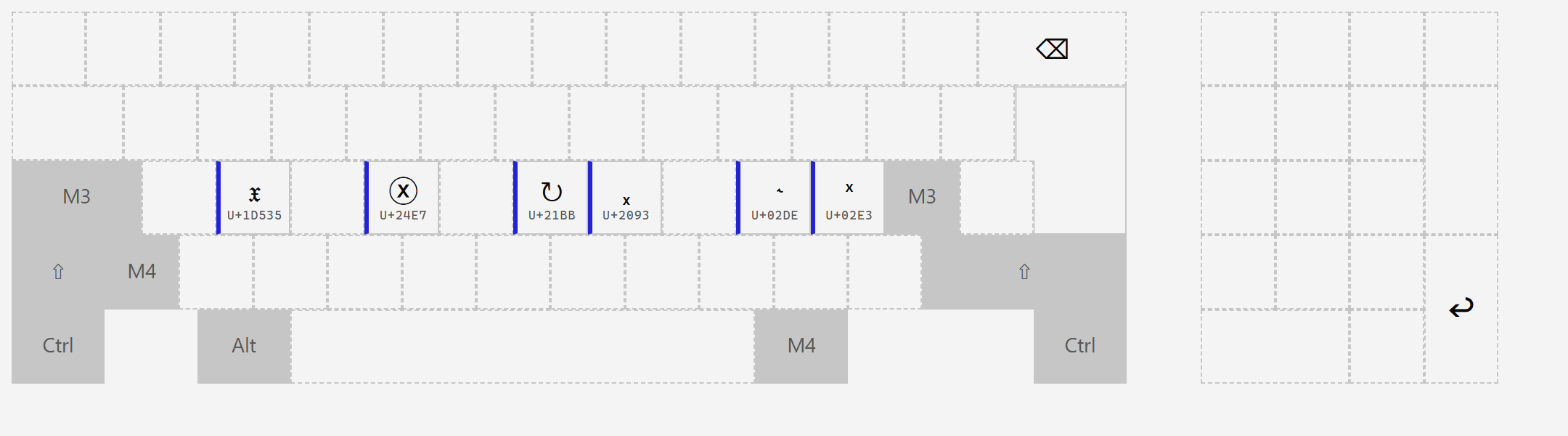
They are compose modifiers – each one opens a branch of the compose tree that derives characters rather than storing them. 𝔵 reaches 1021 mathematical alphanumeric characters, ⓧ reaches 264 enclosed ones, ˣ and ₓ together reach 107 raised and lowered ones. Six keys stand in for roughly 1400 characters that no layer could hold.
Before this layer existed, all four of the older modifiers sat on one key – the ^ key – on four different layers: ↻ on layer 3, ˣ on 7, ₓ on 8, ˞ on 11. Three of the four were behind a lock, which meant that typing a superscript 2 took four actions: lock maths, Mod3+^, 2, unlock. The characters were available; the grip was not.
The scarce resource turned out not to be cells – layers 11 and 12 have dozens free – but cheap reach. Mod3+Mod4 was the one grip left: layers 1 to 4 are full, and Mod5 to Mod9 have no keys at all. It became free when the maths block moved to its own lock, and it now holds the whole modifier alphabet one grip away, from anywhere.
Each modifier has exactly one home. The four old positions were cleared when this layer was created.
This layer is the only one exempt from the rule that a layer must account for every locked modifier. Ordinarily, locking the maths block means every layer that does not mention Mod5 is skipped – which would have made layer 21 unreachable exactly where you are most likely to want a font variant or a superscript.
Layer 21 carries the mark ignoreLocks in layouts.json, the only layer that does. Pressing Mod3+Mod4 inside a locked block lands here rather than falling back to layer 1.
A side effect worth knowing: Mod3 and Mod4 are both lockable in their own right (Mod3+Mod3, Mod4+Mod4). With both locked, every key hits layer 21 – consistent, but surprising. M3+Esc gets you out.
The modifier character is the letter x with the transformation already applied to it. ˣ is a raised x, ₓ a lowered one, ⓧ a circled one, 𝔵 an x in another font. You see the category by seeing what it does.
The two inherited ones – ↻ and ˞ – do not follow the rule and are kept as named exceptions rather than renamed, because they carry inherited compose sequences that predate the grammar.
Mod3+Mod4, S, release, then d K → 𝕂
S gives 𝔵 (font variant), d selects the double-struck family, K is the base. The full notation is on the Compose page.
Note that ↻ was also sitting on layer 18 as an arrow symbol, in the extra block. That was a genuine bug: pressing it to insert an arrow silently started a compose sequence with 70 possible continuations. It has been replaced there with ⟲/⟳, which have no compose meaning. No symbol cell anywhere in the layout carries a compose root character any more.