Repository navigation
Releases: rendyhd/Vicu-Mobile
Release list
v2.5.0 - An assistant with your own model

Vicu 2.5.0 for Android and iOS
Vicu 2.5.0 adds an assistant that runs on the AI model you choose: talk and your tasks appear as cards, organize a long brain dump into projects and tasks, and ask about your tasks by voice. Speech can now be recognized on the phone itself, and projects can be grouped under categories. Update the desktop app to 2.5.0 at the same time: it has the same assistant and categories.
An assistant with your own model
- Off until you set it up, in Settings, Assistant. Choose a provider (OpenAI, Anthropic, Google Gemini, OpenRouter, Ollama, Open WebUI or any OpenAI-compatible server), paste your key and pick a model; Vicu tests the model as soon as you choose it. There is no Vicu server: requests go from your phone straight to your provider, with your key. Before anything goes to a cloud provider, Vicu shows what each feature sends and asks you to agree. Each feature in Settings says where to find it and has Try it.
- Quick capture stays as it was. Hold + and let go, and what you said becomes one task, without the model.
- Smart dictation. Hold +, slide up to the sparkle and keep talking. Each pause turns what you said into task cards with dates, projects, labels, priority, reminders and steps, and a dashed outline marks what Vicu guessed. Say what to change ("make the first one Friday", "and call mum tomorrow") and the cards follow. Add adds them with one Undo. The sheet starts small and grows when the cards come. Also Break into steps in a task's menu, and Make tasks when you share text to Vicu.
- Brain dump. Turn on Brain dump at the top of the dictation sheet and talk, or type, for as long as you like: nothing is sent until you tap Organize. Everything you said is then sorted into tasks with notes, subtasks and priority, in your projects or in new projects and subprojects where none of yours fit. Rename or remove a new project, change a card, or say or type a change and tap Update. Add all creates the new projects and then the tasks, with one Undo. New projects need a connection.
- Ask. The sparkle next to Search on any list opens Ask about that list. It starts small and grows with the first answer, and answers briefly. Changes come as cards that you apply or decline, with Undo. A conversation left for 30 minutes makes way for a new one.
- Talk. Turn on the microphone in Ask and just talk: a pause sends it, the answer is read aloud, and it keeps listening. Talk again to interrupt. A change is read out as a yes-or-no question you answer by voice. With headphones it keeps listening while it speaks.
Speech on the phone
- In Settings, Assistant, Hearing, download a speech model and voice input is recognized on the phone, without sending audio anywhere. Parakeet is the one for phones: it keeps up as you talk. Whisper's larger models are made for computers and are slow on a phone. The phone's own recognizer stays the default.
- Downloads use Wi-Fi unless you allow mobile data. On Android, speech on the phone needs a 64-bit processor from about 2018 or later.
Project categories
- Optional named headers that group your top-level projects in the menu, in Settings, Projects and in the project pickers. Use Add category above or Move to category… in a project's menu; rename, move or delete a category (with Undo) from its header, or drag a project past a header into that category. Collapsed categories show how many projects they hold.
- Categories sync with your other devices and the desktop app. Without any, the project list is as before.
Other changes
- Pull the task editor down by its header, or past the top of its content, to close it.
Fixes
- Android widget: ticking a routine on the Routines widget hid the row, showed it again for a moment and hid it once more. It now stays hidden.
- Android routine reminders: a routine ticked on another device, or ticked earlier on this phone, could still ring later. Every routine reminder now checks the routine on the server first; offline, the phone's copy decides.
Full changelog: v2.4.0...v2.5.0
v2.4.0 - Share a routine
Vicu 2.4.0 for Android and iOS
Vicu 2.4.0 lets you share a routine with someone you already share a project with, gives each routine a colour of its own, and keeps syncing on a server whose search is broken. Update the desktop app to 2.4.0 at the same time: it shares routines too.
Share a routine
- Share with, in the routine editor, lists the people of the projects you already share. Pick one and the routine moves into that project; Vicu never creates or shares a project for you. People who can only view a project are listed as "Can view only". When the person is in more than one of your projects, choose which one keeps the routine.
- A tick or skip by either of you shows for both, and a finished time says who did it ("Done by Maya"). Two people ticking at the same moment both count.
- Members who can edit the project tick, skip and edit the routine; view-only members only look. Only you, the owner, can stop sharing, archive or delete it.
- Your own choices: as a member, turn the routine's reminders off for you, or hide it. Hidden routines are listed in Settings, where you can show them again. Both follow you to your other devices.
- Deleting or archiving a project that holds a shared routine says so first, even with "Confirm before deleting" off.
- Android: a shared routine's reminder looks at the routine again before it rings, so a time someone else already ticked stays quiet. iPhone and iPad plan their reminders after each refresh.
Routine colours
- Give a routine a colour in the editor (Color, at the end): none, or one of the project colours. Its ring and icon on the Routines screen and in Today take the colour, and so does its ring in the Routines widget on Android and iOS.
- Light colours such as yellow darken just enough to read on a light background. A colour picked in the desktop app shows as a swatch of its own.
Fixes
- Syncing with a server whose search is broken. A Vikunja server on ParadeDB whose
pg_searchextension is older than its library (a newer image pulled without runningALTER EXTENSION pg_search UPDATE) answers every search with "unexpected error occurred". The first sync after signing in failed with that error and loaded no tasks. Vicu now syncs your tasks, custom lists, settings and routines on such a server. Search itself is unchanged, though the part of it that asks the server keeps failing until the server is updated. (#51)
Full changelog: v2.3.1...v2.4.0
v2.3.1 - Quick add opens with the keyboard
Vicu 2.3.1 for Android and iOS
Vicu 2.3.1 rebuilds quick add as one sheet that opens with the keyboard, keeps list titles compact next to the menu, and makes Vicu available on Android tablets again. Nothing synced changed: the desktop app 2.3.0 works with it as it is.
Quick add
- Opens with the keyboard. The sheet comes up together with the keyboard, with the title ready to type, and stays where it is while you work in it. Before, it climbed after the keyboard, and on Android the keyboard could stutter on the way up.
- One line of chips: When, Remind and Priority, plus tags, a project and a repeat once they are set. A chip opens its choices where the keyboard was: When with times and a calendar, reminders and places, priority, tags (with New tag), projects and repeat. Tap the title to get the keyboard back without the sheet moving.
- Expand grows the same sheet to full height, with a row for each property, notes and a checklist. Checklist items become subtasks of the new task.
- Nothing is saved until you tap Add.
Lists
- The title of a list sits next to the menu button and stays put; the bar changes colour as the list scrolls under it. Today shows its date as a small line under the title.
Fixes
- A long press on a row you can drag (Inbox and project tasks, projects, lists and labels in the drawer, Settings > Projects) picks it up without also opening it.
- Android: Google Play offers Vicu again on devices without GPS or a microphone, mostly tablets, which 2.3.0 left out. On those devices location reminders and voice input stay off.
Full changelog: v2.3.0...v2.3.1
v2.3.0 - Say a task, get reminded at a place
Vicu 2.3.0 for Android and iOS
Vicu 2.3.0 lets you add tasks by voice and reminds you when you arrive at or leave a place. The task editor is calmer, quick add grows into it, and the + button does more: hold it to say a task, or drag it onto a day or project. Update the desktop app to 2.3.0 at the same time: it can pick a phone's saved place for a reminder, and adds tasks by voice too.
Add tasks by voice
- Hold + to say a task. Your words show in a card as you speak, with the date, project and labels picked out the way quick add reads them. Let go to add the task, slide down to cancel. A tap still opens quick add. The task goes to the list on screen: a project's tasks go to that project, Today's get today's date, unless you say otherwise.
- Siri on iPhone and iPad: "Hey Siri, add a task in Vicu" asks what the task is and adds it without opening the app.
- Android: the launcher shortcuts Add task and Add by voice, a Quick add widget with mic and + buttons, and a mic in the task list widget.
- With TalkBack, the + button has a "Say a task" action.
Location reminders
- Get reminded when you arrive at or leave a place: a saved place (Home, Work, ...), a searched address or where you are now, within 100, 200 or 500 m. Choose "At a location..." among a task's reminders. It fires once, also with the app closed, and never for a task that is done or deleted.
- Say it: "Call mom when I get home" or "Buy bread when I leave work", by voice or in quick add, sets the reminder for a saved place.
- Saved places sync: a place's name and the location reminders sync with your other devices and the desktop app; where a place is stays on the phone that saved it. A place saved on another phone shows "Not set on this phone" in Settings, Notifications, Places, with Set location.
- Location reminders need location access set to Always, so they work in the background. Vicu explains why before it asks.
A calmer editor
- The task editor is a sheet over your list. Today, Tomorrow, This weekend and Next week move a task with one tap, with Undo.
- Properties are rows in one card; the ones you have not set wait under Add. When, Priority, Remind and Repeat offer their common choices right there.
- Quick add has a Notes line, and expand (or drag the handle up) to continue in the full editor.
- Drag + onto a day or project in Today, Upcoming, Anytime or a project to open quick add with that date or project already set.
Routines
- Routines have one simple type: a name, up to five times a day (each with a reminder and a follow-up) and a repeat: daily, weekdays, every 1 to 4 weeks, or a number of days after you complete it. A missed day is "Not logged"; routines are never overdue. Older versions of Vicu keep reading them.
- Widgets show each routine's time.
More
- Save an attachment to Downloads on Android or to Files on iPhone and iPad, next to Share.
- Widget transparency: set how see-through the task list widget is (Android), with thanks to @drdanielbender.
- User-installed certificates are trusted on Android, so a server with your own certificate authority works, with thanks to @nasonovdanila.
- Widgets refresh right after a tap or an edit on Android 12 and later, with thanks to @drdanielbender.
Fixes
- Quick add's keyboard opens together with the sheet instead of after it.
- iPhone: the screen no longer slides up to the field you type in, which pushed Back and Done out of view; the notes editor shows Hide keyboard above the keyboard.
- iPhone: tapping a widget after the app was in the background for a long time no longer closes the app.
- Quick add's chips wrap instead of being cut off on a narrow phone.
Full changelog: v2.2.0...v2.3.0
v2.2.0 - Your settings follow you
Vicu 2.2.0 for Android and iOS
Vicu 2.2.0 makes your settings follow you: the Inbox and the order of your tasks are now the same on every phone, iPhone, iPad and the desktop app. It also makes the data Vicu keeps on your Vikunja server for itself safer, above all in shared projects. Update the desktop app to 2.2.0 at the same time.
Your Inbox and task order sync
- The Inbox project is the same on every device. The first device you update offers its Inbox to the others; a device whose Inbox was different switches to it and tells you so. Choosing another Inbox (Settings, Projects) changes it everywhere. A new device suggests your Inbox during setup.
- Sort the tasks of a project your way, with thanks to @Pegoku: Due date then manual (the default), Due date then priority, Manual, Priority, Title, Newest first or Oldest first. Pick an order for every project in Settings, Projects, Display, or for one project with Sort tasks in its menu (the Inbox has a sort button). A project without its own order follows its parent's. Project and Inbox widgets follow the same order. The order syncs with your other devices and the desktop app.
- In Manual order you can drag every task; in the default order the undated ones; in the sorted orders none.
- The project widget used to list by position and now lists dated tasks first, like the project screen.
Safer hidden data
Vikunja has no place for an app's own data, so Vicu keeps custom lists, routines and now your settings in tasks it hides.
- Shared projects no longer mix people's data. Before, if your Inbox (or another project holding Vicu's hidden tasks) was shared, the other person's Vicu took your custom lists and routines as its own. Now each person's Vicu uses only the hidden tasks they created. Lists or routines that were already mixed cannot be told apart afterwards: delete the ones that are not yours from Custom Lists or Routines.
- Hidden tasks reopened or edited in Vikunja's web app keep working and are hidden again.
- Hidden data a newer version of Vicu wrote is kept and never overwritten; a routine saved by a newer version says so instead of asking for repair.
- Deleted custom lists older than 90 days are cleaned up, so the phone and the desktop app no longer rewrite your custom lists on every sync, and a second copy of your custom lists left by two devices is removed.
- A version older than 2.2.0 shows the new settings task as one done task in the Logbook and search until it updates.
Fixes
- Discard unsynced changes (Settings, General, Clear cache) now also discards custom-list and settings changes that had not reached the server.
- Signing in to another account no longer keeps parts of the previous sign-in.
iPhone and iPad
- An iPhone or iPad set up from another device's backup no longer signs out the original device's backup sign-in, and it starts signed out instead of half signed in. Your sign-in and its device id stay on the device they belong to.
- A widget set to a project or custom list of an account you signed out of says to choose another list instead of showing a list of the new account with the same number.
- Widget contents and shares waiting to be added are left out of iCloud backups, and a share saved before signing out is not added to the next account's Inbox.
Full changelog: v2.1.0...v2.2.0
v2.1.0 - Vicu on iPhone and iPad
Vicu 2.1.0 for Android and iOS
Vicu 2.1.0 brings Vicu to iPhone and iPad. It is the same app as on Android, from the same code: the same lists, editor, quick add, routines, custom lists, review and sharing, reading your Vikunja data by the same rules as Android and the desktop app. Both apps also get optional task counts in the drawer and a few fixes.
On iPhone and iPad, Vicu comes through TestFlight first, before the App Store. If you find a rough edge, please open an issue.
Vicu on iPhone and iPad
- Every screen of the Android app, with iOS gestures and system settings: swipe back from the edge, Dynamic Type, light and dark appearance.
- Sign in with your password (with two-factor), an API token or single sign-on. Some providers, Google among them, do not allow sign-in inside an app; use your password or an API token there.
- Reminders and daily summaries, with Mark Complete and Snooze on the notification, and Complete and Skip for routines. iOS keeps at most 64 notifications waiting, so Vicu plans the soonest ones ahead and tops them up whenever something changes.
- Widgets: a Tasks widget for Today, Inbox, Upcoming, Anytime, any project or custom list (choose it in Edit Widget), and a Routines widget, both with tap-to-complete. A completion from a widget is sent the next time Vicu runs.
- Quick add from anywhere: an Add task control for Control Center, the Lock Screen and the Action Button (iOS 18), "Add a task in Vicu" with Siri, and Add task when you hold the app icon.
- Share to Vicu from any app: a small sheet with the title, notes and attachments; the task lands in your Inbox.
- Attachments from Photos and Files, opened with Quick Look and shared with the share sheet.
- Offline changes are kept and sent when the connection is back, also from the background when iOS allows it.
- Vicu collects no data. Your sign-in is kept in the Keychain on this device only.
What works differently on iOS is described in docs/ios.md.
New on Android and iOS
- Task counts in the drawer: turn on Show task count (Settings, Projects) to see how many open tasks each project has. It is independent of Show project progress, so the drawer can show the rings, the counts, both or neither.
Fixes
-
When you scroll back to the top of a list, pulling down now always opens the large title first; only a further pull refreshes. Before, a slow pull often refreshed and left the title small.
-
The summary times in Settings follow your phone's 12 or 24 hour clock.
-
Today no longer opens scrolled past your routines when they load after your tasks.
-
Setup keeps a comfortable width on tablets instead of stretching across the screen.
-
The calendar in the When sheet and in the reminder picker starts the week on Monday, as the rest of Vicu and the desktop app do, whatever your phone's region. Swipe it or use the arrows to change the month; days of the weeks around the month can be picked too.
Known issues
- Undo of a repeating task that was completed while offline does not put its dates back.
Full changelog: v2.0.1...v2.1.0
v2.0.1 - Fixes for API token sign-ins
Vicu Android 2.0.1
Vicu Android 2.0.1 ships together with Vicu 2.0.1 for the desktop. It stops Vicu from signing you out when an API token is not allowed to do something, and makes switching between the main screens one smooth fade again.
This is a pre-release that builds on 2.0.0; if you are coming from 1.10, read the 2.0.0 notes too. If you find a rough edge, please open an issue. The desktop side is in the Vicu 2.0.1 notes.
Signed in with an API token
Vikunja lets you choose what an API token may do, and it answers a request the token is not allowed to make as if the session had ended. Vicu took that at its word and sent you to the sign-in screen.
- Opening the comments of a shared task, assigning someone, writing a comment or sharing a project with a token that lacks that permission no longer signs you out, and neither does the background check of who can see your projects. Vicu now says what the token is missing: give the token the permissions for task comments, task assignees and project sharing in Vikunja, or sign in with your password instead.
- A comment or assignment made offline that the token is not allowed to send is set aside as a failed change, and the rest of your offline changes are still sent. Before, it paused syncing until you signed in again.
- The Notify me bell on the Comments screen is only shown when you sign in with your password or single sign-on. Vikunja does not let API tokens follow tasks at all.
If you sign in with your password or single sign-on, nothing changes for you.
Fixes
- Switching between the main screens is one smooth fade again. Before, going to the Inbox and back to Today could start the fade on an empty screen, stop half-way with both screens showing, and then jump into place. A screen now fades in once its tasks are there, and Today keeps its content when you come back to it.
Known issues
- The calendar in the When sheet starts the week on Sunday; the rest of Vicu, and the desktop app, start on Monday.
- Undo of a repeating task that was completed while offline does not put its dates back.
Full changelog: v2.0.0...v2.0.1
v2.0.0 - Share projects with your household
Vicu Android 2.0.0
Vicu Android 2.0.0 ships together with Vicu 2.0.0 for the desktop. Vicu is no longer only for you: share a project with the people you live or work with, assign tasks to each other and talk about a task in its comments. New custom-list conditions gather that shared work in one place. This version also has fixes and a bottom bar option that are only on Android.
This is a pre-release. If you find a rough edge, please open an issue. The desktop side is in the Vicu 2.0.0 notes.
Everything about sharing appears only on projects someone else can see. If you share nothing, Vicu looks and works exactly as before.
Share a project
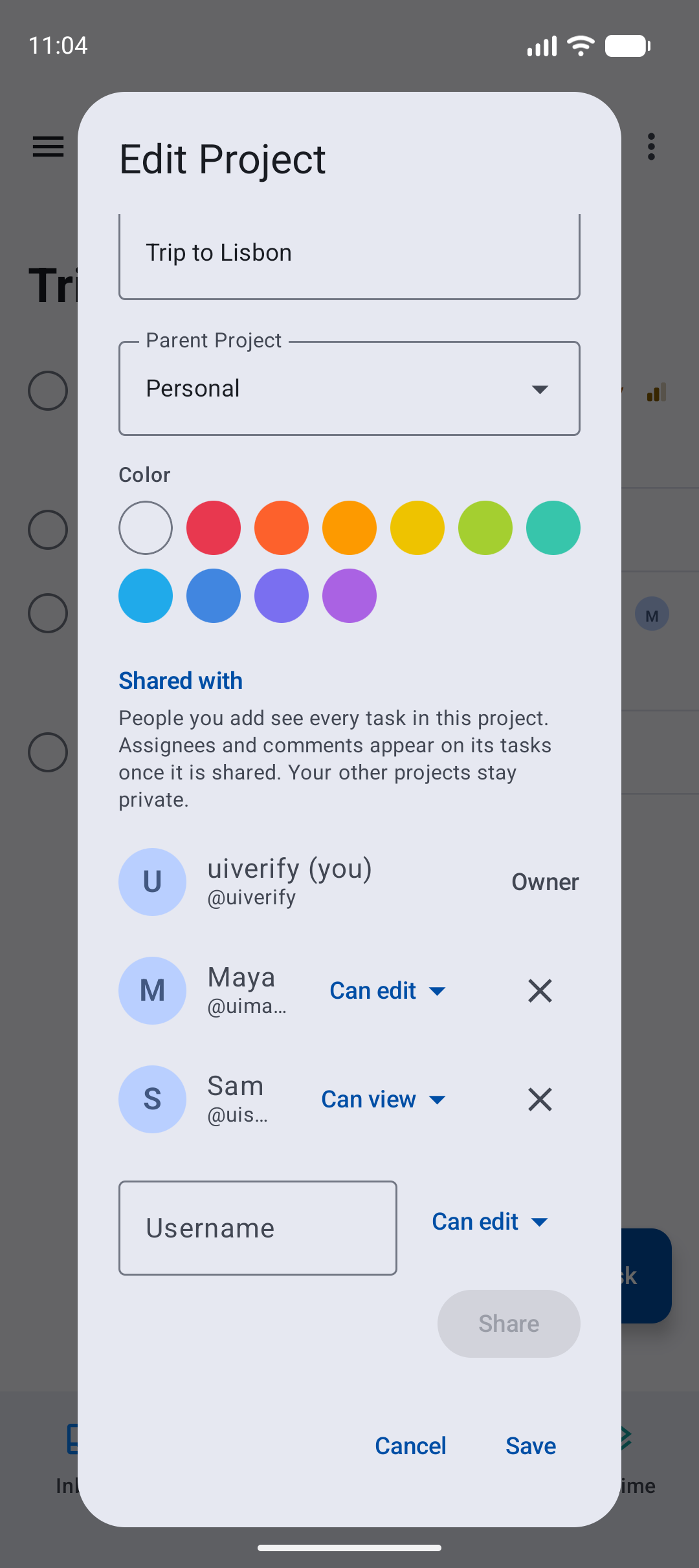
- Open a project, tap ⋮, Edit project, and scroll to Shared with. Type a username, pick Can view, Can edit or Admin, and tap Share. Change someone's access from the menu next to their name, or remove them with ×; a removal offers Undo.
- Only project admins can share. Sharing a project also shares its subprojects. People shared through a team are listed and are managed in Vikunja.
Assign tasks
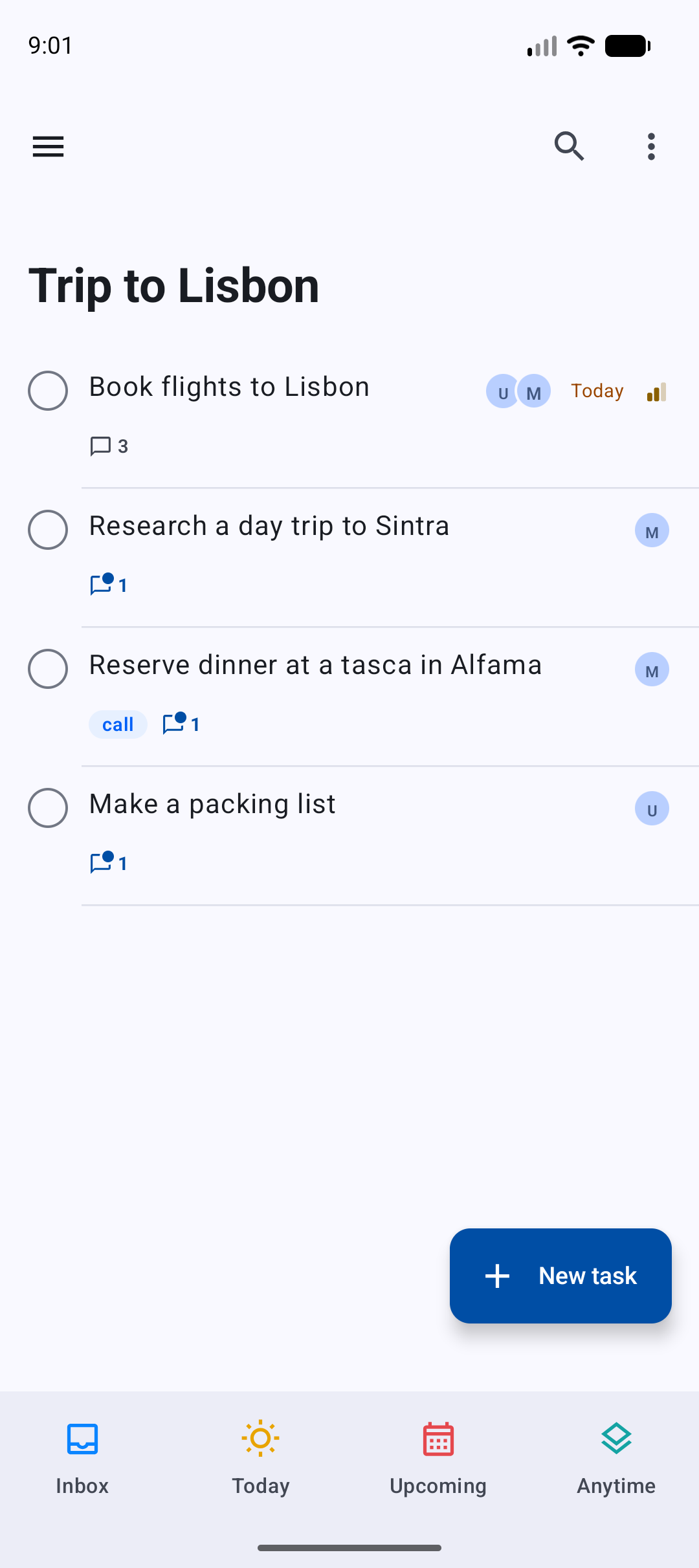
- Rows in a shared project show who is assigned, you first.
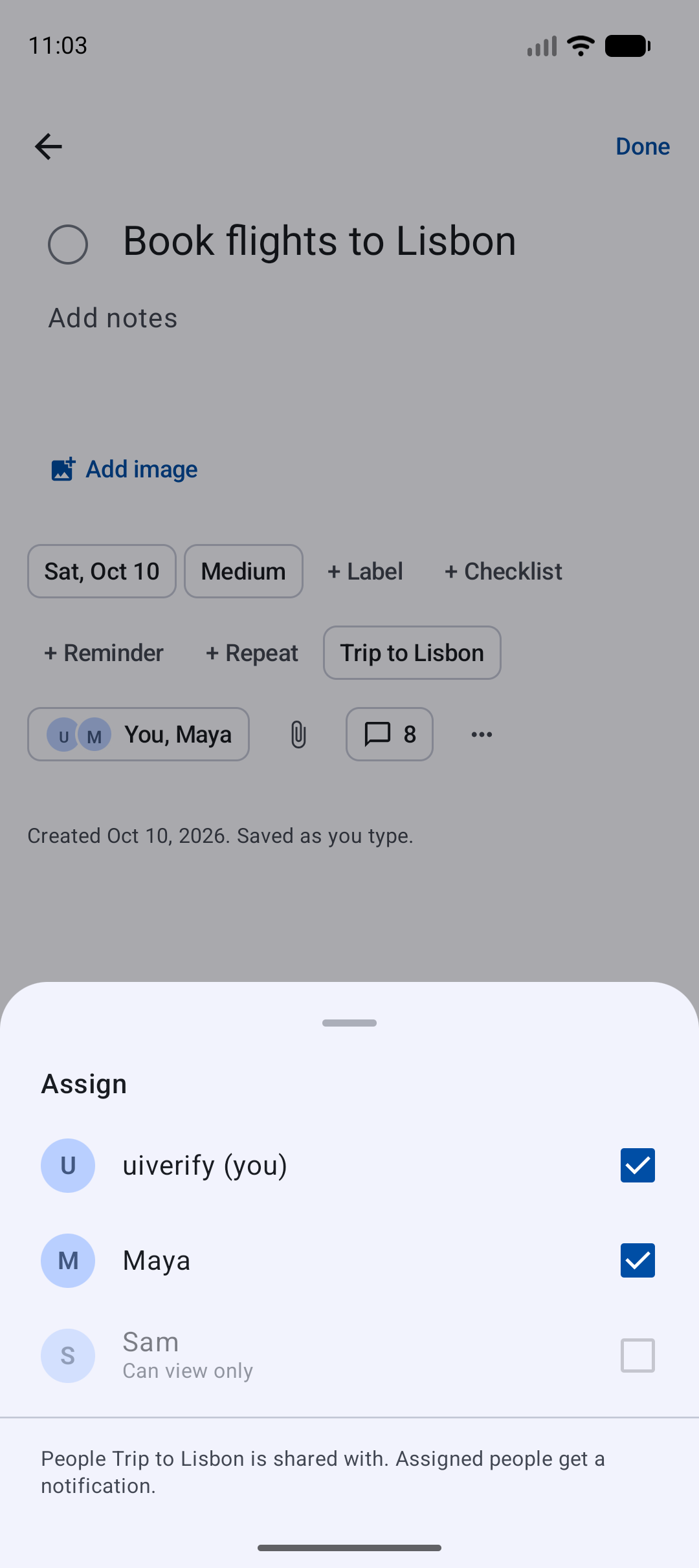
- A task has an Assign chip right after the project. Tick people to assign them; Vikunja notifies them. Someone who can only view the project is listed as Can view only and cannot be picked.
Comments
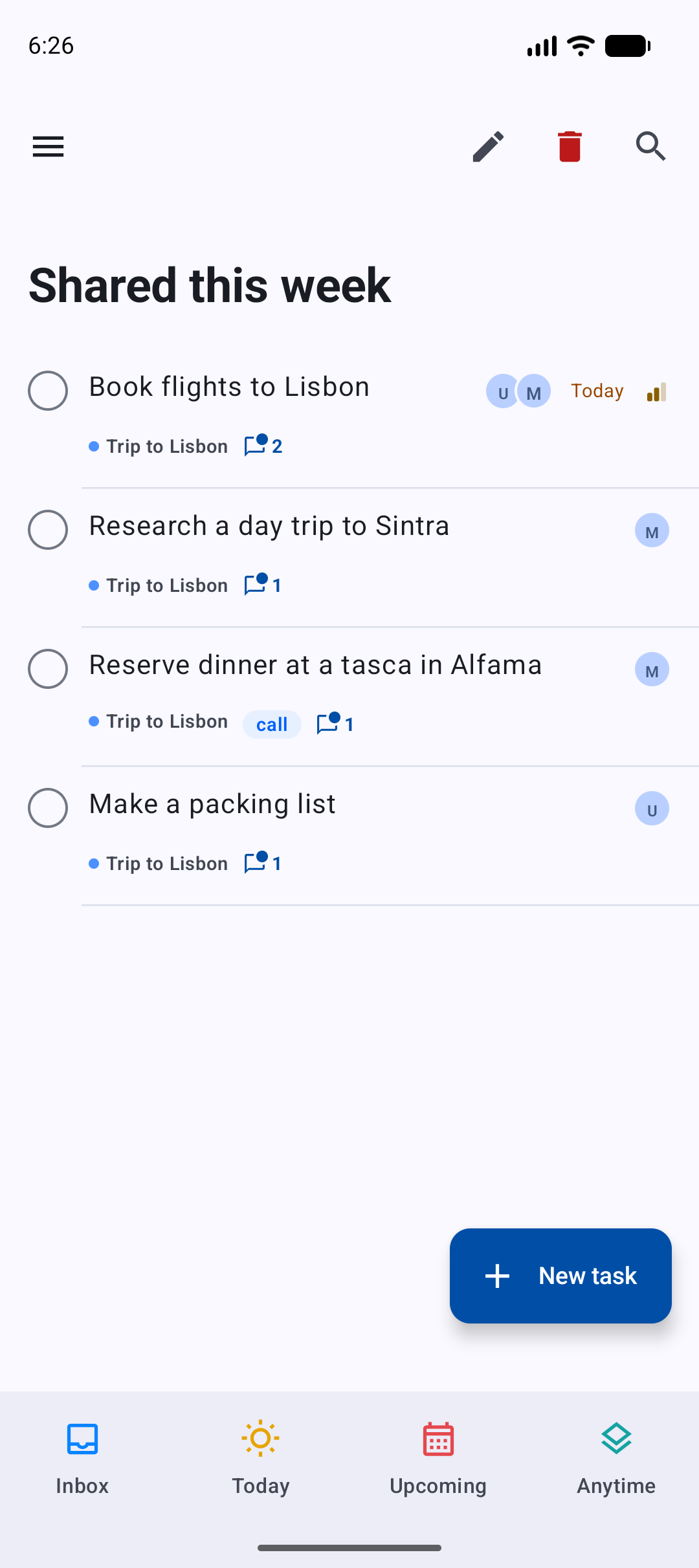
- A row shows how many comments a task has, with a dot when there is something you have not read. Tap the count, or the comments chip of an open task, to read the thread.
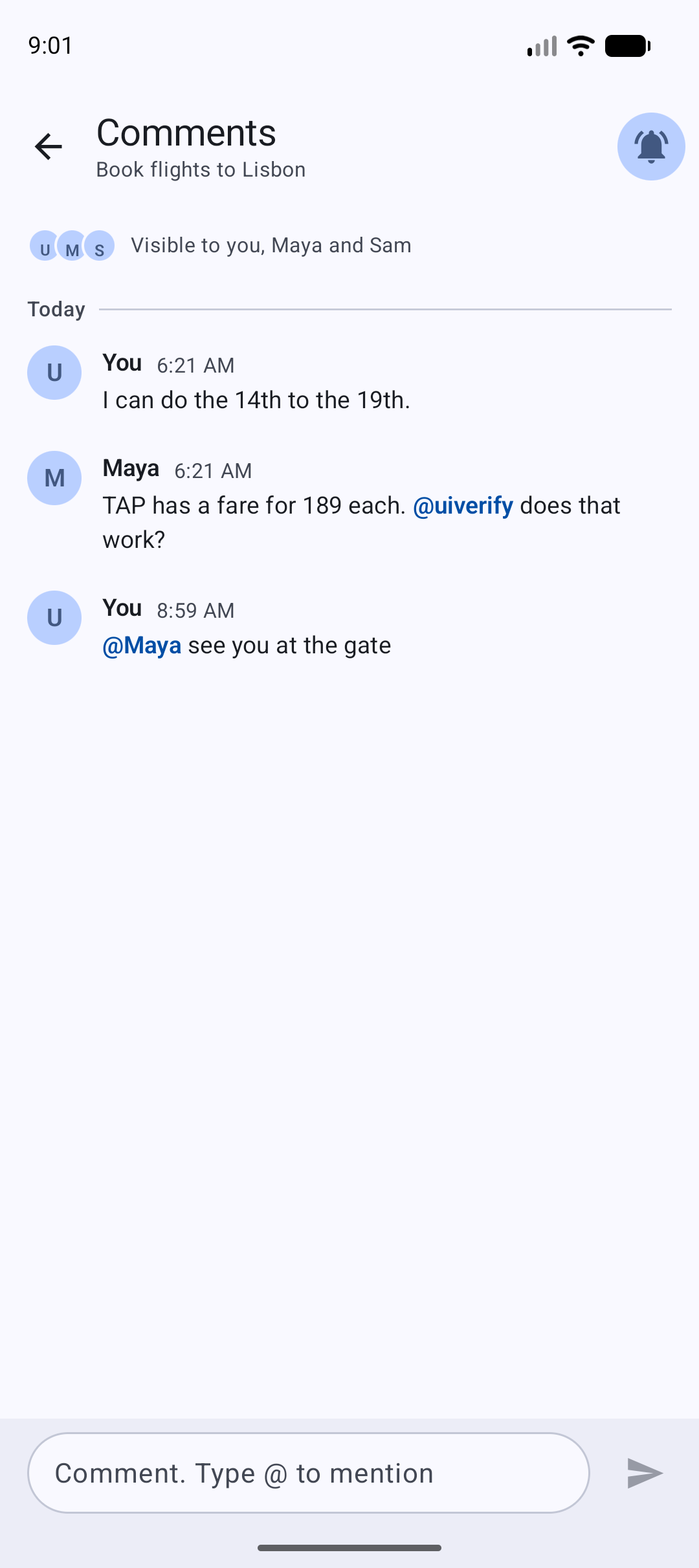
- The Comments screen says who can see the thread. Type @ and pick a name from the suggestions to mention someone (they get a notification). Hold one of your own comments to edit or delete it.
- The bell at the top is Notify me: it follows the task, so you hear about new comments too.
- Opening the comments marks them read, on every device.
- People who can only view a project can read its comments but not write.
Custom lists for shared work
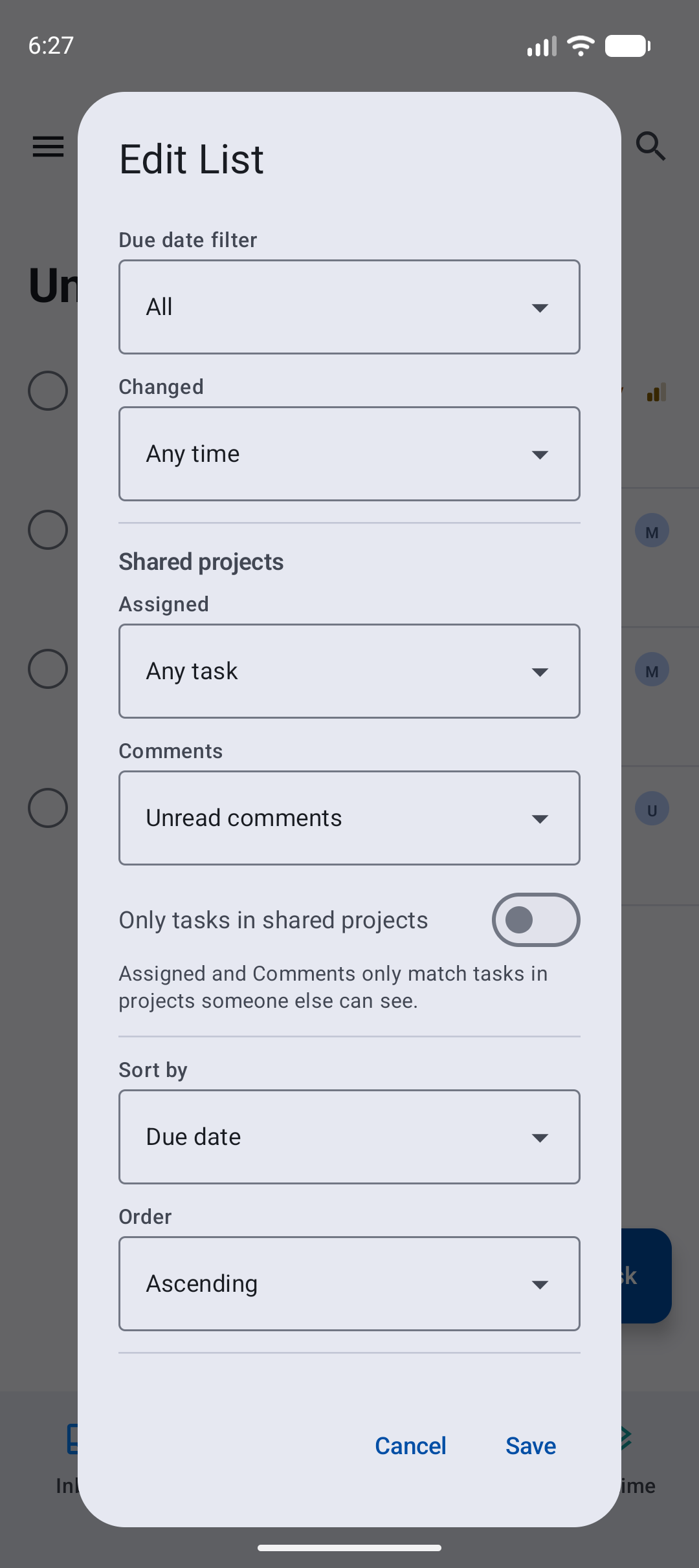
The list editor has new conditions:
- Changed: today, or in the last 3, 7 or 30 days.
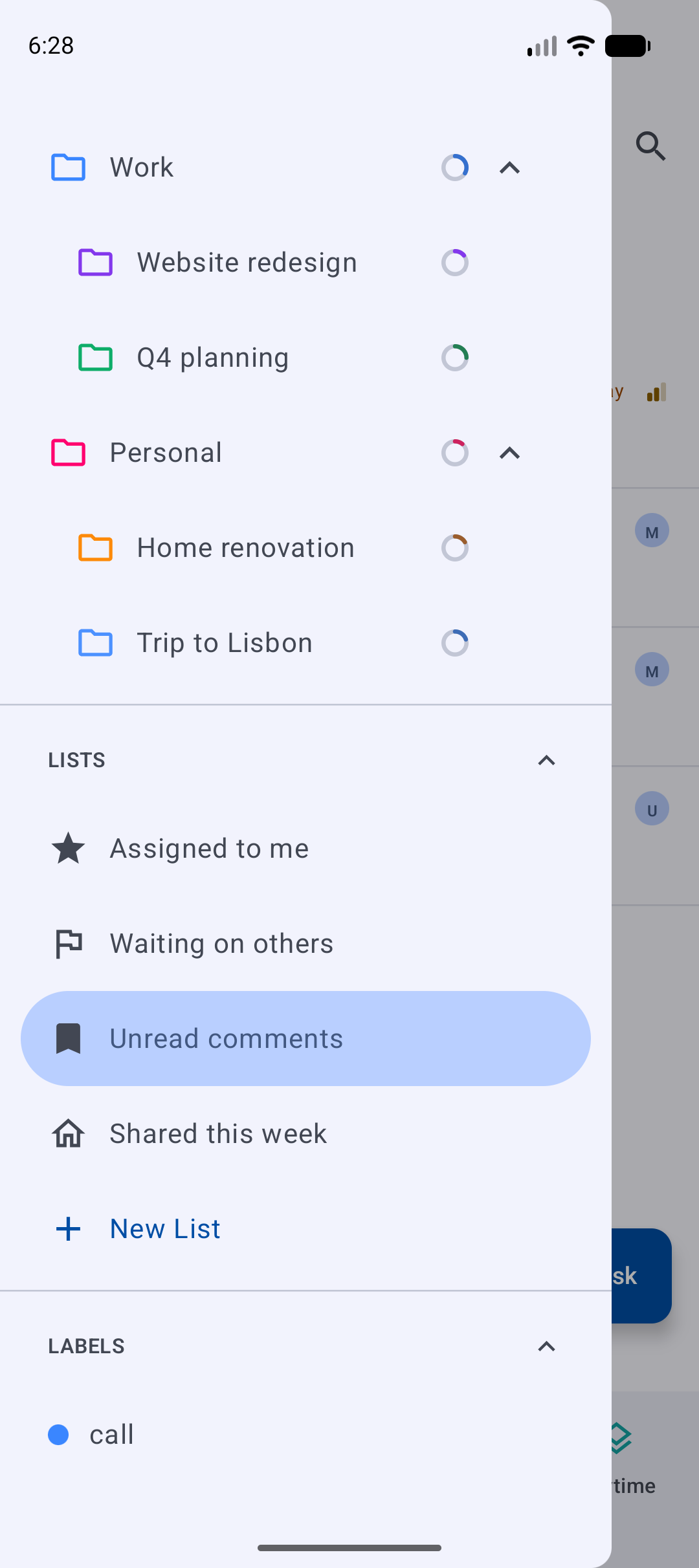
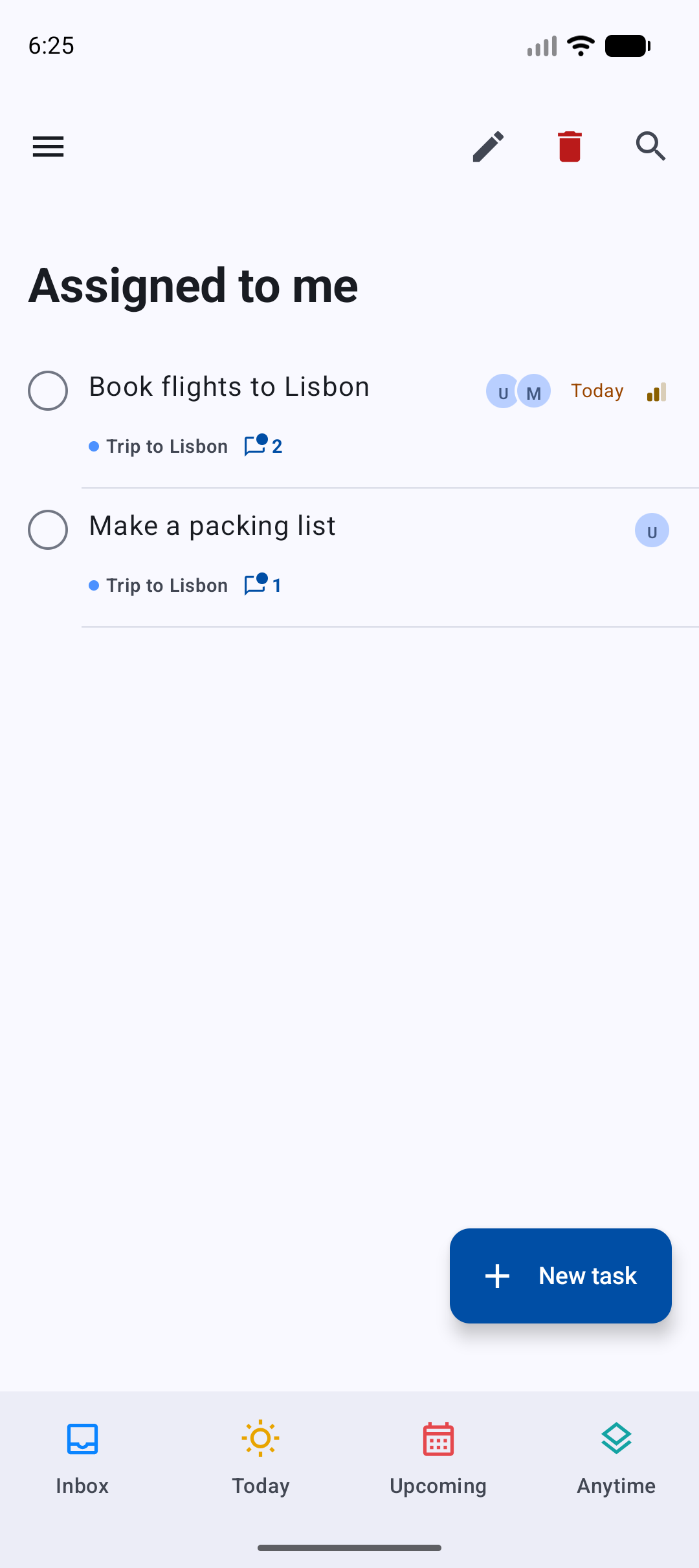
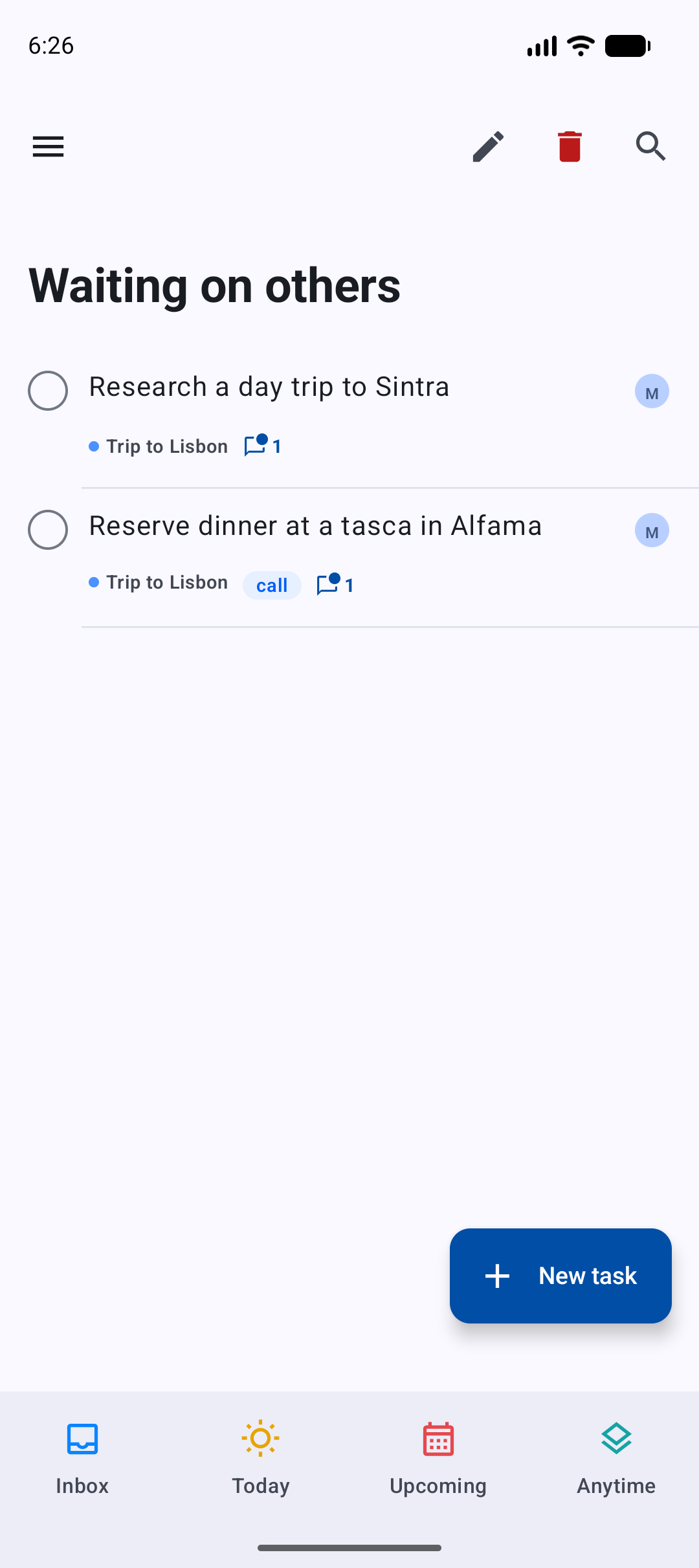
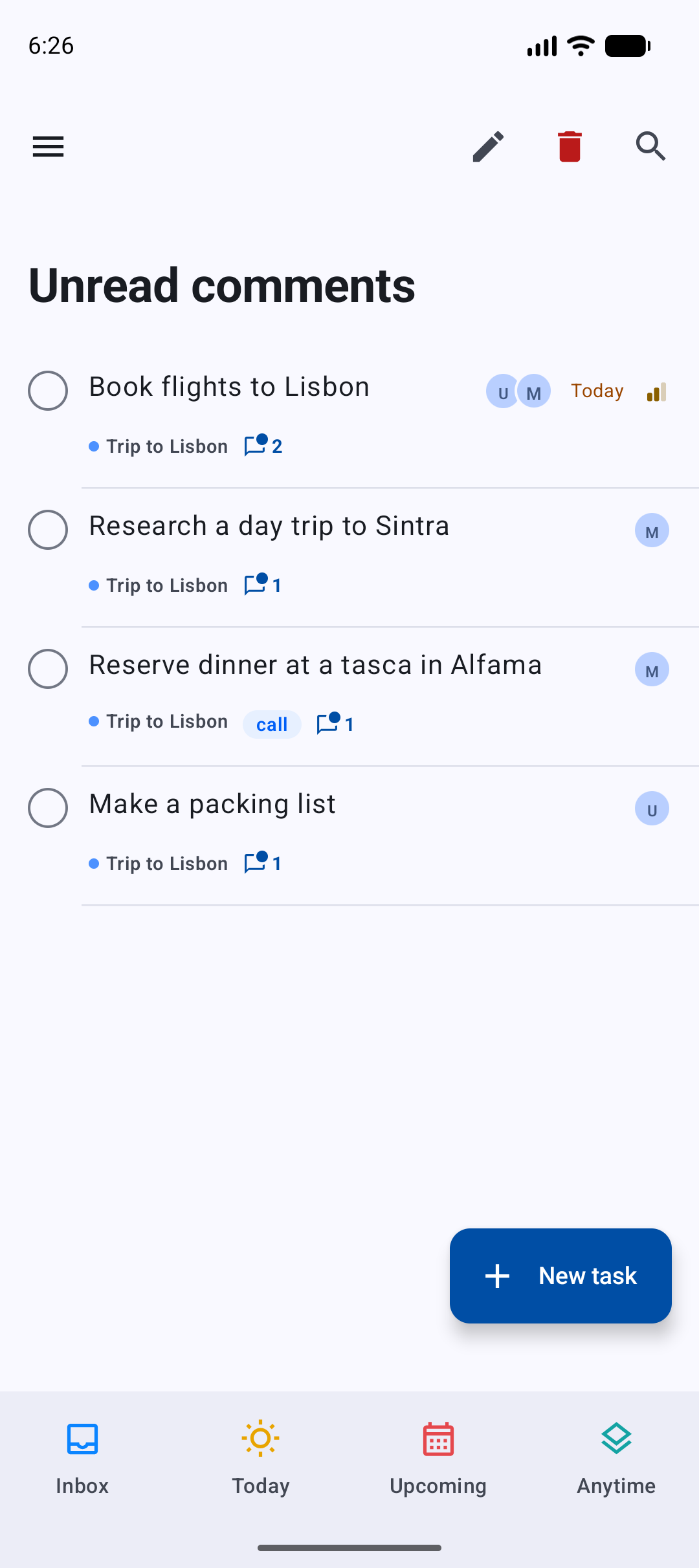
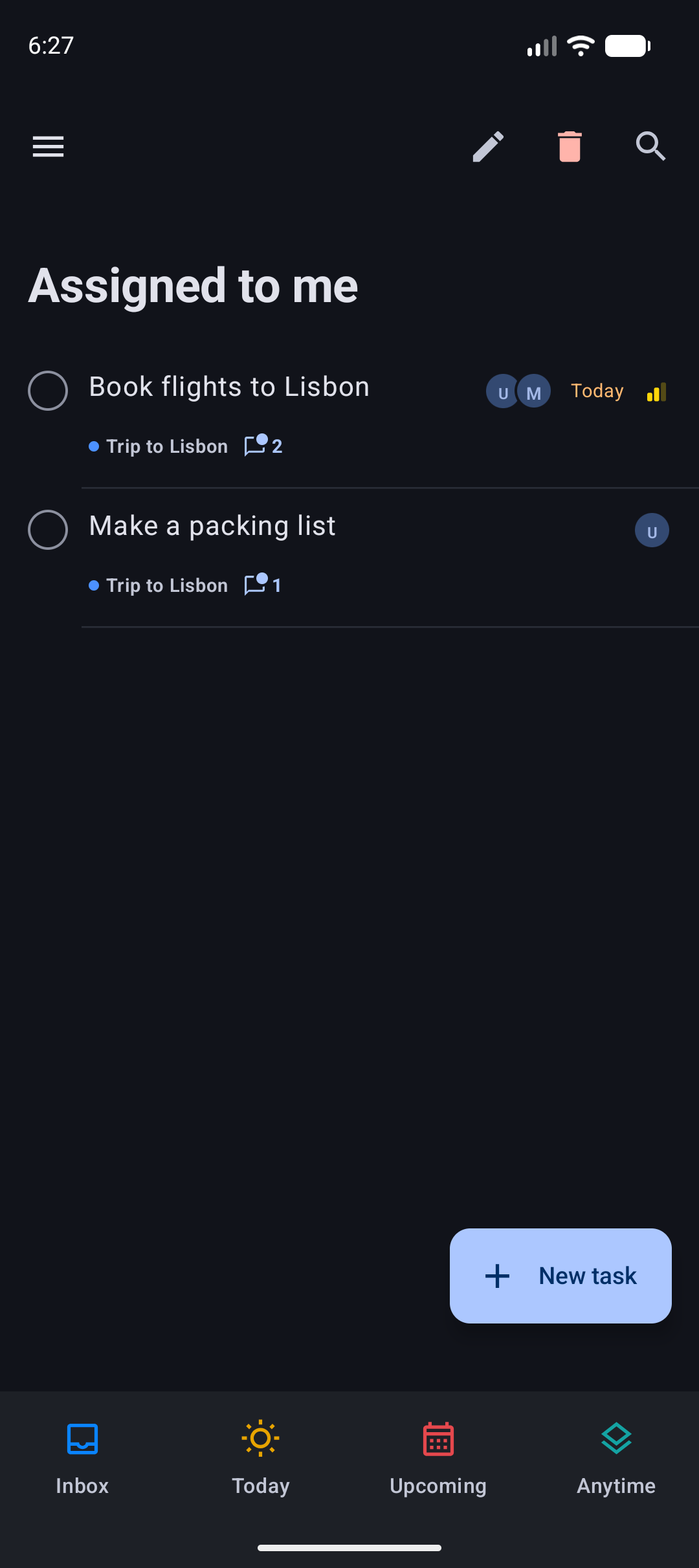
- Under Shared projects: Assigned (to me, to someone else, to nobody), Comments (unread comments, has comments) and Only tasks in shared projects.
Assigned and Comments only match tasks in shared projects. Changed counts every change the server records (edits, completing, comments, assignees, labels), including your own, because Vikunja does not record who changed a task; reading comments does not count. A task you read in an Unread comments list keeps its place until you leave the list. The home screen widget shows a list with the same conditions, and the lists sync with the desktop app with the same meaning.
Offline
- Assigning, unassigning and comments you write offline wait in the sync queue and are sent in order once you are back online. A comment that is still waiting says Waiting to sync.
Only on Android
- Switching between the main screens in the bottom bar is a cross-fade. Before, the old screen faded out completely before the new one faded in, so the top bar and the + button blinked. Choosing a project while another project is open fades too, instead of sliding.
- There is one + button for the whole app, so it no longer fades out and in when you change screens, open a subproject or open Search. On screens without one (Logbook, Review, Settings, Search) it hides with a short fade.
- New setting Smart list colours (Settings, General, Bottom Bar; on by default): turn it off to draw the Inbox, Today, Upcoming and Anytime icons in the bar's own colour. A project or custom list slot can get a colour with Choose colour in the slot editor.
- Saving a custom list on the phone no longer drops a priority condition that was set on the desktop.
Known issues
- The calendar in the When sheet starts the week on Sunday; the rest of Vicu, and the desktop app, start on Monday.
- Undo of a repeating task that was completed while offline does not put its dates back.
Upgrade notes
- The people you share with need an account on the same Vikunja server.
- Update both apps to 2.0.0. An older version keeps the new list conditions when it syncs a list, but ignores them and shows more tasks.
- Vicu Android needs a Vikunja server running version 2.4.0 or newer.
Full changelog: v1.10.1...v2.0.0
v1.10.1 - Projects in Settings
Vicu Android 1.10.1
Vicu Android 1.10.1 ships together with Vicu 1.10.1 for the desktop. Projects get their own tab in Settings, and you can manage a project from its screen and add one from the drawer.
This is a pre-release that builds on 1.10.0. If you find a rough edge, please open an issue.
Projects in Settings
- Settings has four tabs: General, Projects, Notifications and Gestures. On a narrow screen the tab row scrolls.
- Projects holds the Inbox choice, all your projects, display options, project review, labels and custom lists. General keeps the rest.
- Tap a project to edit it, or hold and drag it to change its order within its level; TalkBack offers Move up and Move down. The ⋮ menu on each row has Edit, Add subproject, Set as Inbox, Archive and Delete.
- Archived projects are in a collapsed Archived group with Restore, instead of a switch that showed them in the list.
- Projects are listed in the same order as in the drawer.
- Project review has an Excluded from review list where you can include a project again.
- New setting Show project progress (on by default, under Projects, Display): turn it off to hide the progress rings in the drawer.
Manage a project from its screen
- A project's screen has a ⋮ menu: Edit project, Add subproject, Set as Inbox, Mark reviewed (with Undo), Archive and Delete.
- The Projects header in the drawer has a + to add a project.
Fixes
- The widgets use the same colours as the app: the Vicu colours, or your wallpaper colours when Use device colours is on. Before, some launchers drew the widgets' secondary text, checkbox outlines and + with almost no contrast.
- Switching between the main screens is a plain fade, without the zoom.
Known issues
- The calendar in the When sheet starts the week on Sunday; the rest of Vicu, and the desktop app, start on Monday.
- Undo of a repeating task that was completed while offline does not put its dates back.
Upgrade notes
- The Inbox choice, project review, labels and custom lists moved from General to the new Projects tab. Your settings carry over.
- Update both apps to 1.10.1 to get the same project actions on both.
- Vicu Android needs a Vikunja server running version 2.4.0 or newer.
v1.10.0 - One design with the desktop app
Pre-release. The signed APK is attached by CI once the build finishes.
Vicu Android 1.10.0 ships together with Vicu 1.10.0 for the desktop. Both apps now share one design system, so colours, text, spacing, dates and motion match. Completing tasks is calmer, picking dates is faster, and bulk actions are more reliable.
A new look, shared with the desktop app
- Vicu colours are now the default. If you never changed the setting, the app switches from your wallpaper colours to the Vicu colours. To get your wallpaper colours back, open Settings, go to Appearance, and turn on Use device colours (Android 12 and later). With it on, status and swipe colours are adjusted to blend with your wallpaper palette.
- Text that is easy to read in light and dark themes. Label chips are tinted pills whose text always has enough contrast.
- Each smart list has its own icon and colour in the drawer, the bottom bar and the widget picker.
- Task rows have a title line and a quieter line below with the project, labels and date, and a bell and priority at the end. Sections have two levels of headers with counts, and a group of one gets no header.
- Priority is shown with bars (one to three for low, medium and high) and a filled square for urgent, with the name read out by TalkBack. This replaces the exclamation marks, and the same marks are used in the widget.
- Dates read the same way in rows, chips, headers, the editor and the widget, and follow your phone's 12 or 24 hour clock in every sheet.
- Upcoming is grouped by day with sticky day headers, and by project within each day.
- The Logbook is grouped by the day you completed tasks. Review rows have a Mark reviewed button.
- Large titles fold into the top bar as you scroll, and the New task button shrinks to an icon.
- Vicu asks for notification permission after setup and explains why.
Completing tasks
- A completed task stays in the list for 5 seconds, longer while you touch it, so you can still change your mind. Then the row collapses.
- One Completed message with Undo appears. Complete several tasks in a row and it reads "3 completed". It pauses while you touch it.
- The checkbox animates and you feel a small tap when it completes.
- Undo of a repeating task puts its dates back.
Picking a date: the When sheet
One sheet for every date and time, also when you swipe a task to schedule it:
- Type a date in your own words ("tomorrow 9am", "next friday").
- Quick choices, with the coming weekdays listed by name.
- A calendar docked in the sheet.
- Times, shown in your phone's clock style.
Quick add
- A compact sheet that sits right above the keyboard, with one row of chips.
- The chips follow what you type (project, labels, date, priority) unless you set them yourself, and typed tokens move into chips.
The task editor
The editor now reads like a task: an editable headline, plain notes, and one row of property chips for the date, project, priority, repeat and reminders. It fades and rises in, follows the back gesture as you swipe, and saves the moment you dismiss it.
Swiping and moving
- Swipe actions use the Vicu colours, show a word beside the icon, deepen their tint the further you swipe, and give a tap at the point where the action commits.
- Reordering ticks as the task passes each position.
Motion
- Tabs fade through, and opening a project slides in from the side (mirrored for right-to-left languages).
- Predictive back shows where you are going before you let go.
- Lists move smoothly when rows are added, completed or reordered.
- Counts roll when they change. When you empty Today, it says All clear and offers the next task.
- With animations turned off in Android, all of this becomes a plain fade or nothing at all.
Routines
- Routines are now optional. Settings, General, Routines has Enable routines and Show routines in Today, both on by default. With routines off they leave the drawer and Today and their reminders stay quiet; your routines and their history are kept.
- Today lists only the routines still open for the day. Completed and skipped ones leave the section, and the section disappears when nothing is left, the same as on the desktop.
Projects
The drawer shows a progress ring for each project, from its completed and open tasks.
More reliable
- Changes are sent one at a time. Bulk actions on many tasks no longer lose changes on Vikunja servers that use SQLite ("database is locked").
- A task that was deleted on the server, or on another device, disappears from your lists without needing a full refresh.
Known issues
- The calendar in the When sheet starts the week on Sunday; the rest of Vicu, and the desktop app, start on Monday.
- Undo of a repeating task that was completed while offline does not put its dates back.
Upgrade notes
- Update both apps to 1.10.0 to get the same look and the same date wording on both.
- Vicu Android needs a Vikunja server running version 2.4.0 or newer.
Changelog
All of 1.10.0 arrived in #32 (the October 2026 design review): 37 commits since 1.9.0, grouped by type below.
Features (25)
- routines: Make routines optional and keep finished ones out of Today (abb6e9c)
- design: Add the shared design token contract, completion hold and date display rules (cd9f618)
- theme: Vicu colour schemes, type and shapes from the design tokens, device colours off by default (64d6464)
- upcoming: Group Upcoming by local day with sticky day headers (03a4bcb)
- notifications: Ask for the notification permission after setup, with a reason (31b6ea7)
- theme: VicuMotion springs and LocalVicuColors for status, swipe, priority and identity (e07d474)
- theme: Harmonise status and swipe colours to the device scheme when device colours are on (3be7635)
- ui: Status and priority colours by role in rows, section headers, pickers and the widget (dfe79b7)
- ui: Keep the last row clear of the FAB and drop search from Settings (46ff0bd)
- ui: Priority bars and urgent square instead of "!", and label chips as tinted pills that pass 4.5:1 (b8ed503)
- ui: Smart list icons and colours from the token contract in the drawer, bottom bar and widget picker (02c2117)
- ui: One date formatter for rows, chips, headers, the editor and the widget, from the shared date display rules (9f650f6)
- ui: Two levels of section headers with counts, sentence case, and no header for a group of one (610a20e)
- ui: Task rows as a title line and a meta line with a trailing date, bell and priority (ff90229)
- ui: Logbook grouped by completion day, and Review rows with a mark-reviewed button and the shared review states (34a9055)
- ui: One When sheet with typed dates, quick choices, a docked calendar and times, also from the swipe (5f82ae0)
- quick-add: A compact sheet on the keyboard with one chip row, and chips that follow the parser unless you set them (0fa3b2f)
- editor: The task editor reads as a task: an editable headline, plain notes and one row of property chips (3405ede)
- drawer: Project progress rings from one cached done-count request per visible project (78bb5dc)
- ui: Completing on Android follows the shared hold rules, with a merged Completed snackbar, row animations and ToggleOn haptics (e753855)
- swipe: Role colours, a word beside the icon, a tint that deepens with distance and a haptic at the commit point (66d4fcc)
- ui: Large titles that fold into the bar on scroll, and a New task FAB that shrinks to an icon (74007a0)
- nav: Fade-through between tabs and a shared-axis slide into projects, mirrored for RTL (f43795a)
- editor: The editor fades and rises in, follows the predictive back gesture, and saves the moment it is dismissed (c78310e)
- ui: Counts roll, an emptied Today turns to All clear and offers the next task, tokens travel into chips, reorder ticks (4ae1346)
Fixes (7)
- notifications: Start the permission flow when setup really completes (a70e66f)
- ui: A 48 dp subtask toggle, and project names on rows in Search and custom lists (0b92388)
- ui: The user's clock in every sheet, Upcoming grouped by project per day, and the wave 2 review fixes (b4f5a80)
- ui: Wave 3 review fixes for progress counts, quick add chips and targets, and visible rings (7d29e11)
- sync: Serial writes, ghost rows removed, and the wave 6 review fixes for Undo, haptics, toasts and rings (3f762c6)
- ui: The large title unfolds when a list stops being scrollable; harness motion audit and steadier scenarios (7d792fc)
- quick-add: Chips wrap from font scale 1.25 so every chip stays in view; harness a12 Today check, steadier navigation and clipped-node notes (2ccd150)
Tests, docs and chores (5)
- repository: Give the schedule-action test a due date that is never today (6bd1a35)
- ui-verify: Add the emulator UI harness for captures and accessibility checks (d855c41)
- design: Record that Material 3 Expressive is deferred until a stable multiplatform release exposes it (58d7011)
- CLAUDE.md covers the design system, theme and motion, the token tests, date display, the completion hold and the emulator-only harness (6e38e2f)
- release: Version 1.10.0 (versionCode 42) and its release notes (eefd9cf)
Validation
./gradlew test lint assembleDebuggreen in CI.- On the emulator: light, dark and font scale 1.3 runs of the UI harness green, accessibility check with 0 findings, and an animations-off audit (nothing moves, final states at once, input never blocked).
- GitHub Actions will test, build, sign, and attach the relea...