Repository navigation
The Picker
The picker is the small window that appears next to your cursor when a link has no rule. It's built to be answered in one keystroke and then get out of the way.
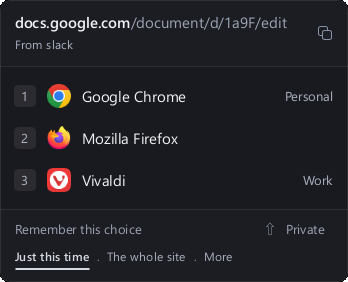
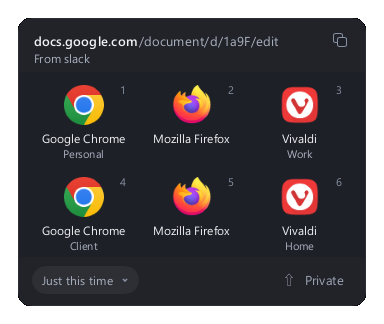
- The address, already unwrapped if it came inside a SafeLink. If the destination can only be known once it's opened, it says Wrapped link: the real destination is known once it opens.
- Where it came from: From Slack, From Outlook… The app that was in front when you clicked.
- Your browsers, one row per browser and per profile (Chrome with its Work profile, Chrome with Personal…), each with its number key.
The list shows nine rows at most; if you have more, the rest scroll underneath.
| Action | What it does |
|---|---|
Click a browser, or press 1–9
|
Opens the link there |
Hold Shift while choosing |
Opens it in a private window |
Ctrl+P (⌘P on a Mac), or the Private pill |
Pins the private window, so you don't have to hold Shift |
Ctrl+C (⌘C), or Copy the address
|
Copies the link and opens nothing |
Esc, or click outside |
Puts the picker away without opening anything |
A browser without a private mode (or a custom one without its private window argument) can't be opened privately; LinkUnbound won't guess the switch, because a wrong one makes some browsers open an error page.
Above the browsers there's a row of reaches. The one selected decides what happens after the link opens:
| Reach | Remembers | Example |
|---|---|---|
| Just this time (default) | Nothing | — |
| This URL | This exact address, query included | https://docs.google.com/document/d/abc |
| Subdomain | Every link on this host | docs.google.com |
| The whole site | The site and all its subdomains |
google.com, which covers mail., drive., docs.… |
| From Slack (the app's name) | Every link that app sends, whatever the address | Everything from Slack |
The row shows two of them and keeps the rest behind More. Move between reaches with the arrow keys or Tab, or click them, then pick the browser. The label changes to say what you're about to do: Remember the whole site, Remember from Slack…
If you also had Private on, the rule opens privately every time.
Careful with This URL. It keeps the whole address. If the link carries a session or a password-reset token, choose the subdomain or the site instead.
How rules compete and how to change them later is in Rules.
Under Settings › Application › Picker:
- Classic: a compact list, one row per browser and profile.
- Tiles: a sheet of tiles that shows every profile at a glance. Handy when you have many.
Both answer to the same keys.
When a new version is available, a strip appears at the top of the picker: Version 2.x ready, with Update and Not now. Pressing Update installs it and LinkUnbound restarts on its own. More in Updates.
If a browser won't start, a profile was deleted, or a rule can't be saved, the picker or the notice says so in plain words (The browser would not start, The profile Work is no longer there…) and the error is written to the local log, with personal details removed. See Troubleshooting.