User Guide Converters and Imports
Converters are registries that map a source rule identifier (a DISA CCI, an AWS Config rule, an AWS Security Hub control, a STIG rule) to the NIST 800-53 control IDs it satisfies. They let SPARC translate scanner and benchmark output into control coverage. This guide covers browsing converters, refreshing them from upstream, importing definitions, and parsing a STIG.
Who this is for: compliance engineers wiring scanner/benchmark data into
SPARC. Viewing converters is public on most instances; mutations require the
converters.write permission — see RBAC.
-
Access: viewing is typically public; creating, editing, refreshing, and
importing require
converters.write. -
Where to find it: Controls → Converters (
/converters).
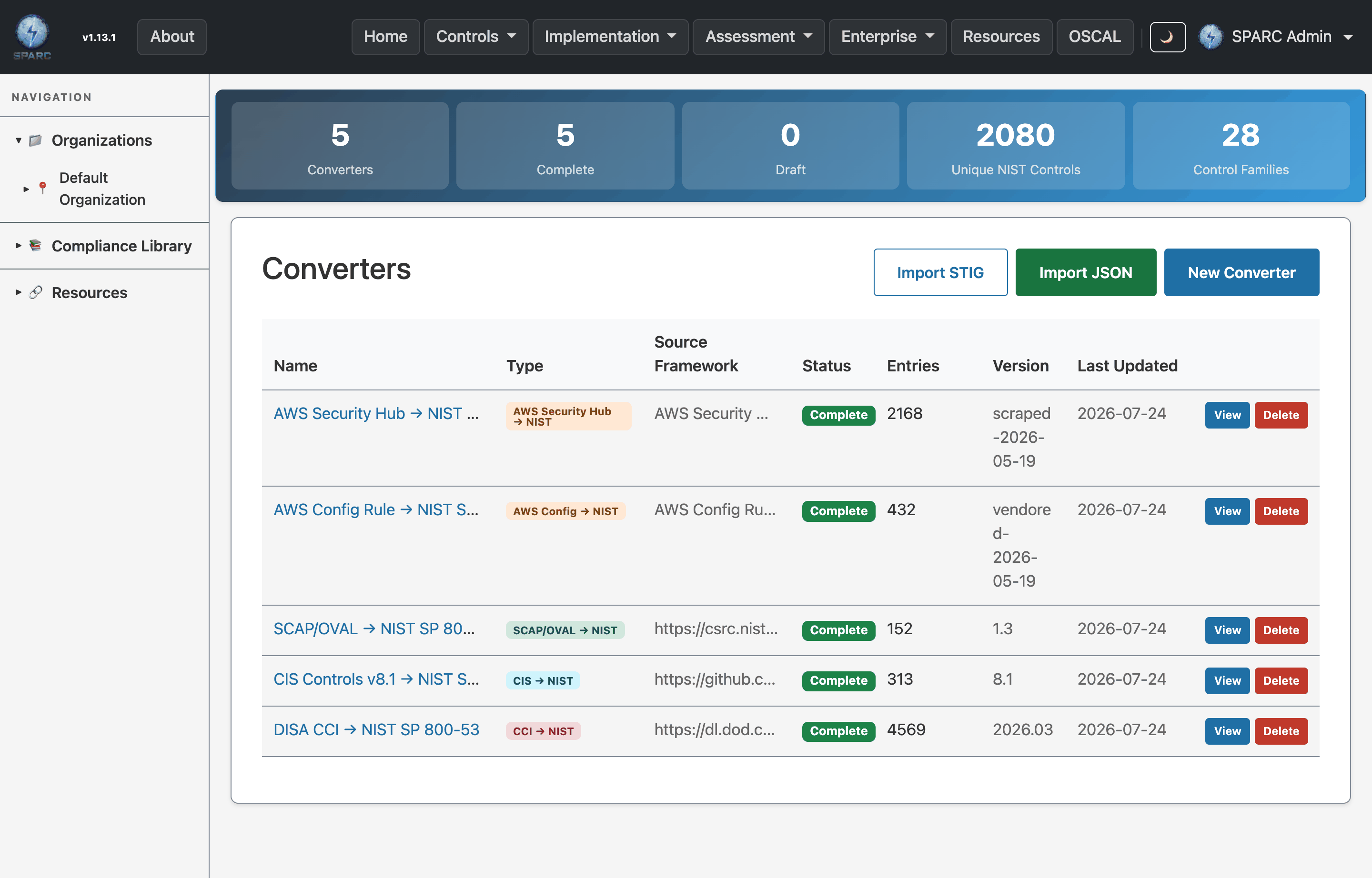
The Converters screen — build and run format converters (DISA, CCI, SCAP, CIS → NIST).
flowchart LR
    UP[Upstream source: CCI / AWS Config / Security Hub] --> CV[Converter registry]
    STIG[DISA STIG XCCDF] --> PARSE[STIG parser] --> CV
    FILE[Converter definition file] --> IMP[Import] --> CV
    CV --> MAP[Rule ID → NIST control IDs]
- Translate scanner findings to controls — use a converter so an AWS Config or Security Hub result counts toward the right NIST controls.
- Keep mappings current — refresh a converter from its upstream source.
- Extract mappings from a STIG — parse a DISA STIG XCCDF into rule → control mappings.
- Go to Controls → Converters (
/converters). - The list shows each registry (e.g. DISA CCI, AWS Config, AWS Security Hub) with its source, entry count, and last-refresh timestamp.
- Open one to see its mapping entries — each row is a source rule ID mapped to one or more NIST control IDs.
On a converter's detail page, use the refresh button that matches its source to pull the latest published mappings:
- Refresh CCI — reloads DISA CCI → NIST mappings.
- Refresh AWS Config — reloads AWS Config rule → NIST mappings.
- Refresh AWS Security Hub — reloads Security Hub control → NIST mappings.
After a refresh, check the updated entry count and last-refresh timestamp.
On the converter detail page, use the inline entry rows to add a single mapping (source rule ID → NIST control IDs) or remove an existing one. Use this for corrections; prefer refresh/import for bulk changes.
-
New (
/converters/new) — enter name, source, and description to register an empty converter. -
Import (
/converters/import) — upload a converter definition file to populate entries in bulk.
- From the converter list, open the STIG parser
(
/converters/stig_parser). - Upload a DISA STIG XCCDF file.
- Submit. The parser extracts the STIG's rule → control mappings, which you can review as converter entries.
- Refresh before a scan cycle so scanner output maps against current control associations.
- Use import/refresh for bulk changes and reserve hand-edited entries for one-off corrections — manual entries are easy to lose track of.
- Converters pair naturally with Component Definitions: a parsed/refreshed converter can drive a CDEF bulk-apply (see Component Definitions).
| Symptom | Likely cause | What to do |
|---|---|---|
| Refresh button does nothing | You lack converters.write
|
Request the permission (RBAC) |
| STIG parse yields no entries | File isn't a valid XCCDF STIG | Confirm you uploaded the XCCDF (not a checklist/CKL) |
| Import rejected | Definition file format not recognized | Match the expected converter definition format |
| Entry count unchanged after refresh | Upstream had no changes | Expected — check the last-refresh timestamp updated |
- User Guides index
- Control Catalogs & Baselines
- Component Definitions (CDEF) — bulk-apply a converter.
- Framework Mapping
- Screens & UI — exhaustive element-level reference.