User Guide Evidence and Attestations
Evidence is the supporting material — screenshots, config exports, scan output, policy documents — that backs up a control's implementation or assessment. An attestation is a signed statement by a named person vouching for that evidence. This guide covers uploading and organizing evidence and attaching attestations to it.
Who this is for: control authors, assessors, and anyone gathering proof for an authorization. Working with evidence requires authentication and a role with evidence permissions — see RBAC.
- Access: signed in, with a role that permits managing evidence.
- Prerequisites: none, though evidence is most useful when linked to the controls it supports.
-
Where to find it: Assessment → Evidence (
/evidences).
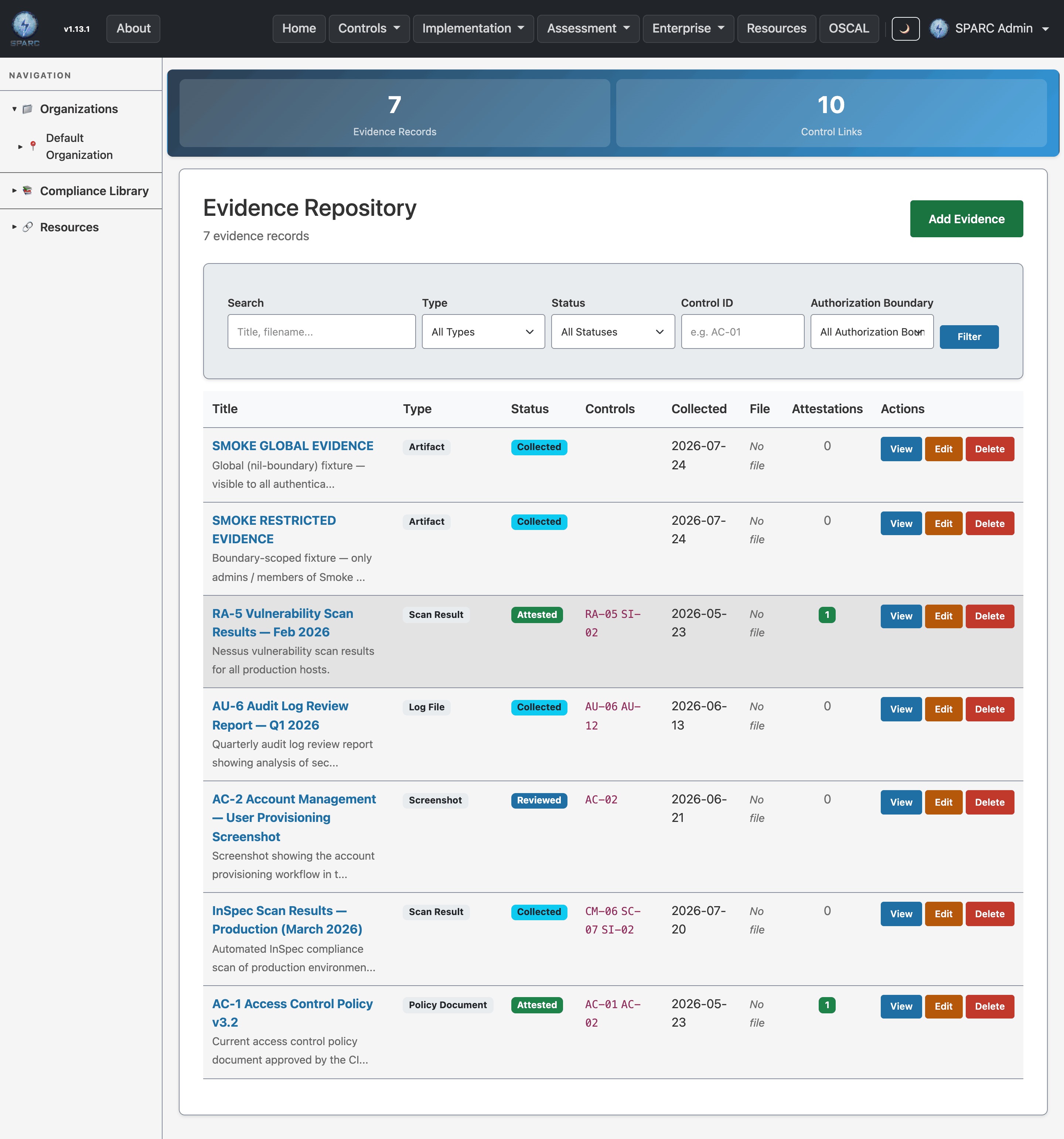
The Evidence index — evidence artifacts and attestations scoped to boundaries and controls.
flowchart LR
    UP[Upload evidence file] --> EV[Evidence record]
    EV --> LINK[Link to controls]
    EV --> ATT[Attestation: attester + statement]
    EV --> SSP[Supports SSP / SAR narratives]
- Upload and organize evidence for controls, filterable by type, status, boundary, and control.
- Attest to evidence — capture who vouches for it, when, and in what role.
- Support assessments — link evidence to the controls it substantiates.
- Go to Assessment → Evidence (
/evidences). - Click Upload.
- Provide the file and its metadata (type, status, associated authorization boundary and control).
- Save. The evidence appears in the list, which you can filter by type, status, authorization boundary, and associated control, or search.
Open an evidence record (/evidences/:id) to see a file preview, the
linked controls, and its attestation list. From here you can Edit the
metadata or Delete the record.
- Open the evidence record.
- Start a new attestation (
/evidences/:evidence_id/attestations/new). - Fill in the attester name, date, role, and attestation statement.
- Save. The attestation is listed on the evidence record, scoped to that evidence.
- Set the associated control when you upload, so evidence is discoverable from the control it supports rather than only by filename.
- Use status consistently (e.g. draft vs. final) so filters give a true picture of what's ready for assessment.
- Add an attestation whenever a human sign-off is expected — an attester, date, and statement turn a raw file into defensible proof.
- Keep evidence scoped to the right boundary so access follows the same rules as the rest of that system's documents.
| Symptom | Likely cause | What to do |
|---|---|---|
| Evidence not showing under a control | No associated control set | Edit the evidence and set the associated control |
| Can't add an attestation | Not on an evidence record, or view-only role | Open the evidence first; confirm your role (RBAC) |
| File won't preview | Unsupported preview type | The file is still stored and downloadable; preview is best-effort |
| Filters hide items you expect | An active filter is applied | Reset the type/status/boundary/control filters |
- User Guides index
- Security Assessment Results (SAR) — evidence supports assessment findings.
- Compliance Library — reusable authoritative back-matter sources.
- Screens & UI — exhaustive element-level reference.