Repository navigation
Releases: ronb1964/TuxTalk
Release list
TuxTalk 0.15.1: Transcribe a File, fix that word and numbers as digits

Transcribe a File is the big one this time. Give it a recording or a video and you get the text back, or subtitles for the video. It's in the tray menu right under Fix a Word. It uses the same model you dictate with, so there's nothing new to download, and you can keep dictating while it works. On my NVIDIA card with Parakeet, three and a half minutes of talking took about nine seconds.
What's new
Transcribe a File. MP3, M4A, WAV, MP4, MKV and a bunch more. It keeps your last 10, so you can close the window and still save one as subtitles later. Remove ums and repeats takes out the um and uh and the "this is this is" without touching anything else. Subtitle timing can be a second or two off, which is fine for most things but I wouldn't use it for a film.
"Fix that word." Say it right after a dictation and Fix a Word opens over your window on what you just said. Click the word it got wrong, type it the right way, and it's fixed in your text and in every dictation after.
Numbers as digits. Parakeet likes to write "twenty-five" and "october fifteenth" out in words. Tick Write numbers as digits in Preferences, Advanced and you get 25 and 15th. Thanks to thecommedore64 for asking (Discussion #11).
Terminals get plain text. Say "git status" into a terminal and it types git status, with no capital and no period.
tuxtalk --toggle, plus --start and --stop, for your own desktop shortcut or a script. Thanks to guelz for asking (Discussion #12).
Only these languages. If Whisper keeps guessing the wrong language on short dictations, tick the ones you actually speak and it sticks to those.
New in TuxTalk Labs, off until you turn it on: select and move by voice. Say "select the last sentence" or "go to the end" on its own and TuxTalk does it instead of typing it. Voice editing can do two or three changes at once now too.
And fixes. "Delete everything" works in a terminal, a spoken question mark doesn't leave ". ?" anymore, and picking a hotkey that KDE already uses to open an app now warns you. The language lists show each language in its own words too, like "Español". The changelog has the rest.
Using TuxTalk on Arch? A vote on the AUR page helps other Arch users find it.
TuxTalk 0.15.0: the new name, voice editing and Your Words
TalkType is now TuxTalk. Turns out another company already owns the TalkType name for dictation software, so the app has a new one. Same app, and updating doesn't lose anything. Your settings, models, voice commands, stats and backups all move over on their own, and so do your menu entry and start at login.
If you're on 0.14.x the update shows up like any other. The .deb and .rpm are called tuxtalk now and replace the old talktype package, and on Arch it's tuxtalk-appimage.
What's new
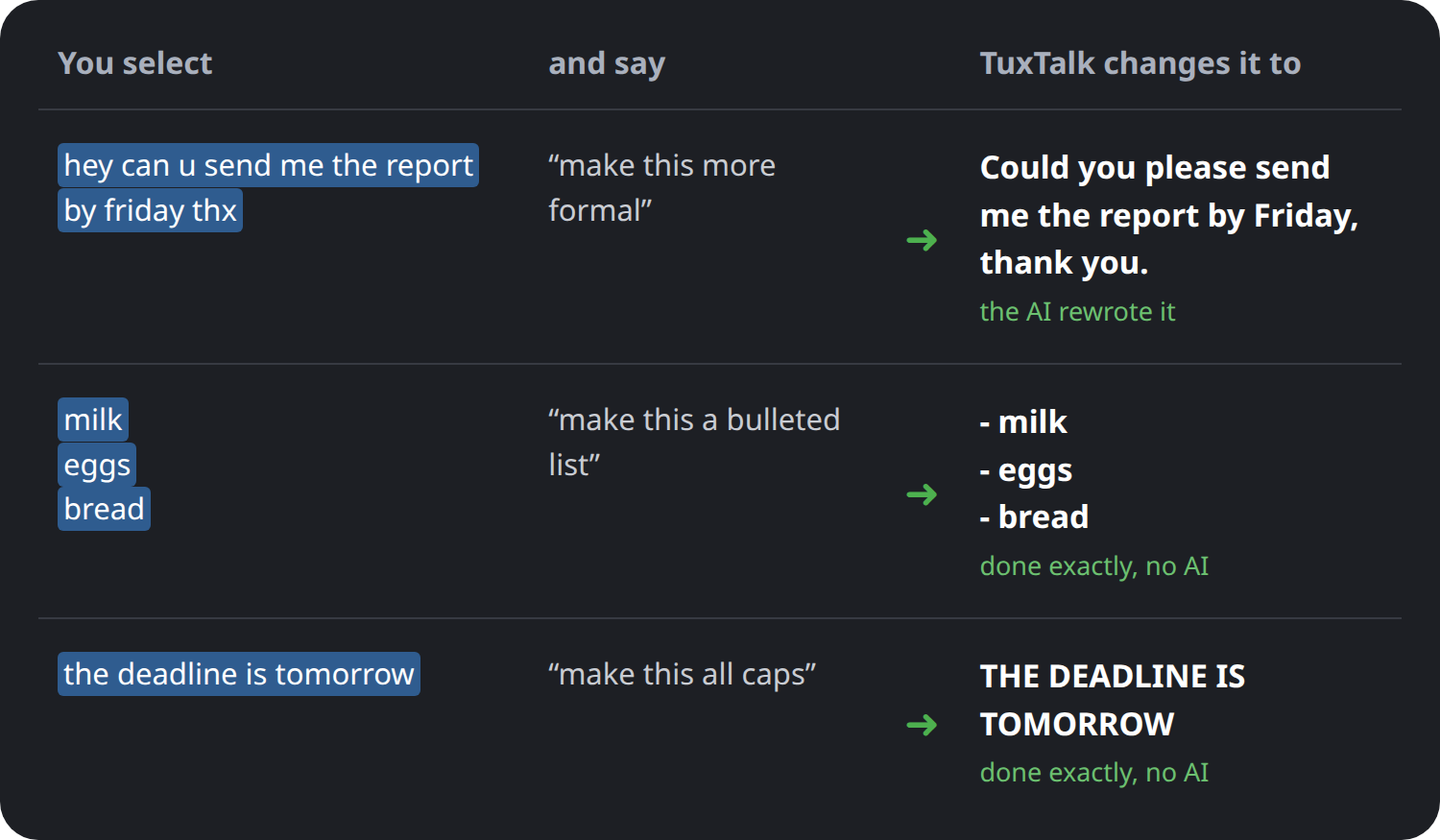
Voice editing. Select some text, hold Shift+F8 and say how you want it changed, like "make this more formal" or "turn this into a bullet list". Ctrl+Z puts it back. All caps, lists, taking out commas or a word, that kind of thing is done exactly in code, and the small AI on your computer only gets the jobs that need it. It's in the new TuxTalk Labs section at the bottom of Preferences, Advanced, and it's off until you turn it on. Labs means it works but I'm still working on it, so tell me how it goes.
Your Words. Put in the names and terms you use and they come out spelled your way. It's in the Snippets tab, which is what the Commands tab is called now.
Ctrl+Alt+P types your last dictation again, for when it lands in the wrong window.
Music and videos pause while you dictate and start back up when you're done.
Also new: the recording indicator can follow the window you're dictating into (Labs), Swiss German spelling (ss instead of ß), a gear next to Preferences in the tray menu, and Preferences asks before you close it with changes you didn't apply.
And a pile of fixes, a lot of them found testing on five different distros. Old TalkType versions still running step aside now, Preferences fits on a laptop screen, and Parakeet won't type "Mm-hmm." when you tap F9 and don't say anything. The changelog has all of it.
If something still says TalkType somewhere, let me know.
Using TuxTalk on Arch? A vote on the AUR page helps other Arch users find it.
TalkType 0.14.6: settings backup, CUDA where you'd look for it, and a first run fix
Backups, CUDA where you'd actually look for it, and a fix for the first run screen that's been hiding the setup card from some people since 0.14.2.
- On some computers the first run screen never showed the setup it recommends, the card with your graphics card and your language. It only appeared on GNOME, with an NVIDIA card, or when something needed fixing first. So someone on KDE with AMD or Intel graphics got the default setup without being asked a thing, and if they speak a language Parakeet doesn't know, dictation was wrong from the first word. Everyone gets the card now.
- You can back up your settings. There's a new Updates & Backup tab in Preferences. Save Backup puts your settings, voice commands, Fix a Word words and stats in one file, and Load Backup brings them back on this computer or a new one. Pick a backup folder once and Save and Load open right there.
- TalkType also keeps your last 10 settings by itself, a copy each time it starts if anything changed. If a change or an update messes something up, pick one under Earlier settings and go back. Your own backups show up in that same list.
- CUDA is listed under Device on NVIDIA computers now, same as Vulkan. Before, you only got it after finding Download CUDA Libraries under Advanced. If you're on Parakeet when you pick it, it asks which Whisper model you want, because Parakeet can't use CUDA.
- There's a Use Recommended button under Model and Device, so you can get back to the setup first run picked without digging through the tray. And "What works with what?" shows which models run on the processor, Vulkan and CUDA, and which of those apply to your computer.
- Change a hotkey and TalkType offers to test it right away. On a lot of laptops the F keys change brightness or volume unless you hold Fn, and the test catches that. If KDE already uses the key you picked, it tells you, where before that only went in the log. F1, F5, F11 and F12 are labelled with what apps already use them for.
- AI corrections handle stacked phrases. "Meet me at three o'clock. No, actually, make that four o'clock." types "Meet me at four o'clock." I checked it on the real model against 8 normal sentences that start with "No", "Sorry" or "Actually", and it left all of them alone.
- Double-tap for hands-free and then say nothing, and it used to record forever. Now it stops after 10 seconds and doesn't type anything.
- The bars indicator kept getting taller in silence, until room noise looked like talking. It stays low now.
Using TalkType on Arch? A vote on the AUR page helps other Arch users find it.
TalkType 0.14.5: smarter corrections, spoken addresses, rounded boxes
Corrections got smarter, addresses come out right, and message boxes finally look like the rest of the app on KDE. Most of this came out of testing 0.14.4.
- Say the whole thing over and the AI fixes it. "Send the report to Bob. Scratch that, send it to Jim." types "Send the report to Jim." The AI was already getting these right, the safety check was throwing its answer away. In testing, restated sentences went from 2 out of 8 fixed to 6 out of 8.
- "Actually" works as a correction now even when you don't pause. Parakeet usually writes it with no comma and TalkType used to ignore it. I tested 15 ordinary sentences like "Pick up milk. Actually pick up eggs too." on the real model and it left every one of them alone.
- Say an email or web address the way you'd say it out loud. "john at gmail dot com" types john@gmail.com and "github dot com" types github.com. Parakeet writes "dot" as a word about one time in three, so before this it worked some of the time. It stays out of the way in normal speech, "a dot com company" stays as it is.
- Addresses with more than one dot, like www.example.org, aren't split up like two sentences anymore, and email addresses come out lower case.
- Message boxes like "You're up to date" had square corners on KDE while every other window was rounded. All of them use your desktop's own frame now.
- Downloading the CUDA libraries saved the switch but never actually moved dictation onto CUDA. It does now. And since Parakeet can't use CUDA, if you're on Parakeet it asks which Whisper model you want on CUDA, or you keep Parakeet as it is.
- Switching the device and cancelling the download left dictation on the old device while Preferences said the new one. Fixed.
- If your device was CUDA but the CUDA files were gone, every dictation crashed. Now it uses the processor and tells you to download CUDA again.
- The hotkey test on the welcome screen reads your keyboard directly again, "New line:" doesn't leave a stray colon behind, and Stats says "1 word" instead of "1 words".
The GitHub page got a makeover too, with a short demo of all this in action.
Using TalkType on Arch? A vote on the AUR page helps other Arch users find it.
TalkType 0.14.4: clearer typing problems, faster start, better self-corrections
Mostly fixes that came out of testing 0.14.3, plus a few older bugs a second review turned up.
- If a dictation can't be typed into the window, TalkType tells you why now and what fixes it. Usually it's the typing setup. After Fix Typing you have to restart the computer, and nothing said so. A Fedora user dictated for minutes with every word transcribed and none typed, and figured his laptop was too weak. If the typing helper has stopped, TalkType starts it again.
- The welcome screen said you could skip the typing setup and use Clipboard Paste. That was wrong, paste needs the same setup.
- Whisper models were loading twice every time the service started. Large-v3 starts a couple of seconds faster and uses less memory.
- Correcting yourself works better when you pause before "no wait". In my testing it went from 4 out of 10 fixed to 8 out of 10.
- "look at github.com" was turning into an email address. Fixed.
- In the AppImage every emoji was blank on newer distros like Fedora, the flags in the language list included. It was carrying an old copy of the library that draws text, and that one can't draw the color emoji font those distros ship. It uses your system's copy now.
- On the welcome screen "Other options" was easy to miss. It's a button now that says what it does, Change language, model or graphics card, and Set it up isn't cut off at the bottom anymore.
- Performance > Custom opens Preferences, in the tray and in the GNOME menu. The GNOME part needs extension version 16, and Check for Updates offers it.
- Long dropdown lists like the languages open in three columns so they fit on the screen.
- Cancel a model download in Preferences and the dropdown goes back to the model you're actually using. And OK closes the window after a download now, you don't have to click it twice.
- Stats and Updates fit their windows.
Using TalkType on Arch? A vote on the AUR page helps other Arch users find it.
TalkType 0.14.3: fixes for GNOME and KDE
Small one, mostly fixes. The main one came from Stefano on GNOME.
- On GNOME under Wayland, the dropdowns in Preferences couldn't be changed if
the window was on a second monitor. The list was opening off screen where you
couldn't see it. That's a GTK bug that never got fixed, so on Wayland the
dropdowns open a different way now that the desktop itself places, and it
works on any monitor. Thanks to Stefano Scipioni for tracking it down (#9). - While fixing that I found GTK's normal dropdown is no good on KDE either. The
first time you click one it opens squashed, with scroll arrows and the items
cut in half, until you move the mouse. The new way doesn't do that. The list
just drops down under the button. - Ordinary sentences could get turned into email addresses. "Look at this. My
car broke." came out as "Look@this.My car broke." because "my", "no", "it"
and "in" are also the endings of some countries' web addresses. Spoken
addresses like "john at gmail.com" still work. - On KDE, TalkType's windows showed a generic "W" icon in the title bar and
taskbar instead of TalkType's own. Every window was calling itself "python3",
so KDE couldn't match it to the launcher. - Opening Preferences straight to a tab, like Your Stats from the menu, showed
the right page but left General highlighted on KDE. - After a service restart on KDE, the log could say F8, F9 and Ctrl+Alt+V were
already taken by KDE when they weren't. It checks again for about a second
now before warning. - Picking the Performance preset you're already on doesn't rerun the speed
check and restart the service anymore. The GNOME menu sends a click even for
the one with the dot next to it. - First run on a graphics card shows one download window instead of two.
- New screenshots in the README and the software store listing. The old store
ones were a year out of date.
Using TalkType on Arch? A vote on the AUR page helps other Arch users find it.
TalkType 0.14.2: a recommended setup for your computer
This one's mostly about setup. TalkType has a lot of settings now and it was
way too easy to end up on a slow combination without knowing it. I did it
myself, I ran Parakeet on the processor for weeks with a graphics card sitting
there doing nothing.
- First run picks a setup for you now. It looks at your graphics card and
your language and shows one card that says what you'll get, something like
"Parakeet on your NVIDIA GeForce RTX 4070 SUPER", and how big the download
is. Click Set it up and that's exactly what gets downloaded. Other options
lets you change the language, the model, or whether it uses the graphics
card, and anything that won't work on your computer is greyed out with the
reason. The separate model picker that came after the hotkey test is gone. - AMD and Intel graphics get used at first run too now, through Vulkan.
TalkType still checks the graphics card is really faster than your processor
before it switches, and stays on the processor if it isn't. The big CUDA
download isn't offered at first run anymore. It's still in Preferences. - Parakeet is the default model for new installs.
- The Performance menu went from seven presets down to three: Recommended for
this computer, Lightest and Battery saver. The old ones were named after
models and half the time did something other than what the label said.
Going back from Battery saver puts the auto-stop back to 5 minutes. The
GNOME menu gets its presets from TalkType itself now, so it needs extension
version 15, and Check for Updates will offer it. - If you're already set up and there's a better setup for your computer, you
get one notification about it after updating. Just the once, and nothing
changes unless you pick it. - The tray and GNOME menus show what's really running instead of just what the
settings say. That turned up a few things that were quietly wrong. Large-v3
on Vulkan was actually running as medium. AMD and Intel users were told
large-v3 wouldn't run for them when it does. And Preferences warns you now
when Parakeet can't do what your settings ask for. - If a dictation doesn't make it into the window, TalkType tells you instead
of failing silently. It's saved in Recent Dictations so you can paste it. - The Voice Commands window and Help were behind. They never mentioned "no
wait" or "scratch that" for correcting yourself, and Help still talked about
a red indicator and menu items that don't exist anymore. Both are caught up,
and they say the commands are English words whatever language you dictate in. - The download sizes for the Whisper models were about half of what they
really are. Small said 244 MB and downloads 486 MB. They're the real numbers
now, everywhere they show up.
Using TalkType on Arch? A vote on the AUR page helps other Arch users find it.
TalkType 0.14.1: keyboard layouts, X11, and no more stray ~ in terminals
Mostly keyboard fixes, and a lot of them came from guelz testing on a Swiss
keyboard.
- Typing mode works on keyboard layouts other than US English now. It used to
send US key positions, so on a German or Swiss keyboard Y and Z came out
swapped and umlauts couldn't be typed at all. TalkType reads the layout you
have on and presses the keys that layout actually uses, accented letters
included. If the layout has no way to type something, like Latin words on a
Ukrainian keyboard, that dictation gets pasted instead. (#8) - On X11, TalkType read the first layout in your list instead of the one you'd
switched to, so Ukrainian came out as a row of 9s. It reads the active one
now, and on X11 it can paste the text a layout can't type, which it couldn't
do before. - Pressing F8 also reached whatever app you were in, so a terminal showed a
stray "~". On KDE and GNOME your hotkeys stay with TalkType while dictation is
on, and go back to being normal keys when you turn it off. GNOME needs the
updated extension (version 14), and Check for Updates will offer it. - Dictations are marked so clipboard managers like Klipper leave them out of
their history. There's also a new option to put back whatever you'd copied
before the dictation. It's in Preferences, Advanced, under Text Injection,
and it's off by default because I like being able to paste a dictation again
when it lands in the wrong window. (#7)
Using TalkType on Arch? A vote on the AUR page helps other Arch users find it.
TalkType 0.14.0: Parakeet on your graphics card, and terminal dictation on more desktops
Parakeet can use your graphics card now, and dictating into a terminal works
on a lot more desktops.
- With the device set to Vulkan (any GPU), Parakeet runs on the graphics
card. On my RTX 4070 Super a minute of talking takes about 0.2 seconds
instead of 2, and it's just as accurate. Choosing Vulkan in Preferences
downloads a copy of Parakeet made for the graphics engine (669 MB) and
checks that your graphics card is really faster than your processor
before it switches. The processor copy stays, so if the graphics card ever
has trouble, TalkType goes back to it. - Terminals need Ctrl+Shift+V to paste, so TalkType has to know when you're
in one. That only worked on GNOME and KDE. Now it also works on Sway, i3,
Hyprland and niri, and on X11 desktops like XFCE, MATE and Cinnamon.
Hyprland is the one I couldn't try on a real machine, so if you're on
Hyprland I'd like to hear whether dictating into a terminal works for you. - Ghostty, GNOME Console, xfce4-terminal, Guake and more than a dozen other
terminals were missing from TalkType's list and got the wrong paste. That's
fixed on every desktop. - On Vulkan, clicking OK in Preferences never closed the window. That's been
there since 0.12.0 and it's fixed. The Device dropdown also closes now
before the speed check pops up, instead of staying drawn on top of it. - On the first-run screen, the Full and Light choices for an NVIDIA card
stayed greyed out until you ticked the box above them, so it looked like
Light couldn't be picked. Picking either one ticks the box for you now. - A quick tap of the key with nothing said doesn't get typed out anymore.
Parakeet would sometimes hear "Thank you." in that fraction of a second of
background noise. - Help has a link to the TalkType Discussions page, for questions or just
telling me how it's going.
Using TalkType on Arch? A vote on the AUR page helps other Arch users find it.
TalkType 0.13.1: presets work with Vulkan
The Performance presets know about Vulkan now.
- Picking Most Accurate from the tray menu used to need NVIDIA's CUDA libraries, and without them it either offered the 4.4 GB download or said it couldn't be done. Now an NVIDIA card gets the same Light (Vulkan) or Full (CUDA) choice as setup, and AMD or Intel graphics get offered Vulkan.
- If you're already set up with Vulkan, picking Balanced, Quality or Most Accurate keeps you on Vulkan. Before, it quietly moved you back to the processor because it didn't find CUDA.
Using TalkType on Arch? A vote on the AUR page helps other Arch users find it.