Repository navigation
Agent in the Loop
📖 Canonical version: read this page on the official docs site — https://www.redamon.org/docs/agent-in-the-loop. The GitHub wiki is a mirror.
Your agent thinks, RedAmon acts, you stay in control.
Agent in the Loop lets your own coding agent, Claude Code or Codex, be the brain of RedAmon's AI agent. You pick "Agent in the Loop" as a project's agent model, start a chat in RedAmon as usual, and tell your agent "Drive my RedAmon session". From then on, every time RedAmon's agent needs a model to decide something (the next action, a scope check, a graph query, the final report), it hands that decision to your agent as a step. Your agent answers it over RedAmon's MCP server, and RedAmon carries on exactly as if one of its built-in models had answered.
RedAmon keeps everything else: the memory of the session, the prompts, every tool, the Rules of Engagement and phase gates, the dangerous-tool confirmations, the approvals, the chat history and the graph. Your agent never runs a command and never touches a target. It only answers steps, and every answer goes through the same parsers and gates as a model's.
It is for people who already work with Claude Code or Codex and want RedAmon's agent to run on it, including people who have no API key to give RedAmon. For runs nobody watches, see Unattended runs.
flowchart LR
    subgraph Machine["Your machine"]
        CC["Claude Code / Codex<br/>(you watch it)"]
    end
    subgraph RedAmon["RedAmon"]
        MCP["MCP server<br/>loop_wait_step · loop_get_step · loop_submit_step"]
        AG["RedAmon agent<br/>memory · prompts · tools · gates"]
        UI["Chat in the RedAmon UI<br/>approvals stay here"]
    end
    CC -- "wait / read / answer<br/>(your token)" --> MCP
    MCP --> AG
    AG -- "live events" --> UI
    UI -- "Approve · Reject · answers" --> AG
sequenceDiagram
    participant You as You (RedAmon UI)
    participant R as RedAmon agent
    participant A as Your agent (Claude Code / Codex)
    You->>R: objective in the chat
    R->>R: think: needs a model answer → opens step 1
    A->>R: loop_wait_step
    R-->>A: step 1 (prompt, answerFormat json)
    A->>R: loop_submit_step (decision JSON)
    R->>R: checks RoE, phase, dangerous tools → runs the tool
    R-->>You: thinking card, tool card (live)
    R->>R: think again → step 2 …
    Note over You,R: approval needed → RedAmon pauses
    A->>R: loop_wait_step → "waiting for a person"
    You->>R: Approve
    R->>R: continues → step N … final report
| Who | Does what |
|---|---|
| RedAmon | Keeps the session's memory and history, builds every prompt, runs every tool, applies the Rules of Engagement, the phase rules and the guardrails, asks you before every dangerous tool, writes the graph. |
| Your agent | Answers the steps RedAmon gives it, in the format each step asks for. Nothing else. |
| You, and only you | Approve phase changes, answer the agent's questions, confirm or reject dangerous tools, stop the run. No MCP tool can do any of these. |
- RedAmon running, version with Agent in the Loop.
- Nothing to switch on for a local install:
./redamon.sh installandupdatewriteMCP_SERVER_ENABLED=trueandAGENT_IN_THE_LOOP_ENABLED=trueinto.env. On a single-host deploy, Agent in the Loop is on too but the MCP server stays off until you setMCP_SERVER_ENABLED=truein the deploy.envand rundeploy.sh(it needs HTTPS); its verify step checks that both the agent and the webapp received the switch. - Claude Code or Codex installed on the machine you will drive from.
Both switches are on by default. If you turned either off, set it back in .env and recreate the containers:
# in the RedAmon folder
grep -E '^(MCP_SERVER_ENABLED|AGENT_IN_THE_LOOP_ENABLED)=' .env   # both should say true
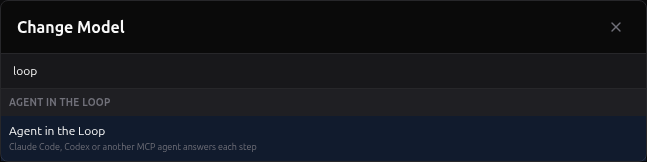
./redamon.sh upIn the project form (Agent Behaviour section), or from the model switcher in the chat drawer, open the model list and choose Agent in the Loop in its own group. It needs no provider and no API key. Only a person can make this choice: an MCP token, a preset or a project import never can.
Recon's own AI features (Nuclei tag selection, the WAF classifier, ...) do not run on Agent in the Loop: they work outside any chat. With no provider configured they fall back to their built-in choices; add a provider in Global Settings to use them.
Global Settings → MCP Server → New token. Choose the profile Agent in the Loop (be RedAmon's brain): it ticks exactly recon:read and agent:loop. Confirm with your password and copy the token once.
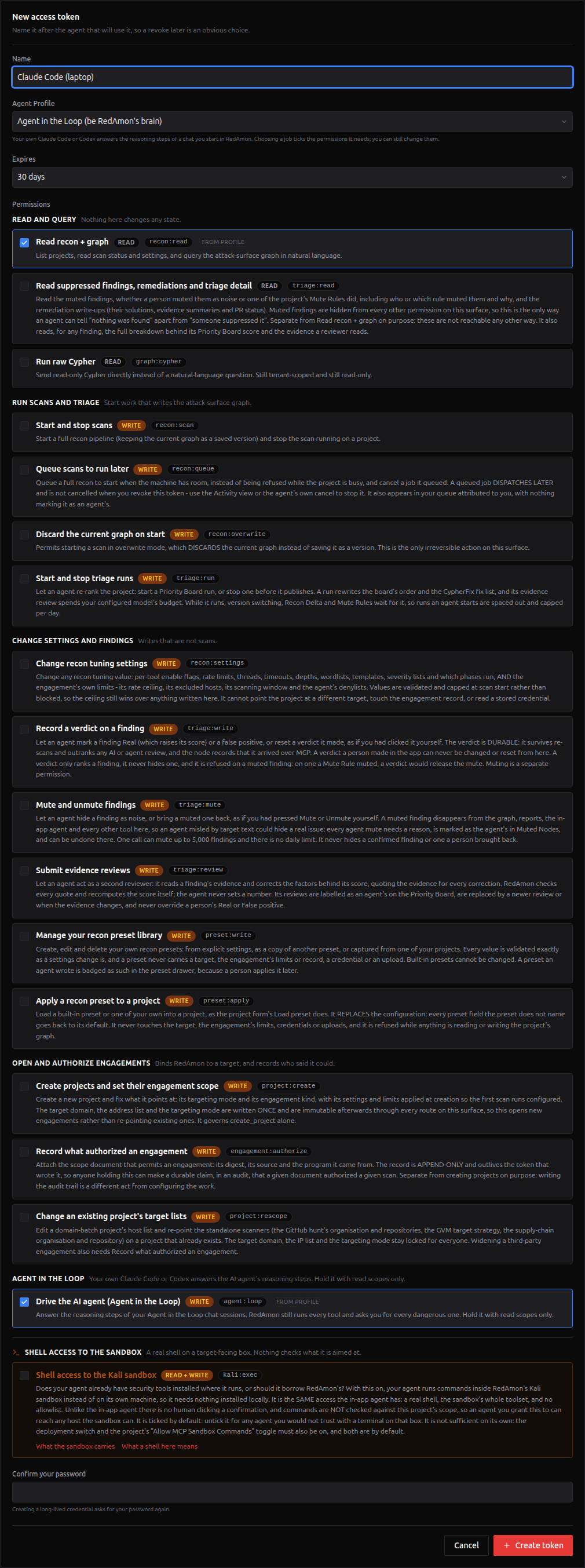
A driver token must hold read permissions only besides agent:loop. Your agent reads text written by the target at every step; a token that could also scan, write or run commands would let injected text use those directly, around every gate RedAmon applies. The form warns you, and the loop tools refuse such a token (loop_token_too_broad).

In the token's row, Agent Onboarding. Keep the profile Agent in the Loop, choose your Client (Claude Code, Codex or Other MCP client), check the server URL, Generate, then Download all as .zip.

The pack holds the skill, a reference file, and for Claude Code and Codex the connection and lock-down templates. It contains no token: everything refers to the environment variable REDAMON_MCP_TOKEN.
mkdir -p ~/redamon-aitl && cd ~/redamon-aitl           # an empty folder, used only for this
mkdir -p .claude/skills && unzip ~/Downloads/redamon-agent-in-the-loop.zip -d .claude/skills
cp .claude/skills/redamon-agent-in-the-loop/templates/claude-mcp.json .mcp.json
cp .claude/skills/redamon-agent-in-the-loop/templates/claude-settings.json .claude/settings.json
export REDAMON_MCP_TOKEN='paste the token here'          # this terminal only
claude-
.mcp.jsoncontains${REDAMON_MCP_TOKEN}, not the token. Claude Code fills it in when it connects, so the token is never written to a file. Do not useclaude mcp add … --header "Authorization: Bearer ${REDAMON_MCP_TOKEN}": your shell expands the variable first, so the token itself would be stored in Claude Code's config. -
.claude/settings.jsonallows the three RedAmon loop tools without a prompt and denies Bash, Edit, Write, WebFetch and WebSearch in this folder. The skill also removes those tools while it is active. - On the first start, approve the project MCP server
redamon. Check that/mcpshows it connected (it lists every RedAmon tool; the token can call the read ones and the three loop tools) and that/skillslistsredamon-agent-in-the-loop. - To choose which Claude model answers the steps, type
/modelin Claude Code, or start it withclaude --model opus(orfable,sonnet). RedAmon does not pick it: the model your client runs is the brain of the chat. - Type Drive my RedAmon session (or
/redamon-agent-in-the-loop).
mkdir -p ~/redamon-aitl-codex && cd ~/redamon-aitl-codex   # an empty folder, used only for this
mkdir -p .agents/skills .codex
unzip ~/Downloads/redamon-agent-in-the-loop.zip -d .agents/skills
cp .agents/skills/redamon-agent-in-the-loop/templates/codex-config.toml .codex/config.toml
export REDAMON_MCP_TOKEN='paste the token here'             # this terminal only
codex-
.codex/config.tomlconnects theredamonserver withbearer_token_env_var, which stores the variable's name, never the token. It also locks down this folder's sessions: a read-only sandbox, no shell tool, no web search, no saved history, only the three loop tools (approved without a prompt), and a tool timeout above the 55-second wait. Your other Codex sessions keep their own settings. - Codex reads a project's
.codex/config.tomlonly in a trusted folder: trust it when Codex asks. - Do not also run
codex mcp add redamon: it writes the same server into~/.codex/config.toml, for every Codex session on the machine. - Type $redamon-agent-in-the-loop drive my RedAmon session.

Open the project, open the AI Agent drawer, send your objective. The drawer shows the Agent in the Loop chip and "Waiting for your agent…"; your agent prints one line per step.


In RedAmon, the chat looks like any other run: thinking cards, tool cards with real output, plan waves, the report. What changes is the status line:
| Status | Meaning |
|---|---|
| Waiting for your agent… | A step is open and your agent has not picked it up yet. |
| Your agent is answering · next action · iteration 4 | Your agent holds the step. |
| RedAmon is running execute_curl | RedAmon is running the tool your agent chose. |
| (the approval dialog) | RedAmon waits for you; your agent waits quietly. |
| Your agent declined this step: … | Your agent refused a step; the run ends cleanly and says why. |
| Your agent did not answer in time. The run ended. | No answer within 15 minutes. |
| No agent is connected … | A step is open and no agent of yours has called in for a minute. After 5 minutes the run ends with "No agent answered within 5 minutes". |

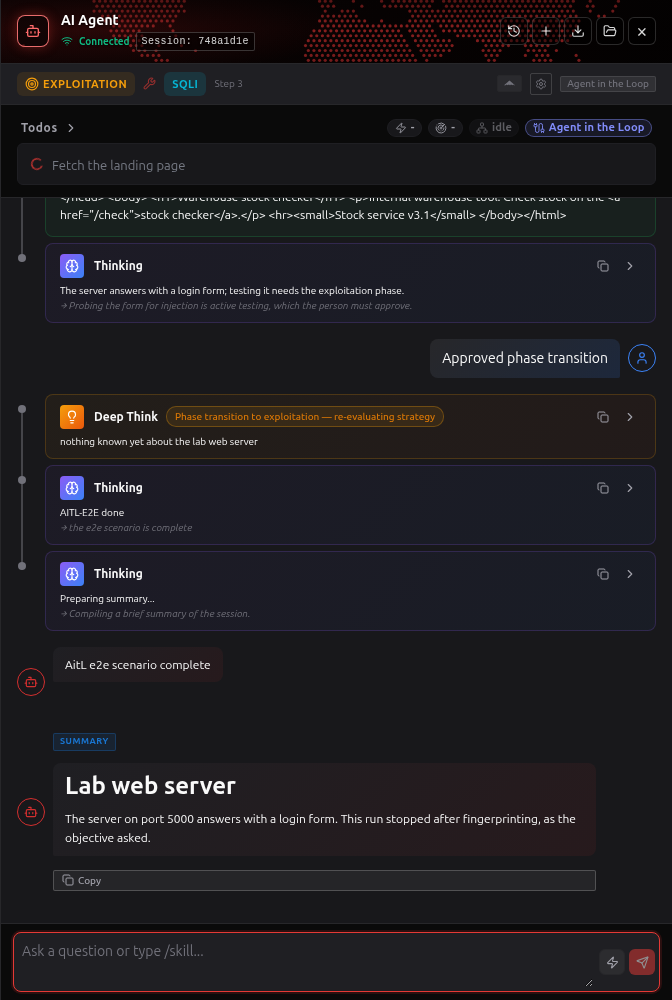
Each thinking card says which token answered it ("answered via (…)"), and the audit log has one row per step claimed and per answer.
In your client, one line per step, for example:
Step 1 · think · iteration 1 → curl the landing page of 172.28.0.91:5000
Step 2 · think · iteration 2 → the login form posts to /login; test it for SQL injection
RedAmon is waiting for you to approve a phase change in the RedAmon UI.
A phase change, a question from the agent, a dangerous tool, or a Fireteam member's escalation pauses the run. RedAmon shows the dialog in the chat; your agent's next loop_wait_step says "waiting for a person" and it keeps waiting quietly. When you answer, the run continues and the next step's prompt contains your decision (approved, modified, rejected, or your answer).
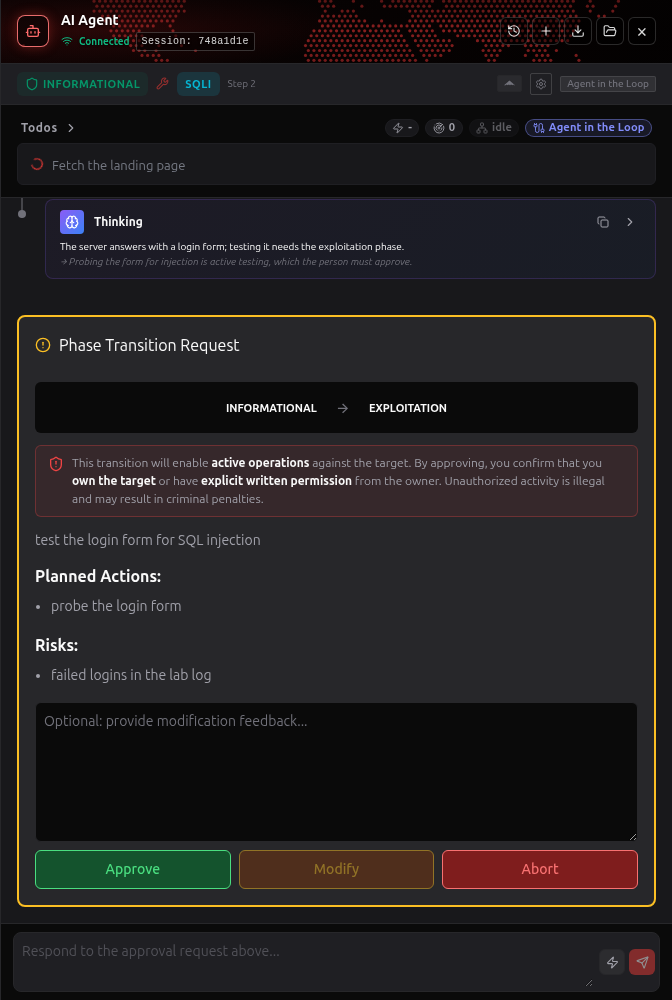
Dangerous tools always ask you in an Agent in the Loop run, even if the project's "Require tool confirmation" is off: the human confirmation is the one brake RedAmon enforces in code when the brain is an outside process.
All of them work unchanged; they only produce more steps.
| Mode | Steps it adds | Notes |
|---|---|---|
| Deep Think | one deep_think step when it fires |
non-blocking: a refused step skips it |
| LATS exploit-path search |
lats_expand steps, one at a time |
each returns a JSON list of candidate probes |
| Fireteam | one fireteam_member step per member turn; members run in parallel (Fireteam's concurrency, 5 by default), so several steps can be open at once |
answer the oldest first; members wait at human speed, so keep the team small in interactive use |
| Parallel tool plans | none | RedAmon runs the wave itself |
| Graph questions in the chat | one cypher step |
answer with the bare query; it is checked, tenant-filtered and run read-only |
You can run several RedAmon chats on Agent in the Loop at the same time, on different projects or in different sessions of one project. They all work; how fast each one goes depends on how many Claude Code (or Codex) windows answer their steps.
flowchart LR
    A["Chat A"] --> Q["Waiting steps<br/>(oldest first)"]
    B["Chat B"] --> Q
    C["Chat C"] --> Q
    Q --> W1["Claude Code<br/>window 1"]
    Q -.-> W2["window 2<br/>(optional)"]
| Setup | What you do | How it behaves |
|---|---|---|
| One window for every chat (simplest) | Start the chats in RedAmon, then say Drive my RedAmon session once | The window answers one step at a time, oldest first, across all your chats. Every chat runs; each one goes slower, roughly in proportion to how many are waiting for a step. Tools still run inside RedAmon meanwhile, so a chat busy with a long tool does not hold the others up. |
| Several windows sharing the work (faster) | Open two or three terminals in the same folder and say Drive my RedAmon session in each | Whichever window is free takes the next step, from any chat. This works because every step carries its chat's whole context, so any window can answer any step. Each window picks its own driver name; they can share one token. |
| One window per chat | Tell each window its chat, for example Drive my RedAmon session, only the session that starts with cd9f46b4 (the start of the id is in the chat header; your agent finds the full id in the session list loop_wait_step returns) |
A window serves only its own chat. Every running chat then needs a window: a chat that no window serves shows "No agent is connected" and ends after 5 minutes. |
With one window the order looks like this:
Claude Code: step of chat A → step of chat B → step of chat A → step of chat C → …
Plan for these limits:
-
Memory. Each running chat holds one agent session slot, about 512 MB of the agent's budget, until it ends. With the default
AGENT_MEM=3ga few run at once; raiseAGENT_MEMin.envfor more. -
Waiting steps. At most 16 steps wait at once per user (
LOOP_MAX_OPEN_STEPS_PER_USER), Fireteam members included. -
Rate. 120 loop calls per minute per token (
MCP_RATE_LOOP_PER_MIN), shared by every window that uses the token. That is plenty for two or three windows; mint one token per window beyond that. - Your client. Every window uses your own Claude or OpenAI plan, and each fills its own context.
Agent in the Loop is for a person watching their own agent. For runs nobody watches, add your Anthropic or OpenAI API key as a provider in AI Model Providers and pick that model: RedAmon calls it directly, with prompt caching, retries and streaming. Both vendors require an API key for automation (see Terms of use).
| Variable | Default | Meaning |
|---|---|---|
LOOP_WAIT_MAX_S |
55 | Longest single loop_wait_step call. Keep your client's tool timeout above it. |
LOOP_LEASE_S |
90 | A step your agent holds is hidden from other clients this long; reading a page renews it. |
LOOP_STEP_DEADLINE_S |
900 | A step unanswered this long ends the run. |
LOOP_NO_DRIVER_GRACE_S |
300 | A step nobody picks up, with no call from any agent of yours for this long, ends the run early. |
LOOP_DRIVER_SEEN_S |
60 | After this long without a call, the chat shows "No agent is connected". |
LOOP_PAGE_CHARS |
40000 | Prompt page size (below Claude Code's 50 000-character result limit). |
LOOP_ANSWER_MAX_CHARS |
262144 | Largest accepted answer. |
LOOP_MAX_OPEN_STEPS_PER_USER |
16 | Open steps per user at once. |
LOOP_STATE_TTL_S |
3600 | How long RedAmon remembers which prompt parts a client already has. |
MCP_RATE_LOOP_PER_MIN |
120 | Loop tool calls per token per minute. |
Each unchanged part of a prompt (most of the system prompt) is sent to your agent once and replaced by a one-line placeholder afterwards, when your agent passes a driver name; every 10 steps it is sent in full again, in case your client compacted its context. Even so, an interactive client's context fills after roughly 20-40 steps: for long runs use a provider model.
The project lock. A loop run holds the project like any chat run: preset apply, rescope, graph version activation, queued and scheduled scans wait for it. An abandoned run frees it after 5 minutes (LOOP_NO_DRIVER_GRACE_S).
Memory. Each loop run uses one agent session slot (about 512 MB of budget) for as long as it runs, even with the RedAmon tab closed: the session cap counts running chats as well as open tabs. With the default AGENT_MEM=3g only a few run at once, and Fireteam members add their own budget. To run several, raise AGENT_MEM, or lower MAX_AGENT_SESSIONS so the cap refuses a new session before the container runs out.
For operators. GET /loop/stats on the agent (master key) answers counts only: open and claimed steps, waiting sessions, drivers seen in the last 5 minutes. /health says only whether the feature is on (loop_enabled).
-
What your agent can do: answer the steps of chat runs of projects you own, and read with
recon:read. It cannot start a chat, approve anything, answer a question, confirm a dangerous tool, or switch a project to Agent in the Loop. -
The token rule: a token holding
agent:loopmay hold no other write or exec permission; the loop tools refuse it otherwise. - The lock-down templates: no shell, no file edits, no web access in the client, only the three loop tools.
- Prompt injection: the prompts carry text written by the target. RedAmon fences it, the skill tells your agent it is data and never an instruction, the client has no tool to act on your machine, and RedAmon's own gates decide every action: your agent's answer only proposes.
- Dangerous tools always ask you in a loop run; the agent's graph queries run in a read-only database session.
- Your Claude or OpenAI credentials never reach RedAmon: your client logs in with its own account.
-
What leaves RedAmon: each step is the agent's prompt. It carries target data, credentials the agent found during the engagement, and, with Rules of Engagement on, the client's contact details. That content reaches your agent's vendor and the client's local transcripts. Codex's template turns its history off; Claude Code keeps transcripts for
cleanupPeriodDays(default 30, minimum 1, for every project on the machine), which you can lower in~/.claude/settings.json. Treat that folder and the transcripts as engagement data. -
The token stays out of files:
${REDAMON_MCP_TOKEN}in Claude Code's.mcp.json,bearer_token_env_varin Codex's.codex/config.toml. -
Attribution: every thinking card records which token answered; claims and answers are audited (
mcp.loop_wait_step,mcp.loop_submit_step) with the project, session, purpose and iteration, never the answer text. Idle polling is not audited.
Driving a session from Claude Code or Codex that you run and watch, with your own subscription login, is ordinary interactive use of those clients. Scripts and automation must use an API key under each vendor's terms (Anthropic Consumer Terms, Claude Code legal and compliance, OpenAI Codex authentication). RedAmon never starts your client and never handles its credentials.
| Symptom | Cause | Fix |
|---|---|---|
The loop tools are not in /mcp or tools/list
|
The switch or the MCP server is off, or the token lacks agent:loop
|
Set both switches in .env and ./redamon.sh up; mint a token with the Agent in the Loop profile |
| The scope or the profile is missing in the token form | Agent in the Loop is off on this deployment | Turn it on (step 1) |
loop_token_too_broad |
The token also holds a write or exec permission | Mint a separate token with the Agent in the Loop profile |
| "Could not set up the model loop/mcp" | The switch is off | Turn it on, or pick another model |
"No agent is connected", or the run ended with LoopNoDriver
|
Your agent was not running | Start your client and say "Drive my RedAmon session" before or right after sending the message |
The run ended with LoopStepNotAnswered
|
Your agent stopped answering | Check your client, then send the message again |
| A queued scan waits | A loop run holds the project | It continues when the run ends (at most 5 minutes after an agent goes away) |
| Codex reports a tool timeout, or does not list the loop tools | The folder is not trusted, so Codex ignores .codex/config.toml (its timeout is 90 s) |
Trust the folder, or check the file is at .codex/config.toml
|
| Claude Code saved a step to a file | The client's per-result output limit | Nothing to do: pages are below it; if you changed LOOP_PAGE_CHARS, lower it |
A natural-language graph query is refused (loop_model_out_of_session) |
Graph questions outside a chat need a provider model | Use raw Cypher, or pick a provider model for that project |
| On a single-host deploy the feature stays off | The switch did not reach a container | Read deploy.sh verify; check the deploy .env
|
- Can my agent approve for me? No. Approvals, questions and dangerous-tool confirmations are yours, in the RedAmon UI.
- Does RedAmon spend tokens? No. Token counters show nothing for loop runs.
- Can I switch model mid-session? Yes. The next message uses the new model.
- Can it be my default model? No, it is chosen per project, by a person.
- Can a preset choose it? No. A preset or an imported project never carries it.
- As an admin acting as a user, can I drive their chat? No. Only a token of that user can; the drawer says so.
- I have two Agent in the Loop chats running: which one does my agent answer? Every one of yours, oldest step first, including a chat whose RedAmon tab you closed. Stop a chat in RedAmon if you do not want it driven. See Several chats at once for running more than one, with one window or several.
- Which agents work? Claude Code and Codex have ready-made packs; any MCP client works if its tool timeout is above 55 seconds.
Set AGENT_IN_THE_LOOP_ENABLED=false and ./redamon.sh up: the loop tools disappear from tools/list, the model disappears from the pickers, and a project still set to it fails at session start until someone picks another model. Before removing the code, reset every project still on it:
UPDATE projects p
   SET agent_openai_model = COALESCE(NULLIF(u.default_agent_model, ''), 'claude-opus-4-6'),
       updated_at = NOW()
  FROM users u
 WHERE p.user_id = u.id AND p.agent_openai_model LIKE 'loop/%'
   AND COALESCE(u.default_agent_model, '') NOT LIKE 'loop/%';
UPDATE projects SET agent_openai_model = 'claude-opus-4-6', updated_at = NOW()
 WHERE agent_openai_model LIKE 'loop/%';
UPDATE users SET default_agent_model = NULL WHERE default_agent_model LIKE 'loop/%';
Tokens holding agent:loop can be revoked or kept: the permission does nothing while the feature is off.