Muted Nodes
📖 Canonical version: read this page on the official docs site — https://www.redamon.org/docs/muted-nodes. The GitHub wiki is a mirror.
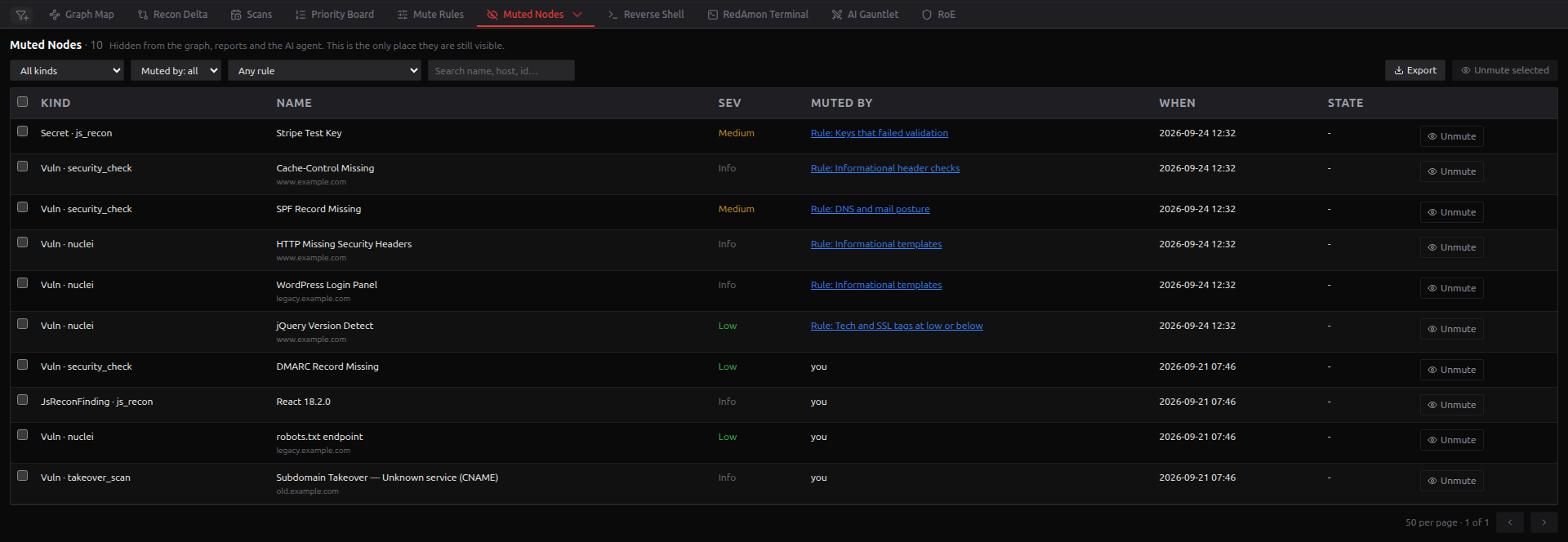
A muted finding is hidden from the Graph Map, the AI agent, analytics and reports. Muted Nodes lists every muted finding in the project and is where you bring one back. It shows both kinds of mute: a person pressing Mute on the Priority Board, and a rule from Mute Rules.
On the Red Zone, there are three ways in:
- open the ▾ menu on the node-table tab (it reads All Nodes or Node Inspector, whichever you used last) and choose Muted Nodes;
- press Muted in the Priority Board header;
- after you mute a finding on the Priority Board, press View muted on the "Finding muted" notification.
Only the project owner, or an admin acting as them, can open the list and unmute.
Mute state belongs to the live graph. While you are viewing a past version, the table is replaced by a notice that it reflects the active version; switch back to it, or activate the version you are viewing, to see its muted findings.
The header shows Muted Nodes · N, the number of findings that match the current filters. The newest mute comes first, 50 rows per page.
| Column | What it holds |
|---|---|
| Kind | The finding's type and, when it has one, its source: Vuln · nuclei, Secret · js_recon, JsReconFinding · js_recon
|
| Name | The finding, with its host underneath when it has one |
| Sev | The severity the scanner reported |
| Muted by |
you for a mute you made; Rule: <name> for a rule mute, which opens that rule in Mute Rules; Rule: Allowlist: not kept by any rule for a mute made in allowlist mode; Rule (deleted): <reason> once the rule no longer exists. A mute carried over from another account, such as in an imported project, shows that account's id. |
| When | When it was muted, in UTC |
| State |
resolved: no longer reported once the scanner has stopped reporting a finding a person muted; otherwise -
|
A finding a rule muted never shows as resolved: when its scanner stops reporting it, it is removed from the graph, like any other finding nobody decided on.
| Filter | Options |
|---|---|
| Kind | All kinds, or one graph label with its count, such as Vulnerability (8) |
| Muted by | Muted by: all, People, Rules, Deleted rules |
| Rule | Any rule, or one rule with the number of findings it muted |
| Search | Name, host, id and mute reason |
The counts in the Kind and Rule menus cover the whole project, whatever else is filtered. The rule menu is the quickest way to spot a rule that hides far more, or less, than you meant.
Any muted finding can appear here: vulnerabilities, JS Recon findings, secrets, Secret Multiscanner findings, GitHub secrets and sensitive files, malicious packages and GVM exploits.
Press Unmute on a row, or tick rows and press Unmute selected (N). The checkbox in the header selects the current page. There is no confirmation step; a notification confirms it: Unmuted. It is visible again everywhere.
An unmute removes only the mute. Every relationship, property and verdict the finding had was kept while it was muted, so it comes back complete. The Graph Map shows it again the next time it loads the graph; reload the page to see it at once.
An unmute sticks. It records an exemption, so no rule mutes that finding again, even if a rule muted it in the first place. A person can still mute it by hand. The exemptions are counted in Mute Rules, where they can be cleared. If the exemption cannot be saved, the finding is still unmuted and a warning says a rule may mute it again.
Unmuting waits for an apply. While mute rules are being applied to the current graph, or when the app cannot tell whether they are, unmuting is refused with a message saying so. The running apply read the exemptions when it started and would mute the finding again.
To undo a whole rule rather than a few of its findings, disable the rule in Mute Rules and apply to the current graph. Findings muted by a rule you deleted are released the same way, at the next apply to the current graph.
Every unmute is audited: how many findings, which ones, and who did it, including an admin acting as another user.
Export downloads the current filtered view, not just the visible page, as CSV or JSON, up to 5,000 rows; a notification says when the list was cut. The file carries the id, kind, name, severity, host, who muted it and how, the rule, the mute reason, the time and the state.
Every CSV cell that starts with =, +, -, @, a tab or a carriage return is prefixed with '. Finding names and hosts come from the target, and a spreadsheet would otherwise run them as formulas.
- Nothing is muted in this project. No finding is muted, by anyone.
- No muted nodes match these filters., with Clear filters.
- If the list cannot be loaded, the table says why and offers Retry.
I unmuted a finding, and it is still missing from the Graph Map. The map shows it the next time it loads the graph. Reload the page.
A finding a rule muted disappeared from this list after a scan. Its scanner stopped reporting it. A rule mute is not a person's decision, so the finding was removed like any other stale finding. A finding a person muted would have stayed, marked resolved: no longer reported.
Why is Unmute refused? Mute rules are being applied to the current graph. Try again when the apply ends.
Can other tools see muted findings?
External agents connected over MCP can list them, read-only, with list_muted_findings. They cannot unmute.
- Mute Rules: mute whole classes of findings by rule
- Priority Board: what "muted" actually means, and per-finding mute