Repository navigation
Plugins
📖 Canonical version: read this page on the official docs site — https://www.redamon.org/docs/plugins. The GitHub wiki is a mirror.
Plugins are optional features that an administrator installs into RedAmon on demand, from the signed RedAmon plugin catalog, without waiting for a RedAmon release. Each plugin lives outside RedAmon's own code, is released and updated on its own schedule, and can be disabled or removed at any time; with no plugin installed, RedAmon behaves exactly as it does without the platform.
The plugin platform that hosts them is part of every RedAmon: ./redamon.sh starts it with
the rest of the stack, and the Plugins page is always there. The plugins themselves are
optional: none runs until an admin installs it.
Plugins are not the same thing as MCP Tool Plugins, which connect MCP servers to the agent from Global Settings. This page is about Plugins only.
- Available plugins
- Requirements and first start
- The Plugins page
- Installing a plugin
- Disabling, enabling, updating
- Uninstalling
- When something goes wrong
- How the plugin system works
- For plugin authors
Each plugin has its own page with what it does, how to use it and how it works.
| Plugin | What it does |
|---|---|
| Skiller | Learns from a finished chat session and proposes a better version of a skill the agent used, a built-in attack skill or (1.1.0) one of your own, for you to approve. |
Every plugin's source code, releases and changelog are public in samugit83/redamon-plugins.
To run the platform and its plugins you need:
-
Docker Engine 28.0.0 or newer on the host. RedAmon as a whole needs it: the plugin
runner's networks use a Docker feature that older engines do not have. Check with
docker version --format '{{.Server.Version}}'. - RedAmon installed, updated and started with
./redamon.sh. It writes the two plugin secrets (PLUGIN_RUNNER_KEYandPLUGIN_CALL_TOKEN_SECRET) into.envwhen they are missing and builds the plugin runner image. - For the official catalog, outbound HTTPS from the server to
raw.githubusercontent.com,github.comandrelease-assets.githubusercontent.com. Without it, plugins can still be installed from files (below). - For a plugin that calls a model, such as Skiller: an LLM provider in Global Settings.
./redamon.sh install, update and up start the plugin runner (the container that runs plugin
code, with no access to RedAmon's database, secrets or the internet) and the small proxy in front
of it, together with the rest of RedAmon. A plain docker compose up -d starts neither of them
and leaves the webapp without its plugin network, so every plugin action fails until you run
./redamon.sh up.
When RedAmon refuses to start. The Docker Engine is checked first, before anything is built
(update checks it before it pulls). The plugin checks run before any RedAmon service is started
or recreated. Each of these stops the command:
| Message | What to do |
|---|---|
RedAmon needs Docker Engine 28.0.0 or newer; this host runs <version>. |
Upgrade Docker, then run the command again. |
Could not read the Docker Engine version. Is the Docker daemon running? Check: docker version |
Start Docker, then run the command again. |
The plugin platform cannot run on this host: <reason>. |
The reason names the cause. A secret: INTERNAL_API_KEY empty or changeme, PLUGIN_RUNNER_KEY or PLUGIN_CALL_TOKEN_SECRET empty or changeme, or PLUGIN_CALL_TOKEN_SECRET shorter than 32 characters or equal to another secret. Delete that line from .env: the next ./redamon.sh install, update or up generates a new value. Otherwise: a Docker Engine older than 28.0.0 (upgrade Docker), a runner image that does not build, or Docker refusing the plugin networks, volume or containers (for these two, the reason names the command that shows why). |
The plugin runner image did not build. See: docker compose build plugin-runner |
Run that command to see the build error. |
Insufficient memory: ... |
The memory check always counts the plugin runner. Free memory or give Docker more. |
The plugin services did not start. See: docker compose --profile plugins logs plugin-runner |
The rest of RedAmon is already running. Read the runner's log, fix the cause, then run ./redamon.sh up. |
An update that stopped after its pull. When ./redamon.sh update stops after it pulled the
new code (an engine too old for the new release, a runner image that does not build, a failed
plugin check), it says the code is already updated but not rebuilt. Fix the cause, then run
./redamon.sh update again: it finishes the stopped update and rebuilds everything the new
release changed (a .update-pending file in the RedAmon folder records where the update
started). Until then, ./redamon.sh up still starts RedAmon but warns that some images may be
older than the code.
Checking it. ./redamon.sh status prints one line for the platform and changes nothing:
PLUGINS: runner: <status>; gateway: <status>, where each status is Docker's own (for example
Up 3 hours) or not running. When the host cannot run the platform, the line is red and says
why: PLUGINS: cannot run (<reason>).
Who sees what. Every signed-in user sees a Plugins button in the top bar's main group, before Reports. Only admins can install, update, enable, disable and uninstall plugins, because these put code on the host. Other users see each plugin's state, read-only.
The platform itself cannot be turned off. To stop a plugin, an admin disables or uninstalls it on the Plugins page: see Disabling, enabling, updating and Uninstalling.
Before going back to an older RedAmon. A RedAmon release from before the plugin platform deletes the plugin tables, with every installed plugin, its data and approved skill versions, the first time it starts. Export each plugin's data first (the plugin's Details → Export data).
Open Plugins in the top bar. Every signed-in user sees the page; only admins see the buttons that change something.
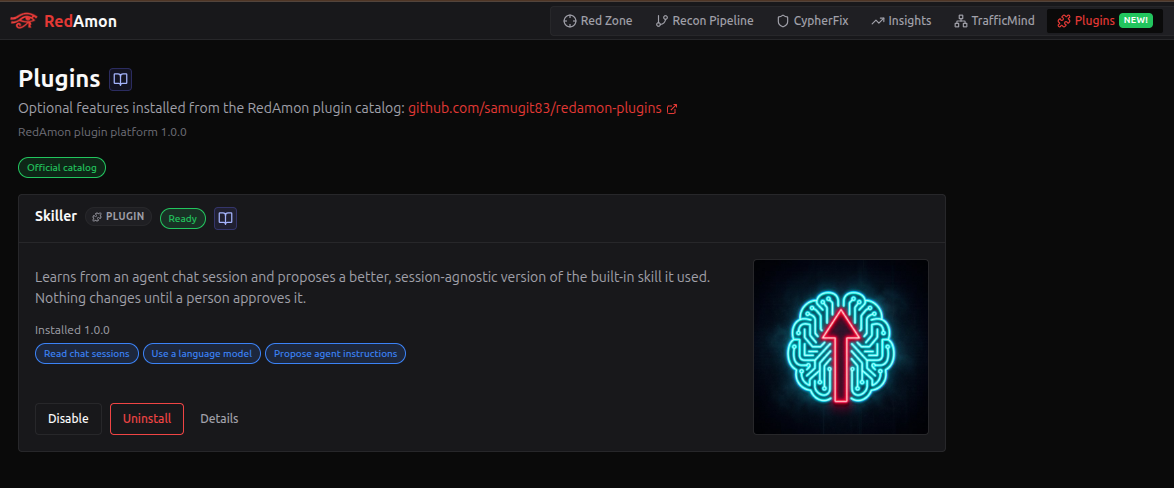
At the top:
- the link to the catalog repository and the platform version this RedAmon runs (plugins declare which platform versions they work with);
- the catalog badge, about the catalog this server downloads (below);
- a banner when the plugin runner is down, not configured, or out of date for this RedAmon (then
./redamon.sh uprebuilds it). Plugin actions are unavailable until it is back; approved skill versions keep applying; - a Plugin pages list, when an installed plugin has screens of its own, with an Open button for each. Every user sees it, and an entry shows only while its plugin is enabled and running.
| Catalog badge | Meaning |
|---|---|
| Official catalog | Signed by RedAmon's own key. |
| Custom catalog | Signed by a key the server operator added in PLUGINS_EXTRA_TRUSTED_KEYS. |
| Catalog unreachable | The server could not download it. |
| Catalog invalid | Its signature or its content did not pass the checks. |
| Catalog not trusted | Signed by a key this RedAmon does not trust. |
When the catalog cannot be used, installed plugins keep working, the catalog's other plugins are not listed, and an admin can still use Install from file.
One card per plugin, with its icon, its name and the plugin badge, its status, a book icon that opens the plugin's documentation, its description, the installed version, the permissions it holds, and the buttons its state allows:
| Status | Meaning | Buttons (admins) | Its skill versions apply? |
|---|---|---|---|
| Not installed | Listed in the catalog, not on this host. | Install; Delete kept data when an earlier uninstall kept its data | No |
| Installing… / Uninstalling… | An operation is running. | none until it ends | No |
| Ready | Installed, enabled and running. | Disable, Uninstall, Details | Yes |
| Updating… | An update or a rollback is running. Its actions are paused; its menu items stay. | none until it ends | Yes |
| Disabled | Installed, stopped by an admin. Code and data stay. | Enable, Uninstall, Details | No |
| Failed | Installed, but its code did not start. The card shows the reason. RedAmon retries it on its own about every five minutes. | Retry, Uninstall, Details | No |
| Incompatible | This RedAmon is outside the platform range the installed release supports. | Uninstall, Details | No |
| Revoked | The catalog withdrew the installed version; the reason is shown to everyone. | Uninstall, Details | No |
On any installed plugin, Update to x.y.z appears when the catalog offers a newer release that works with this RedAmon: that is how an Incompatible or Revoked plugin comes back.
Users who are not admins see the same cards without buttons, with plainer status words: Installed for Ready, Unavailable for Failed, Needs an update for Incompatible. They do not see failure reasons.
- Open Plugins and find the plugin's card. The page shows whether the catalog is the official one.
- Click Install. A consent prompt lists what the plugin may do, permission by permission, and where its code runs. Read it: you grant these permissions once, for every user of this RedAmon.
- Tick I have read what this plugin may do, and I allow it for every user of this RedAmon, then click Install x.y.z (the button names the version).
- The card shows Ready when the plugin runs, or Failed with the reason.
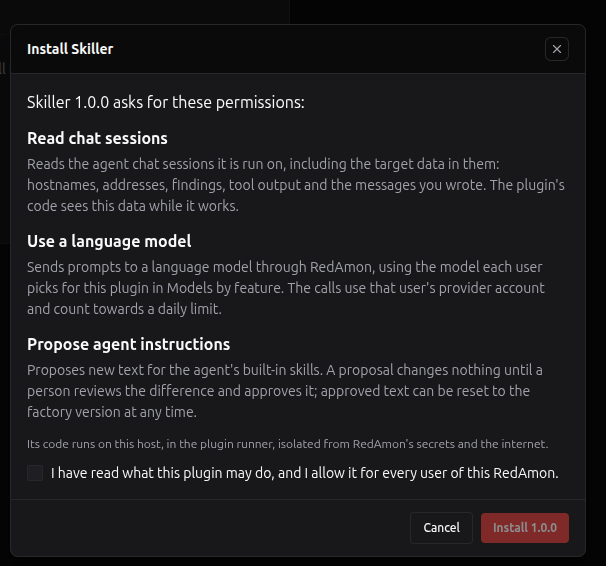
The permissions a plugin can ask for:
| Permission | What it allows |
|---|---|
| Read chat sessions | The plugin reads the agent chat sessions it is run on, including their target data: hostnames, addresses, findings, tool output and the messages you wrote. RedAmon masks credential-shaped values (keys, tokens, cookies, private keys) first. |
| Use a language model | The plugin sends prompts to a language model through RedAmon, on the model each user picks for it in Models by feature and that user's provider account. The plugin never sees an API key. Its calls count against its own daily limit. With Read chat sessions too, what it sends can include target data from those sessions. |
| Propose agent instructions | The plugin proposes new text for the agent's built-in skills. A proposal changes nothing until a person reviews the difference and approves it, and approved text can be reset to the factory version at any time. See Agent Skills → Plugin skill versions. |
Every plugin may also keep its own data, which needs no permission: it cannot see any other plugin's data or any RedAmon table.
RedAmon installs the newest release of the plugin that works with its own version and that the catalog has not revoked. The archive is checked before any file is written: the catalog's signature, the archive's checksum, and what the archive contains. A refused install changes nothing except the reason shown on the card. The checks are described in The signed catalog.
When the catalog cannot be reached (an offline host), or to try a plugin you are developing, an
admin can click Install from file and give three files: the plugin archive (.tar.gz), the
catalog.json that lists it, and its signature catalog.json.sig. You can download all three
from the plugin repository: the archive from the
plugin's GitHub release, the catalog and its signature from the repository's root.
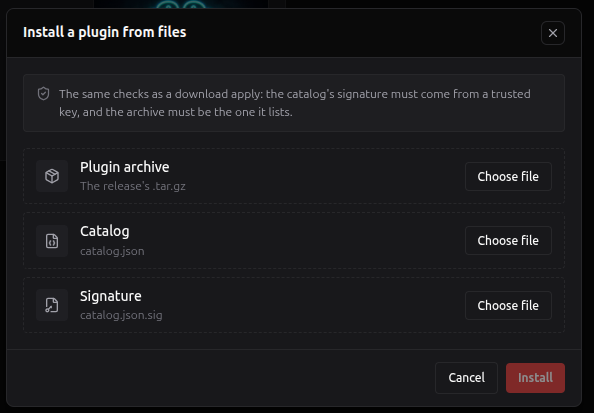
The same checks apply as for a download, so a file install is as safe as one from the internet.
Once the archive and the catalog are chosen, the dialog shows which plugin and version they are
and the permissions it asks for, for your consent. A catalog signed with a key that is not
RedAmon's own is accepted only when the server operator added that key to
PLUGINS_EXTRA_TRUSTED_KEYS. The three files together may be up to 10 MiB; a larger plugin
installs from the catalog. An archive of a plugin that is already installed updates it: the
dialog says so, marks the permissions it adds and warns when its data moves to a new format. It
must be a newer version than the installed one; to go back to an older one, use Roll back
in Details.
- Disable stops the plugin for everyone: its actions and screens disappear and the skill versions it produced stop applying from the next agent message. Its code and data stay, so Enable brings everything back. Retry on a failed plugin tries to start it again.
- Update appears when a newer release is available. If it asks for new permissions, the prompt marks them and you consent again. While the update runs, the plugin's actions are paused for a moment, its menu items stay and its approved skill versions keep applying. If the update fails, the old version stays active. Updating a disabled plugin leaves it disabled.
- When an update moves the plugin's data to a new format, the prompt warns you that a later rollback works only if the new release ships a way back. After the update, Details → Rollback tells you whether a rollback is possible.
- Details (admins) opens a panel with everything RedAmon knows about the installed plugin.
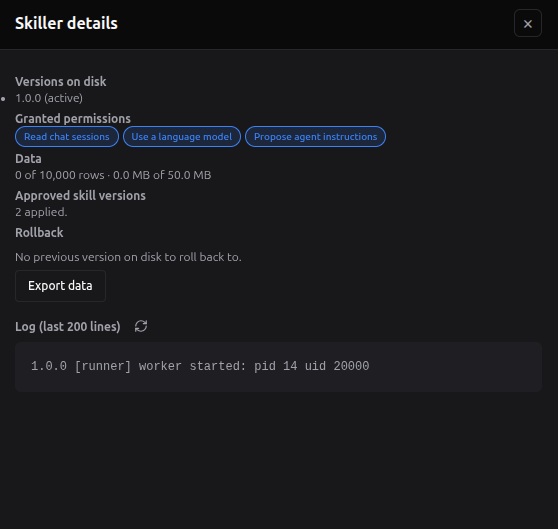
| In Details | What it tells you |
|---|---|
| Versions on disk | The active version, and the previous one when it is kept for a rollback. |
| Granted permissions | What the admin allowed at install or at the last update. |
| Data | The rows and megabytes the plugin stores, against its caps (10,000 rows and 50 MB by default). Two further caps are not shown here: 2,000 rows per user or project, and 1 MB per value. |
| Approved skill versions | How many skill versions this plugin produced that apply now. |
| Rollback | Roll back to the previous version, or why it is not possible: no previous version on disk, the previous version was revoked or needs another RedAmon, or the data moved forward and the release ships no way back. |
| Export data | A JSON download of everything the plugin stores, for every user and project. |
| Log | The last 200 lines from the plugin and from the runner about it (for example worker started), with a refresh button. The first place to look when an action fails. |
| Last error | Shown when the last operation or start failed. |
Click Uninstall and choose:
- Keep its data (the default): the code is removed; the plugin's data and the skill versions it produced stay, unused, and come back if you install it again (RedAmon asks whether to restore those versions).
- Delete all data for every user and project: everything the plugin stored, every skill version it produced, and every user's model choice for it in Models by feature are deleted, for everyone. This cannot be undone.
Whichever you choose, the agent goes back to the factory text of every skill the plugin changed from its next message.
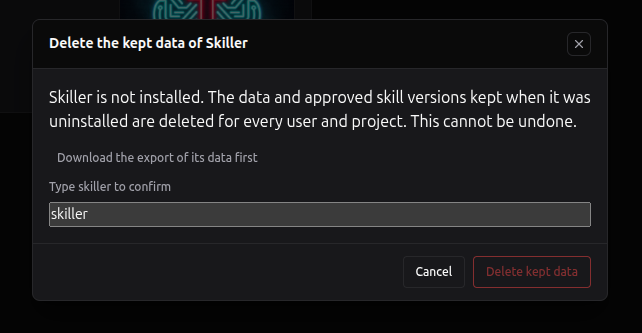
Deleting a plugin's data needs two deliberate steps, and the delete button stays disabled until both are done:
- Click "Download the export of its data first". Your browser downloads the JSON export, the only copy that survives the deletion. The download counts for one hour: if more time passes before you delete, download it again.
-
Type the plugin's id (for example
skiller) in the box.
The same two steps apply to Delete kept data, the button on the card of a plugin that was uninstalled with its data kept.
While a plugin is uninstalled with its data kept, Reset to factory on its skill versions still works: you do not need to reinstall it to clear them. Reinstalling an older release over data a newer release left is refused: export, then delete the kept data, to go back.
- If the plugin runner is down, the page says that plugin actions are unavailable. Skill versions that were already approved keep applying.
- If the webapp stops in the middle of an install, update or uninstall, RedAmon finishes or undoes it on its own, usually within a quarter of an hour.
- If the catalog revokes the installed version, the plugin stops at the next check after the new catalog reaches this server (about eleven minutes at worst), its approved skill versions stop applying, and its card shows the reason. Enable is refused while it is revoked. Update it when the card offers a release that is not revoked, roll it back in Details if the previous version is not revoked too, or uninstall it.
- If a plugin action fails, the message usually comes from the plugin; messages about the plugin runner come from RedAmon. An admin finds the details in the plugin's log (Details on its card).
- The repairs, retries and catalog checks above run from the recon orchestrator's timer. While the recon orchestrator is stopped, they wait.
- If a plugin shows Incompatible after a RedAmon update, the new RedAmon is outside the platform range that release supports. Update the plugin when the catalog offers a compatible release.
This section explains what happens behind the Plugins page: where plugin code comes from, where it runs, what it can reach, and how RedAmon keeps a third-party plugin from changing anything you did not approve. The full technical design, with every code reference, is README.PLUGINS.md in the RedAmon repository.
RedAmon's own repository contains only the platform: the machinery that hosts plugins. It
contains no plugin code and does not know what any plugin does. The plugins live in a second
public repository, redamon-plugins, side by
side, with a catalog that lists them.
%%{init: {'theme':'base','themeVariables':{'primaryColor':'#64748b','primaryTextColor':'#ffffff','primaryBorderColor':'#475569','lineColor':'#8b949e','textColor':'#737b85','edgeLabelBackground':'#475569','clusterBkg':'transparent','clusterBorder':'#8b949e','titleColor':'#737b85'},'flowchart':{'padding':14,'nodeSpacing':36,'rankSpacing':58}}}%%
flowchart TB
    subgraph AUTHOR["redamon-plugins (GitHub)"]
        A1["a release tag<br/>skiller-v1.0.0"] --> A2["CI validates and tests,<br/>packs only that plugin's folder"]
        A2 --> A3["a reviewer approves:<br/>archive published,<br/>catalog regenerated and signed"]
    end
    subgraph HOST["your RedAmon"]
        H1["Plugins page reads<br/>the catalog, checks its signature"] --> H2["Install: download one archive,<br/>check it, unpack it on a volume"]
        H2 --> H3["the plugin runs isolated:<br/>its menu items appear"]
        H3 --> H4["people use it;<br/>results are stored as data"]
        H4 --> H5["a person approves<br/>any change to the agent"]
    end
    A3 --> H1
-
Each plugin is released on its own. A release is a git tag such as
skiller-v1.0.0. CI validates the plugin, tests it against the oldest platform version it claims to support, packs only that plugin's folder into an archive, records the archive's SHA-256 checksum in the catalog, raises the catalog's serial number and signs it. Nothing is published until the repository owner approves the release. -
Installing downloads one archive, never the whole repository, into the plugin's own folder
on a shared Docker volume. RedAmon's git checkout, images and database schema do not change,
so installing a plugin needs no rebuild and no RedAmon update, and
./redamon.sh updateleaves installed plugins alone. - A plugin improves without a RedAmon release: its author publishes a new version, and an admin clicks Update.
- RedAmon always works without any plugin. Disable or uninstall every plugin and RedAmon behaves exactly as before. The agent never waits for plugin code.
- Plugins contribute only where the platform opened a slot. A plugin cannot patch RedAmon's code; it can only add entries at named places (below).
- Data, not schema; descriptions, not code, for the UI. A plugin never adds a database table and never ships web-page code: it stores rows in a shared store and describes its screens, which RedAmon draws.
- Plugin code is untrusted and runs isolated, with no database credentials, no API keys and no internet access.
- A person approves every change to the agent's behaviour, in RedAmon's own review window, which the plugin does not control.
- The platform is a versioned contract. What plugins rely on cannot change silently.
%%{init: {'theme':'base','themeVariables':{'primaryColor':'#64748b','primaryTextColor':'#ffffff','primaryBorderColor':'#475569','lineColor':'#8b949e','textColor':'#737b85','edgeLabelBackground':'#475569','clusterBkg':'transparent','clusterBorder':'#8b949e','titleColor':'#737b85'},'flowchart':{'padding':14,'nodeSpacing':36,'rankSpacing':58}}}%%
flowchart TB
    CAT["catalog + release archives<br/>(GitHub)"]
    subgraph WEB["webapp · trusted"]
        PM["Plugin Manager<br/>Plugins page, lifecycle"]
        UI["UI host<br/>draws plugin screens and menus"]
        GW["Gateway<br/>checks every plugin call"]
        ST["project settings<br/>sent to the agent"]
    end
    VOL[("plugins volume")]
    PX["plugin-gateway proxy<br/>passes plugin routes only"]
    subgraph RUN["Plugin Runner · untrusted · no internet"]
        SUP["supervisor"]
        WK["one worker process<br/>per plugin version"]
    end
    AG["agent<br/>holds the LLM keys"]
    DB[("Postgres<br/>four plugin tables")]
    CAT -- "download, verify" --> PM
    PM -- "writes" --> VOL
    VOL -- "read-only" --> WK
    UI -- "run an action,<br/>with a fresh call token" --> PX
    PX --> SUP --> WK
    WK -- "SDK calls with a call token" --> PX
    PX --> GW
    GW -- "model calls" --> AG
    GW -- "sessions, plugin data, proposals" --> DB
    DB -- "approved skill versions" --> ST
    ST -. "every turn" .-> AG
| Part | Where it runs | What it does |
|---|---|---|
| Plugin Manager | the webapp | The Plugins page: reads and verifies the catalog, installs, updates, rolls back and uninstalls, and repairs anything an interrupted operation left. The only writer of the plugins volume. |
| Plugins volume | a Docker volume | The installed code, one folder per plugin version. Read-write for the Manager, read-only for the runner. Never inside RedAmon's git checkout. |
| Plugin Runner | its own container, plugin-runner
|
Runs plugin code: a supervisor and one worker process per plugin version. |
| plugin-gateway proxy | its own small container | The only path between the runner and the webapp. From the runner it passes only the Gateway's routes and the list of what to run; from the webapp, only the runner's own control routes. |
| Gateway | webapp routes under /api/plugin-gateway/v1/
|
Serves every call plugin code makes, and checks each one. |
| UI host | the webapp | Draws plugin menu items and screens from their descriptions. |
| Agent | the agent container | Makes model calls on a plugin's behalf with the user's key, and receives approved skill versions inside the project settings the webapp sends it each turn. It never calls plugin code. |
| Plugin tables | Postgres | Installs, plugin data, skill versions (proposed and approved) and the platform's own state. Created once with RedAmon; a plugin never adds one. |
Plugin code is downloaded from another repository and runs inside a security tool, so it runs apart from everything else:
- A container of its own. A slow or crashing plugin cannot take down the agent or the webapp. If the runner stops, RedAmon keeps running: plugin actions answer "unavailable", the Plugins page shows a banner, and skill versions already approved keep applying, because they are data, not code.
- No secrets. The runner holds no database credentials and no LLM API keys. When a plugin needs a model, the agent makes the call for it.
- No way out. The runner sits alone on an internal Docker network with no route to the internet, no published port and no address on the host. Its only neighbour is the proxy, which is not on the network where Postgres, Neo4j, the agent and the Kali sandbox listen.
- One process per plugin version. Each worker runs under its own user id, starts with a minimal environment (a path, the locale, the Gateway's address) and none of the runner's variables or secrets, and has its own memory, process-count and file limits at a lower priority. CPU is capped for the runner container as a whole. A timeout kills the worker, so a hung action really stops; other actions running in that worker at that moment (up to four at once) end with it. Two versions of one plugin (old and new during an update) are just two workers.
- Only what the plugin brings. A worker sees Python 3.11's standard library, the platform's SDK and the plugin's own bundled libraries (pure Python by convention), never the runner's own packages.
A plugin talks to RedAmon only through the SDK, a small Python library that turns calls into HTTP requests to the Gateway. All the checks happen in the Gateway, so a plugin that skips the SDK and sends raw requests gains nothing.
Every time a user runs a plugin action, the webapp creates a short-lived call token bound to the plugin, its version, the user, the project when there is one and, when the action was started from a chat, that one session. The token dies with the action (or the background job), and makes at most 600 calls by default. On every call, the Gateway checks again that:
- the token is valid and its action or job is still running;
- the plugin is still enabled, ready, not revoked, and running the token's version (so an update cuts off the old version's tokens);
- the permission the call needs is both declared by the plugin and granted by the admin;
- the user still exists, owns the project, and the session belongs to that user and project.
| SDK call | Needs | What the Gateway does |
|---|---|---|
session.read() |
Read chat sessions | Returns the transcript of the token's session only, with credential-shaped values masked, capped at 2 MiB (the middle of a very long session is what gets dropped). |
llm.invoke(...) |
Use a language model | Forwards the prompt to the agent, which runs the model the user chose for this plugin, on the user's provider. |
data.get / put / delete / query / count |
nothing | Reads and writes the plugin's own rows, within its quota. |
override.get / propose / withdraw |
Propose agent instructions | Reads a built-in skill's factory text and current version; stores a new version as a proposal after the agent's own validator checked it; withdraws the plugin's own pending proposal. |
jobs.progress(...) |
a background action | Updates the progress window the user sees. |
Three choices shape these calls:
- Transcripts are masked, not anonymised. Keys, tokens, cookies and private keys are masked; target hostnames, addresses and findings stay readable, because a transcript without them is useless and automatic anonymisation of free text is not reliable. That is why the consent prompt says plainly that the plugin's code sees target data, and why it matters that the code comes only from the signed catalog and has no way to send anything out, except, with Use a language model, to the model the user picked.
-
The user picks the model, not the plugin. Each plugin that uses a model gets its own tile
in Models by feature. Its calls have their own daily limit
per user (100 by default,
PLUGIN_LLM_DAILY_CALL_CAP), so a plugin cannot use up the budget of your other AI features. - Long work runs as a job. An action can run in the background: the user sees a progress window, can cancel it, and only one run per plugin, action, user, project and session is active at a time.
A plugin can add things only at extension points, named places the platform opened on purpose:
| Extension point | What a plugin can add |
|---|---|
Plugin pages (nav) |
An Open entry in the Plugin pages list at the top of the Plugins page, and its own pages under /plugins/<plugin id>. Never a new item in the top bar, which keeps one Plugins button however many plugins you install. |
Chat actions (chat.session.actions) |
Items in the chat's gear menu, in a group named after the plugin with the plugin badge, usable once the chat has started. Each item runs an action on that chat session, or opens the skill versions window (the only RedAmon screen a plugin can open). Since platform 1.1.0 an item can ask RedAmon to show its skill picker first, so you choose which of the session's skills the action works on. |
Skill rows (project.skills.row) |
A control next to each built-in skill in a project's Agent Skills settings. |
Skill text (skill.text) |
A new version of a built-in skill's instructions, as a proposal a person must approve. The most sensitive point, because it changes what the agent reads. |
Your skills (user_skill.text, platform 1.1.0) |
A new version of one of your own skills that a session used, as a proposal. Saving it creates a new skill of yours; the original never changes. |
The skill-text point, in short. A proposal is validated by the agent's own rules before it is stored and again at approval: placeholders intact, size limits, no invisible characters, nothing that imitates the scope guardrail or the Rules of Engagement. It applies only after the owner of the scope (you for your account, the project owner for one project), or an admin acting as that owner, approves it. The agent receives approved versions with its settings at the start of every turn and re-checks them. When a version is stale or fails a check, or when the plugin that made it is disabled, uninstalled or revoked, the agent uses the factory text for the whole skill. A single part that fails its last check once the project's values are filled in falls back to its own factory text. A version can change wording, never switch a part of a skill on that the project's settings leave out. The review window, the versions window and Reset to factory are RedAmon's own screens, so they work even when the plugin is gone. Details: Agent Skills → Plugin skill versions.
The your-skills point, in short. A plugin reads only your own skills that the session it runs on used, never another user's and never one holding a key or token (a private key, a JWT, an API token); the text it proposes is checked by the agent, and its risky lines must be acknowledged. Saving needs the plugin still installed, enabled and at the version that made the proposal. The skill you save is yours: it stays if the plugin is disabled, uninstalled or purged; if the catalog later revokes the plugin version that proposed it, RedAmon turns it off everywhere and quarantines it until you read and release it. Details: Agent Skills → Plugin proposals for your own skills.
How plugin screens are drawn. RedAmon's web pages are compiled when its image is built, so a plugin cannot ship web-page code, and it should not: plugin JavaScript would run with your login and could call any RedAmon route as you, including approving its own proposals. A plugin instead describes its screens in JSON, and RedAmon draws them from a fixed set of building blocks: page, list, table, form, select, button, Markdown view, before/after comparison, badge, empty state. Plugin content is drawn defensively:
- text is always escaped, and the Markdown view renders no raw HTML and no remote images, so a screen cannot leak data to an outside server through your browser;
- links to outside sites open through a confirmation page that shows the full address;
- icons come from a fixed list, and every plugin contribution carries the plugin badge, so a plugin button cannot pass itself off as a RedAmon button;
- plugin pages under
/pluginsrun under a Content Security Policy that keeps scripts, images, connections and forms on RedAmon's own address; elsewhere (the chat's gear menu, project settings) escaping and the image-free Markdown view protect you; plugin routes refuse cross-site requests.
A plugin can change things through four channels only, and all four are data (reading a session, with its permission, changes nothing):
| Channel | What it changes | Bound by |
|---|---|---|
| Its own data | its rows in the shared plugin data table | its quota; it cannot see other plugins' rows |
| Skill-text proposals | the wording of a built-in skill, as a proposal | a person's approval; reset at any time |
| Menu items and screens | entries at the extension points above | drawn by RedAmon, with the plugin badge |
| Model calls | prompts the agent sends for it | the user's chosen model and the plugin's own daily limit |
A plugin can never change RedAmon's code or images, the database schema, any other table
(users, projects, findings, settings, the audit log), the attack-surface graph, a project's
settings, scope or Rules of Engagement, .env or the compose files, its own permissions, or
another plugin's code or data.
RedAmon created four plugin tables once, when the platform shipped. No plugin ever adds one.
| Table | Holds |
|---|---|
| Plugin installs | One row per plugin on this RedAmon: whether an admin enabled it, its status, its active and previous versions, the permissions granted, a copy of its manifest, and the catalog entry it was installed from. The source of truth that everything else follows. |
| Plugin data | Everything plugins store, as JSON rows owned by a user or a project, with a quota per plugin. When a user or a project is deleted, its rows go with it. |
| Plugin overrides | Skill versions, proposed and approved, with their approval state and the checksum of the factory text they were made against. |
| Platform state | The highest catalog serial accepted, version counters that never go down, and the lock the repair job uses. |
A plugin is installed once for the whole RedAmon, at one active version, and any admin manages it. What it does stays scoped: an action reads only the acting user's project and session, data belongs to a user or a project, the model and budget are the user's, and skill versions belong to a user or a project. Plugin data and skill versions are not part of a project export or import; they belong to the plugin installation.
The catalog is a JSON file that lists every plugin, every release, the download address and SHA-256 checksum of each archive, and the permissions each release asks for. It comes with a separate signature file.
%%{init: {'theme':'base','themeVariables':{'primaryColor':'#64748b','primaryTextColor':'#ffffff','primaryBorderColor':'#475569','lineColor':'#8b949e','textColor':'#737b85','edgeLabelBackground':'#475569','clusterBkg':'transparent','clusterBorder':'#8b949e','titleColor':'#737b85'},'flowchart':{'padding':14,'nodeSpacing':36,'rankSpacing':58}}}%%
flowchart LR
    K["public keys<br/>built into RedAmon"] -- "verify" --> S["catalog.json.sig"]
    S -- "covers every byte of" --> C["catalog.json"]
    C -- "pins the checksum of" --> A["plugin archive<br/>skiller-1.0.0.tar.gz"]
- Signed with Ed25519. The private key exists only in the plugin repository's protected release environment (plus an offline backup); RedAmon holds only public keys, which can verify but never sign. Even a fully compromised RedAmon server cannot sign a catalog other installations accept.
-
The keys are built into RedAmon. The official public keys are code in the webapp image,
not a setting, so nobody who can edit the database can make RedAmon trust their own catalog.
Trusting a new official key is the same decision as trusting the RedAmon release that ships
it. The one way to add a key is
PLUGINS_EXTRA_TRUSTED_KEYSin.env, a deliberate choice of the server operator; while a catalog signed with such a key is in use, the page shows Custom catalog. - Checked byte for byte. RedAmon verifies the signature over the catalog's exact bytes before reading anything in it, then checks every archive against the checksum the catalog pins. No transport needs to be trusted: not GitHub, a CDN, a proxy or DNS.
- No going back. Every catalog carries a serial number that only grows. RedAmon remembers the highest one it accepted and never goes back to an older catalog once it has seen a newer one, so nobody can replay an old catalog to hide a revocation. Catalogs do not expire: a RedAmon that cannot fetch the new catalog keeps the last one it accepted, and does not learn of a revocation until it can.
- Revocation. The plugin repository can revoke a released version. Every RedAmon that runs it stops it at its next check after the new catalog reaches it (about eleven minutes at worst), stops applying its skill versions and shows the reason on the card.
- Safe downloads. Archives are fetched only over HTTPS from an allowlist of hosts (GitHub's release storage by default), checked again on every redirect, only from public addresses, with size and time limits. A catalog entry can never make RedAmon fetch an internal address.
Before any file reaches the plugins volume, every archive passes six checks in memory: its
checksum matches the signed catalog; it unpacks safely (no absolute paths, no .., no links,
under the size limit); the plugin.json inside matches the catalog entry, permissions included,
so the archive cannot ask for more than you consented to; the manifest and every screen
description are valid; the release supports this platform version; and every extension point and
building block it uses exists here.
Two fields, never mixed. For each plugin, RedAmon keeps what the admin wants (enabled or disabled) apart from what it observed (ready, failed, incompatible, updating...). Every status change is a compare-and-swap in the database, so two admins clicking at once get one operation and one "plugin busy".
Install first marks the plugin as installing in the database, with a ten-minute lock, then downloads the archive, runs the checks, moves the files into place with one atomic rename on the volume, and commits the install in the database. That commit is the moment the install happens: until then, nothing in RedAmon uses the new files, and a refused archive leaves only its reason on the card. The worker is started last; if it cannot start, the plugin is installed but Failed, with the reason.
Update installs side by side, never in place. During any update the plugin's actions are paused, while its menu items stay and its approved skill versions keep applying. When a release changes the shape of the plugin's data, the new version migrates a copy of the data, and RedAmon swaps the copy in with the version switch in one database transaction. If anything fails, the copy is thrown away and the old version stays: data is never half migrated. Only the active and the previous version are kept on disk, for Roll back. A rollback over migrated data runs the plugin's own way back first; when a release ships none, rollback is refused, and so it is when the previous version was revoked or needs another RedAmon.
Uninstall stops the workers and deletes the code. What happens to the rest depends on your choice:
| Keep its data | Delete all data | |
|---|---|---|
| Plugin code, every version | deleted | deleted |
| Its install row | kept, as not installed | deleted |
| Its data, for every user and project | kept, unread | deleted |
| Its skill versions | kept, not applied | deleted |
| Every user's model choice for it | kept | deleted |
| Its menu items and screens | gone | gone |
| The agent | factory text from its next turn | factory text from its next turn |
The audit log, the catalog counters and the platform itself always stay. Reinstalling a plugin whose data was kept finds that data, migrates it if needed, and asks whether to restore its skill versions; a version whose factory text changed meanwhile comes back for review, not active.
Self-repair. Every five minutes (driven by the recon orchestrator, so only while it runs) RedAmon reconciles what should be with what is:
- an operation interrupted by a crash is taken over once its ten-minute lock expires: an interrupted install is undone; an interrupted update or rollback is finished when the target version is on disk and moves no data, and undone otherwise; an interrupted uninstall is finished, with the admin's keep or delete choice;
- folders no install references are removed, after a 15-minute grace period;
- a plugin whose files were lost is downloaded again from the archive the catalog pins;
- a Failed plugin is retried;
- a plugin outside the platform range becomes Incompatible, and comes back when it is in range again;
- a revoked version stops;
- a skill version whose factory text changed with a RedAmon update, or that changed a part RedAmon no longer has, is marked stale;
- expired data rows are deleted, and background jobs past their deadline fail with a timeout.
Three version numbers move independently:
| Version | Example | What it versions |
|---|---|---|
| Platform | 1.1.0, shown at the top of the Plugins page | What RedAmon offers plugins: the SDK, the extension points, the screen building blocks, the manifest format. |
| Plugin | Skiller 1.1.0 | One plugin's release. Each release declares the platform range it supports, for example >=1.1.0 <2.0.0; the catalog keeps older releases (Skiller 1.0.0, >=1.0.0 <2.0.0) for RedAmons that are not there yet. |
| Plugin data | 1, 2, 3... | The shape of a plugin's stored data, moved by its migrations during an update. |
Adding something to the platform is a minor version and keeps every plugin working. Changing or removing something is a major version: plugins that do not support it become Incompatible until they publish a compatible release. RedAmon always installs the newest release that the catalog has not revoked, whose range includes its own platform version, and whose permissions this RedAmon knows.
- All plugins share one runner container, separated by process and user id rather than by container. If stronger isolation is ever needed, the next step is one container per plugin, with no change for plugin authors.
- A plugin with Read chat sessions sees the target data in the sessions it is run on. Its containment relies on the signed catalog and on having no way out, not on anonymisation.
- Plugin code sees only the Python standard library, the SDK and its own bundled pure-Python packages. Anything that needs a compiled or system library needs a new runner image, which is a RedAmon release.
- Self-repair, revocation and stale checks run from the recon orchestrator's timer: while it is stopped, they wait.
- Building a plugin without write access: Building a Plugin. Fork the plugin repository, open a pull request, and wait for an administrator to review and merge it; the release is theirs too.
- The plugin repository: samugit83/redamon-plugins, with the contributor procedure in its CONTRIBUTING.md and the administrators' procedures (adding a plugin, merging a contribution, releases) in its README.
- The plugin author's contract (manifest, actions, SDK calls, screen descriptions, data, migrations, errors, local development): README.PLUGIN_SDK.md.
- The platform's design, end to end: README.PLUGINS.md.
- A worked example: Skiller, whose source is in
skiller/in the plugin repository.
See also: Skiller · Agent Skills · Global Settings → Models by feature · MCP Tool Plugins