Mute Rules
📖 Canonical version: read this page on the official docs site — https://www.redamon.org/docs/mute-rules. The GitHub wiki is a mirror.
A scan of a real attack surface produces a lot of findings nobody will act on: informational nuclei templates, missing Cross-Origin-* headers, ungraded OSV advisories. Muting them one at a time on the Priority Board does not scale. With Mute Rules you write rules, per kind of finding, that mute whole classes of noise at once: on the current graph now, on every new scan, or both.
A rule mute is the same as pressing Mute by hand: the finding disappears from the Graph Map, the AI agent, analytics and reports, and it shows up in Muted Nodes with the rule that muted it. Nothing is deleted. Disable the rule, apply again, and the findings come back.
- The mental model
- Where to find it
- Denylist and allowlist
- Writing a rule
- The live preview
- Save and Apply
- Presets
- What a rule never mutes
- Kinds you can filter
- Operators
- Safety properties
- FAQ
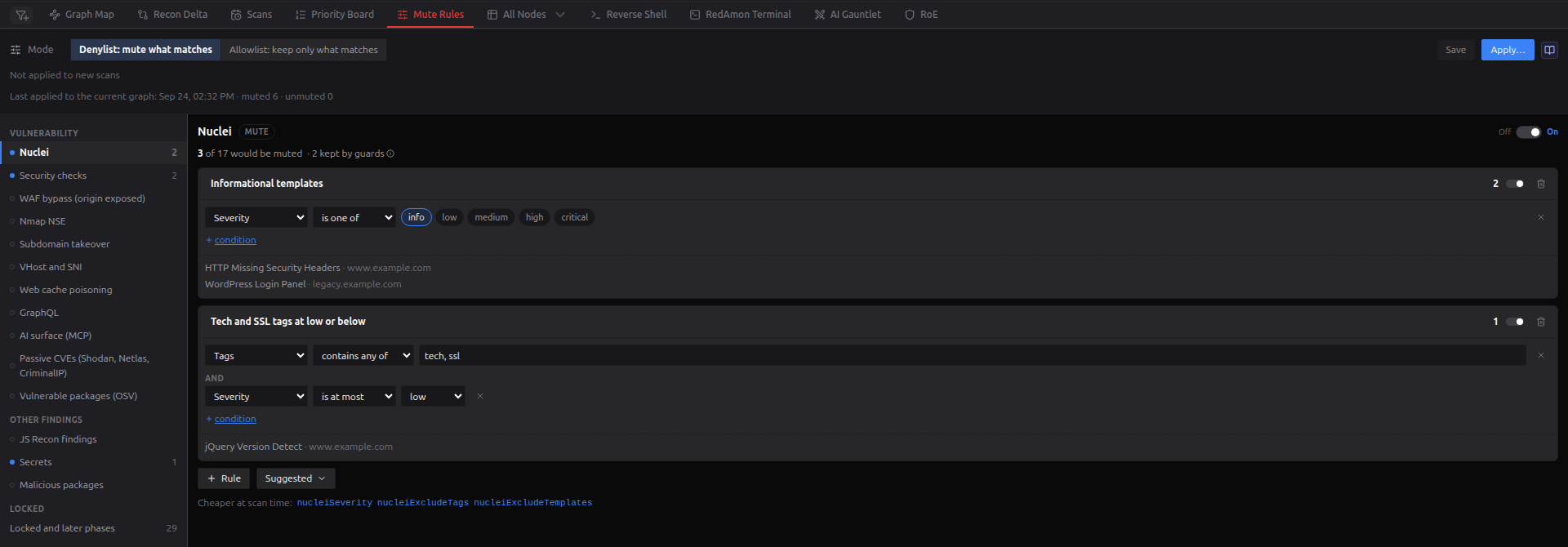
- A rule is a set of conditions joined by AND. "Severity is one of info" is a rule with one condition; "Tags contains any of tech, ssl AND Severity is at most low" has two.
- Rules live per kind. A kind is a family of findings with the same fields, such as Nuclei, Security checks or Secrets (the full list). Each kind has its own Off / On switch.
- Filtering is muting. A rule adds the same marker a manual mute adds, stamped with the rule that applied it. Only findings can be muted: hosts, ports and endpoints cannot, because muting them would orphan the findings attached to them.
- Rules are project settings. Saving a rule changes nothing in the current graph: Apply does. Once the rules are active on new scans, every scan uses the rules as they were last saved.
On the Red Zone, the Mute Rules tab sits next to Priority Board. While the rules are active on new scans, the tab carries a small blue badge with the number of rules that will run.
Only the project owner, or an admin acting as them, can see or change the rules. Anyone else sees Mute rules are not available for this project.
| Area | What it holds |
|---|---|
| Header | The Mode toggle and Presets ▾; the preset badge while the rules match a loaded preset; Unsaved changes and Discard while you have edits; Save; Apply… |
| Status | Active on new scans · N rules in K kinds · denylist with a Turn off button, or Not applied to new scans. Below it, Last applied to the current graph: date · muted N · unmuted N, followed by the graph or the rules changed since then once those counts are out of date. |
| Kinds (left) | The kinds, grouped under Vulnerability and Other findings. A filled blue dot marks an active kind (switched on, with at least one valid enabled rule), and the number is how many rules it has enabled. On a narrow screen the list becomes a drop-down. |
| Kind panel (right) | The kind's switch, its live preview, its rule cards, + Rule, Suggested, the scan settings that do the same job, and notes on that kind's quirks. |
The mode in the header decides what the rules mean, for every kind:
| Mode | A finding of an active kind is muted when… |
|---|---|
| Denylist: mute what matches (default) | it matches any enabled rule |
| Allowlist: keep only what matches | it matches no enabled rule |
Allowlist is powerful: a kind with one keep rule, "Severity is at least high", mutes every finding of that kind below high. It is built to fail safe:
- A finding that lacks the field a keep rule tests is not kept. The kind panel says how many findings that affects.
- In allowlist mode an invalid rule deactivates its whole kind, because dropping a broken keep rule would mute exactly what it was written to keep. In practice you cannot save one: any rule marked in red disables Save and Apply… ("Fix the rules marked in red first"), in either mode.
- While the rules are active on new scans, switching to allowlist asks first (Switch to allowlist?), because the next scan mutes by the new mode.
- The Suggested rules are written for denylist. In allowlist mode, "Informational templates" would keep only the informational findings.
A kind whose switch is off, or that has no valid enabled rule, is never filtered in either mode.
+ Rule adds a rule named "Rule N" with one condition on the kind's first field. It stays red until you pick a value. Adding the first rule to a kind also switches the kind on.
Each condition is field, operator, value:
- Fields are the kind's own (a nuclei template id, a takeover verdict, a secret's validation status) plus, for every Vulnerability kind, a shared set: Severity, CVSS score, CVE ids, Has a CVE, Newest CVE year, Name and Last reported.
- Values are entered as chips for fixed choices, a comma-separated list, a wildcard pattern, or a From / To pair for is between. Security checks' Check field also offers group chips such as + TLS, + Headers and + DNS and mail, which add a whole family of checks at once.
- + condition adds another condition, joined by AND; ✕ removes one.
Every rule card has its own switch and a delete button. The number on the card is how many findings the rule mutes (denylist) or keeps (allowlist), with up to five examples listed below the conditions.
Suggested ▾ adds a ready-made rule for the kind (they are listed in Kinds you can filter). Use one as a starting point and edit it.
Rule names are 1 to 80 characters of letters, digits, spaces and .,:()_/+-, with no leading or trailing space, because they appear in Muted Nodes, in reports and to MCP clients.
Which rule takes the credit. In denylist mode a finding is credited to the first matching rule in the list. In allowlist mode a mute belongs to no single rule, and Muted Nodes shows Rule: Allowlist: not kept by any rule.
Cheaper at scan time. Some noise is better not produced at all. Most kinds list the scan settings that skip the same findings before they are written (for Nuclei: nucleiSeverity, nucleiExcludeTags, nucleiExcludeTemplates). Each links to the project settings tab that holds it.
Every change is counted against the active version's live graph, 600 ms after you stop typing. While a new count runs, the previous one stays on screen marked · updating….
- Per kind: "412 of 1,930 would be muted · 14 kept by guards · 3 exempt · unmutes 2". Kept by guards are findings a rule never touches (see below). Exempt are findings an operator unmuted. Unmutes counts findings a rule muted earlier that no rule matches any more.
- Per rule: how many findings it would mute (denylist) or keeps (allowlist), and up to five examples.
- A warning when the rules would mute more than half of a kind.
On a very large graph the count stops after 20 seconds: its numbers are shown as "≥", the header says Counts are partial (≥): the graph is large., and kinds it did not reach show No preview yet. If the agent cannot be reached, the header shows Preview unavailable with a Retry link; you can still save.
Save stores the mode and the rules. If someone else saved in between, The rules changed elsewhere asks whether to Overwrite their version or Keep editing. Keeping editing, or closing the question, never loses your changes; Discard replaces them with the version they saved.
Apply… opens the dialog below. With unsaved changes it reads "Saves the rules … and then:", and saves them when you press Apply.
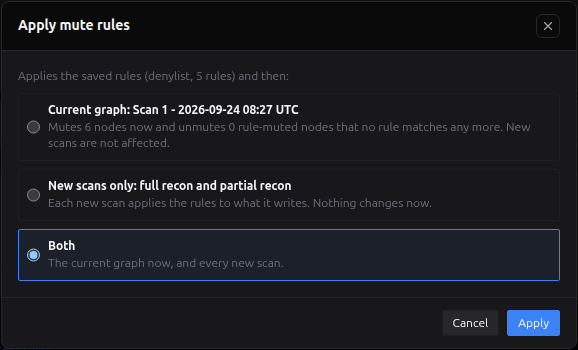
| Choice | What happens |
|---|---|
| Current graph | The rules are applied now to the active version: the findings they match are muted, and findings a rule muted earlier that no rule matches any more are unmuted. New scans are not affected. |
| New scans only | The rules become active on new scans: every new full recon and partial recon applies them to the findings it wrote, once, when it ends. Nothing changes now. |
| Both (preselected) | Both of the above. |
While the rules are active on new scans, the status line shows Active on new scans with a Turn off button. Turning it off changes nothing already muted.
Current graph and Both are unavailable, and the dialog says why, when:
- you are viewing a past version: it is a saved snapshot, and only the live graph changes;
- something else is writing the graph: a recon or partial recon, a GVM, GitHub Secret Hunt, supply-chain, Secret Multiscanner or AI attack-surface scan, an agent session, a triage run, a version activation or another apply. If the app cannot tell, it assumes something is;
- the dialog cannot count the findings ("Cannot reach the agent, so the current graph cannot be changed now.");
- the current graph has none of these findings yet.
The dialog also warns when a kind would lose more than half its findings, and counts the open CypherFix remediations that share a host or a CVE with what would be hidden ("may relate": remediations are not linked to individual findings).
While an apply runs, the page shows Applying… N nodes checked (the number moves about every 30 seconds) and locks the mode, the switches, + Rule, Suggested, Save and Apply…. Until it ends, these are refused with a message saying why: version activation, Recon Delta against the live graph, starting a scan or a partial recon, Save Version, a triage run, unmuting in Muted Nodes, and editing the project's hostname list.
When it ends, the Graph Map refreshes and the status line records the result. If the Mute Rules tab is open you also get Rules applied: muted N, unmuted N., or the reason it failed.
A preset is a saved copy of the mode and every rule, switched on or off, under a name. Presets belong to you, not to a project: save one on one project and load it on any other you own.
The Presets ▾ menu next to the mode toggle holds three actions:
| Action | What it does |
|---|---|
| Save as preset… | Saves the rules on screen, unsaved edits included, under a name (up to 100 characters) and an optional description. Unavailable while a rule is marked in red. |
| Load preset… | Lists your presets with their mode and number of active rules. Load replaces the mode and the rules with the preset's and saves them, after asking. |
| Manage presets… | Rename a preset or change its description (pencil), or delete it (bin). Deleting a preset leaves the projects that loaded it as they are. |
What a preset does not hold: whether the rules are active on new scans, and the findings an operator exempted. Both stay with the project.
Loading saves; it does not apply. The confirmation says so: the current graph changes only when you Apply. It also warns when loading throws away unsaved changes, and when the rules are active on new scans, because the next scan then uses the preset, spelling it out for an allowlist preset. If someone saved the rules in between, you choose to Overwrite their version or keep the preset on screen unsaved. A preset whose rules name a field that Mute Rules no longer has is loaded but not saved, with the rules at fault marked in red.
The preset badge. After a load, PRESET ✓ name appears on the right of the header. It stays while the mode and the rules are exactly what the preset loaded, and goes away the moment either changes: an edited condition, a rule or kind switched, a flipped mode. Discard, or undoing the change by hand, brings it back. The badge survives a reload, and the save that loaded the preset names it in the audit log.
A rule never mutes a finding that:
- a person muted: it stays theirs, and a rule does not touch it in either direction;
- a person judged Real or False positive on the Priority Board;
- was confirmed, by a triage run's proof or by the agent in an attack chain;
- an operator unmuted in Muted Nodes. That unmute is recorded as an exemption, so no rule mutes the finding again.
If a finding becomes one of these while a rule has it muted (you record a verdict on it, for example), the next apply or scan unmutes it. A verdict sent by an MCP access token is refused on a muted finding instead, so an agent cannot unmute anything this way.
Exemptions are counted per graph label, not per kind. Every Vulnerability kind therefore shows the same number, and Clear N exemptions on any of them clears the exemptions of every Vulnerability finding, GVM ones included. It asks first (Clear exemptions?); the rules can then mute those findings again at the next apply or scan.
| Group | Kind | Suggested rules |
|---|---|---|
| Vulnerability | Nuclei | Informational templates · Tech and SSL tags at low or below |
| Security checks | Informational header checks · DNS and mail posture | |
| WAF bypass (origin exposed) | Low-confidence origins | |
| Nmap NSE | Only likely, not confirmed | |
| Subdomain takeover | Manual review only | |
| VHost and SNI | Size-only anomalies | |
| Web cache poisoning | Reflected only, below Confirmed | |
| GraphQL | Informational GraphQL behaviour | |
| AI surface (MCP) | Annotation mismatches | |
| Passive CVEs (Shodan, Netlas, CriminalIP) | Old CVEs with no public exploit | |
| Vulnerable packages (OSV) | Ungraded advisories | |
| Other findings | JS Recon findings | Emails and external domains · Low-confidence developer comments |
| Secrets | Keys that failed validation | |
| Malicious packages | GuardDog analysis errors |
Passive CVEs, Vulnerable packages (OSV) and Malicious packages are reached only by applying to the current graph. Rules active on new scans run at the end of a recon and only over the findings recon's own scanners wrote. OSV advisories and malicious packages come from the supply-chain scanner, and passive CVEs come from Shodan, Netlas and CriminalIP, which that end-of-scan pass does not cover.
Each kind panel ends with notes on its quirks, for example that a DNS or port-exposure security check is one finding per project, so a rule on its host or URL never matches it.
The last entry in the kind list, Locked and later phases, lists what can never be filtered and why: the domain itself, the shared CVE, MITRE and CAPEC reference data, what an operator typed in, the agent's attack chains, the scan structure of the GitHub hunt and the Secret Multiscanner, an uploaded SBOM, and confirmed GVM exploitations. It also lists the kinds planned for later phases.
| Field type | Operators |
|---|---|
| Number | is below, is at most, is above, is at least, equals, is between (inclusive), is missing |
| Ordered (severity, confidence, confidence tier) | is one of, is not one of, is below, is at most, is above, is at least, is missing |
| Choice | is one of, is not one of, is missing |
| Text | is, is not, contains, does not contain, starts with, ends with, matches, does not match, is missing |
| Host, URL | matches, does not match, is missing |
| IP | is in, is not in (addresses or CIDRs, IPv4 or IPv6), is missing |
| Yes/no | is true, is false, is missing |
| List | contains any of, contains all of, contains none of, is empty, is missing |
| Date | is before, is after, is older than (days), is newer than (days), is missing |
- Text and pattern matching ignore case. matches takes a wildcard pattern that must match the whole value:
*matches any run of characters,?one character, and[...]one of a set (*.example.com). - is missing matches an absent or empty value. Every other operator is false on a missing value, including the negative ones: "is not one of info" does not match a finding with no severity.
- Lists are the exception: an empty list is not missing. is empty matches an empty or absent list, and contains none of matches an empty one.
- Limits: 40 rules per kind, 8 conditions per rule, 200 values per list, 16 wildcards per pattern.
- Reversible. A rule mute is the same marker a manual mute uses, plus the rule's name. Disable the rule and apply to the current graph, and exactly those findings come back.
- Owner only, and audited. Only the project owner can see, edit or apply the rules. Every save, mode change, apply, activation, turn-off and exemption clear is audited with the person who did it, including an admin acting as another user.
- Apply uses the saved rules. What runs is a snapshot of the rules as they were saved when you applied; nothing in the request can change it.
- A scan applies the rules as they are when it ends, not as they were when it started, so a scan never undoes a later save. It only reconciles the findings it wrote itself, never ones another scanner wrote at the same time, and a failure there never fails the scan.
- Fails closed. A rule document that cannot be read, or a catalog problem, means nothing is filtered.
- A stale finding a rule muted is removed. When a scanner stops reporting a finding, one a person muted or judged is kept and marked resolved; one a rule muted is not a person's decision, so it is removed like any other stale finding.
- Export and import. A project export carries the rules and the exemptions. On import the rules arrive not active on new scans, and a rule document that is not valid is skipped.
Does a rule delete findings? No. It mutes them. Deleting ("Drop") is planned for a later release, per kind, once the mute has been in use.
I disabled a rule, but the findings are still muted. Saving does not change the current graph. Apply to the current graph.
I changed a rule and the next scan used it without an Apply. That is expected once the rules are active on new scans: every scan uses the rules as they were last saved.
Why can't I choose Current graph? The dialog gives the reason: you are viewing a past version, something else is writing the graph, the findings cannot be counted, or the graph has none of them yet. Choose New scans only, or try again once the other writer finishes.
Why does Muted Nodes say "Rule (deleted)"? The rule that muted those findings has since been deleted. Apply to the current graph to unmute them, or unmute them there by hand.
A scan found new noise and it is visible until the scan ends. Rules active on new scans run once, when the scan finishes. Findings are visible while the scan is still running.
I renamed a preset, but the badge still shows the old name. The badge records the name the preset had when you loaded it. Load the preset again to show the new one.
Can the AI agent change the rules? No. The agent cannot see muted findings or the rules, and nothing on the MCP surface can write them.
- Muted Nodes: every muted finding, by a person or a rule, and where to unmute it
- Priority Board: per-finding mute and verdicts
- Scan Timeline: versions, and why only the active one changes