Note
This repo is still growing – feedback welcome…

Accurate high-resolution and vector graphic replicas of vintage TV test patterns are hard to come by, and those created by drawing tools cannot be altered because master files are unavailable.
This test card maker (TCM) recreates memorable TV test patterns with a high level of empirical accuracy. Rendering parameters are adjustable and custom elements – shapes, images and text – can be superimposed anywhere.
As a novel PostScript1 application, TCM demonstrates precision control of vector graphic creation and some interesting coding paradigms that add structure and adaptability. Indeed the implementation was key to the project rationale.
Hopefully TCM may prove useful to retro TV enthusiasts and the amateur TV community and spark wider interest as a generic pattern maker. Aside from TV, it champions the benefits of PostScript for creating intricate graphics programmatically.
This project is dedicated to the memory of Gordon J. King whose technical writings inspired so many budding electronics enthusiasts – see dedication.
Much of the nitty gritty is contained in collapsible sections revealed in the Table of Contents.
Table of Contents
- Summary
- Aims
- Implementation • Overview
- Installing
- PostScript basics
- Making patterns
- Pattern templates • Template names
- Compositing groups
- Group elements • BBC elements • PCP elements
- Element arguments
- Custom elements
- Resolution
- Aspect ratio
- Scaling
- Timing
- Colours
- Fonts
- Command line interface
- Video generation
- Test card sources
- Graphical user interface
- In memoriam
- Further reading
- make test patterns in vector graphic and high-resolution raster formats
- ensure faithful replicas of vintage test patterns (UK test cards initially)
- accurate digitisations from reliable sources, not reconstructions
- calculated frequency gratings, sinusoidal where needed, and other timings
- show overlay animations to demonstrate authentic accuracy
- indicate replication with removable watermark
- reference original test card image sources used to model replicas
- options to alter, add content, and generally customise to requirements
- options to superimpose shapes, images and styled text anywhere
- enable transparency for image and video layering
- be robust enough to calibrate television receivers
- clear instructions and numerous examples
- guidance for generating videos with audio and making DVDs
These test patterns, a.k.a. test cards, consist of graphical elements rendered according to arguments and composited according to a layout group. Pattern templates are element sets that replicate historic patterns. All element arguments can be overridden to alter element appearance, and additional custom elements can be layered on top.
Patterns are created programmatically in PostScript (PS) and generated on the command-line by Ghostscript (GS). Commands simply involve passing arguments to templates following examples in this README.
Overview
PostScript is an interpreted Page Description Language2, somewhat underappreciated now but arguably the most concise language for computed drawing tasks like this. Being quite vintage itself3, it is particularly apt for making vintage test card replicas. Apart from its formidable control over layout and detail, it is tremendous fun!
PostScript has a rich set of graphics capabilities that accomplish the TCM aims in a user-centric way with minimal code.
For instance the BBC pattern graticule, corner stripes, castellations and non-sinusoidal frequency bars are all simple dashed lines, albeit wide, accomplished with the setdash and lineto PS operators.
Matrix transformations are used extensively,
for instance the corner stripes are rotated to vertical then drawn horizontally,
mirrored in the other three quadrants by reflection and translation.
Gradient and sinusoidal fills use PS shading functions.
Image imports delegate to Anastigmatix resources4.
Ghostscript is an open source cross-platform PostScript interpreter. It can output high-resolution vector and raster formats which can be post-processed to create even more image and video formats. The command-line interface (CLI) for TCM is the GS CLI, and the PS code uses GS-specific procedures, therefore other interpreters will not work without modification.
This implementation makes it easy without PS or GS expertise to modify pattern elements just by changing arguments that control composition: dimensions, coordinates, colours, text, frequencies, imported resources, etc. Arguments can be specified as command line options or read from file, and follow basic PS dictionary syntax. To achieve this in a structured way without the benefits of object-oriented features5 a simple argument inheritance paradigm has been devised.
Custom elements, namely custom shapes, custom images and custom text, are a major design feature which enable graphic shapes, images, EPS6 vector graphics and text objects to be placed anywhere, each with comprehensive formatting options, in ordered layers. For instance, captions are custom-text elements and the Carole Hersee photo is a custom-image element.
Note
This nomenclature of elements, arguments and groups is TCM-specific.
Click the GitHub green Code button at the top of the page, then Download ZIP.
Unzip and copy tcm.ps and Resource/ to a designated TCM directory.
The Ghostscript interpreter is available for most platforms:
Platform details
For native Windows, run the 64-bit AGPL release from GS Downloads
and restart to update %PATH%
(WSL and MSYS2 are good alternatives)
For Arch Linux and MSYS2, use Pacman
e.g. pacman -S mingw-w64-ucrt-x86_64-ghostscript for Windows MSYS2
For Debian/Ubuntu and WSL, use APT
e.g. sudo apt-get install ghostscript
For RPM-based Linux, use YUM
e.g. yum install ghostscript
For Mac, use MacPorts (recommended) or Homebrew
e.g. sudo port install ghostscript for MacPorts
Further info: GS User Guide: Installing
All you need to know to tweak TCM patterns are the objects and operators detailed below and three basic concepts:
- PostScript uses postfix notation, a.k.a. Reverse Polish, where operands precede operators – like Forth7.
- PostScript is stack-based, where operands and intermediate results are stored on a stack
- everything is an object (all data and procedures, that is)
- whitespace separates tokens and % starts a line comment
The following tables show basic object types and operators needed to modify test cards.
They are mostly intuitive and by no means exhaustive
but you really shouldn’t need to dig any further.
Many of the examples take element arguments as operands,
see for instance the TCC set.
Objects
| type | examples | comment |
|---|---|---|
| boolean | true false |
these are keywords |
| numeric | 1 -2.3 4.5e3 |
integers and reals |
| string | (Hello) |
enclose text in ( and ) escape with backslash \ |
| name | /TCh TCh 4 div /CCf? |
names have a slash / drop the / to get named objects names can have any characters |
| array | [] [ 1 2 3 ] [ true 4.5 (Hi) /Lo [6 7] ] |
empty array array of numbers array of mixed objects |
| dictionary | /Is? true def /Value 8.9 def /Text (Bye) def /Colour /Red def /Numbers [1 2 3] def |
name-object pairs def is the define operator |
| null | null |
empty or missing value |
| procedure | { 2 sqrt } |
an executable array of objects |
Further info: PLRM §3.3: Data Types and Objects
Operators
| operator | example | comment |
|---|---|---|
num1 num2 add sum |
1.2 3.4 add |
return num1 + num2 |
num1 num2 sub difference |
9.8 7.6 sub |
return num1 - num2 |
num1 num2 mul product |
0.5 -4 mul |
return num1 × num2 |
num mul2 product※ |
Gsz mul2 |
return num × 2 |
num1 num2 div product |
5.6 3 div |
return num1 ÷ num2 |
num div2 quotient※ |
Glw div2 |
return num ÷ 2 |
num1 num2 mod remainder |
/S7x rand TCw mod |
return remainder of num1 ÷ num2 |
num sq num※ |
CCr sq |
return num2 |
num sqrt num |
TCy sqrt |
return √num (square root) |
num neg num |
123 neg |
return -num |
num abs num |
-99 abs |
return |num| (absolute value) |
leg1 leg2 hypot hypot※ |
TCw TCh hypot |
return hypotenuse (root sum of squares) |
hypot leg1 leg leg2※ |
Gsz mul2 Gsz leg |
return leg (cathetus, root absolute difference of squares) |
angle sin real |
-20 sin |
return sine of angle degrees |
angle cos real |
110 cos |
return cosine of angle degrees |
angle tan real※ |
70 tan |
return tangent of angle degrees |
y x atan angle |
123 234 atan |
return arctangent of y ÷ x in degrees |
num1 num2 min num※ |
1.2 3.4 min |
return minimum of num1 |
num1 num2 max num※ |
1.2 3.4 max |
return maximum of num1 |
array length int |
SWc length |
return length of array |
num xGsz product※ |
3 xGsz |
return num × Gsz (multiply by grid size, see scaling) |
– hGsz size※ |
hGsz Glw sub |
return Gsz ÷ 2 (half grid size) |
num xGlw product※ |
0.6 xGlw |
return num × Glw (multiply by grid linewidth) |
– hGlw width※ |
hGsz hGlw add |
return Glw ÷ 2 (half grid linewidth) |
freq mhz width※ |
2.5 mhz |
return period width corresponding to MHz of active line time |
time us width※ |
0.25 us |
return width corresponding to μs of active line time |
num lines height※ |
7 lines |
return height corresponding to number of scan lines |
left bot rt top randp x y※ |
0 0 TCw TCh randp |
return random point within bounding box |
any cvas str※ |
3.14 cvas |
return number or name converted to string |
str1 str2 cat str1str2※ |
(") IDs (") cat cat |
return concatenated strings |
name value arg –※ |
/IDh hGsz arg |
define argument (name-object pair) iff not already defined |
to from merge –※ |
/T7 /T4 merge |
define undefined args from another custom element of same type |
any === –※ |
Gsz === |
dump any to standard output (improved ==) |
※ TCM procedures, as opposed to built-in PS operators
Further info: PLRM §8: Operators
Parameters are set using GS options and TCM arguments.
The test card size parameters are TCh (height), TCw (width) and TCr (aspect ratio).
Two may be specified, the third is calculated,
with TCh & TCw having precedence over TCr, stretching horizontally.
Size parameters have to be set first to establish output dimensions that calibrate scaling.
They must be set using the -d GS option.
Examples:
gs -q -IResource -sDEVICE=pdfwrite -o tc.pdf -dTCh=1152 tcm.ps
creates a PDF 1536x1152 points (default 4:3 ratio, TCF-electronic template)
gs -q -IResource -sDEVICE=pdfwrite -o tc.pdf -dTCw=1200 tcm.ps
creates a PDF 1200x900 points
gs -q -IResource -sDEVICE=png256 -dTextAlphaBits=4 -dGraphicsAlphaBits=4 -o tc.png -dTCr=1.25 tcm.ps
creates a low-resolution 72dpi 8-bit indexed PNG 720x576 pixels (5:4 ratio, default 576 high)
gs -q -IResource -sDEVICE=png16m -dTextAlphaBits=4 -dGraphicsAlphaBits=4 -r600 -dDownScaleFactor=2 -o tc.png -dTCr=1.25 -dTCw=700 -dTCh=r500 tcm.ps
creates a high-resolution 300dpi 24-bit PNG 2916x2083 (2083=TCh*300dpi/72ppi), TCr is ignored
The test card template /TC may be specified anyhow but
gs -q -IResource -sDEVICE=pdfwrite -o fe.pdf tcm.ps
makes the default TCF-electronic pattern as a PDF file fe.pdf
gs -q -IResource -sDEVICE=eps2write -o c.eps -dTC=/TCC tcm.ps
makes the long-running 405-line TCC pattern as an EPS file c.eps
gs -q -IResource -sDEVICE=pnggray -dTextAlphaBits=4 -dGraphicsAlphaBits=4 -o c625.png -dTC=/TCC-625 tcm.ps
makes the 625-line TCC-625 pattern as a greyscale PNG file c625.png
gs -q -IResource -sDEVICE=pngalpha -o fo.png -dTC=/TCF-optical -dCPi=null tcm.ps
makes the two-slide TCF-optical pattern as a PNG file fo.png
with a transparent hole where the image should be (see arguments)
These are the replica test card patterns composited so far. All pattern elements can easily be adjusted or customised.
The thumbnails link to larger animated images showing replica and original overlaid, for testing.
By default a replica icon  in the bottom-right corner watermarks the replica pattern.
TCA

TCC-early

TCC

TCD-early

TCD-improved

TCE

TCC-625

TCF-early

TCF-optical

TCF-electronic

International and widescreen patterns may follow if called for but many modern digital test patterns exist already.
Names are hyphenated as pattern-variant which controls compositing and drawing algorithms. The optional variant controls element variations.
Note
Groups are of no concern unless you are coding new patterns.
A compositing group is a set of visibly similar templates that share a common layout of graphic elements and their respective arguments. Each group has its own procedure resource for compositing all patterns in the group. Grouping enables TCM to generate widely differing patterns and provides extensibility.
Patterns that do not fall into a group (like TCA) are orphaned into a null group.
Group composition
| group | patterns |
|---|---|
/BBC |
classic BBC/ITA/IBA/BREMA graticule patterns |
/PCP |
Philips circle patterns |
When making a new pattern, add it to the groups dictionary in tcm-init.ps.
If it’s in the null group, create a ProcSet resource file tcm-pattern-P.ps for pattern name /P.
These are graphic elements that make up the test patterns in a group, such as the graticule, streak box, step wedge, corner stripes, etc.
These variables follow a naming convention where upper-case letters denote the element
and lower-case letters denote the parameter,
for instance TCbc is the test card background colour and SWw is the step wedge width.
A question mark denotes a switch, for instance PP? controls whether pulse panes are drawn.
The following tables show element arguments for each template and the hierarchy for inherited arguments.
TCC-early arguments
Inheritance: TCC-early <— Blank
| arg | value | description |
|---|---|---|
| /TC… | test card arguments | |
/TCbc |
0.6 |
background colour |
| /G… |  |
graticule arguments |
/Gsz |
TCh 0.129 mul |
grid size: datum for all measurements |
/Glw |
Gsz 12 div |
grid linewidth |
/Golw |
0 |
grid outline width: 0 for no outline (F/J/W/X pattern) |
/Gps? |
false |
true to shift grid phase by half a square |
/Glc |
/white |
grid line colour |
/G? |
true |
false for no graticule |
| /SB… |  |
streak box arguments |
/SBow |
2.66 xGsz |
streak box outer width |
/SBoh |
0.89 xGsz |
streak box outer height |
/SBiw |
1.75 xGsz |
streak box inner width |
/SBih |
0.31 xGsz |
streak box inner height |
/SBy |
TCy 2.81 xGsz add |
streak box vertical centre |
/SBc |
[/black /white] |
streak box colours: [inner outer] |
/SB? |
true |
false for no streak box |
| /PP… |  |
pulse pane arguments |
/PPw |
2 xGsz Glw add |
pulse pane width |
/PPh |
3 xGsz Glw add |
pulse pane height |
/PPx |
TCx 2 xGsz sub |
pulse pane horizontal centre |
/PPc |
[/black /white] |
pulse pane colours: [left right] |
/PP? |
true |
false for no pulse panes or needle pulse lines |
| /NP… | needle pulse line arguments | |
/NPw |
0.25 us |
needle pulse linewidth |
/NPh |
1.8 xGsz |
needle pulse line height |
/NPx |
PPx 0.725 xGsz sub |
needle pulse line horizontal centre |
| /ID… |  |
ident designation arguments |
/IDs |
(C) |
ident string: empty for no ident |
/IDf |
/GillSans |
ident font |
/IDc |
/white |
ident colour |
/IDh |
0.63 xGsz |
ident height |
/IDx |
TCx 0.07 xGsz sub |
ident horizontal centre |
/IDy |
TCy 3 xGsz sub |
ident vertical centre |
/IDdr |
0 |
ident adjacent dot radius: 0 for none |
| /C… | caption arguments | |
/Ct |
[] |
caption custom text element names: empty for no caption |
/Cy |
TCy 3 xGsz sub |
caption vertical centre |
/Cr |
1 |
caption rectangle graticule rows |
/Cc |
2 |
caption rectangle graticule columns |
/Cch |
1 |
caption rectangle clip height scale factor |
| /CC… |  |
centre circles arguments |
/CCf? |
true |
false for no fill (empty) |
/CClw |
0.1 xGsz |
centre circles stroke width |
/CCr |
2 xGsz |
white circle radius |
/CCbr |
CCr CClw add |
black circle radius: 0 for none |
/CCor |
CCr CClw mul2 add |
outer circle radius: 0 for none |
/CC? |
true |
false for no circles |
| /CP… | centre picture arguments | |
/CPi |
null |
picture custom image element name, null for no image |
| /SW… |  |
step wedge arguments |
/SWx |
TCx |
step wedge horizontal centre |
/SWw |
0.5 xGsz |
step wedge width |
/SWoh |
2.5 xGsz |
step wedge outer height |
/SWc |
[0 0.3 0.5 0.7 1] |
step wedge colours: [bottom to top] |
/SWds |
0 |
step wedge dot size 0 for none, diameter or [width height] array |
/SWdc |
[0.2 1] |
step wedge dot colours: [bottom top] |
/SW? |
true |
false for no step wedge |
| /FB… |  |
frequency bars arguments |
/FB2? |
true |
true for 2 bars, false for 1 |
/FBoh |
PPh |
freq bar outer height |
/FBow |
SWw |
freq bar outer width |
/FBh |
0.505 xGsz |
freq bars height |
/FBg |
0 |
freq bars gap size (>0 for D/E) |
/FBp |
0.012 xGsz |
freq bars padding |
/FBc |
[0 1 1] |
freq bars colours: [min max surround] |
/FBs? |
false |
true for sinusoidal frequency gratings, false for square |
/FBx |
TCx 1.21 xGsz sub FBow div2 add |
freq bars horizontal centre |
/FBf |
[ [1 4 0] [1.5 6 0] [2 8 0] [2.5 10 0] [3 12 0] ] |
frequencies: [MHz nbars antiphase] array |
/FBt |
null |
custom text element name for freq text template, null for no text |
/FB? |
true |
false for no frequency bars |
| /CS… |  |
corner stripes arguments |
/CSa |
1 TCr atan |
corner stripes angle from horizontal |
/CSol |
3.03 xGsz |
corner stripes outer length from corner |
/CSow |
Gsz |
corner stripes outer width |
/CShf |
0.9 |
corner stripes horizontal fundamental MHz |
/CSlw |
CShf mhz div2 1 TCar atan sin mul |
corner stripes linewidth at normal aspect ratio |
/CSnl |
10 |
corner stripes number of lines |
/CSep |
Glw |
corner stripes end padding |
/CSbp |
Glw |
corner stripes border padding (clipped) |
/CSc |
[/black /white] |
corner stripes colours: [grating surround] |
/CS? |
true |
false for no corner stripes |
| /CB… | colour bar arguments | |
/CBh |
0 |
colour bar height: 0 for no colour bars (fraction of border width) |
/CBc |
[] |
colour bar colours: [left to right] |
/CBew |
0 |
colour bar end widths (fraction of uniform inner widths) |
| /B… |  |
border arguments |
/Bw |
0.26 xGsz |
border width |
/Bah |
0 |
border arrow height (fraction of border width, 0 for no arrows) |
/Bac |
[1 0] |
border arrow colours: [horizontal vertical] |
/Bcc |
[] |
castellation colours: empty or [left-red left-blue bottom-green right-yellow top-cyan] |
/B? |
true |
false for no drawn border |
TCC arguments
Inheritance: TCC <— TCC-early <— Blank
| arg | value | description |
|---|---|---|
| /G… |  |
graticule arguments |
/Gsz |
TCh 0.129 mul |
grid size: datum for all measurements |
| /SB… |  |
streak box arguments |
/SBih |
0.28 xGsz |
streak box inner height |
| /ID… |  |
ident designation arguments |
/IDf |
/TCM-BBC_C-SemiBold |
ident font |
/IDh |
0.69 xGsz |
ident height |
/IDx |
TCx 0.02 xGsz sub |
ident horizontal centre |
| /C… |  |
caption arguments |
/Ct |
[/T-1] |
caption custom text element names: empty for no caption |
| /SW… |  |
step wedge arguments |
/SWoh |
2.55 xGsz |
step wedge outer height |
/SWw |
0.52 xGsz |
step wedge width |
| /NP… | needle pulse line arguments | |
/NPx |
PPx 0.7 xGsz sub |
needle pulse line horizontal centre |
| /CC… |  |
centre circles arguments |
/CCor |
CCr CClw 1.9 mul add |
outer circle radius: 0 for none |
| /FB… |  |
frequency bars arguments |
/FBh |
0.53 xGsz |
freq bars height |
/FBp |
0.02 xGsz |
freq bars padding |
| /CS… |  |
corner stripes arguments |
/CSol |
3.08 xGsz |
corner stripes outer length from corner |
| /B… |  |
border arguments |
/Bw |
0.29 xGsz |
border width |
/Bah |
0.5 |
border arrow height (fraction of border width, 0 for no arrows) |
TCC-625 arguments
Inheritance: TCC-625 <— TCC <— TCC-early <— Blank
| arg | value | description |
|---|---|---|
| /TC… | test card arguments | |
/TCbc |
0.53 |
background colour |
| /G… |  |
graticule arguments |
/Gsz |
TCh 7.79 div |
grid size: datum for all measurements |
/Glw |
Gsz 12 div |
grid linewidth |
| /SB… |  |
streak box arguments |
/SBy |
TCy 2.8 xGsz add |
streak box vertical centre |
/SBoh |
0.89 xGsz |
streak box outer height |
/SBow |
2.68 xGsz |
streak box outer width |
| /NP… | needle pulse line arguments | |
/NPx |
TCx 2.74 xGsz sub |
needle pulse line horizontal centre |
/NPw |
0.2 us |
needle pulse linewidth |
| /ID… | ident designation arguments | |
/IDs |
() |
ident string: empty for no ident |
| /C… |  |
caption arguments |
/Cc |
7 |
caption rectangle graticule columns |
/Ct |
[/T-3 /T-4] |
caption custom text element names: empty for no caption |
| /CC… |  |
centre circles arguments |
/CClw |
0.12 xGsz |
centre circles stroke width |
/CCr |
2.01 xGsz |
white circle radius |
/CCbr |
CCr CClw add |
black circle radius: 0 for none |
/CCor |
CCr CClw 1.8 mul add |
outer circle radius: 0 for none |
| /SW… |  |
step wedge arguments |
/SWoh |
2.67 xGsz |
step wedge outer height |
/SWw |
0.535 xGsz |
step wedge width |
/SWc |
[0 0.33 0.5 0.8 1] |
step wedge colours: [bottom to top] |
| /FB… |  |
frequency bars arguments |
/FBow |
0.6 xGsz |
freq bar outer width |
/FBh |
0.525 xGsz |
freq bars height |
/FBg |
0 |
freq bars gap size (>0 for D/E) |
/FBp |
0.023 xGsz |
freq bars padding |
/FBoh |
3 xGsz Glw add |
freq bar outer height |
/FBx |
TCx 1.27 xGsz sub FBow div2 add |
freq bars horizontal centre |
/FBf |
[ [1.5 4 0] [2.5 7 0] [3.75 10 0] [4.5 12 0] [5.25 14 0] ] |
frequencies: [MHz nbars antiphase] array |
/FBt |
/T-1 |
custom text element name for freq text template, null for no text |
| /CS… |  |
corner stripes arguments |
/CSol |
3.11 xGsz |
corner stripes outer length from corner |
/CShf |
1.3 |
corner stripes horizontal fundamental MHz |
| /B… |  |
border arguments |
/Bw |
0.29 xGsz |
border width |
/Bah |
1 |
border arrow height (fraction of border width, 0 for no arrows) |
| /X… | extra processing arguments | |
/Xsp |
{ Mcs } |
supplementary rendering procedures |
TCD-early arguments
Inheritance: TCD-early <— TCC-early <— Blank
| arg | value | description |
|---|---|---|
| /G… |  |
graticule arguments |
/Gsz |
TCh 9 div |
grid size: datum for all measurements |
/Glw |
Gsz 0.1 mul |
grid linewidth |
/Gps? |
true |
true to shift grid phase by half a square |
| /SB… |  |
streak box arguments |
/SBow |
3.45 xGsz |
streak box outer width |
/SBoh |
0.9 xGsz |
streak box outer height |
/SBiw |
2.2 xGsz |
streak box inner width |
/SBih |
0.4 xGsz |
streak box inner height |
/SBy |
TCy 3 xGsz add |
streak box vertical centre |
| /PP… |  |
pulse pane arguments |
/PPw |
Gsz Glw add |
pulse pane width |
/PPh |
2.9 xGsz Glw add |
pulse pane height |
/PPx |
TCx 4 xGsz sub dup Gsz lt { Gsz add } if |
pulse pane horizontal centre |
/PPc |
[/white /black] |
pulse pane colours: [left right] |
| /NP… | needle pulse line arguments | |
/NPw |
0.3 us |
needle pulse linewidth |
/NPx |
PPx |
needle pulse line horizontal centre |
| /ID… |  |
ident designation arguments |
/IDs |
(D) |
ident string: empty for no ident |
/IDf |
/GillSans |
ident font |
/IDh |
0.52 xGsz |
ident height |
/IDy |
TCy 2.62 xGsz sub |
ident vertical centre |
/IDx |
TCx 0.02 xGsz add |
ident horizontal centre |
| /C… |  |
caption arguments |
/Cy |
TCy 3.5 xGsz sub |
caption vertical centre |
/Cc |
7 |
caption rectangle graticule columns |
/Cch |
0.85 |
caption rectangle clip height scale factor |
/Ct |
[/T-1 /T-2] |
caption custom text element names: empty for no caption |
| /CC… |  |
centre circles arguments |
/CClw |
0.1 xGsz |
centre circles stroke width |
/CCr |
2.05 xGsz |
white circle radius |
/CCbr |
CCr CClw add |
black circle radius: 0 for none |
/CCor |
CCr CClw mul2 add |
outer circle radius: 0 for none |
| /SW… |  |
step wedge arguments |
/SWw |
0.593 xGsz |
step wedge width |
/SWoh |
2.965 xGsz |
step wedge outer height |
/SWc |
[0 0.33 0.55 0.75 0.95] |
step wedge colours: [bottom to top] |
/SWds |
1.6 xGlw |
step wedge dot size 0 for none, diameter or [width height] array |
| /FB… |  |
frequency bars arguments |
/FBow |
Gsz Glw sub |
freq bar outer width |
/FBh |
0.53 xGsz |
freq bars height |
/FBoh |
1.8 xGsz |
freq bar outer height |
/FBx |
TCx 1.58 xGsz sub FBow div2 add |
freq bars horizontal centre |
/FBg |
FBoh FBh 3 mul sub div2 |
freq bars gap size (>0 for D/E) |
/FBp |
0.075 xGsz |
freq bars padding |
/FBc |
[ 0.25 0.75 1 ] |
freq bars colours: [min max surround] |
/FBs? |
true |
true for sinusoidal frequency gratings, false for square |
/FBf |
[ [1 5 0] [1.5 7 1] [2 9 1] [2.5 12 0] [2.75 13 0] [3 14 0] ] |
frequencies: [MHz nbars antiphase] array |
| /CS… |  |
corner stripes arguments |
/CSa |
45 |
corner stripes angle from horizontal |
/CSol |
3.31 xGsz |
corner stripes outer length from corner |
/CSow |
1.05 xGsz |
corner stripes outer width |
/CSnl |
8 |
corner stripes number of lines |
/CSep |
1.2 xGlw |
corner stripes end padding |
/CShf |
1.0 |
corner stripes horizontal fundamental MHz |
/CSlw |
CShf mhz div2 CSa sin mul |
corner stripes linewidth at normal aspect ratio |
| /B… |  |
border arguments |
/Bw |
hGsz hGlw sub |
border width |
/Bah |
1 |
border arrow height (fraction of border width, 0 for no arrows) |
TCD-improved arguments
Inheritance: TCD-improved <— TCD-early <— TCC-early <— Blank
| arg | value | description |
|---|---|---|
| /ID… |  |
ident designation arguments |
/IDdr |
0.07 xGsz |
ident adjacent dot radius: 0 for none |
| /C… |  |
caption arguments |
/Ct |
[/T-1 /T-2] |
caption custom text element names: empty for no caption |
| /FB… |  |
frequency bars arguments |
/FBc |
[ 0.15 0.85 1 ] |
freq bars colours: [min max surround] |
TCE arguments
Inheritance: TCE <— TCD-early <— TCC-early <— Blank
| arg | value | description |
|---|---|---|
| /TC… | test card arguments | |
/TCbc |
0.5 |
background colour |
| /G… |  |
graticule arguments |
/Glw |
7 lines |
grid linewidth |
| /NP… | needle pulse line arguments | |
/NPw |
0.2 us |
needle pulse linewidth |
| /ID… |  |
ident designation arguments |
/IDs |
(E) |
ident string: empty for no ident |
/IDy |
TCy 2.6 xGsz sub |
ident vertical centre |
| /SW… |  |
step wedge arguments |
/SWds |
1.3 xGlw |
step wedge dot size 0 for none, diameter or [width height] array |
| /FB… |  |
frequency bars arguments |
/FBh |
0.55 xGsz |
freq bars height |
/FBc |
[ 0.25 0.75 0.75 ] |
freq bars colours: [min max surround] |
/FBf |
[ [1.5 5 0] [2.5 9 0] [3.5 11 0] [4 13 0] [4.5 15 0] [5.25 17 0] ] |
frequencies: [MHz nbars antiphase] array |
| /CS… |  |
corner stripes arguments |
/CShf |
1.5 |
corner stripes horizontal fundamental MHz |
TCF-early arguments
Inheritance: TCF-early <— TCE <— TCD-early <— TCC-early <— Blank
| arg | value | description |
|---|---|---|
| /G… |  |
graticule arguments |
/Glw |
8 lines |
grid linewidth |
/Golw |
0.42 xGlw |
grid outline width: 0 for no outline (F/J/W/X pattern) |
| /CP… |  |
centre picture arguments |
/CPi |
/I-1 |
picture custom image element name, null for no image |
| /SB… |  |
streak box arguments |
/SBow |
3.45 xGsz |
streak box outer width |
/SBoh |
0.9 xGsz |
streak box outer height |
/SBiw |
2.1 xGsz |
streak box inner width |
/SBih |
0.45 xGsz |
streak box inner height |
| /PP… |  |
pulse pane arguments |
/PP? |
false |
false for no pulse panes or needle pulse lines |
| /ID… |  |
ident designation arguments |
/IDs |
(F) |
ident string: empty for no ident |
/IDf |
/Helvetica-Narrow-Bold |
ident font |
/IDh |
0.38 xGsz |
ident height |
/IDx |
TCx |
ident horizontal centre |
/IDy |
TCy 2.71 xGsz sub |
ident vertical centre |
/IDdr |
0 |
ident adjacent dot radius: 0 for none |
| /C… | caption arguments | |
/Ct |
[] |
caption custom text element names: empty for no caption |
| /CC… |  |
centre circles arguments |
/CCf? |
false |
false for no fill (empty) |
/CClw |
0.9 xGlw |
centre circles stroke width |
/CCr |
2.5 xGsz 0.8 xGlw sub |
white circle radius |
/CCbr |
0 |
black circle radius: 0 for none |
/CCor |
0 |
outer circle radius: 0 for none |
| /SW… |  |
step wedge arguments |
/SWw |
Gsz Glw sub |
step wedge width |
/SWx |
lGx 2 xGsz add TCx 3 xGsz sub min |
step wedge horizontal centre |
/SWc |
[0 0.2 0.3 0.4 0.6 0.85] |
step wedge colours: [bottom to top] |
/SWoh |
4 xGsz Glw sub |
step wedge outer height |
/SWds |
1.2 xGlw |
step wedge dot size 0 for none, diameter or [width height] array |
| /FB… |  |
frequency bars arguments |
/FB2? |
false |
true for 2 bars, false for 1 |
/FBow |
SWw |
freq bar outer width |
/FBh |
SWoh SWc length div |
freq bars height |
/FBx |
TCx SWx sub TCx add |
freq bars horizontal centre |
/FBg |
0 |
freq bars gap size (>0 for D/E) |
/FBp |
0 |
freq bars padding |
/FBc |
[ 0 0.95 1 ] |
freq bars colours: [min max surround] |
/FBf |
[ [1.5 6 0] [2.5 9 0] [3.5 13 0] [4 15 0] [4.5 17 0] [5.25 20 0] ] |
frequencies: [MHz nbars antiphase] array |
/FBs? |
false |
true for sinusoidal frequency gratings, false for square |
/FBoh |
FBh FBf length mul |
freq bar outer height |
/FBt |
/T-1 |
custom text element name for freq text template, null for no text |
| /CS… |  |
corner stripes arguments |
/CSol |
2.73 xGsz |
corner stripes outer length from corner |
/CSow |
1.1 xGsz |
corner stripes outer width |
/CSep |
Glw |
corner stripes end padding |
| /CB… | colour bar arguments | |
/CBh |
0 |
colour bar height: 0 for no colour bars (fraction of border width) |
| /B… |  |
border arguments |
/Bac |
[1 1] |
border arrow colours: [horizontal vertical] |
/Bcc |
[ [ 250 19 30 ] [ 27 85 157 ] [ 40 107 47 ] [ 254 203 33 ] [ 17 133 222 ] ] |
castellation colours: empty or [left-red left-blue bottom-green right-yellow top-cyan] |
TCF-optical arguments
Inheritance: TCF-optical <— TCF-early <— TCE <— TCD-early <— TCC-early <— Blank
| arg | value | description |
|---|---|---|
| /G… |  |
graticule arguments |
/Glw |
7 lines |
grid linewidth |
/Golw |
0.5 xGlw |
grid outline width: 0 for no outline (F/J/W/X pattern) |
| /ID… |  |
ident designation arguments |
/IDy |
TCy 2.7 xGsz sub |
ident vertical centre |
| /CB… |  |
colour bar arguments |
/CBh |
0.75 |
colour bar height: 0 for no colour bars (fraction of border width) |
/CBew |
0.78 |
colour bar end widths (fraction of uniform inner widths) |
/CBc |
[/white /yellow /cyan /green /magenta /red /blue /black] |
colour bar colours: [left to right] |
| /C… |  |
caption arguments |
/Ct |
[/T-1 /T-2] |
caption custom text element names: empty for no caption |
| /SB… |  |
streak box arguments |
/SBih |
0.4 xGsz |
streak box inner height |
/SBiw |
2.23 xGsz |
streak box inner width |
| /CC… |  |
centre circles arguments |
/CCr |
2.5 xGsz 0.88 xGlw sub |
white circle radius |
| /FB… |  |
frequency bars arguments |
/FBt |
null |
custom text element name for freq text template, null for no text |
TCF-electronic arguments
Inheritance: TCF-electronic <— TCF-optical <— TCF-early <— TCE <— TCD-early <— TCC-early <— Blank
| arg | value | description |
|---|---|---|
| /G… |  |
graticule arguments |
/Glw |
5 lines |
grid linewidth |
/Golw |
0.65 xGlw |
grid outline width: 0 for no outline (F/J/W/X pattern) |
| /CC… |  |
centre circles arguments |
/CCr |
2.5 xGsz 1.15 xGlw sub |
white circle radius |
/CClw |
1.33 xGlw |
centre circles stroke width |
| /ID… |  |
ident designation arguments |
/IDf |
/Sanchez-Regular |
ident font |
/IDh |
0.39 xGsz |
ident height |
/IDy |
TCy 2.71 xGsz sub |
ident vertical centre |
| /C… |  |
caption arguments |
/Ct |
[/T-2 /T-3] |
caption custom text element names: empty for no caption |
/Cch |
1 |
caption rectangle clip height scale factor |
| /SB… |  |
streak box arguments |
/SBoh |
0.87 xGsz |
streak box outer height |
/SBih |
0.39 xGsz |
streak box inner height |
/SBiw |
2.2 xGsz |
streak box inner width |
| /CB… |  |
colour bar arguments |
/CBh |
1 |
colour bar height: 0 for no colour bars (fraction of border width) |
/CBew |
0.5 |
colour bar end widths (fraction of uniform inner widths) |
/CBc |
[/white /yellow /cyan /green /magenta /red /blue /black /white] |
colour bar colours: [left to right] |
| /SW… |  |
step wedge arguments |
/SWc |
[0 47 93 139 183 232] |
step wedge colours: [bottom to top] |
/SWoh |
4 xGsz Golw 3 mul sub |
step wedge outer height |
/SWw |
Gsz hGlw sub Golw 1.5 mul sub |
step wedge width |
/SWx |
lGx 2 xGsz add TCx 3 xGsz sub min hGsz add hGlw sub SWw div2 sub |
step wedge horizontal centre |
/SWds |
[ 1.5 xGlw dup TCr div ] |
step wedge dot size 0 for none, diameter or [width height] array |
| /FB… |  |
frequency bars arguments |
/FBf |
[ [1.5 6 0] [2.5 10 0] [3.5 13 1] [4 15 0] [4.5 17 0] [5.25 20 0] ] |
frequencies: [MHz nbars antiphase] array |
/FBs? |
true |
true for sinusoidal frequency gratings, false for square |
/FBt |
null |
custom text element name for freq text template, null for no text |
| /CS… |  |
corner stripes arguments |
/CSol |
2.7 xGsz |
corner stripes outer length from corner |
/CSow |
1.05 xGsz |
corner stripes outer width |
/CSep |
1.5 xGlw |
corner stripes end padding |
| /B… |  |
border arguments |
/Bcc |
[ [235 70 70] [70 70 235] [70 253 70] [253 253 70] [70 253 253] ] |
castellation colours: empty or [left-red left-blue bottom-green right-yellow top-cyan] |
Blank arguments
| arg | value | description |
|---|---|---|
| /X… | extra processing arguments | |
/Xsp |
{} |
supplementary rendering procedures |
/Xwt |
/T-9 |
watermark text element name, null for no watermark |
/X? |
true |
false for no extra processing |
Custom elements (CE) are custom shape, custom image and custom text elements layered over the composite pattern.
CEs let you overlay your own pattern elements, such as call signs, regional information, event promotion, photos, clip art, humour etc.
With a bit of scripting you can have hundreds of CEs, positioned in an orderly fashion or at random using the rand operator.
Each CE has a name formed from a type letter and an element number, e.g. /S4 (shape 4), /I23 (image 23), /T17 (text 17).
CEs with a negative element number are not layered, they are for replica elements,
but they can be overridden in the normal way, for instance to change captions.

Example: pattern TCD-improved with 500 custom elements
Here is a 1960s-themed example to illustrate the concept (click to enlarge). It is created from the arguments below extracted from the args file used. Unspecified arguments take default values – see shape arguments, image arguments, text arguments.
CE example arguments
| arg | value | description |
|---|---|---|
| T12 |  |
dark blue TCM title |
/T12s |
(Test Card Maker) |
text string |
/T12f |
/Times,BoldItalic |
font name |
/T12c |
/MidnightBlue |
colour |
/T12h |
Gsz 3 div |
height |
/T12y |
TCh 0.8 xGsz sub |
horizontal centre |
/T12z |
30 |
z-index |
| S12 |  |
sky blue filled ellipse with dark green stroke |
/S12s |
/Ellipse |
shape |
/S12c |
/LightSkyBlue |
fill colour |
/S12k |
/ForestGreen |
stroke colour |
/S12h |
0.6 xGsz |
height |
/S12w |
5 xGsz |
width |
/S12y |
T12y |
horizontal centre |
/S12t |
2 lines |
stroke thickness |
/S12d |
[5 xGlw Glw] |
stroke dash |
/S12z |
30 |
z-index |
| S20 |  |
green filled Reuleaux triangles |
/S20s |
/Polygon |
shape |
/S20x |
Gsz |
horizontal centre |
/S20y |
Gsz |
vertical centre |
/S20h |
Gsz |
height |
/S20w |
Gsz |
width |
/S20n |
3 |
number of sides |
/S20r |
true |
Reuleaux polygon curve sides |
/S20a |
15 |
rotate anticlockwise |
/S20c |
/Green |
fill colour |
/S20k |
null |
no stroke |
/S20q |
/VB |
mirror in top quadrants |
/S20z |
30 |
z-index |
| S15 |  |
yellow stroked circle |
/S15s |
/Circle |
shape |
/S15k |
/Yellow |
stroke colour |
/S15c |
null |
no fill |
/S15h |
6 xGsz |
diameter |
/S15t |
CClw mul2 |
stroke thickness |
/S15z |
10 |
z-index |
| S14 |  |
red stroked polygon |
/S14s |
/Polygon |
shape |
/S14n |
11 |
number of sides |
/S14k |
/red |
stroke colour |
/S14c |
null |
no fill |
/S14h |
S15h 1.01 mul |
height |
/S14w |
S14h |
width |
/S14y |
TCy 1.007 mul |
vertical centre |
/S14t |
1 lines |
stroke thickness |
/S14z |
20 |
z-index |
/S14 |
/S15 merge |
merge in shape S15 args |
| I11 |  |
PNG8: 1965 curved text |
/I11f |
(CE/1965.png) |
image filename |
/I11y |
TCy 1.2 xGsz add |
vertical centre |
/I11w |
5.3 xGsz |
width |
/I11h |
-1 |
height |
/I11z |
10 |
z-index |
| I1 |  |
PNG24: The Magic Roundabout |
/I1f |
(CE/Magic-Roundabout.png) |
image filename |
/I1h |
CCr mul2 CClw sub |
image diameter |
/I1w |
0 |
circle |
/I1z |
10 |
z-index |
| I2 |  |
EPS: Art Nouveau by Dan X. Solo |
/I2f |
(CE/ArtNouveauCornerOrnament-DXSolo.eps) |
image filename |
/I2x |
3.25 xGsz |
horizontal centre |
/I2y |
6.75 xGsz |
vertical centre |
/I2w |
1.5 xGsz |
width |
/I2h |
I2w |
height |
/I2q |
/NHVB |
mirror in other quadrants |
/I2z |
10 |
z-index |
| T10 |  |
blue block-inverted CE caption with beige background |
/T10s |
(Custom Elements) |
text string |
/T10f |
/Helvetica-Bold |
font name |
/T10h |
0.4 xGsz |
height |
/T10w |
5 xGsz |
width |
/T10p |
0.1 |
block padding |
/T10o |
1.2 |
horizontal block padding multiplier |
/T10y |
Cy |
vertical centre |
/T10a |
/J |
alignment |
/T10c |
/Blue |
colour |
/T10i |
true |
block-inverted |
/T10r |
0.15 |
block corner radius |
/T10b |
/Beige |
background colour |
/T10v |
0.5 |
background bleed |
/T10d |
T10r |
background corner radius |
/T10z |
10 |
z-index |
| I4 |  |
PNG8: Florence |
/I4f |
(CE/Florence.png) |
image filename |
/I4x |
2.9 xGsz |
horizontal centre |
/I4y |
1.4 xGsz |
vertical centre |
/I4h |
2.4 xGsz |
height |
/I4w |
-1 xGsz |
width auto |
/I4z |
31 |
z-index |
| I5 |  |
PNG8: Dougal |
/I5f |
(CE/Dougal.png) |
image filename |
/I5x |
1.8 xGsz |
horizontal centre |
/I5y |
0.95 xGsz |
vertical centre |
/I5h |
1.3 xGsz |
height |
/I5w |
-1 xGsz |
width auto |
/I5z |
30 |
z-index |
| I6 |  |
PNG8: Dylan |
/I6f |
(CE/Dylan.png) |
image filename |
/I6x |
1.2 xGsz |
horizontal centre |
/I6y |
1.5 xGsz |
vertical centre |
/I6h |
2.7 xGsz |
height |
/I6w |
-1 |
width auto |
/I6z |
31 |
z-index |
| I7 |  |
PNG8: Ermintrude |
/I7f |
(CE/Ermintrude.png) |
image filename |
/I7x |
TCw 1.9 xGsz sub |
horizontal centre |
/I7y |
1.4 xGsz |
vertical centre |
/I7w |
3.8 xGsz |
width |
/I7h |
-1 |
height auto |
/I7z |
29 |
z-index |
| I8 |  |
PNG8: Brian |
/I8f |
(CE/Brian.png) |
image filename |
/I8x |
TCw 1.4 xGsz sub |
horizontal centre |
/I8y |
1.1 xGsz |
vertical centre |
/I8h |
1.6 xGsz |
height |
/I8w |
-1 |
width auto |
/I8z |
31 |
z-index |
| I9 |  |
PNG8: Zebedee |
/I9f |
(CE/Zebedee.png) |
image filename |
/I9x |
TCw 1.3 xGsz sub |
horizontal centre |
/I9y |
1.9 xGsz |
vertical centre |
/I9h |
1.9 xGsz |
height |
/I9w |
-1 xGsz |
width auto |
/I9z |
30 |
z-index |
| S3 |  |
dark grey stroked rectangles |
/S3s |
/Rectangle |
shape |
/S3k |
/DarkGrey |
stroke colour |
/S3c |
null |
no fill |
/S3x |
PPx |
horizontal centre |
/S3h |
3 xGsz |
height |
/S3w |
Gsz |
width |
/S3t |
Glw |
stroke thickness |
/S3j |
/R |
rounded corners |
/S3q |
/NH |
mirror horizontally |
/S3z |
20 |
z-index |
| S5-6 |  |
red & cyan filled triangles |
/S5s |
/Polygon |
shape |
/S5n |
3 |
number of sides |
/S5a |
90 |
rotate anticlockwise |
/S5c |
/Red |
fill colour |
/S5k |
null |
no stroke |
/S5h |
0.52 xGsz |
height |
/S5w |
S5h |
width |
/S5x |
S5w div2 |
horizontal centre |
/S5y |
TCy |
vertical centre |
/S5t |
1 lines |
stroke thickness |
/S5q |
/NH |
mirror horizontally |
/S5z |
10 |
z-index |
/S6s |
/P |
shape |
/S6c |
/Cyan |
fill colour |
/S6a |
180 |
rotate anticlockwise |
/S6x |
TCx |
horizontal centre |
/S6y |
S5x |
vertical centre |
/S6q |
/NV |
mirror vertically |
/S6 |
/S5 merge |
merge in shape S5 args |
| S1 |  |
red stroked lines |
/S1s |
/Line |
shape |
/S1k |
/Red |
stroke colour |
/S1c |
null |
no fill |
/S1x |
Gsz |
horizontal centre |
/S1h |
Gsz |
height |
/S1a |
90 |
rotate anticlockwise |
/S1t |
Glw |
stroke thickness |
/S1q |
/NH |
mirror horizontally |
/S1z |
10 |
z-index |
| S10 |  |
chocolate brown stroked rectangle |
/S10s |
/Rectangle |
shape |
/S10k |
/Chocolate |
stroke colour |
/S10c |
null |
no fill |
/S10h |
8 xGsz |
height |
/S10w |
11 xGsz |
width |
/S10t |
Glw |
stroke thickness |
/S10z |
20 |
z-index |
| T101-580 |  |
border decoration |
/T#f |
/ZapfDingbats |
font name |
/T#s |
a character from (^_`acdef) |
random dingbat from 4 fleurons, 3 snowflakes, 1 asterisk |
/T#h |
0.1 xGszto 0.22 xGsz |
random height |
/T#c |
a colour from [/yellow /cyan /green /magenta /red /blue] |
random RGB primary or secondary colour |
/T#x |
from randp |
random horizontal position within border |
/T#y |
from randp |
random vertical position within border |
/T#z |
0 |
z-index |
(# is the text element number 101-580)
(other arguments that lighten the background and alter the ident are not shown)
CE example notes
T12&S12(title & frame): both CEs numbered 12 but text is layered over shapes, see layeringS20(green triangles): drawn in quadrant Q3 at bottom-left but only painted in Q2 and Q1, see mirroringI2(Art Nouveau): transparent EPS, drawn in quadrant Q2 but painted in all quadrantsI11(curved text) &I4-I9(Zebedee & co.): indexed PNGs with transparency dither and matte equal toTCbgbackground colour to blend in outline and shadow effectsT101-T580(border decoration): 480 dingbats in random colours, sizes, characters and positions generated by PS loop constructs
In 1965 Test Card D was amended and The Magic Roundabout first aired, as did Jackanory, Thunderbirds and Till Death Us Do Part.

Layering provides CE overlap control but is only needed when elements actually overlap, as in the example.
Each CE has an index for visual layering, like z-index in CSS8.
Lower index CEs are painted before higher ones.
CEs with identical index but different type are also layered but have a lower priority:
text (T) over images (I) over shapes (S).
For instance CEs with z-indices I3z=40, T5z=70, S3z=40, T7z=10
are layered T7, S3, I3, T5 with T5 on top.
Layering of CEs with identical index and same type is undefined.
Layering of mirrored CEs is described next.

All coordinates are relative to the origin 0,0 at bottom-left in quadrant Q3. By combining reflection and translation transformations, custom shapes and images (text makes no sense) can be mirrored as though painted relative to any corner, and get flipped over accordingly.
The mirroring argument determines which quadrant corners act as the origins:
/N Normal origin (bottom-left),
/H Horizontally mirrored (bottom-right),
/V Vertically mirrored (top-left),
/B Both horizontally and vertically mirrored (top-right).
The order of the letters determines the painting order, i.e. the layering.
For instance for /NHBV, a CE painted in Q3 is then mirrored in Q4 then Q1 then Q2,
but if it paints into Q2 then it mirrors into Q1 then Q4 then Q3.
Similarly /HB paints the horizontal and diagonally opposite reflections only,
without painting from the normal drawing origin at all.

Shapes are currently limited to lines, concave polygons, rectangles and ellipses, squares and circles. They are calculated to fit the unit square9 at the specified rotation then scaled. Odd-sided polygons are oriented with a vertex at top-centre and horizontal base, placed using constant width Reuleaux10 curve fitting to normalise size and rotation within the bounds, therefore the centroid is offset from the specified centre as this animation shows (credit: LEMeZza/Wikimedia Commons). All shapes can be rotated and distorted, filled and/or stroked, and selectively mirrored in all quadrants. See also colour arguments.
For other shapes, consider using dingbat fonts and render as custom text instead. Font ZapfDingbats comes with GS. Microsoft Webdings and Wingdings TrueType fonts come with Windows, see adding fonts.
Shape arguments and notes
| arg | default | description |
|---|---|---|
/S#s |
/R |
shape (required): /S(quare), /C(ircle), /L(ine), /R(ectangle), /E(llipse), /P(olygon) |
/S#c |
/LightGrey |
fill colour: null for no fill |
/S#k |
/DarkGrey |
stroke colour: null for no stroke |
/S#x |
TCx |
horizontal centre |
/S#y |
TCy |
vertical centre |
/S#h |
TCh 5 div |
height/diameter/length |
/S#w |
TCh 5 div |
width (ignored for Square/Circle/Line) |
/S#a |
0 |
rotation angle (degrees anticlockwise) |
/S#n |
3 |
number of sides (Polygon) |
/S#r |
false |
true for Reuleaux polygon curve sides (odd-sided only) |
/S#d |
[] |
stroke dash pattern: empty for solid else dash-length gap-length pairs |
/S#t |
1 |
stroke thickness |
/S#j |
/M |
stroke line join: /M(itre), /R(ound), /B(evel) |
/S#q |
/N |
mirroring: /N(one), /H(orizontal), /V(ertical), /B(oth) |
/S#z |
0 |
z-index for layering |
/S#? |
true |
true to show this custom shape element |
(# is the shape element number)
- polygons with
/S#n 4shows a diamond shape /S#r trueshows the Reuleaux curves used to size odd-sided polygons maximally instead of straight sides
Image import accepts JPEG, PNG, EPS and JFIF formats. Transparency in EPS and 8-bit indexed PNG images works but 32-bit PNG images with an alpha channel are not supported. Scaling is relative to the auto-fit scale which is calculated using offset translation, rotation and scalar projection11 to enclose the specified rectangle or circle. Images are then clipped to that shape. Unlike custom shapes and text, images cannot be distorted, but like shapes they can be selectively mirrored in all quadrants.
Image arguments and notes
| arg | default | description |
|---|---|---|
/I#f |
() |
image filename (required), accepts JPEG/PNG/EPS/JFIF |
/I#x |
TCx |
horizontal centre |
/I#y |
TCy |
vertical centre |
/I#h |
TCh 5 div |
height/diameter: -1 to calculate from aspect ratio |
/I#w |
TCh 5 div |
width: 0 for circle, -1 to calculate from aspect ratio |
/I#a |
0 |
rotation angle (degrees anticlockwise) |
/I#s |
0 |
scale: 0 to auto-fit to width,height max |
/I#i |
0 |
horizontal offset from x at auto-fit scaling |
/I#j |
0 |
vertical offset from y at auto-fit scaling |
/I#q |
/N |
mirroring: /N(one), /H(orizontal), /V(ertical), /B(oth) |
/I#z |
0 |
z-index for layering |
/I#? |
true |
true to show this custom image element |
(# is the image element number)
- see finding files on locating image files
- to position, use auto-fit scale to centre the offset point,
/I#s 0, then rotate and scale - GS fails for EPS files with DOS/Windows line endings, so use:
sed $'s/\r$//' bad.eps > good.epsto remove CR characters - EPS files with Document Structuring Convention (DSC)12 errors can be fixed by regenerating through GS:
eps2eps bad.eps good.eps
Text can be aligned around the compass, justified, scaled, distorted to fit width,
and block-inverted to replicate logos like  (sometimes called cameo fonts).
There are many arguments to control block-inversion,
including monospacing, padding, rounded corners, tracking.
Text can also have an opaque background, optionally skewed and rounded.
See also font resources and colour arguments.
(sometimes called cameo fonts).
There are many arguments to control block-inversion,
including monospacing, padding, rounded corners, tracking.
Text can also have an opaque background, optionally skewed and rounded.
See also font resources and colour arguments.
For styled text, create it in a word processor and export to PDF,
then use the GhostScript eps2eps utility to convert to EPS:
eps2eps text.pdf text.eps
and render it as a custom image instead.
Text arguments and notes
| arg | default | description |
|---|---|---|
/T#s |
() |
text string (required); T used to size font if string has no height |
/T#f |
/Helvetica |
font name |
/T#c |
/Black |
colour |
/T#x |
TCx |
horizontal alignment anchor |
/T#y |
TCy |
vertical alignment anchor |
/T#h |
TCh 10 div |
maximum text height |
/T#w |
0 |
maximum text width: 0 for auto (unscaled), >0 for absolute, <0 to scale (negated) |
/T#a |
/C |
alignment: /C(entre) /L(eft) /R(ight) /J(ustify) /T(op) /B(ottom) /TJ /TL /TR /BL /BR (+ /JT etc.) |
/T#t |
0 |
tracking between characters or blocks (fraction of height, auto if width>0 & Justify) |
/T#i |
false |
true to block-invert characters (cameo style) |
/T#p |
0.1 |
block padding (fraction of height) |
/T#o |
1 |
horizontal block padding multiplier |
/T#r |
0 |
block corner radius (fraction of height): 0 for none, 1 for maximum rounding |
/T#g |
0 |
block gap for whitespace (fraction of height): 0 for auto (use advance width) |
/T#m |
0 |
block monospace width (fraction of height or a character e.g. /M): 0 for no monospace |
/T#k |
null |
italic skew (degrees anticlockwise): null for auto (use font-embedded ItalicAngle) |
/T#b |
null |
background colour: null for no background |
/T#v |
0 |
background bleed (fraction of height) |
/T#u |
1 |
horizontal background bleed multiplier |
/T#d |
0 |
background corner radius (fraction of background height): 0 for none, 1 for maximum rounding |
/T#e |
0 |
background skew (degrees anticlockwise): /k to use effective italic skew |
/T#z |
0 |
z-index for layering |
/T#- |
false |
true for no reversepath of blocked text charpath (use if text blanked out) |
/T#? |
true |
true to show this custom text element |
(# is the text element number)
- the text width is squeezed or stretched to the overall width
/T#wwhich if negative is a negated scale factor, e.g./T#w -1.2 argstretches by 120%, whereas positive is an absolute width and zero is the default string width - faulty fonts can cause problems:
if blocked text shows no characters, try
/T#- true arg; if italic text blocks do not skew, try/T#k -10 argfor, say, 10° skew /T#wand/T#hcontrol the overall lettering size, whether blocked or not/T#vand/T#umake opaque backgrounds bleed beyond the lettering but are not considered when sizing- use
/T#e /kto skew the background with the italic angle of the font - use
/T#d T#rto round the background in proportion to the block character rounding
Note
Resolution, aspect ratio and scaling depend on factors too involved to delve into here – whether analogue/digital, PAL/NTSC/SECAM, line count, line time, sampling rate etc. but there are experts on the VideoHelp Forum13 and elsewhere with detailed answers.
In the vertical plane, analogue scan lines are inherently discrete. In the horizontal the intensity is continuous but cannot alternate faster than the scan rate and video bandwidth allow under the sampling theorem14. These constraints are specified by various standards, therefore analogue horizontal resolution can be approximated15. The practical measure used is Television lines (TVL)16, explained in Alan Pemberton’s Ponderings17.
In simulating analogue test cards digitally, TCM simply scales the active analogue line time to the width TCw and the active scan lines to the height TCh.
This gives square unit pixels for 4:3 625-line replicas at the default 768x576 size but applies scaling for other values.
If the aspect ratio TCr is distorted the effective line time width does not change in order to maintain element shapes,
see aspect ratio and time-base scaling.
TCM takes no account of Kell factor18 and rounds pattern size up to even numbers to simplify the maths and facilitate digital video post-processing. So 625/50 has 575 active lines (25 frame blanking lines) but 576 is used (the default), and 405/50 has 377 active lines (14 frame blanking lines) and height 378. Units are arbitrary but PostScript/PDF points are 1/72" by default, or 1 pixel for raster format images.
TCM size is detailed above; that defines the Storage Aspect Ratio (SAR) in pixels or points.
Changing the aspect ratio TCr expands or contracts the width accordingly
and the drawing algorithms compensate without distorting element shapes.
Element positions should therefore be anchored relative to centrelines or edges or other elements.
Widescreen aspects, being digital, retain 625-line time-base scaling for frequency gratings, needle pulse widths and corner stripes, which presumably lose their intended significance.
Examples: a 5:4 TCA and widescreen TCD-improved with altered text and square TCF-electronic


Engineering documents specify the width of certain pattern elements in terms of time (MHz or μs or lines). TCM scales all other dimensions relative to the grid size to maintain proportions.
Scaling details
TCM computes the width of frequency gratings, needle pulse lines and corner stripes in proportion to the 1μs width, where the active line time corresponds to the product of height and intended pattern aspect ratio (a constant, TCr is variable).
Values for these are found in BBC engineering documents.
The scaling operators for timed and periodic widths are us (microseconds) and mhz (megahertz), computed for the active line time.
The scaling operator for scan line heights is lines, computed for the active lines.
Example: TCC centre frequency grating is 2MHz, so the stripe width is specified as
2 mhz div2 for the half period
Example: TCC-625 needle pulse width is 0.2μs, specified as
/NPw 0.2 us arg
Example: TCF-electronic grid width is 5 scan lines, specified as
/Glw 5 lines arg
The unit of scaling for all other graphic elements is the grid size, i.e. the length of one side of a graticule square.
This unit is named /Gsz and the main scaling operator for fixed elements is xGsz.
Example: TCC streak box outer width is 2.66 grid squares, specified as
/SBow 2.66 xGsz arg
For TCA, which has no graticule,Gszis the distance between adjacent horizontal castellation midpoints clamped within ±10% of the vertical ones. This makes elements shrink as the aspect ratio reduces, resulting in a 5:4 version close to the early TCA shown on Arthur Dungate’s 5x4 era page, see test card links and ratio example.

TODO: note about 405/625 constants
TODO: note about rise/fall times in simulating analogue test cards digitally
Colour can be expressed as greyscale, RGB, YUV, HSL, HSB (HSV), unit interval (UI)19 or named colours. There are special names for chroma keying and random colours.
Colour arguments
Grey shades are specified as a value from 0 to 255.
Example: 128 for mid-grey
Colour component values need not be integers, e.g.127.5is acceptable.

Regardless how a colour is specified, if it produces grey then the PostScript colour space is set to Gray, otherwise it is converted to RGB.
If colour is rendered to a grey/mono output device, e.g.pnggray, then GS emits a warning.
RGB colours can be specified as an array of [Red Green Blue] values from 0 to 255:
Example: [207 92 230]RGB or just [207 92 230] (RGB is the default)
RGB can also be specified in hexadecimal #RRGGBB notation (case-insensitive) as a name or a string:
Example: /#Cf5cE6 (name syntax), (#Cf5cE6) (string syntax)
YUV was invented for colour television20 but the number of standards nowadays is bewildering. The following are currently supported21:
YUVDSD: limited YCbCr → full RGB, ITU-R BT.601, for digital SDTVYUVDHD: limited YCbCr → full RGB, ITU-R BT.709, for digital HDTVYUVFR: full YCbCr → full RGB, with no footroom or headroom
Example: [168 44 136]YUVDSD or just [168 44 136]YUV
YUV defaults to YUVDSD about which Wikipedia has this to say:
This form of Y′CbCr is used primarily for older standard-definition television systems, as it uses an RGB model that fits the phosphor emission characteristics of older CRTs22.
To extend YUV conversions, add a matrix procedure like YUVDSD in tcm-colour.ps
to convert Y Cb Cr components to R G B
with constants Gy Rv Gu Gv Bu Yo Co
for the matrix:
HSL colour is specified as an array of [Hue Saturation Lightness] values.
Hue is an angle (0 to 360°), and Saturation and Lightness are percentages (0 to 100%).
Example: [310 60 90]HSL
HSB colour, a.k.a. HSV23, is specified as an array of [Hue Saturation Brightness] values.
Hue is an angle (0 to 360°), and Saturation and Brightness are percentages (0 to 100%).
Example: [310 60 90]HSB
HSV is an alias for HSB.
All the standardised X11 colour names24 are supported.
Colour names are case-insensitive and must not contain spaces.
Both grey and gray (US) are recognised.
Example: /Lightgrey (case-insensitive)
Colour names for chroma key compositing (case-insensitive) are:
/GreenScreen ([0 177 64])
/BlueScreen ([0 71 187])
these seem most common but [8 39 245] is given as blue standard by Gerriets25.
Green screens are generally used now but blue screens were prominent in early television26.
Use /RandomColour or /RandomGrey (case-insensitive) for a randomly generated colour or greyscale value.
Whichever colour representation above is used, TCM has to convert all colour component values to the unit interval19 (UI), i.e. real numbers between 0.0 and 1.0 inclusive, for PostScript to process.
Therefore TCM also accepts UI values for all colour components, with automatic UI detection.
Example: 0.75 (greyscale equivalent to 191)
Example: [0.812 0.361 0.902]RGB (equivalent to [207 92 230]RGB)
Example: [0.659 0.173 0.533]YUV (equivalent to [168 44 136]YUV)
Example: [0.806 0.6 0.9]HSB (equivalent to [290 60 90]HSB)
UI detection interprets colour component value 1 as maximum, therefore it can be ambiguous when all component values are 1 or less. For instance greyscale1is white but1.001computes to almost black (1.001/255) because it is greater than 1. Similarly[1 0 0]RGBis red, not#010000, whereas[1.001 0 0]does compute close to#010000. However[1 10 0]RGB,[100 0 1]YUVand[30 1 1]HSBare not ambiguous because components lie outside the unit interval. To avoid ambiguity, add an epsilon to tip the relational test.
Unfilled areas are opaque or transparent depending on the output format.
For transparent PNG, use sDEVICE=png16malpha or sDEVICE=pngalpha.
Transparent PDF is an outstanding task.
Chroma keying is a useful alternative to transparency for overlays.
TCM provides sinusoidal shading between two colours across a span where called for. PS can paint any gradient, not necessarily continuous, by interpolation between samples or bounds.
Colour space
TCM uses PS DeviceRGB and DeviceGray colour spaces which, by default, GS renders as sRGB and sRGB-linearised grey respectively.
Since GS release 9.0 the colour architecture uses the ICC27 format for colour management. Specifically, for DeviceRGB and DeviceGray, the GS Color Management document28 states:
“The profile default_gray.icc is defined to provide output along the neutral axis with an sRGB linearization. The profile default_rgb.icc is the V2 sRGB ICC profile”
How to
list,
add and
edit fonts,
with notes about  characters and historical logo fonts:
Font resources
Use the ps-fonts.ps script to list fonts available to GhostScript, including added fonts:
Example:
gs -q -IResource -sDEVICE=pdfwrite -o ps-fonts.pdf ps-fonts.ps
creates a PDF file ps-fonts.pdf listing the PostScript font names alphabetically with sample texts, like the sample below.
These are the PS FontName values to use for font arguments.

TrueType and Type 42 (encapsulated TrueType) fonts
can be added to the Resource/Font directory or to a dedicated directory – see Finding files and Environment variables.
The filename must match the PS FontName in the file, which is often the filename minus extension and spaces.
If that fails, use a font inspector app:
- Mac: Font Book –> File –> Validate File…
- Linux:
fc-scandumps thepostscriptname - Windows: install Font-Validator
FontForge (open source) is good for creating, editing and converting fonts.
The TCC ident letter C is a Type 42 font made with FontForge
because the font couldn’t be found (it’s close to a cropped circle).
The Replica icon is also a single-glyph Type 42 font, extracted from TTF.
And the GillSans-alt TTF is GillSans with altered weight for TCA, which also couldn’t be matched.
Block-inverted fonts (a.k.a cameo) are hard to find
so TCM fashions them in PostScript by modifying the glyphs
(reversing paths and appending padded anticlockwise border).
Consequently, any font can be block-inverted.
The ItalicAngle embedded in the font determines the default skew
and characters can be monospaced with fixed width and tracking.
See Text arguments for all block rendering argument details.
From inspection, websites reproducing early BBC logos are not very reliable. The definitively font name according to Dave Jeffery’s blog is Washington, from a BBC insider, which he recreates in FontForge from BBC specimen sheets of the metal typeface – perhaps like this similar Doric No. 1 Italic sheet from the Caslon Letter Foundry. But vintage footage and photos reveal variants through the years – differences in weight, number glyphs, gap between letter C pincers – and did they use dry transfer lettering for the large physical cards?
Anyway, Washington derives from Fette Kursiv Grotesk, revised in 1950 as Old Gothic Bold Italic, itself digitised from 1962 drawings as Flight Center Gothic, and another digital version of Fette Kursiv Grotesk is Derek AT Italic.
TCM block-inverts Derek AT Italic for TCC-625 and TCD, and Washington Book for TCF-optical, as they match closest in overlay tests.
Other fonts are easier to identify, e.g. Gill Sans, Helvetica. Sanchez is used for the TCF-electronic ID.
Run Ghostscript from the command line in a Linux/Mac Terminal or Windows Command Prompt.
Note
The executable command is gswin64c on Windows and gs on most other platforms.
Examples here use gs but Windows users should substitute gswin64c.
Further info: GS User Guide: Invoking Ghostscript
TCM only uses a few GS options:
Basic options
-qsuppresses startup messages-Iadds directories for file access-osets the output filename and disables interactive mode-rsets the resolution (default 72 ppi)-sdefines a name with a string value (without parenthesis)-ddefines a name with a numeric or name value ortrue,false,null-fexecute a file, used here for argument files-+execute a file and create an array of following arguments--end of options, execute following files
Further info: GS User Guide: Command line options
Environment variables
Use GS_OPTIONS to save CLI verbosity:
export GS_OPTIONS='-q -IResource -dInterpolateControl=-1'
or on Windows:
set GS_OPTIONS="-q -IResource -dInterpolateControl=-1"
GS_FONTPATH specifies font directories.
Further info: GS User Guide: Summary of environment variables
Finding files
By default Ghostscript runs with limited filesystem access (SAFER mode),
so directory access must be enabled explicitly:
The Resource/ directory contains all TCM resources needed by tcm.ps
-
-IResourceallows access to files in theResource/tree
For simplicity, put your images in Resource/Image/ and your fonts in Resource/Font/
and use -IResource (see Adding fonts).
To use images in a subdirectory, say MyPics:
-
-IResource:MyPics(on Windows use a semicolon, not a colon)
To use images in $HOME/Pictures/TCMpics, say:
-IResource:$HOME/Pictures/TCMpics
And similarly for Windows:
-
-IResource;%HOMEDRIVE%%HOMEPATH%/Pictures/TCMpics(use forward-slash /)
To use fonts in a subdirectory, say MyFonts:
-sFONTPATH=MyFonts
Further info: GS User Guide: How Ghostscript finds files
Rendering options
See also colour space.
By default, GS renders images using nearest neighbour scaling.
To force images to be interpolated using bicubic scaling, use
-dInterpolateControl=-1 which is slower.
However GS can only interpolate non-skewed images at 0° and 180° rotation.
For PDF and EPS rendering there are Distiller parameters:
-dDownsampleXXXImages
-dXXXImageDownsampleThreshold
-dXXXImageDownsampleType
-dXXXImageResolution
where XXX is Color, Gray or Mono.
Whether -dInterpolateControl takes precedence is not documented.
Further info: GS User Guide: -dInterpolateControl, GS PDF/PS Devices: Distiller Parameters
For high quality image rasterisations of text and graphics content, use subsample antialiasing:
-dTextAlphaBits=4 -dGraphicsAlphaBits=4 (set by default for pngalpha device).
For best PNG and TIFF rendering, use a high resolution with downscaling:
-r600 -dDownScaleFactor=2 gives an improved 300dpi image
-r1200 -dDownScaleFactor=6 gives 200dpi image
this is the recommended way to achieve antialiasing and gives better results than -dTextAlphaBits=4 -dGraphicsAlphaBits=4 alone.
Use -sDEVICE= to select a driver for the output format.
See also rendering options and colour space regarding rendering.
Vector formats
Use sDEVICE=pdfwrite.
Use sDEVICE=eps2write.
Use option -sEPSCrop when converting from EPS to other formats with GS.
Not supported directly.
There are many PDF/EPS to SVG converters for download or online use.
I use pdf2svg from MacPorts, available as a Windows binary at pdf2svg-windows,
which simply delegates to Poppler and Cairo,
preserving paths and even gradients without converting to bitmaps.
e.g. pdf2svg myTC.pdf myTC.svg
Further info: GS User Guide: High level devices
Raster formats
PNG is versatile and optionally lossless, good for transparent areas, and is the recommended GS format for high-quality images.
PNG device summary
sDEVICE=png16malpha(with-dDownScaleFactor) for 32-bit RGBA colour with transparencysDEVICE=pngalphafor 32-bit RGBA colour with transparency and default anti-aliasingsDEVICE=png16mfor 24-bit RGB coloursDEVICE=pnggrayfor grayscalesDEVICE=png256for 8-bit indexed coloursDEVICE=png16for 4-bit indexed colour
Further info: GS User Guide: PNG file format
The tiffscaled devices support the DownScaleFactor option:
gs -q -IResource -sDEVICE=tiffscaled24 -r576 -dDownScaleFactor=8 -sCompression=lzw -o tcf.tiff tcm.ps
JPEG is not intended for graphics but -dJPEGQ=100 maximises the quality.
Although undocumented, the jpeg device also supports DownScaleFactor but sets the DPI to the GS resolution, so
gs -q -IResource -sDEVICE=jpeg -dJPEGQ=100 -r576 -dDownScaleFactor=8 -o tcf576.jpg tcm.ps
for the default 576 pixel height makes a best-quality JPEG at 576 dpi downscaled from 6144x4608 internally (8x).
For normal display resolution, change the JFIF density metadata to 72, e.g. with ExifTool (open source):
exiftool -XResolution=72 -YResolution=72 -o tcf72.jpg tcf576.jpg
See GS User Guide: Image file formats for these and other raster formats Ghostscript can output directly.
Not supported directly.
ImageMagick (open source) is good for CLI image conversions and manipulations,
and there are many graphics editing apps,
for instance Affinity Photo or GIMP (open source),
e.g. convert myTC.png myTC.webm (ImageMagick) converts PNG to WEBM.
Video formats
Video is not supported directly.
FFmpeg (open source) is a widely used CLI for making video files from raster images and other media sources, supporting many codecs and containers. The following suggests some video and audio settings.
Advanced Video Coding (AVC), see H.264 Video Encoding Guide.
-c:v libx264 -tune stillimage -pix_fmt yuv420p
-c:a aac -ar 48000 -ac 2
Lossless, see FFV1 encoding cheatsheet.
-c:v ffv1 -level 3 -coder 1 -context 1 -g 1 -pix_fmt yuv420p
-c:a pcm_s16le -ar 48000 -ac 2
WebM 1280x720p@24,25,30, see Recommended Settings for VP9.
-c:v libvpx-vp9 -b:v 1024k -minrate 512k -maxrate 1485k -crf 32 -quality good -g 240 -tile-columns 4 -threads 4 -pix_fmt yuv420p
-c:a libopus
WebP Image encoder wrapper, see libwebp.
-c:v libwebp -r 20 -pix_fmt yuv420p -loop 0
The APNG animations in this README will become WEBP when it has wider Apple support.
APNG muxer, see apng.
-r 20 -f apng specify frame rate and format
-plays 0 loop forever
-final_delay n delay n seconds between loops
For smaller, paletted files
include palettegen and paletteuse in the filtergraph:
[v]split[p][v]; [p]palettegen[p]; [v][p]paletteuse[v]
Or for even smaller and better quality, use pngquant on each frame together with apngasm:
-r 20 -f png frame-%03d.png (ffmpeg output)
pngquant --ext .q frame-*.png
apngasm output.png frame-001.q 1 20
rm frame-*.*
For this README I make high quality animated GIFs with gifski (which uses pngquant) then convert to animated PNG:
convert animated.gif -coalesce $TMP/a/frame-%03d.png
apngasm output.png frame-000.png 1 20
Optimise (if beneficial) with Oxipng.
For best results, save or pipe concatenated uncompressed frames and encode them with gifski:
-r 20 -pix_fmt yuv420p -f yuv4mpegpipe output.y4m (ffmpeg output)
gifski -q -r 20 -o output.gif output.y4m
or
-r 20 -pix_fmt yuv420p -f yuv4mpegpipe | gifski -q -r 20 -o output.gif -
Otherwise, include palettegen and paletteuse in the filtergraph:
[v]split[p][v]; [p]palettegen[p]; [v][p]paletteuse[v]
Optimise (if beneficial) with Gifsicle.
Tip
Use ffmpeg options:
• -y to overwrite output file
• -hide_banner to suppress copyright and build information
• -v warning to show warnings and errors only (hides banner too)
• -v error to show errors only
Here are some examples of making still videos of test card with or without sound:
Static examples
First, make a test card image, say TCF-electronic (TCF, the default):
gs -q -IResource -sDEVICE=png16m -r576 -dDownScaleFactor=8 -o myTC.png tcm.ps
this makes a 24-bit sRGB antialiased PNG image, 768x576 pixels by default.
These examples make simple MP4 videos; see Video formats for other formats and better encoding options.
Create a 60 second 25 fps MP4 video from image without audio:
ffmpeg -i myTC.png -vf loop=-1:1 -pix_fmt yuv420p -t 60 myTC.mp4
(the loop filter here creates an infinite loop)
Create a 60 second MP4 video from image with a 1kHz mono sine wave tone:
ffmpeg -i myTC.png -f lavfi -i sine=1000 -vf loop=-1:1 -pix_fmt yuv420p -t 60 myTC.mp4
(the sine audio source here creates a sine wave of 1000Hz)
Create a 1-hour MP4 video from image and looped audio:
ffmpeg -i myTC.png -stream_loop -1 -i myTC.wav -vf loop=-1:1 -pix_fmt yuv420p -t 1:0:0 myTC.mp4
See the Test Card Circle link for historical test card and intermission background music lists.
Example: pattern TCD-improved with transparent centre overlaying a mono video:

Overlay example
gs -q -IResource -sDEVICE=png16malpha -r1200 -dDownScaleFactor=4 -o tcD.png \
   -+ tcm.ps /TC /TCD-improved /CCf? false /SW? false /FB? false \
   /T-1s '(1965)' /T-2s '(The Magic Roundabout)'

ffmpeg -y -v warning -i magic.mkv -i tcD.png -filter_complex '
    [0]scale=-2:260, pad=768:576:-1:-1[tmr];
    [1]scale=768:576[tcd];
    [tmr][tcd]overlay[v]
    ' -map [v]:v -map 0:a -c:v libx264 -pix_fmt yuv420p -c:a aac magicD.mp4
The gs command /CCf? /SW? /FB? arguments switch off the centre circle fill, step wedge and frequency bars to make a transparent hole, and the /T-1s /T-2s arguments replace the caption text strings.
As recommended, -r1200 -dDownScaleFactor=4 creates a high resolution antialiased PNG.
The ffmpeg command scales and centres the video 260px high (centre circle radius CCr x 2) and the image 576px high,
then overlays the two, producing a MP4 video complete with sound from the video.
The animation above actually uses other ffmpeg filters too and different encodings:
ffmpeg -y -v warning -ss 13:5.1 -t 5 -i magic.mkv -i tcD.png -filter_complex '
    [0]crop=1584:1056:170:12, zscale=ih*4/3:ih:f=spline36:r=full,
       monochrome, cas=0.75, normalize=smoothing=50, setsar=1/1, setdar=4/3,
       zscale=-2:260*504/768:f=spline36, pad=504:378:-1:-1[v];
    [1]zscale=504:378:f=spline36[i];
    [v][i]overlay[g];
' -map [g]:v -r 20 -pix_fmt yuv420p -f yuv4mpegpipe | gifski -q -o magicD.gif -The magic.mkv source29 is a HD (BT.709) 1920x1080 60 fps progressive video with 3:2 aspect centred episodes.
A 5 second clip is extracted 13 minutes 5.1 seconds in.
Filters:
cropcuts out the episodes- crop rectangle obtained using
cropdetecton video source zscaletoih*4/3width corrects the aspect from 3:2 to 4:3 and convert to full range colour like the sRGB PNG source (you can usescaleof course butzscalepasses colour characteristics unchanged)- the
spline36scaling algorithm is good for downscaling sharp sources like test cards and animated content, aslanczostends to introduce haloing/ringing artefacts monochromeconverts video to grey (it looks grey but we don’t know), omit for a colour videocassharpens videonormalizestretches dynamic range from black to whitesetsar&setdar(Sample/Pixel Aspect Ratio & Display Aspect Ratio) set square pixels and 4:3zscaleto504*260/768height reduces the video to double the centre circle radiusCCrfor the GIF width 504padto504:378pads the video to the GIF sizezscaleto504:378reduces the test card image source to the GIF sizeoverlayoverlays the test card mask over the centred video-r 20sets the frame rate to 20 fps for the GIF-pix_fmt yuv420pconverts to YUV foryuv4mpegpipe-f yuv4mpegpipeconcatenates frames, see animated GIF
The Summary animation is made from frames with linear interpolated element arguments, combined with easing and a xfade-easing transition.
Custom elements can be animated in a similar manner.
Making a DVD involves:
- creating the needed media files to DVD standards
- authoring and building the DVD file structure
- making an ISO image
- burning to a physical disk
DVD example
Retro RGB
First a word about colour reproduction because it is so convoluted. The project FreeCalRec601 by Dan Mons is a Rec.601/BT.6012230 DVD and test pattern generator for calibrating Standard Definition (SD) CRT displays from sRGB colour chunks made with ImageMagick. TCM images also have sRGB colour space when output by GS RGB devices, so we just deploy similar FFmpeg options for SD DVD conformance (FreeCalRec601 ISOs built from GS-made colour chunks are binary-identical – tested for TIFF and PNG). See also an excellent post on FFmpeg color space at Canva Developers31.
VOB commands
FreeCalRec601 build_vob.sh builds VOBs using FFmpeg, comparable to this Bash snippet:
vf=pal # or ntsc
width=720 # or 704
if [[ $vf = pal ]]; then
    cs=bt601-6-625 cp=bt470bg ct=gamma28 r=50 s=${width}x576
else # ntsc
    cs=bt601-6-525 cp=smpte170m ct=smpte170m r=60000/1001 s=${width}x480
fi
ffmpeg -y -v warning -loop 1 -i myTC.png -i myTC.wav \
    -vf "
        fps=$r, zscale=s=$s:f=spline36,
        colorspace=all=$cs:iall=bt709:itrc=srgb:irange=tv:range=tv,
        tinterlace=interleave_top:flags=low_pass_filter
    " \
    -target $vf-dvd -s $s -flags +ildct+ilme \
    -colorspace $cp -color_primaries $cp -color_trc $ct \
    -video_format $vf -aspect 4:3 -shortest myTC.vob
This makes an anamorphic 4:3 interlaced DVD VOB in PAL or NTSC standard of an image and audio.
VOB explanation
-
vf,width,cs,cp,ct,sshell variables for PAL/NTSC variants and width -
-loop(image2 demuxer) loops the image frame -
-vfvideo filters:-
fpsset the frame rate to twice required rate (or useframerateto interpolate new frames when video input rate is lower than twice output rate) -
zscalescale input for correct interlacing and size with no colour conversion -
colorspaceconverts the colour primaries, white point and gamma from bt709 (sRGB) to bt601 for the target (irange=tvbecausecolorspacedoesn’t support RGB input so inserts a limited range YUV conversion31) -
tinterlacemakes the video interlaced, top field first, with vertical low-pass filtering (reduces interline twitter and Moiré artefacts)
-
-
-target(main options) sets video and audio format options for the target output,pal-dvdorntsc-dvd -
-s $soverride size, see 720 vs 704 -
-flags(generic codec options) sets interlace encoding flags (discrete cosine transform (DCT) and motion estimation) -
-color_primaries,-colorspace,-color_trc(generic codec options) sets colour encoding metadata -
-video_format(mpeg2 codec options) format written into the sequence display extension -
-aspect(video options) sets display aspect ratio (DAR) -
-shortest(advanced options) limits duration to the shortest output stream (audio here)
720 vs 704
There’s a bewildering amount of discussion about DVD aspect ratios and the 720 vs 704 debate.
I am no expert but I gather digital sources like TCM are not subject to padding considerations.
For analogue sources (702?) I think the options are either to pad wider then scale back32
(insert pad=iw*720/704:ih:-1 before the zscale filter)
or use the 704 width option of the DVD standard.
In practice, there is no noticeable difference between DVDs made with 720 and 704 width using the code above for a 768 (square pixel) source.
If using the default 720, remove -s $s after the target option to avoid the Multiple -s options… warning.
Authoring and burning
For free DVD authoring check out the DVDAuthor CLI and DVDStyler app. FreeCalRec601 shows DVDAuthor in use with a menu.
To make a basic DVD file system with DVDAuthor, create a configuration file, say myDVD.xml:
<dvdauthor>
    <vmgm />
    <titleset>
        <titles>
            <pgc>
                <vob file="myTC.vob" />
            </pgc>
        </titles>
    </titleset>
</dvdauthor>
then make the file structure myDVDfs/:
mkdir -p myDVDfs
rm -fr myDVDfs/*
export VIDEO_FORMAT=PAL # or NTSC
dvdauthor -o myDVDfs -x myDVD.xml
To make an ISO image for this example from the CLI :
Linux:
`mkisofs -V 'Volume Name' -dvd-video -udf -J -o myDVD.iso myDVDfs
Mac:
`hdiutil makehybrid -default-volume-name 'Volume Name' -udf -iso -joliet -ov -o myDVD.iso myDVDfs
Windows:
Oscdimg.exe -l"Volume Name" -u1 -j1 myDVDfs myDVD.iso
See ISOs for built BT.601 DVD variants discussed here of the overlay example which overlays a TCD-improved sRGB PNG over a BT.709 60fps progressive video.
Burning is usually a platform-dependent proprietary command.
Authentic originals of adequate quality and resolution are hard to find, not least owing to the plethora of reconstructions that abound which on close scrutiny differ from reliable sources. Of course there were no ‘masters’ as such in the early days, and the cards, monoscopes and slides all differed slightly.
- BBC Testcards – lots of authentic captures at the online TV museum TVARK, many dated
- Transdiffusion article on Test Card C – early version of BBC pattern C with fault-tracing guidance, reproduced from A Beginner’s Guide to Television by F.J. Camm, 1958
- Information Sheet 2021A – BBC patterns C, D, E dated 1964 (it is not clear whether all images are from the same Info Sheet)
- BBC Monograph 69 by George Hersee – BBC patterns A, C, D, F, dated 1967
- BBC C (625) – BBC 625-line pattern C (E replacement) from the TVARK
- Test Card D (improved) – BBC pattern D 1965 version from Transdiffusion (unfound link)
- Test Card F (original) – early BBC pattern F from the TV Forum (archive)
- Information Sheet 4306(6) – contains BBC pattern F, dated 1967
- Test Card F (optical vs electronic) – slide scan from the archived barney-wol site (Peter Vince, G8ZZR) with excellent discussion on optical and digital features (see also Eng Inf No.10 p.8 and Eng Inf No.18 p.9)
- Test Card F (electronic) – as confirmed by its subtle errors, from Remember the test card girl?
- Test Card J – from the archived barney-wol site, this shows EBU R 103 ‘broadcast-safe’ 8-bit colour values 16-253 (except side magentas, possibly in error)
- Test Card J Carole Hersee – high resolution from the Flickr bbccouk photostream
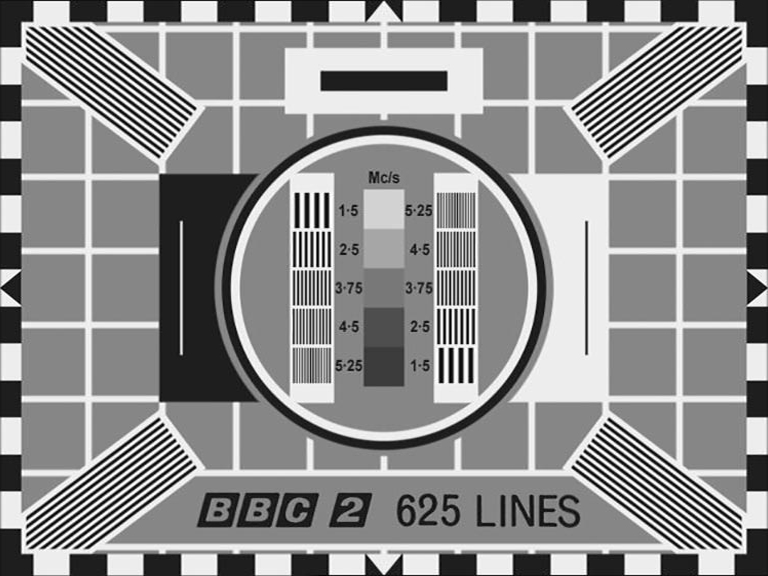


- The Rewind Team – montages of mixed originals and reconstructions with useful commentary
- The Test Card Circle – most of the images shown are reconstructions
- sub-TV ATV Test Cards and 625 TV Room – many thumbnail re-creations by artist Dave Jeffery
- DeviantArt LDD101 – lots of patterns from a Vietnam artist
- all manner of commercial outlets like Alamy, Adobe Stock etc. sell test cards of dubious authenticity
In general, any analogue-era test pattern with uniform grey background or perfect typography or lacking telltale signs of handcrafted workmanship is likely to be a reconstruction.
There isn’t one but TCM lends itself to be GUI-driven easily.
A neat freeware GUI test card maker for Windows exists called CardMaker by FML. Although old and unmaintained it still works well. Indeed it is so useful that it deserves a mention here:
CardMaker

Funsville Memetic Laboratories (FML) is the web space of Steve Heap, a.k.a. FMLTheGeneral, author of CardMaker on the defunct oodletuz.fsnet.co.uk domain but available on The Wayback Machine. Pertinent links are:
- FML Test Card Maker – the
tcmaker.zipfile contains theCardMaker.exeexecutable, Compiled HTML Help (CHM), resource files, instructions and sample Test Card Definition (TCD) files - The TCD Resource – a lot of TCD files for UK, European and other world standard test cards
- Testcards by Wenlock Burton (VK3YWB) – a Flickr album of 80 more test card reconstructions using CardMaker
- Wenlock’s Testcard Galleries and TCDs – showcase and a downloadable zip file of all his TCDs on the oocities.org archive.
TCD files are conceptually like TCM templates: they define pattern objects and layer properties. The TCD format is plain text: tab- and space-separated property values stored as implicit fixed-point integers (2 dp), integer 24-bit RGB colours, and text.
The image (click to enlarge) shows CardMaker running on Windows 10 with two layers: pattern elements on the left and cutouts on the right, also a CHM Help window and a Paint window of the image generated from the PM5544 TCD sample.
CardMaker generates lossless BMP and variable-quality JPEG images only, no vector formats. Despite its legacy 32-bit 2004 vintage it is well designed, intuitive and functional. For detailed information see the CardMaker Help PDF converted from the CHM.
This project is dedicated to Gordon J. King (G4VFV) whose lucid servicing handbooks helped nurture my teenage passion for practical electronics which led to an enjoyable and fulfilling career, including a training spell with the BBC. Back then, after persistently borrowing GJK’s books from the Horsham lending library, I managed to save enough money to buy my own (below). Even now they are a fascinating read, and many principles explained are relevant today.


This year (2025) I became aware that I had been living just two streets away from Mr King in Furzeham, Brixham, for 14 years until he died in 2010. That August soon after his funeral service at St. Mary’s I joined the organist rota there, still unaware. Anyway, he mentored through his writings, covering the heyday of analogue electronics and milestone transitions from valve to semiconductor, monochrome to colour, analogue to digital… RIP GJK.
- Torbay Weekly: article – the story of Gordon King by Ian Handford, 2023
- SuperannRTÉ.ie: obituary & tributes – Gordon J King, Author and Editor Practical Wireless
- UK Vintage Radio forum – discussion thread on Gordon J. King (3 pages)
- Bibliography – informal list of GJK book titles compiled by Andrewausfa
- BBC Television from Alexandra Palace, 1952–63 – personal experiences by Arthur Dungate, with index
- A Tech Ops History – in stories and pictures, by Bernie Newnham
- British Heritage Television – 405-line demo transmissions and A Brief History
- List of years in British television – Wikipedia
- The Story of BBC Television Idents – the BBC’s on-air look from 1936 to the present day
- World Radio History – UK collection of documents and publications
- The Transdiffusion Broadcasting System – a broadcasting archive for research and education
- TVARK – a comprehensive TV archive of Betamax and VHS home recordings
- TV Camera Museum – virtual camera museum with interesting monoscope test card grabs
- Early Television Foundation – interesting American site with a British and European section
- BBCeng.info – BBC Engineering Information from 1922 to 1997
- BBC Engineering Monographs – 115 downloadable editions from 1955 to 1980
- BBC Technical Instruction: Test Waveforms – 405-line waveforms (p.11) and 625 (p.17)
- A Broader Aspect – Transdiffusion article on early television aspect ratios
- EBU Technical Recommendation R92-1999 – active picture area and centring in analogue and digital 625/50 television systems
- Analog television – Wikipedia
- Television Technical Theory: Unplugged & Analog Video – comprehensive insights by Dana M. Lee
- List of common display resolutions: Analog systems – approximate dots x lines resolution
- World Analogue Television Standards and Waveforms – summary of colour standards at the time they were current
- PAL encoding – Wikipedia
- Limiting of YUV Digital Video Signals – a BBC Research Report
- YUV Color Calculator – colour conversion calculator
- BBC HD test signals – Andy Quested, BBC Internet Blog
- Capture-Cards and aspect-ratio for Dummies – analogue digitisation guide by Der Karl
- 5x4 era and early 4x3 cards – by Arthur Dungate
- Test Card History – excellent background by Alan Pemberton
- TVARK: BBC Testcards – archive of test card video recordings
- The Test Card Girl – AMTV documentary video: The Lasting Legacy of Test Card F
- Technical descriptions of UK test cards – authoritative information by Alan Pemberton
- Tim Worthington: The Test Card – a humorous take
- see also Test card sources links above
- repo danmons/FreeCalRec601 – accurate Rec.601 SD calibration DVD and test pattern generator
- repo davecrump/vidsource – BATC Composite Video Source for Raspberry Pi Zero
- repo sarodp/myatv – amateur TV test pattern generator from static JPEG images for Raspberry Pi
- repo georgik/esp32-monoscope-pattern – for ESP32, simulates classic test patterns with old TV effects
- repo edent/SVGtestcard – SVG 1080p test Card based on BBC HD pattern
- repo jyun9504/tv-test-card – a widescreen Vue implementation
- repo lordxeorus/Test-Patterns – FFmpeg colour bars generation: EBU 100/75% for PAL and SMPTE for NTSC
- TV Testcard Generator – interactive online tool for quick TC generation on the Render platform
- FML Test Card Maker – Windows tool, creates test cards and patterns from elements, see CardMaker
- British Amateur Television Club – promotes all aspects of television past and present
- British Vintage Wireless Society – preservation of vintage radio and related equipment, history, technical data
- UK Vintage Radio Repair and Restoration – discussion forum
- Radios-TV – Vintage radio & television blog and forum
- TV Forum – discussion forum, static archive since 2021
- Golborne Vintage Radio – forums on everything vintage
- The Test Card Circle – for test card music enthusiasts
- PostScript Language Reference Manual – Adobe Systems PLRM LanguageLevel 3
- ttf2pscid2 – TTF to PostScript Type 2 CIDFont Converter by scriptituk
- Lettering Designer – PostScript generated signage developed by scriptituk
- Affinity Photo – low cost professional photo editing app
- apngasm – APNG assembler, creates animated PNG from PNG sequence
- Cairo – 2D graphics library
- DVDAuthor – for authoring DVD file and directory structure
- DVDStyler – cross-platform free DVD authoring, front end for DVDAuthor
- ExifTool – for manipulating metadata in a wide variety of file types
- FFmpeg – software suite that handles multimedia data
- FontForge – comprehensive font editor
- Font-Validator – initially developed by Microsoft, has cross-platform binary downloads
- Gifsicle – GIF editor and optimiser
- Gifski – high-quality GIF animation encoder using pngquant
- GIMP – GNU Image Manipulation Program
- ImageMagick – for editing and manipulating digital images
- Oxipng – PNG/APNG compression optimizer
- pdf2svg – simple PDF to SVG converter using Poppler and Cairo
- pdf2svg-windows – ditto for Windows
- Poppler – PDF rendering library
- pngquant – lossy compression of PNG images
- xfade-easing – video transition effects for FFmpeg Xfade filter by scriptituk
Footnotes
-
The PostScript Language: A Comprehensive Guide – by SmallUsefulTips ↩
-
Page Description Language – Wikipedia ↩
-
The history of PostScript – by Laurens Leurs ↩
-
Anastigmatix Import – PostScript resource for embedding media file elements ↩
-
Object-oriented programming – Wikipedia ↩
-
Encapsulated PostScript – Wikipedia ↩
-
Forth programming language – Wikipedia ↩
-
CSS z-index property – Mozilla MDN Web Docs ↩
-
Unit square – Wikipedia ↩
-
Reuleaux polygon – Wikipedia ↩
-
Scalar projection – Wikipedia ↩
-
Document Structuring Conventions – Wikipedia ↩
-
VideoHelp Forum – huge video knowledgebase since 1999 ↩
-
Sampling theorem – Wikipedia ↩
-
List of common display resolutions – Wikipedia ↩
-
Television lines (TVL) – Wikipedia ↩
-
Technical descriptions of UK test cards: Resolution – Alan Pemberton ↩
-
Kell factor – Wikipedia ↩
-
Unit interval – Wikipedia ↩ ↩2
-
Y′UV History – Wikipedia ↩
-
YUV – RGB Conversion – archived from equasys GmbH ↩
-
ITU-R BT.601 conversion – Wikipedia ↩ ↩2
-
HSL and HSV – Wikipedia ↩
-
X11 colour names – Wikipedia ↩
-
Green screen / blue screen technique —> Color location – by PremiumBeat (Shutterstock) ↩
-
Blue Screen vs Green Screen – Gerriets, specialist for stage and event equipment ↩
-
International Color Consortium – ICC specification ↩
-
Ghostscript 9 Color Management – colour architecture in Ghostscript Release 9 ↩
-
The Magic Roundabout Series 1 1965–68 (incomplete) – 5 episodes, not 224, because of lost media ↩
-
Rec.601/BT.601 – Wikipedia, ‘the bridge that joined the analogue and digital worlds’ ↩
-
A journey through color space with FFmpeg – excellent article by Sven Schindler, Canva ↩ ↩2
-
Scaling interlaced video – Mark Himsley on FFmpeg-user ↩