Repository navigation
Home

Welcome to the official wiki of the Selldone® Storefront SDK (@selldone/sdk-storefront). The SDK is a TypeScript client for the Selldone storefront API (XAPI). It lets you build a complete, custom shop front end in Vue, React, Svelte, plain HTML or any other stack, while products, orders, payments, inventory and customers are handled by Selldone Business OS. Whether you are building a simple online shop for a small business or a multi-vendor platform, this wiki takes you from setup to checkout.
- New to the SDK? Follow Getting Started and have a product list on screen in a few minutes.
- Deploying a plain HTML page or a Page Builder section? Read Setup and Meta Tags and Page Builder Snippets.
- Need a specific call? Jump to the API Reference.
- Stuck? Check the FAQ.
Add the shop meta tags to <head>:
<!-- 🏬 Specify the shop's name -->
<meta name="shop-name" content="toysworld">

<!-- 🎗 Set the app's prefix address, for example: /my-shop-path -->
<meta name="shop-prefix-address" content="">

<!-- 📰 Define a custom homepage for the shop -->
<meta name="custom-home" content="shop">
Set up Selldone Core and the Storefront SDK:
// ━━━ Selldone Core (gapi,...) ━━━
import { SelldoneCore } from "@selldone/core-js";
SelldoneCore.Setup();

// ━━━ Storefront SDK (xapi) ━━━
import { StorefrontSDK } from "@selldone/sdk-storefront";
StorefrontSDK.Setup(); // Set up the Shop SDK.
Fetch products, with a 10-minute cache:
/**
 * Handles the success response from the storefront API fetch call.
 *
 * @param {Object} response - The response object from the API.
 * @param {Array} response.products - Array of product objects.
 * @param {number} response.total - Total number of products.
 * @param {Array} response.folders - Array of folder (category) objects.
 * @param {Object} response.parent - The parent category object.
 */
const handleSuccessResponse = ({ products, total, folders, parent }) => {
  this.products_count = total;
  this.products = products;
  this.folders = folders;
};

window.$storefront.products
  .optimize(600) // Cache products for 600 seconds
  .list(null, 0, 10, {
    categories_count: 10,
    with_parent: true,
    with_page: true,
    sort: null,
    available: false,
    search: null,
    search_type: null,
    dirs: null,
    filter: null,
    products_only: false,
    categories_only: false,
    with_total: true,
    bounds: null,
    tags: null,
    vendor_id: null,
    surrounded: false,
  })
  .cache(handleSuccessResponse)
  .then(handleSuccessResponse)
  .catch((error) => {
    // log error
  })
  .finally(() => {
    // ...
  });
Note
Earlier versions of this page used fetchProducts(...). It still works, but it is a deprecated alias of list(...). Use list() in new code. All options are explained in Products.
| Page | What you'll learn |
|---|---|
| Getting Started | Prerequisites, install, meta tags and a first working product list. |
| Setup and Meta Tags | npm vs CDN, every meta tag, Setup() options, what window.$storefront contains, request headers. |
| Authentication | Email OTP and SMS OTP login, registration, account selection, storing the token, logout. |
| Products | Listing, search, filters and sorting; product details; ratings; subscription content; caching. |
| Basket and Checkout | Add and remove basket items, bills, guest baskets and the checkout endpoints. |
| Customer Account | Current user, shop bootstrap, currency, exchange rates, language packs, local database. |
| Coupons, Offers, Cashback and Lottery | Incentive APIs and saved coupon codes. |
| API Reference | Every namespace and method, with signatures and endpoints. |
| Page Builder Snippets | Use the SDK inside a Page Builder Raw HTML section. |
| SaaS Hosting Strategies | Two business models for selling a web app built on Selldone. |
| FAQ | Common questions and troubleshooting. |
- A fully custom storefront (a Selldone Layout) in the framework of your choice.
- Product widgets on a static HTML page, using the CDN bundle and the meta tags.
- Dynamic sections in the Selldone Page Builder.
- Vertical SaaS products on top of Selldone shops (see SaaS Hosting Strategies).
The Storefront SDK is the customer-facing data layer of Selldone. It builds on Selldone Core and powers the official Storefront, the Storefront Playground starter, Components and the Page Builder. Admin tools use the Backoffice SDK instead.
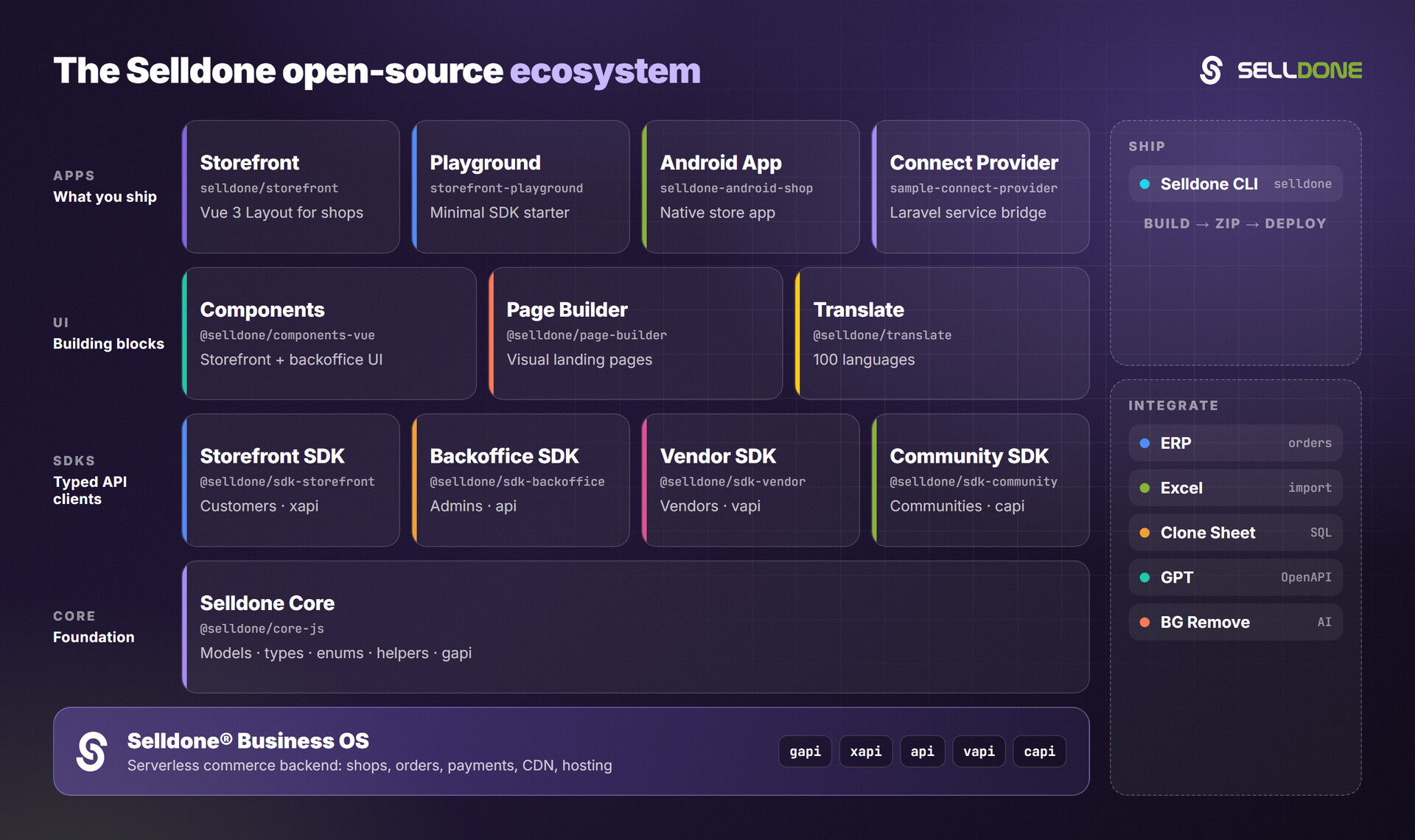
- storefront — Production-ready Vue 3 + Vite storefront built on this SDK (wiki).
- storefront-playground — Minimal Storefront SDK starter.
- core — Shared models, types, enums and helpers (wiki).
- components — Pre-built Vue 3 commerce components.
- community-sdk — Community (posts, topics) API client.
- backoffice-sdk — Admin API client (wiki).
- vendor-sdk — Marketplace vendor panel API client.
- cli — Build, zip and deploy a Layout to Selldone.