Repository navigation
Page Builder Snippets
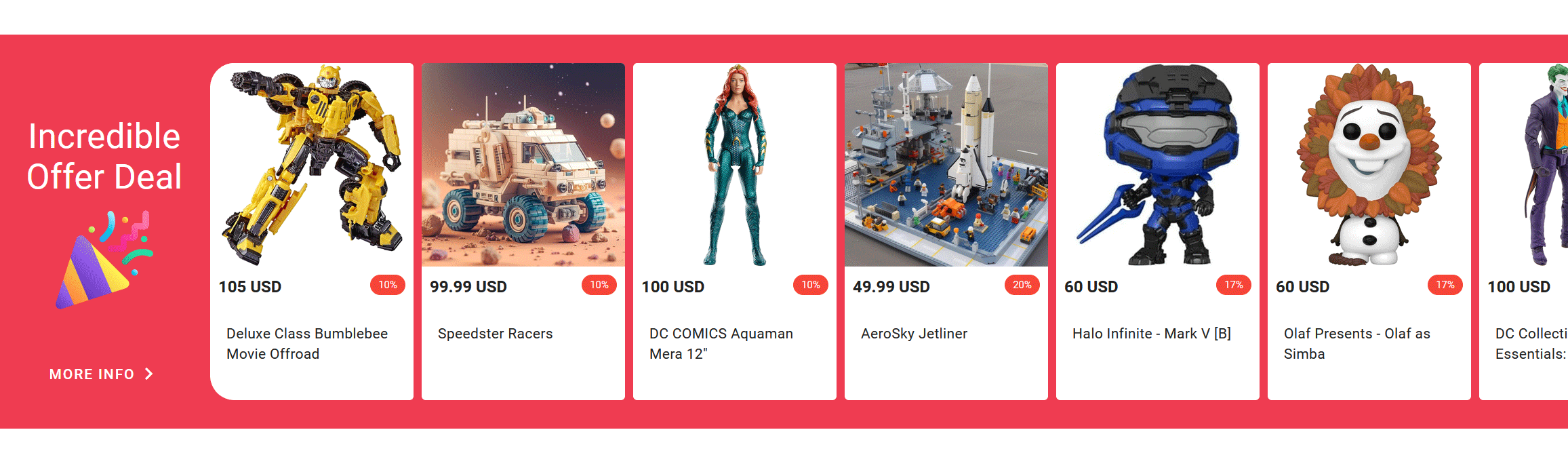
You can use the Storefront SDK directly inside pages made with the Selldone Page Builder. On a published shop page the SDK is already initialized, so window.$storefront and window.CDN are ready to use. This page shows how to add a custom code section and gives a complete, working example: a horizontal carousel of discounted products. The same snippets live in the standalone/ folder of the repository.
In the Page Builder, drag and drop the Raw HTML section and click Add Custom Code Here. Then paste your code.
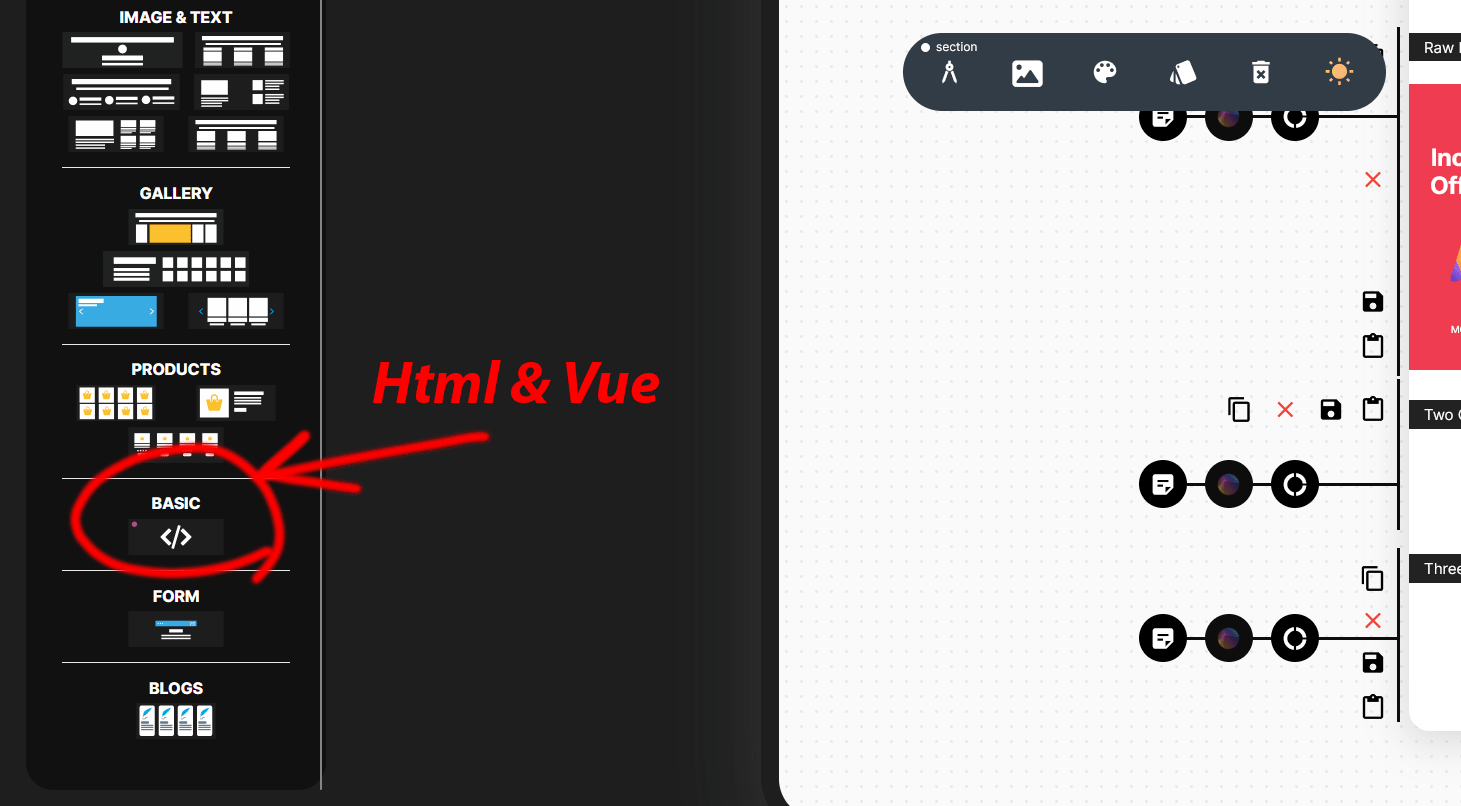
A snippet has two parts:
- A template that starts with the
<!----vue---->marker. You can use Vue template syntax and Vuetify components (v-sheet,v-card,v-img,v-btn, …). - A
<script>block that assigns a Vue component options object toconfig(data,methods,created, …).
Live code: https://codepen.io/pajuhaan/pen/JjqGBWJ
<!----vue---->
  <v-sheet color="#ef3c51" style="overflow-x: auto;" class="my-5 py-3 py-sm-5 text-start">
    <v-container fluid>
      <v-row class="flex-nowrap" align="stretch">
        <v-col style="min-width: 200px; max-width: 200px" class="text-center d-flex flex-column align-center">
          <v-spacer></v-spacer>
          <div>
            <h4 class="my-3 text-h4">Incredible Offer Deal</h4>
            <v-img src="https://cdn.selldone.com/app/shops/115/pages/1926/images/confettisvg967788a152da6f5a63ca8fef86119157.svg"
                    height="100px" width="100px" class="mx-auto my-3"></v-img>
          </div>
          <v-spacer></v-spacer>
          <v-btn color="#fff" variant="text" :href="`/?search=*&sort=most_popular&filter=${JSON.stringify({only_has_discount: true})}`">
            More Info
            <span class="material-icons">chevron_right</span>
          </v-btn>
        </v-col>
        <v-col v-for="(product, index) in products" :key="index" class="pa-1">
          <v-card style="width: 200px; min-height: 320px; height: 100%" :rounded="index === 0 ? 's-xl' : undefined" flat>
            <v-img :src="getImageUrl(product.icon)" height="200px" cover></v-img>
            <div class="d-flex justify-space-between pa-2">
              <b>{{ product.price }} {{ product.currency }}</b>
              <v-chip color="red" size="x-small" variant="flat">
                {{ Math.round(100 * (product.discount) / (product.price)) }}%
              </v-chip>
            </div>
            <v-card-text class="text-wrap">{{ product.title?.substring(0,80) }}</v-card-text>
          </v-card>
        </v-col>
        <v-col class="pa-1">
          <v-card style="width: 200px; min-height: 320px; height: 100%" rounded="e-xl" class="d-flex flex-column align-center justify-center" flat :href="`/?search=*&sort=most_popular&filter=${JSON.stringify({only_has_discount: true})}`">
            <div style="height: 56px; width: 56px; border-radius: 50%; border: solid thin #eee" class="d-flex align-center justify-center">
              <span class="material-icons">trending_flat</span>
            </div>
            <div class="mt-5">
              View All
            </div>
          </v-card>
        </v-col>
      </v-row>
    </v-container>
  </v-sheet>


<script>
 config = {
  data() {
    return {
      products: [],
      folders: []
    };
  },
  methods: {
    fetchProducts(dir, more, limit, options) {
      window.$storefront.products
        .optimize(600)
        .list(dir, more ? this.products.length : 0, limit, options)
        .then(({ products, folders }) => {
          this.products = products;
          this.folders = folders;
        })
        .catch((error) => {
          console.error("Failed to fetch products:", error);
        });
    },
    getImageUrl(path, size) {
      return window.CDN.GET_SHOP_IMAGE_PATH(path, size);
    }
  },
  created() {

    this.fetchProducts('*', false, 10, {
      categories_count: 10,
      with_parent: true,
      with_page: true,
      sort: 'random',
      available: false,
      search: null,
      search_type: null,
      dirs: null,
      filter: JSON.stringify({only_has_discount: true}),
      products_only: false,
      categories_only: false,
      with_total: true,
      bounds: null,
      tags: null,
      vendor_id: null,
      surrounded: false
    });
  }
}
</script>-
list('*', 0, 10, …)searches all products and categories, sorted randomly, filtered to discounted items (only_has_discount). -
optimize(600)lets the SDK reuse a stored response for up to 10 minutes. Responses are only stored for requests chained with.cache(), so to benefit from it add.cache(({ products, folders }) => { this.products = products; this.folders = folders; })before.then(...). See Caching and request control. -
window.CDN.GET_SHOP_IMAGE_PATH(product.icon, size)turns the stored image name into a CDN URL. - The "More Info" and "View All" links open the shop listing with the same search, sort and filter in the query string.
- Keep snippets small and self-contained; they run inside the shop page next to other sections.
- Use the cache helpers to avoid repeated requests when the same section appears on many pages.
- Any SDK namespace works here: show offers with
window.$storefront.offer.fetchOffers(window.$storefront.currency.code), or a vendor card withwindow.$storefront.vendor.getVendor(id). - For larger or reusable sections, build a custom storefront instead (Storefront) or contribute a section to the Page Builder.
- Products: all listing options.
- API Reference
- Page Builder repository