Repository navigation
SaaS Hosting Strategies
The Storefront SDK and Selldone components are not only for single shops. Because all commerce operations run on Selldone, you can build a specialized e-commerce product for one industry and sell it as a SaaS, without writing backend code. This page describes the two hosting strategies, with their case studies.
- Easy to use: even with a few months of JavaScript and HTML experience, you can create a fully customized online store in a day.
- Unlimited customization: components and pages can be extended to build specialized solutions for different industries.
- No backend to run: products, orders, payments, customers and subscriptions are handled by Selldone Business OS. Examples: a subscription service for marketing analysis, or a platform for selling training courses.
You run the web app and sell access to it yourself. Your customers connect their own Selldone shop.
- Create an app with Selldone components.
- Develop a website with a home page and onboarding.
- Define subscription plans, code to sell subscriptions, and host the web app.
- Users subscribe, connect their Selldone shop, and offer their services.
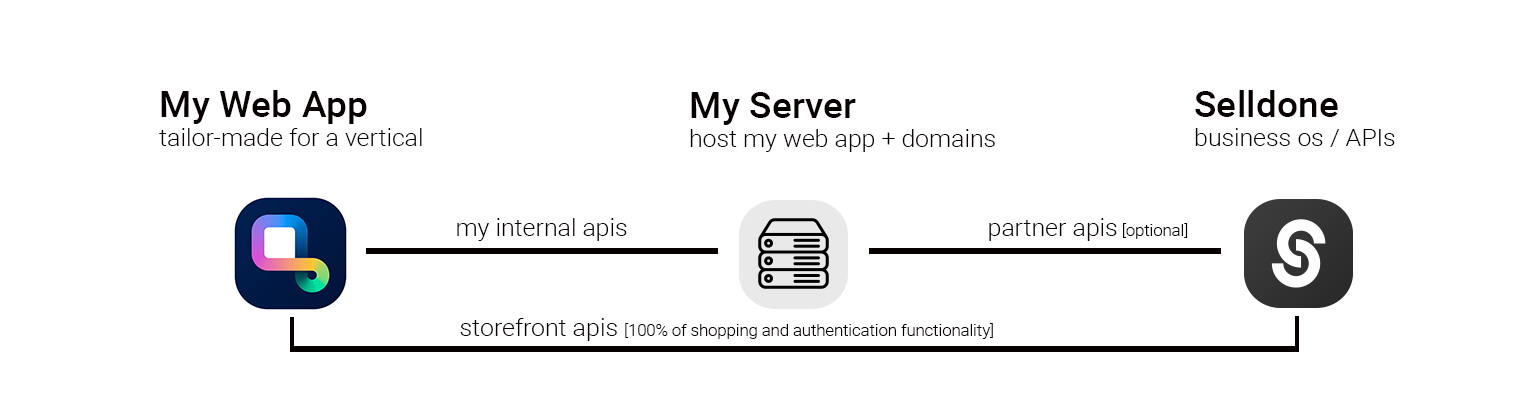
Choose this when you already have infrastructure, want full control over billing and onboarding, or your app combines Selldone data with other services.
Selldone hosts the web app and handles billing for you.
- Create a custom web app with Selldone components.
- Register and verify as a SaaS owner on Selldone.
- Deploy the web app on Selldone and charge users via Selldone's subscription service.
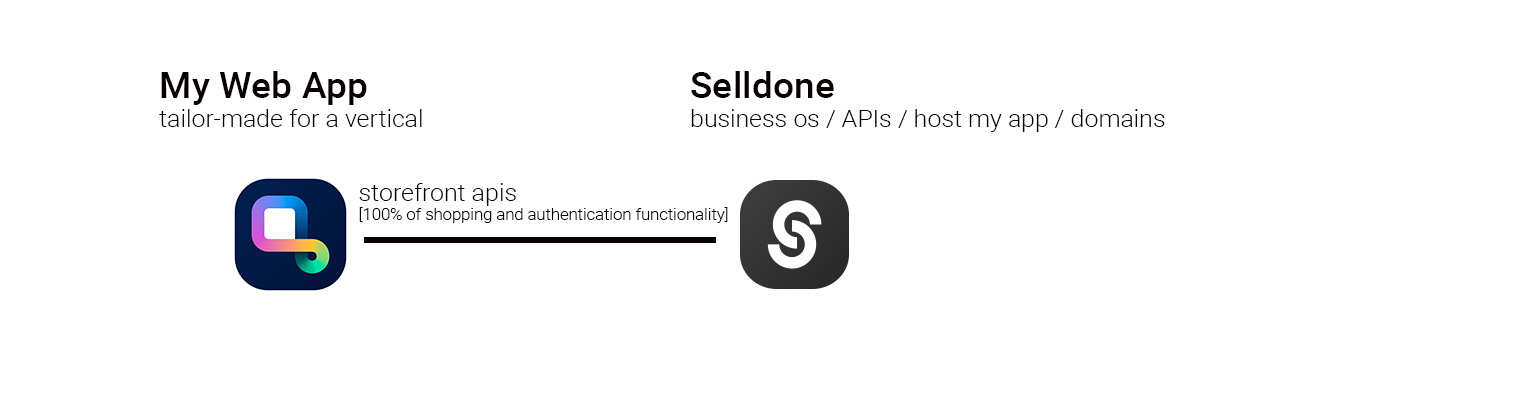
Choose this when you want a serverless setup: no hosting, no payment integration, and distribution through Selldone. Storefront web apps deployed on Selldone are called Layouts; you can manage them in the developer panel and deploy them with the Selldone CLI.
| Need | Project |
|---|---|
| Customer-facing data (products, basket, login) | Storefront SDK (this repository) |
| Ready-made storefront to start from | storefront |
| UI components | components |
| Drag-and-drop pages | pagebuilder |
| Admin features for your customers | backoffice-sdk |
| Marketplace vendor panels | vendor-sdk |
| Build and deploy to Selldone | cli |