Changelog Generation
Verified against GitMind
5.0.0on June 7, 2026.
GitMind Pro can generate or update CHANGELOG.md from Git history.
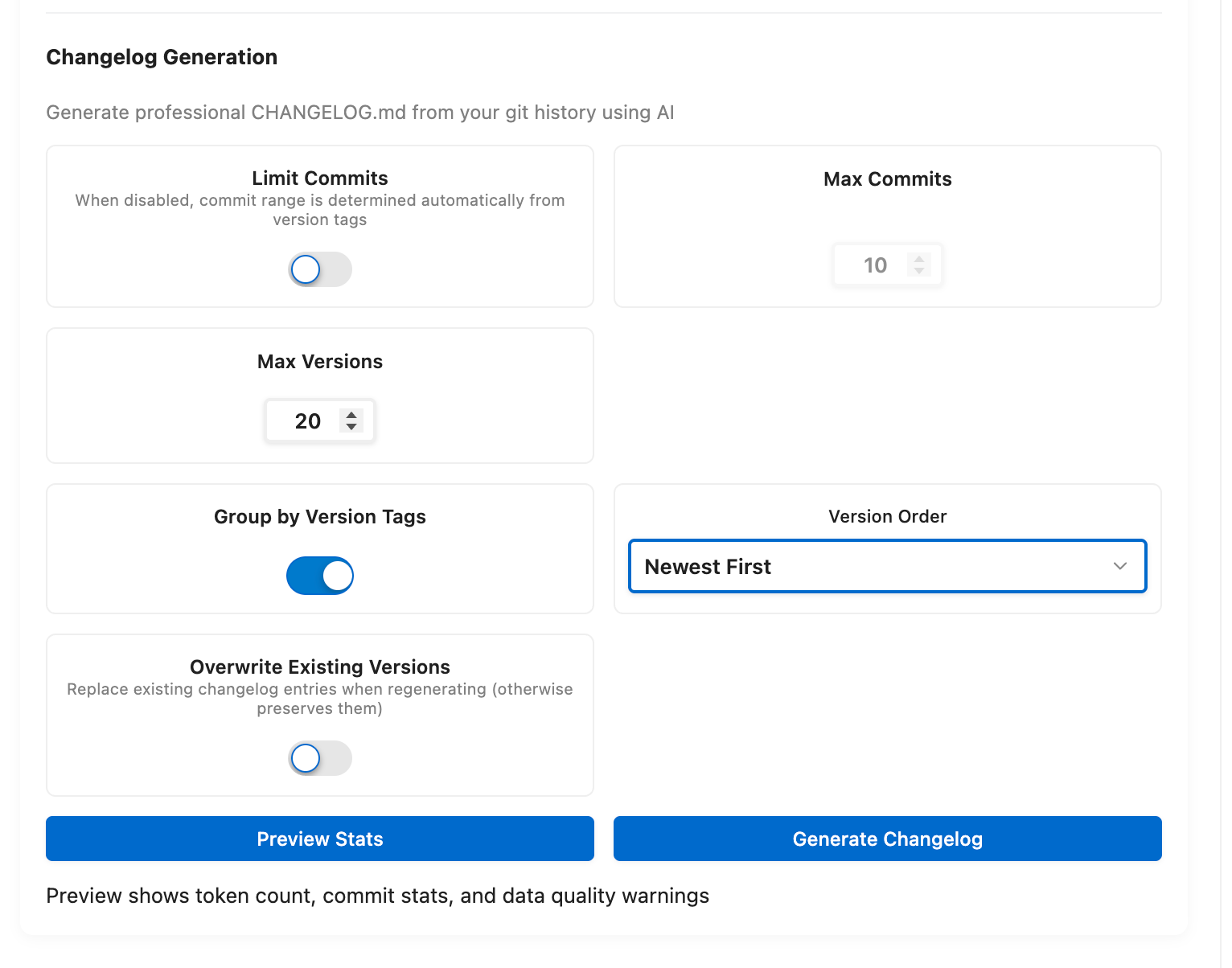
GitMind previews repository statistics and estimates request size. Version detection uses Git tags first, then version-related commits/package metadata, and falls back to an Unreleased group when no version is found.
-
gitmind.pro.changelog.enabled: enable the feature. -
maxCommitsEnabled/maxCommits(2-2500): manual cap used for no-tag fallback scenarios. -
groupByVersion: group by detected versions. -
maxVersions(1-25): limit versions processed in one request. -
versionOrder: newest-first or oldest-first. -
overwriteExisting: replace existing generated version entries; default off preserves them.
With version tags, GitMind retrieves commits between selected tag boundaries rather than applying the no-tag max-commit fallback.
- Commit or stash unrelated working changes.
- Run GitMind: Generate Changelog from Git History (Pro) for an initial changelog.
- Review preview statistics and detected versions.
- Confirm generation and inspect
CHANGELOG.md. - Later, run GitMind: Update Changelog (Pro) to add new history.
GitMind tries to preserve an existing changelog's version format, categories, bullets, and ordering. Keep overwriteExisting disabled when entries contain manual edits.