A standalone macOS debugger for React Native apps
Supports React Native 0.74+ with Hermes, New Architecture, and latest versions





The original React Native Debugger only supports the old Remote Debugger and doesn't work with Hermes / JSI / New Architecture. ReactoRadar is the modern replacement — built from scratch to work with the latest React Native versions.
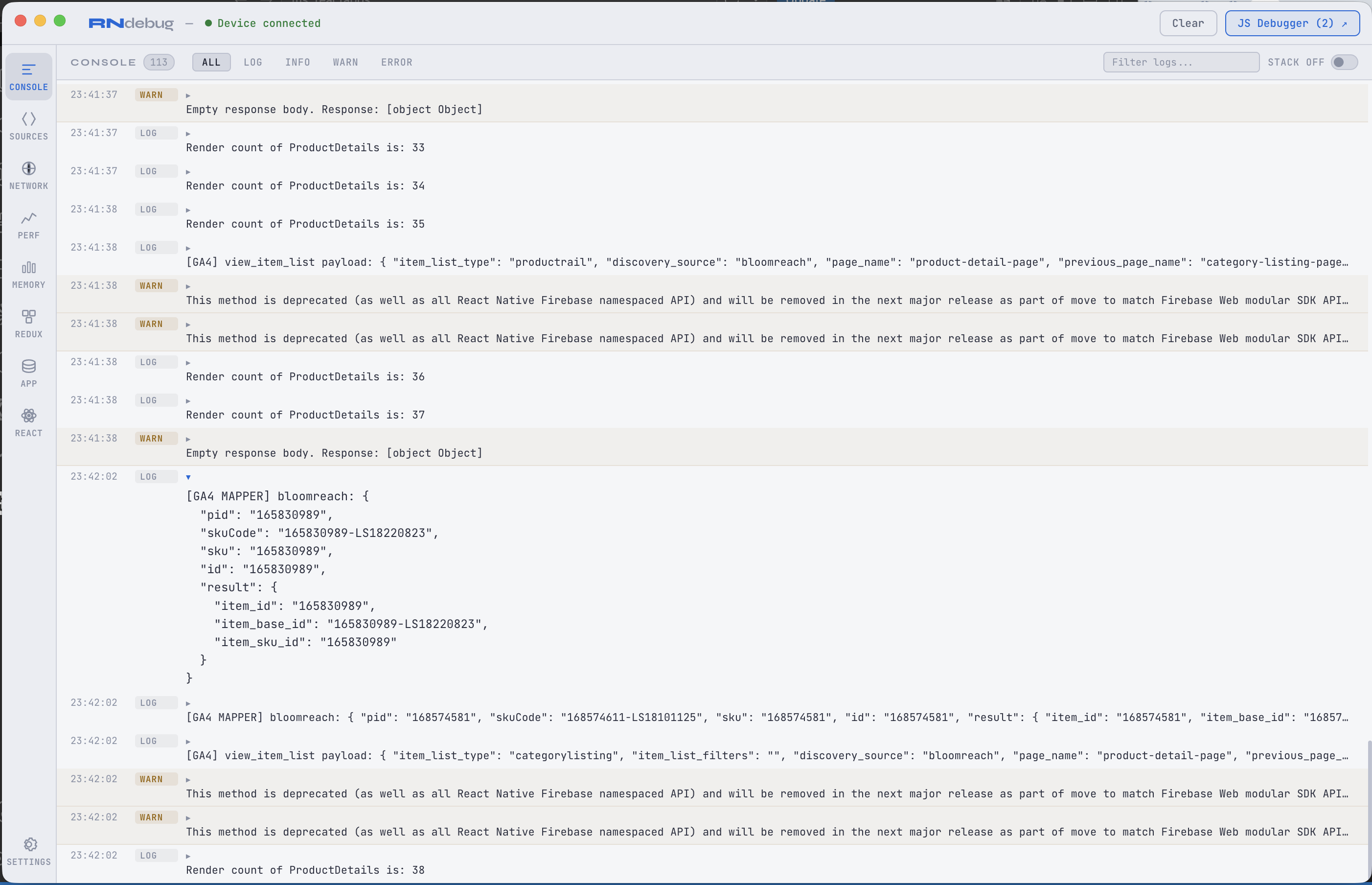
Collapsible object trees, multi-select level filters, log grouping, search, export as JSON, right-click to copy
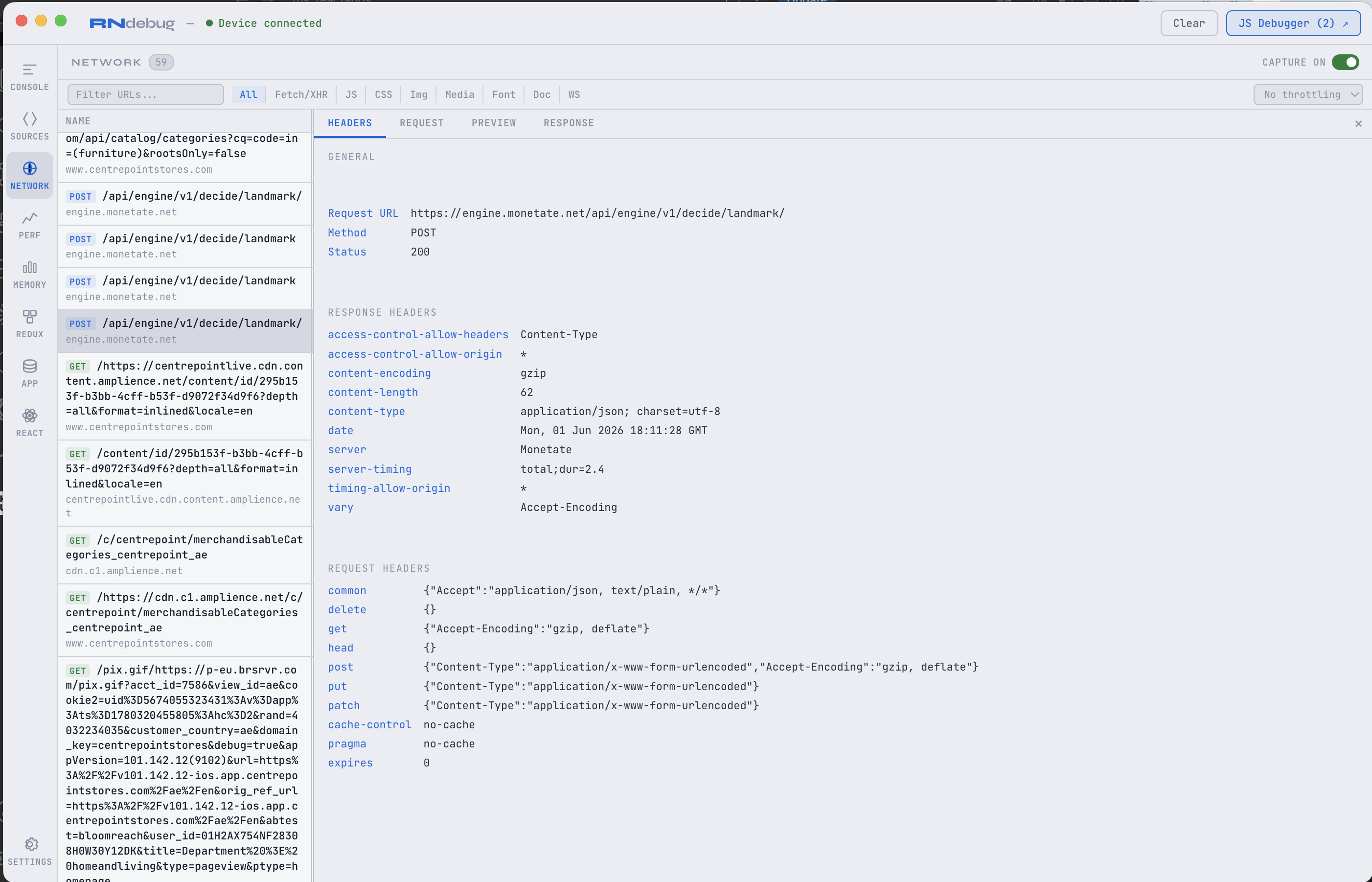
Resizable/sortable columns, slow API highlights, export as HAR, stats bar, hide unwanted URLs, throttling
| Tab | What it does |
|---|---|
| Console | Log viewer with collapsible trees, level filters, log grouping (repeated messages), search, export as JSON |
| Network | Chrome DevTools-style inspector — resizable/sortable columns, slow API highlighting (>1s orange, >3s red), status filters (All/2xx/Errors/Slow), export as HAR, hide unwanted URLs, stats bar, throttling, Copy as cURL |
| Redux | Action list with category color coding, click to expand payload + two-column store diff (Previous | Current) with changed keys highlighted, time travel |
| GA4 Events | Firebase Analytics inspector — intercepts ALL log* and set* methods, event list with detail pane, summary chips |
| App | AsyncStorage live key/value browser with search |
| Memory | JS Heap Used/Total, Native Memory from Hermes runtime |
| Performance | Live FPS meter, JS Thread timing, UI Thread timing with sparkline graphs |
| React | Component tree and props inspector via react-devtools-core relay |
| Settings | 9 color themes, font family/size, configurable panel visibility with drag-to-reorder, Metro port config, keyboard shortcuts, auto-update, support link |
- Auto-Update —
.dmgbuilds auto-download updates from GitHub Releases. Settings shows "Restart & Update" when ready. - Keyboard Shortcuts —
Cmd+1–9switch panels,Cmd+Kclear,Cmd+Sscreenshot,Cmd+Ffind - Toast Notifications — Non-intrusive alerts for console errors, API errors (4xx/5xx), and slow APIs (>3s) when you're on a different tab. Duplicate toasts are grouped with count.
- Console Log Grouping — Repeated identical consecutive messages show a count badge instead of duplicates
- Export — Console logs as JSON, Network requests as HAR 1.2 (importable into Chrome DevTools, Charles, etc.)
- Network Stats Bar —
47 requests | Avg: 320ms | Slowest: 4.2s (products) | Errors: 2 | Slow: 5 - Slow API Highlights — Rows >1s turn orange, >3s turn red (background, path, time column)
- Status Filters — All / 2xx / Errors / Slow (>1s) filter buttons
- Hide URLs — Right-click any request → "Hide this URL". Manage hidden URLs with the "Hidden (N)" dropdown.
- Redux Category Colors — Action types like
ANALYTICS/TRACK_EVENTshow category prefix in a unique color - Two-Column Redux Diff — Store changes show Previous and Current state side-by-side, trees collapsed by default, changed keys highlighted
- Panel Visibility — Settings > Panels: show/hide tabs and drag to reorder. Disabled tabs stop processing data to save memory.
- Font Family — Choose from SF Mono, Menlo, Monaco, Courier New, System Mono
- Screenshot — Camera button in titlebar or
Cmd+S— saves PNG to Downloads - Memory Safeguards — Auto-caps console (5K logs), network (1K requests), Redux (500 states). Warning banner at 70% heap usage.
- Real Device Support — iOS real device auto-detects LAN IP. Android uses adb reverse.
- Debugger Detection — SDK auto-pauses when Chrome DevTools or Hermes Inspector attaches, resumes on disconnect
cd your-react-native-project
npx reactoradar setup     # Install SDK (one time)
npx reactoradar # Launch the debugger- Download from Releases
- Drag ReactoRadar to Applications
- Install the SDK:
npx reactoradar setupfrom your RN project - Open ReactoRadar from Applications
macOS Gatekeeper: First launch — right-click → Open → Open. Or:
xattr -cr "/Applications/ReactoRadar.app"
npm install -g reactoradargit clone https://github.com/sharanagouda/react-native-debugger.git
cd react-native-debugger
npm install
npm start # dev mode
npm run build # build .dmg# Step 1: Install SDK (one time)
cd your-react-native-project
npx reactoradar setup
# Step 2: Launch debugger
npx reactoradar
# or open ReactoRadar.app from Applications
# Step 3: Run your app
npx react-native start --reset-cacheConsole, Network, Redux, GA4, AsyncStorage data flows automatically. No config needed.
| Device | HOST | How it connects |
|---|---|---|
| iOS Simulator | 127.0.0.1 |
Shares Mac's network (auto-detected) |
| Android Emulator | 10.0.2.2 |
Special host alias (auto-detected) |
| Android real device (USB) | 10.0.2.2 |
adb reverse tunnels over USB (auto-configured) |
| iOS real device (USB/WiFi) | Mac's LAN IP | Auto-detected. Device must be on same WiFi as Mac. |
npx reactoradar setup auto-detects your platform and sets the correct HOST.
npx reactoradar remove| ReactoRadar | React Native | Engine | Architecture |
|---|---|---|---|
| v1.6+ | 0.74 — 0.81+ | Hermes | Old & New Architecture |
| Feature | Details |
|---|---|
| Columns | Name, Status, Type, Initiator, Size, Time, Waterfall — resizable and sortable |
| Search | Filter by URL in real time |
| Type filters | All, Fetch/XHR, JS, CSS, Img, Media, Font, Doc, WS |
| Status filters | All, 2xx, Errors, Slow (>1s) |
| Slow API highlights | >1s orange background + bold time, >3s red |
| Stats bar | Total requests, Avg duration, Slowest endpoint, Error count, Slow count |
| Hide URLs | Right-click → Hide this URL. Manage via "Hidden (N)" dropdown. Persists across sessions. |
| Export | Export as HAR 1.2 — importable into Chrome DevTools, Charles Proxy |
| Throttling | No throttling, Fast 3G (500ms), Slow 3G (2s), Offline |
| Detail view | Click row → Headers / Request / Preview / Response side panel |
| Copy as cURL | Right-click → Copy as cURL / Copy URL / Copy Response / Hide this URL |
| Capture toggle | ON/OFF switch to pause network capture |
| Feature | Details |
|---|---|
| Auto-intercept | Patches ALL log* and set* methods on Firebase Analytics prototype |
| Event list | Time + event name, newest first, sortable |
| Detail pane | All parameters as key-value list with word-wrapped long values |
| Summary chips | Click any chip to filter by event type |
- Action list with category color coding (e.g.,
ANALYTICS/in blue,CART/in green) - Click to expand, click again to collapse. Close button on expanded detail.
- Two-column store diff: Previous (red) and Current (green) side-by-side with changed keys highlighted
- Trees collapsed by default — user expands what they need
- Right-click to copy action type or payload
- Deep equality comparison (no false positives)
- Time travel with ◀ ▶ navigation
- Memory capped at 500 action/state pairs
npx reactoradar setup auto-detects Redux and patches your store. If it can't auto-patch, add manually:
Redux Toolkit (configureStore):
// In your store file (e.g. src/store/store.ts)
import { configureStore } from '@reduxjs/toolkit';

export const store = configureStore({
  reducer: rootReducer,
  middleware: (getDefaultMiddleware) =>
    __DEV__
      ? getDefaultMiddleware().concat(require('../debug/RNDebugSDK').reduxMiddleware)
      : getDefaultMiddleware(),
});
Legacy Redux (createStore):
import { reduxEnhancer } from '../debug/RNDebugSDK';
const store = createStore(reducer, __DEV__ ? reduxEnhancer : undefined);
Note: The import path is relative from your store file to
src/debug/RNDebugSDK. Runnpx reactoradar setupto auto-detect the correct path.
- 9 Themes: Dark, Light, Monokai, Dracula, Solarized Dark/Light, Nord, GitHub Dark, One Dark
- Font Family: SF Mono, Menlo, Monaco, Courier New, System Mono
- Font Size: Adjustable with A-/A+ buttons
- App Name: Customizable titlebar text
- Show/Hide Tabs: Toggle visibility of any tab (Console and Network are required)
- Drag to Reorder: Drag tabs to change sidebar order
- Memory Saving: Disabled tabs stop processing data entirely
- Metro Port: Configurable (default 8081) for multi-bundler setups
- Bridge Ports: Redux :9090, Storage :9091, Network :9092
| Shortcut | Action |
|---|---|
Cmd+1–9 |
Switch panels (follows custom order) |
Cmd+K |
Clear active panel |
Cmd+S |
Screenshot (saves to Downloads) |
Cmd+F |
Find/Search in active panel |
Cmd+D |
Open JS Debugger (CDP DevTools) |
Cmd+R |
Open React DevTools |
Cmd+Shift+T |
Cycle through themes |
Cmd+C/V/A |
Copy / Paste / Select All |
| Port | Service |
|---|---|
| 9090 | Redux bridge |
| 9091 | AsyncStorage bridge |
| 9092 | Console + Network + GA4 + Performance bridge |
| 8097 | React DevTools relay |
| 8081 | Metro bundler (CDP) — configurable in Settings |
┌─────────────────────────────────────────────────────┐
│               ReactoRadar (Electron)                │
│                                                     │
│  Console │ Network │ Redux │ GA4 │ App              │
│  Memory │ Perf │ React │ Settings                   │
│                                                     │
│  main.js                                            │
│   ├─ WS :9092 ← console + network + ga4 + perf     │
│   ├─ WS :9090 ← redux actions + state              │
│   ├─ WS :9091 ← asyncstorage                       │
│   ├─ WS :8097 ← react-devtools relay               │
│   └─ HTTP :8081 → Metro CDP (on-demand)             │
│                                                     │
│  Auto-update via electron-updater (GitHub Releases) │
└──────────────────────┬──────────────────────────────┘
                       │ WebSocket
┌──────────────────────┴──────────────────────────────┐
│            Your React Native App                    │
│                                                     │
│  RNDebugSDK.js (__DEV__ only)                       │
│   ├─ console.* interceptor                          │
│   ├─ XHR constructor wrapper (axios + fetch)        │
│   ├─ Firebase Analytics prototype interceptor       │
│   ├─ FPS + memory metrics                           │
│   ├─ Redux middleware / enhancer                    │
│   ├─ AsyncStorage watcher                           │
│   └─ Debugger detection (auto-pause on CDP attach)  │
└─────────────────────────────────────────────────────┘
| Problem | Solution |
|---|---|
| App won't launch from VS Code terminal | unset ELECTRON_RUN_AS_NODE && npx reactoradar |
| "Waiting for device" | Restart Metro: npx react-native start --reset-cache |
| Network tab empty | Run Metro with --reset-cache |
| Blank screen after long use | Click "Clear All Data" on the memory warning banner, or restart the app |
| Redux shows "No actions dispatched" | Verify reduxMiddleware is wired in your store. Run npx reactoradar setup to auto-detect. |
| Real device not connecting | Ensure HOST in src/debug/RNDebugSDK.js matches your Mac's LAN IP. Re-run npx reactoradar setup. |
XHRInterceptor.js warning |
Set networking: false in ReactotronConfig.js |
| GA4 events not showing | Restart Metro with --reset-cache after setup |
| Port conflict | Run kill $(lsof -ti :9092) to free the port, then restart |
| "ReactoRadar is already running" | Close the existing instance or kill the process |
ReactoRadar runs entirely on your local machine. No data collection, no analytics, no telemetry. See PRIVACY.md.
If ReactoRadar helps your workflow, consider supporting development:


Contributions welcome! Fork → branch → PR.
git clone https://github.com/sharanagouda/react-native-debugger.git
cd react-native-debugger
npm install
npm start- Windows / Linux support
- WebSocket message inspector
- Network request comparison (diff two requests)
- Session recording & replay
- Custom themes
- React Native New Architecture profiling
- Electron
- React DevTools
- Redux DevTools
- React Native Debugger — the original inspiration