Telegram: Getting User IDs
Screenshots in this guide are taken from the Telegram Desktop app, but the process should be the same on the mobile app.
Unfortunately there isn't a straightforward way to obtain user IDs from the Telegram app, but there is a bot that can make it really easy!
-
Search for "@Telegram Bot Raw" (note the spaces)
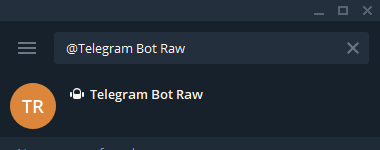
-
Click "Start"
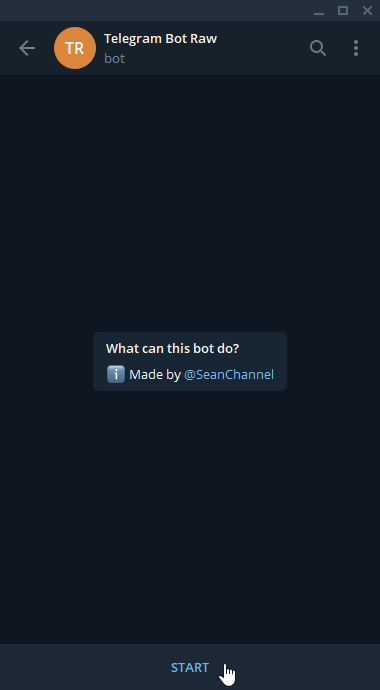
Immediately, the bot will send you detailed information.
There's one piece of data we're looking for, the
"id"value under the"from"line: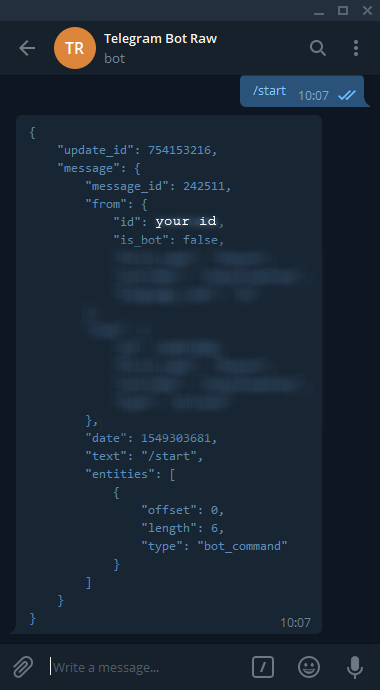
For privacy reasons, I've blurred and omitted my personal values. -
Copy your user ID
Telegram user IDs are, generally, positive 9-digit numbers: e.g.
123456789. Copy the ID shown.This can be used in the
TG_USER_WHITELIST(env) /tg_user_whitelist(yaml) configuration for NxBot. It can also be used in theTG_MOTION_RECIPIENT(env) /tg_motion_recipient(yaml) value, to receive motion-event action camera snapshots.