Put interactive HTML and React UI on real Three.js meshes—without giving up UV mapping, depth occlusion, browser input, or lifecycle control.
Live demo · 日本語 · API · Browser support


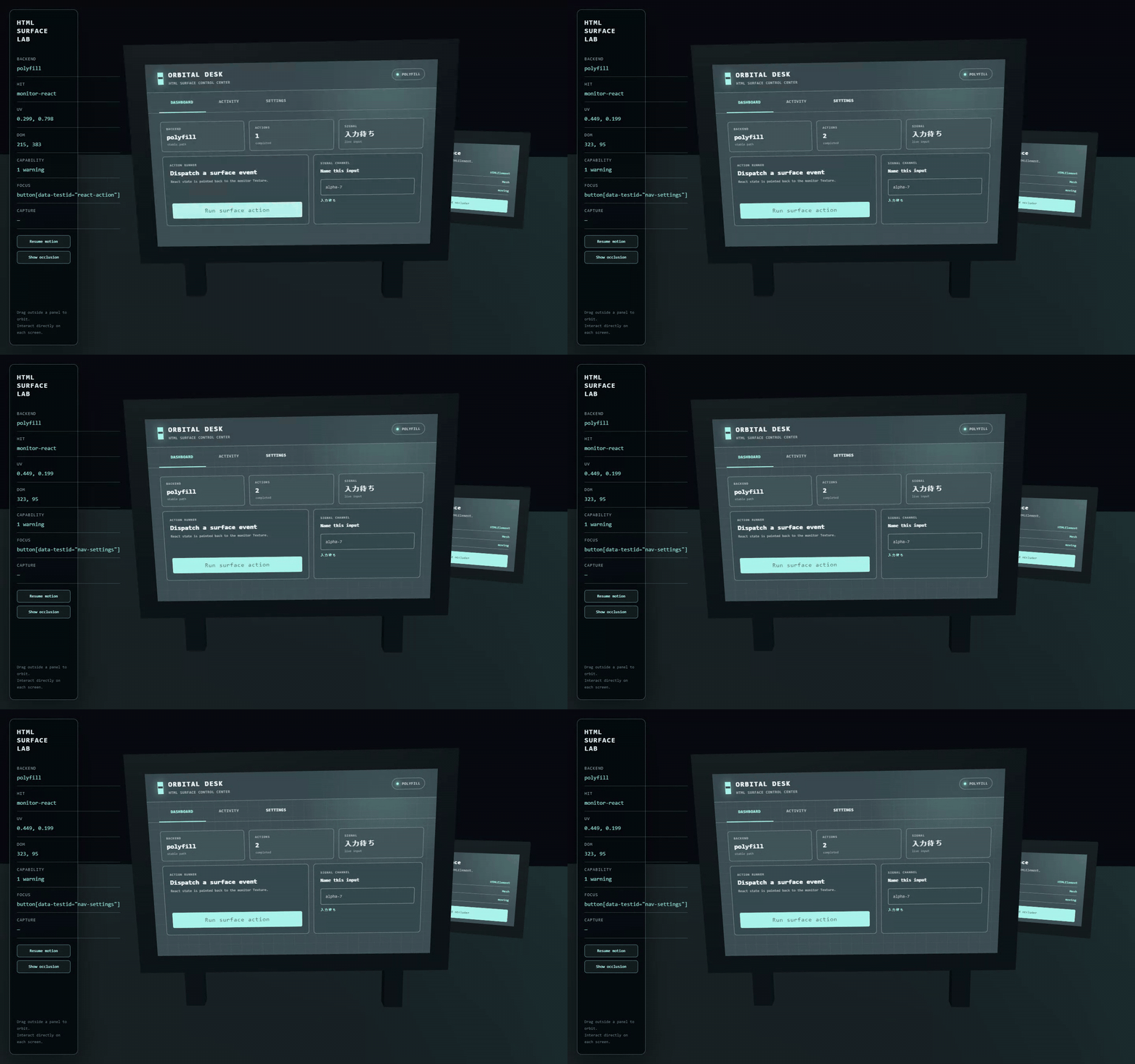
An HTML Surface is more than an HTML texture. It treats an HTMLElement as the rendering source and a Three.js Mesh as the display target, then manages these concerns as one unit:
- HTML-derived texture creation and invalidation
- material slot, map property, and texture transform binding
- raycast UV to DOM coordinate mapping
- browser-native hit testing, focus, keyboard, pointer, wheel, and touch routing
- input occlusion by ordinary scene meshes
- multiple surfaces, ownership, restoration, and disposal
HTML-in-Canvas, Three.js HTMLTexture, and three-html-render are replaceable rendering Backends or low-level building blocks. The library's value lives above them: binding any UV-mapped Mesh, routing input through the scene, and keeping the whole surface lifecycle coherent.
| A rendering primitive gives you | HTML Surface Three adds |
|---|---|
| DOM → pixels | Backend selection and explicit invalidation |
| A Texture | Mesh, material slot, map property, and UV transform binding |
| A visual result | UV → DOM targeting and browser interaction |
| One rendered element | Multiple-surface registry and ownership |
| Mesh depth while rendering | The same scene-aware occlusion for input |
This is not a DOM overlay. The UI is uploaded as a Texture, so it follows Mesh deformation, camera perspective, depth testing, and occlusion.
0.1.0-rc.2 is a release candidate and is published under the next dist-tag.
npm install html-surface-three@next three@0.185.1Requirements:
- Node.js
^20.19.0or>=22.12.0 - Three.js
>=0.184.0 <0.186.0 - a stable browser with WebGL
The core is framework-independent. Give the manager a live HTMLElement and an existing Mesh with UVs:
import * as THREE from 'three';
import { HtmlSurfaceManager } from 'html-surface-three';

const panel = document.createElement('section');
panel.style.cssText = 'width: 640px; height: 420px';
panel.innerHTML = `
  <button type="button">Run action</button>
  <label>Signal <input aria-label="Signal" /></label>
  <div style="height: 120px; overflow: auto">...</div>
`;

const manager = new HtmlSurfaceManager({
  renderer,
  camera,
  scene,
  backend: 'auto',
});

const surface = manager.add({
  id: 'monitor',
  element: panel,
  mesh: monitorScreen,
  materialIndex: 0,
  mapProperty: 'map',
  transformUv(uv, texture) {
    texture.transformUv(uv);
  },
});

function frame() {
  manager.update();
  renderer.render(scene, camera);
  requestAnimationFrame(frame);
}
frame();

await surface.ready;
surface.invalidate();

// Cleanup
surface.dispose();
manager.dispose();
disposeMaterial and disposeGeometry default to false. Resources owned by your application are not destroyed implicitly.
React is an integration example, not a core dependency. Mount React into an ordinary element and pass that element to the same Vanilla API:
import { createRoot } from 'react-dom/client';

const element = document.createElement('div');
element.style.cssText = 'width: 640px; height: 420px';

const surface = manager.add({
  id: 'react-monitor',
  element,
  mesh: monitorScreen,
});

const root = createRoot(element);
root.render(<ControlPanel />);
surface.invalidate();

// Stop React before disposing the Surface.
root.unmount();
surface.dispose();
The live demo mounts a complete React dashboard—with navigation, button state, text input, checkbox, range drag, and scrolling—on a moving and rotating 3D monitor. A second Vanilla Surface demonstrates multi-surface routing and occlusion.
| Option | Behavior |
|---|---|
auto |
Stable-first. Uses the polyfill path even if a native experimental API is present. |
polyfill |
Uses three-html-render explicitly. |
native |
Uses native HTML-in-Canvas only when detected. Experimental and opt-in. |
The Backend SPI is isolated behind html-surface-three/experimental, keeping experimental Three.js APIs out of the stable facade. See Texture Backends.
Support is intentionally tiered:
| Tier | Browser | Coverage |
|---|---|---|
| Tier 1 | stable Chrome and Edge | moving and rotated surfaces, navigation, button, input, keyboard, IME composition, checkbox, range drag, scroll, multiple surfaces, occlusion, pointer capture, touch |
| Tier 2 | Playwright Firefox and WebKit | startup, rendering, button, input, and scroll smoke tests |
| Manual | Safari | published checklist; Playwright WebKit is not claimed as Safari |
| Experimental | native HTML-in-Canvas environments | detection and explicit selection only |
The default Backend is the stable polyfill path. See the complete browser matrix and Safari checklist.
- The polyfill path uses SVG
foreignObjectand texture uploads. - Cross-origin media, iframe content, DRM, complex CSS, and native form styling remain browser-constrained.
- Overlapping UVs, alternate UV channels,
SkinnedMesh, andInstancedMeshare outside the release-candidate guarantee. - Scene-wide recursive raycasting needs application-specific optimization in very large scenes.
- The DOM accessibility tree and the visual 3D position are not the same thing.
- React Three Fiber and WebXR adapters are planned, not stable APIs.
See current limitations for details and mitigation ideas.
- API reference
- Texture Backends
- Browser support
- Current limitations
- Migration from the prototype
- Related technology research
- Changelog
npm install
npm run dev

npm run typecheck
npm test
npm run build
npm run test:e2e:tier1
npm run test:e2e:smoke
npm run test:visual
npm run verify:package- library ESM and declarations:
dist/ - production demo:
dist-demo/ - browser evidence:
artifacts/
Read CONTRIBUTING before opening a pull request. Report vulnerabilities through the process in SECURITY.
This project is not an HTML rasterizer, UI component kit, DOM overlay, React-only library, image/video decoder, or media player.