Repository navigation
CustomGame Encrypt
A live client reads the custom map and monster files only packed. The same IGC File Encrypt tool that packs Lua UI scripts does it, in two of its modes, picked at the bottom of its window. A third mode, Map number, packs nothing at all - it writes a world number into terrain files and uses no key.
| What | You edit | The client reads | Mode | Key |
|---|---|---|---|---|
| map registration | Data\Local\CustomMap.xml |
CustomMap.xdc |
Standard | none |
| monster registration | Data\Local\CustomMonster.xml |
CustomMonster.xdc |
Standard | none |
| map and monster scripts |
.lua under Data\Custom\Scripts\Game\
|
.gsc |
Custom maps | LuaGameScriptKey |
| a world's terrain (optional) |
EncTerrain<n>.att / .map / .obj
|
.xtt / .xap / .xbj
|
Custom maps | LuaGameScriptKey |
The tool only encrypts. Keep your .xml, .lua and terrain files as the working
source, and treat what the tool writes as build output.
A client without dev mode deletes every plain .lua it finds under
Data\Custom\Scripts\, Game\ included - keep your sources somewhere the client never
looks.
Scripts and terrain are packed with a 32-character key, the same as LuaGameScriptKey
in the [Lua] section of the GameServer's Data\Plugins\PluginSettings.ini - the
server hands it to the client with the plugin packet. A script packed with another key
does not load. Terrain packed with another key cannot be read, and the client stops
with a file not found error when it opens the world.
The tool keeps the key in its own config.ini, next to the exe:
[Config]
LuaGameScriptKey=<your 32-character key>
ToolDefaultMode=CustomMaps
The LuaGameScriptKey field in the window shows it and writes it back when you change it.
Pick Standard and drop CustomMap.xml and CustomMonster.xml on the window: they
become CustomMap.xdc and CustomMonster.xdc beside them, packed without a key. They
cannot take one - the client reads them at start-up, before the server has sent it
anything. For the same reason dev mode does not reach them: the client reads only the
.xdc, so pack them again after every change.
- Pick Custom maps at the bottom of the window.
- Check the LuaGameScriptKey field matches your server's.
- Drag your files - or a whole folder - onto the window, or use Choose file. A
folder is walked for
.luascripts and terrain files, and you get one summary at the end.
A .lua is compiled and packed as .gsc. EncTerrain161.att becomes
EncTerrain161.xtt, .map becomes .xap and .obj becomes .xbj, next to the
originals.
Ship the packed files without the plain ones. Packing the terrain is optional: without
the keyed files the client reads the plain ones as always. In dev mode a plain .lua
beside a .gsc, and a plain terrain file beside its keyed one, win - so a dev client
runs from your working files.
A terrain file carries the number of the world it was made for, and the client refuses one whose number does not match its name, so a copied world has to be renumbered once:
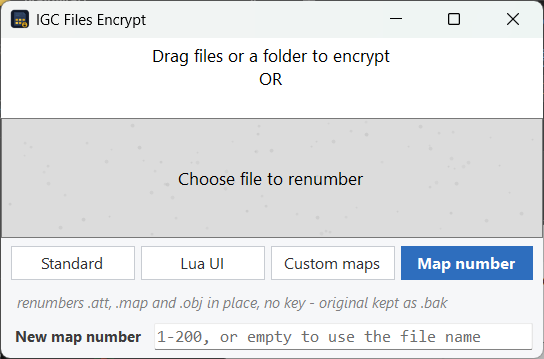
- Pick Map number at the bottom of the window. The key field goes away with it - this mode has nothing to pack.
- Leave the field empty to take the number from each file name -
EncTerrain161.attbecomes map 161 - or type one to force it. It is the world's own number, the one its folder carries, and it runs 1 to 200. - Drag the world's
.att,.mapand.objonto the window, or a whole world folder.
A renumbered file is written under the name that number gives it, the way a world folder names
its files: EncTerrain139.att written as map 15 comes back as EncTerrain15.att, and the
original stays beside it as EncTerrain139.att.bak. A file that already carries the number,
under the name that matches it, is reported and left alone.
No key is involved - the number lives in the client's own terrain header, not behind your
script key - and the whole job happens inside CptModule: the tool itself never holds a decoded
terrain file, and it refuses one whose header is not the shape its extension promises.
Renumber before packing: the mode takes plain .att, .map and .obj, not the keyed
.xtt, .xap and .xbj. Both forms a terrain file ships in are handled - the container an
.att or .map usually arrives in, and the plain form - and what comes back is always the
plain form, which the client reads just the same.
- every script in
Data\Custom\Scripts\Game\- the sharedEnums,Helpers,Registry,WeatherandSkillEffects, and those inMaps\andMonsters\ - the terrain files of each custom world,
Data\World<n>\EncTerrain<n>.att,.mapand.obj, if you want them packed -
Data\Local\CustomMap.xmlandCustomMonster.xml, in the Standard mode
Dropping the whole Game\ folder packs all the scripts in one pass.
- The older keyless
.lsc- a.luapacked in the Standard mode - still loads for map and monster scripts. Do not keep an.lscand a.gscof the same script: the.gscis taken, and with a wrong key the script then does not load at all. - An
.xmlis packed only in the Standard mode; the Custom maps mode reports it. - An empty file is reported as "file is empty" rather than a vague failure.
-
Custom Maps & Monsters -
LuaGameScriptKeyand dev mode -
Adding a map -
CustomMap.xmland the world files -
Adding a monster -
CustomMonster.xml - Lua UI - Encrypting scripts - the same tool for Lua UI