Repository navigation
GrokGauge 0.3.0: Grok + Grok Bot usage

GrokGauge keeps your SuperGrok and Grok Bot weekly usage in the macOS menu bar.
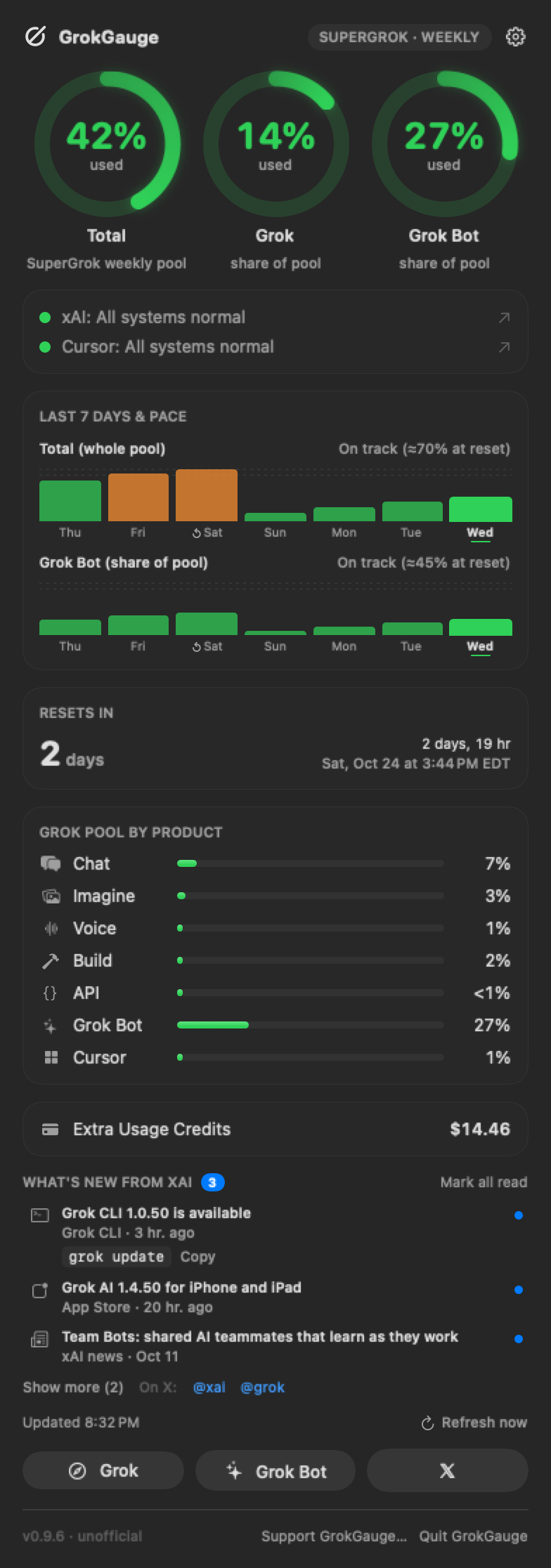
What's in 0.3.0
- Grok Bot tracking. A second ring sits next to Grok's and shows Grok Bot's weekly usage, the same number Grok Bot shows under Settings › Usage & Billing. GrokGauge reads the small usage cache Grok Bot keeps on your Mac. It makes no network request for Grok Bot and uses no Grok Bot login or Keychain item.
- Two ring gauges, one look. Both use the same colors: green up to 80%, orange 81–90%, red above 90%.
- Reset times for both. Days to reset, a live countdown, and the exact reset time in your time zone. When Grok and Grok Bot reset at different times, you get one clearly labeled line for each.
- Menu bar. Shows the higher of the two percents by default. Turn on Show both percentages in menu bar to see
G 0% · B 9%. - Separate 80% / 90% notifications for Grok and for Grok Bot.
--print-usageand--jsonnow include Grok Bot.
From earlier releases
- 0.2.0: GrokGauge renews your Grok CLI login automatically, so you don't need to run
grok loginagain. It uses the same OAuth refresh flow as the official CLI, and it respects the CLI's lock file and the format of~/.grok/auth.json. - 0.1.0: Menu bar meter, ring gauge, per-product breakdown (Chat, Imagine, Voice, Build, API), Extra Usage Credits, Refresh now, Launch at login, and Open Grok / Open Grok Bot.
Install
Homebrew
brew install --cask stevencombs/tap/grokgaugeManual: download GrokGauge-0.3.0.zip below, unzip it, drag GrokGauge.app to /Applications, and open it.
Requirements: macOS 14 or later (Apple silicon or Intel), a SuperGrok plan, and the Grok CLI signed in once (grok login). Grok Bot is optional; its ring appears only when Grok Bot is installed.
Gatekeeper
GrokGauge is open source and ad-hoc signed, not notarized by Apple. If you install it with Homebrew, the cask clears the download quarantine flag on GrokGauge.app only, so it opens normally. If you downloaded the zip yourself and macOS says it can't verify the app, either open System Settings › Privacy & Security and click Open Anyway, or run:
xattr -dr com.apple.quarantine /Applications/GrokGauge.appSHA-256 of GrokGauge-0.3.0.zip: f2a1ce893646ac18413f234ddbfb4f9e522691d278f42b61dd2caebc76a6c687
Privacy
- Your Grok tokens go only to xAI:
cli-chat-proxy.grok.comfor usage andauth.x.aifor renewing your login. - Grok Bot's numbers are read from a local file. Nothing about Grok Bot is sent anywhere.
- No analytics or telemetry.
See the README for the exact files and hosts.
Unofficial. GrokGauge is a community project. It is not made, endorsed, or supported by xAI, or by Anysphere, the maker of the Grok Bot app. "Grok" and "SuperGrok" are trademarks of xAI. GrokGauge relies on undocumented data sources that can change without notice.
Credits
Created by Steven Combs (retroCombs) and built together with Grok Bot, Steven's AI assistant, which wrote the code, tests, and docs to his spec. MIT licensed.